 Login
Login
HIBP Mega Update: Passkeys, k-Anonymity Searches, Massive Speed Enhancements and a Bulk Domain Verification API

For a hobby project built in my spare time to provide a simple community service, Have I Been Pwned sure has, well, "escalated". Today, we support hundreds of thousands of website visitors each day, tens of millions of API queries, and hundreds of millions of password searches. We're processing billions of compromised records each year provided by breached companies, white hat researchers, hackers and law enforcement agencies. And it's used by every conceivable demographic: infosec pros, "mums and dads", customer support services, and, according to the data, more than half the Fortune 500 who are actively monitoring the exposure of their domains. So yeah, "escalated" seems fair!
Amidst all the time spent processing data, we've been trying to figure out where to invest energy in building new stuff. In essence, data breaches are pretty simple: you've got a bunch of exposed email addresses attributed to a source, sitting next to a whole bunch of fields we describe with metadata. Our goal has always been to help people use this data to do good after bad things happen, and today we're launching a bunch of new features to do just that. So, here goes:
New Features, New Plans
In the beginning (ok, in "recent years"), there was one plan we referred to as "Pwned", and within that, there were various levels. For example, the entry-level plan has been "Pwned 1," and to this day, more than half our subscriptions are on it. That's "a coffee a month" for a simple service that, by the raw numbers, does precisely what most of our subscribers are looking for. These are typically small businesses that make a handful of API queries or monitor a domain or two with a few email addresses. It's simple, effective and... insufficient for larger organisations. So, we added Pwned 2, 3 and 4, and they all added more RPMs for email searches and more capacity for searching larger domains. Then we added Pwned 5, which added stealer log support, and somewhere along the way also added Pwned Ultra tiers for making large numbers of API requests. As a result, that one "plan" added more and more stuff at different levels and ultimately became a bit kludgy.
Today, we're launching a bunch of new features to better support the volume and privacy needs of our subscribers, and we're shuffling our existing plans to help do this. Here's what they now look like:
- Core: The fundamentals, largely being what we already had and designed for entry-level use cases
- Pro: Contains a bunch of the new features designed for larger orgs and those searching domains on behalf of customers
- High RPM: The old "Ultra" plan levels, designed solely for making large volumes of requests to the email search API
- Enterprise: We've had this for many years now, and it's a more tailored offering
So, that's the high-level overview. Let's now look at all the new stuff and everything that changes:
Supporting MSPs Monitoring on Behalf of Third Parties
For most people, this won't sound particularly exciting, but I'm putting it up front because I'll refer to it when describing the more important stuff shortly. In the past, we've had the following carve-out in our terms of use, namely, what you're not permitted to use the service for:
the benefit of a third party (including for use by a related entity or for the purpose of reselling or otherwise making the Services available to any third party for commercial benefit)
This excluded managed service providers from, for example, monitoring their customers' domains as part of their services. That clause has now been revised with the preceding text:
unless you have purchased a Paid Service which expressly allows you to do so
Which means we can now welcome MSPs to the Pro and High RPM tiers. They can't just take HIBP and use it to create a competing product (for obvious reasons, that's a pretty standard clause within many online services), but they can absolutely add it to the offerings they provide to their own customers. And we're adding new features to make it easier to do just that, for example:
Automating Domain Verification
Preserving privacy whilst still providing a practical, effective service has always been a balancing act, one I think we've gotten pretty spot on. But the hoops people have had to jump through for domain verification, in particular, have been cumbersome. An organisation wanting to add a bunch of its domains has had to go through the process one by one via the web interface, then verify control over them one by one. They'd spend a lot of time doing kludgy, repetitive work. Today, we're launching two new ways of adding domains in a much more automated fashion, and the first is the verifying via DNS API:
Successfully adding a pre-defined TXT record to DNS is solid proof that whoever is attempting to search that domain genuinely controls it. As well as the old kludgy way of doing it in the browser, waiting for DNS to propagate, then coming back to the browser to complete the verification, we can now fully automate the process via API. Here's how it works:
- Call the HIBP API to generate the TXT record token
- Call the API on your DNS provider to add the token to the TXT record
- Call another HIBP API to validate that the token exists
This is easily scripted in your language of choice, and you can enumerate it over as many domains as you like. You can also keep retrying step 3 above as often as needed when DNS takes a little while to do its thing. It's all now fully documented in the latest version of the API, and ready to roll. But what if you don't control the DNS? Perhaps it's a cumbersome process in your org, or you're an MSP monitoring your customers' domains, but you don't have control of DNS. That's where the verifying by email API comes in:
We've long had a verification process that involves choosing one of several standard aliases on a domain to email a verification token to. You do this via the dashboard, grab the token sent to the email, paste it back into the dashboard and the domain is now verified. The new API makes that much easier, especially when multiple domains are being verified. Here's how it works:
- Call the HIBP API and specify one of the pre-defined aliases to send a verification email to
- Click the link in the email and approve the domain to be added to the requester's account
And that's it. We see this being particularly useful for MSPs who can now send a heap of emails on their customers' domains, and so long as someone receives it and clicks the link, that's the verification process done. That API is also now fully documented and ready to roll and is accessible to all Pro plan subscribers.
Auto-verifying Subdomains
This one was just unnecessarily frustrating for larger customers who spread email addresses over multiple subdomains. Let's say a company owns example.com and they successfully verify control of it, but then they distribute their email addresses by region. They end up with addresses @apac.example.com and @emea.example.com and so on, and in the past, needed to verify each subdomain separately.
Turns out we have 154 votes for this feature in User Voice, which is substantially more than I expected. So, in keeping with the theme of the Pro plan making it easier on larger orgs, anyone on that level can now add their apex domain, verify it accordingly, then go to town adding all the subdomains they want without the need for verifying each one.
Bringing K-Anonymity Searches to the Masses
Until today, every time you took out a subscription via the public website and started searching email addresses, it looked like this:
GET https://haveibeenpwned.com/api/v3/breachedaccount/test@example.comClearly, this involved sending the email address to HIBP's service. Whilst we don't store those addresses, if you're sending data to a service in this fashion, there's always the technical capability for us to see that piece of PII and associate it back to the requester via their API key. This approach is what we'll refer to as "direct email search". Let's now look at k-anonymity searches, and I'll break it down into a few simple steps:
- Start by creating a SHA-1 hash of the address to be searched, so for test@example.com, that's:
567159D622FFBB50B11B0EFD307BE358624A26EE - Take the first 6 characters of the hash and pass them to the new API:
What's really important here is that those 6 characters are the only identifier sent to HIBP and they're completely useless in identifying which address was actually searched for (that link also explains why SHA-1 is perfectly reasonable for this)GET https://haveibeenpwned.com/api/v3/breachedaccount/range/567159 -
HIBP then responds with the suffixes of every hash we have that matches that prefix and for each one, the breaches it's appeared against:
The prefix presently contains 393 suffixes, and if one of them matches the remaining characters of the hash of the full email address, you know that's the address you're looking for.{ "hashSuffix": "D622FFBB50B11B0EFD307BE358624A26EE", "websites": [ "Adobe", "Stratfor", "Yahoo", ... ] }, ...
This is the same methodology we've been using for years with the Pwned Passwords search, and we're currently serving about 18 billion requests a month, so it seems that lots of people have easily gotten to grips with it. It's a pretty simple technical concept with great privacy attributes, and it's fully documented on the API page.
K-anonymity searches are now available to all Pro and High RPM subscribers at the same rate limit as the direct searches. That rate limit is shared, so you can either make 100% of them to k-anon or 100% to the direct search or go 50/50. We're really happy with the privacy aspects of this API and we know it ticks a box a lot of orgs have been asking for.
Unsmoothing the API Rate Limit
Previously, when you took out a 10-request-per-minute API key, we implemented a rate limit of 1 request every 6 seconds. The same logic applied to all the higher-tier products, too, and the reason was simply to distribute the load across each minute more evenly or in other words, "smoothing" the rate at which requests were made. That was important earlier on as the underlying Azure infrastructure had to support that traffic, and sudden bursts could be problematic.
But the other thing that was problematic is that people (quite reasonably) assumed that they could make 10 fast requests, wait a minute, then go again. This led to support overhead for us and customer frustration, and neither is good.
With these latest updates, 10RPM (and all the other RPMs) is now implemented exactly as it sounds - 10 requests in any one-minute block. Here's our Azure API Management policy:
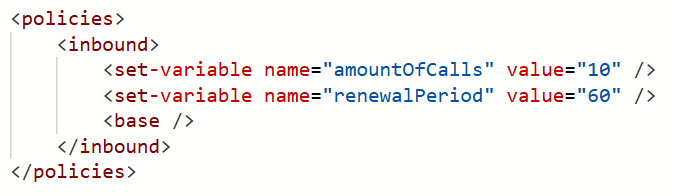
In other words, we've "unsmoothed" it. You can hammer the service 10 times in quick succession, then wait a minute, and you won't see a single HTTP 429 "Too many requests" response. Equally, if you're on a 12,000 RPM plan (and you can actually send that many requests quickly!), you won't see an unexpected 429. We can do this now because of the way we serve a huge amount of content from Cloudflare's edge, unburdening the underlying infrastructure from sudden spikes.
It's a little thing, but it'll solve a lot of unnecessary frustration for a bunch of people, including us. That's implemented across every single plan, too, so everyone benefits.
We Just Wanna Go (Even) Fast(er)
Here's our challenge today: how do we enable millions of people a day to search through billions of records with near instantaneous results... and do it affordably? They're somewhat competing objectives, but every now and then, we find this one neat trick that dramatically improves things. About 18 months ago, I wrote about how we were Hyperscaling HIBP with Cloudflare Workers and Caching. The basic premise is that, as people search the service, we build a cache in Cloudflare's 300+ edge nodes that includes the entire hash range just searched for (see the k-anon section above). We flush that out on every new breach load and as it builds back up to the full 16^6 possible cachable hash ranges, our origin load approaches zero and everything gets served from the edge. Almost, because we have the following problem I described in the post:
However, the second two models (the public and enterprise APIs) have the added burden of validating the API key against Azure API Management (APIM), and the only place that exists is in the West US origin service. What this means for those endpoints is that before we can return search results from a location that may be just a short jet ski ride away, we need to go all the way to the other side of the world to validate the key and ensure the request is within the rate limit.
Or at least we had that problem, which we've just solved with a simple fix. The quoted problem stemmed from the fact that, to ensure everyone adhered to the rate limit, we performed the APIM check before returning any data. That meant always waiting for packets to make a round trip to America, even when the data was cached nearby. But what we realised is that adhering to the rate limit can be eventually enforced; it really doesn't matter too much if a request or two in excess of the rate limit slips through, then we enforce it. The reason why that epiphany is important is that with that in mind, we can start returning data to the client immediately whilst doing the APIM check asynchronously. If the request exceeds the rate limit, Cloudflare will block subsequent requests until the client starts making requests within their limit. So, the rate limit check is no longer a blocking call; it's a background process that doesn't delay us returning results.
What that means is a dramatic reduction in the time til first byte:
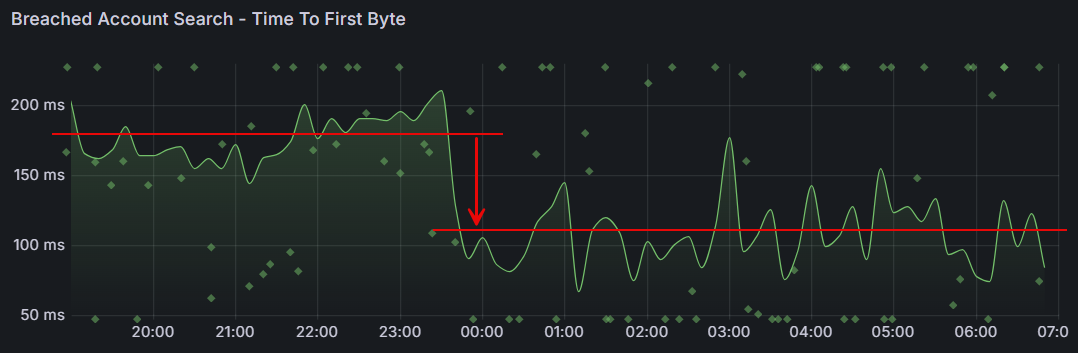
That's almost a 40% reduction in wait time! It's an awesome example of how continuous investment in the way we run this thing yields tangible results that make a meaningful difference to the value people get from the service.
Passkeys!
Just one more thing...
This is all new, all free and all available to everyone, whether they have a paid subscription or not. Remember when I got phished last year? I sure do, and I vowed to use that experience to maximise the adoption of passkeys wherever possible. So, putting my money (and time) where my mouth is, we've now launched passkeys as an alternate means of signing into your dashboard:
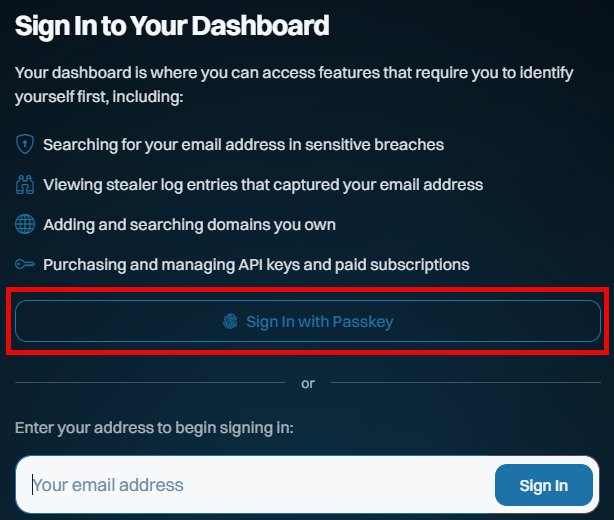
This saves you needing a "magic" link via email on every sign-in, and whilst it doesn't constitute 2FA (the passkey becomes a single factor used to sign in), it massively streamlines how you access the dashboard. And because we never used passwords for access in the first place, the only account-takeover risk our customers face is someone gaining access to either their email account or to where they store their passkeys (in either case, they have much bigger problems!).
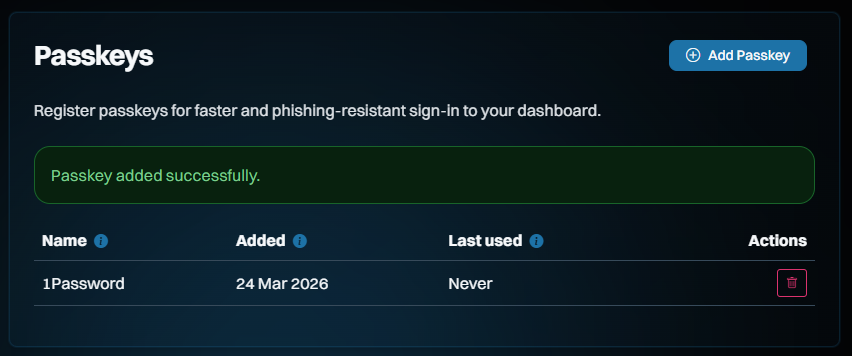
Here's how it works: start by signing into your dashboard, then heading over to the "Passkeys" section on the left of the screen and adding a new one:
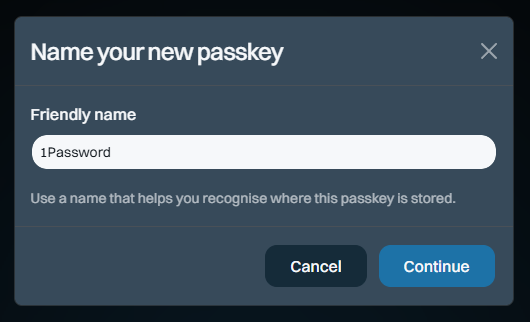
The name is so you can keep track of which passkey you save where. I save most of mine in 1Password, but you can also save them on a physical U2F key or in your browser, for example. Clicking "Continue" will cause your browser to prompt you for the location where you'd like to store it and again, that's 1Password for me:
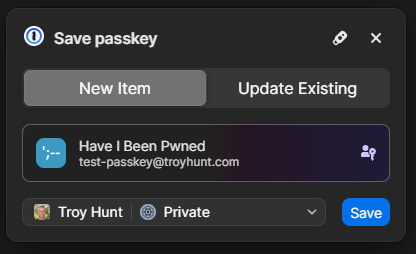
And that's it - we're done!
So, how does it work? Check this out, and don't blink or you'll miss it:
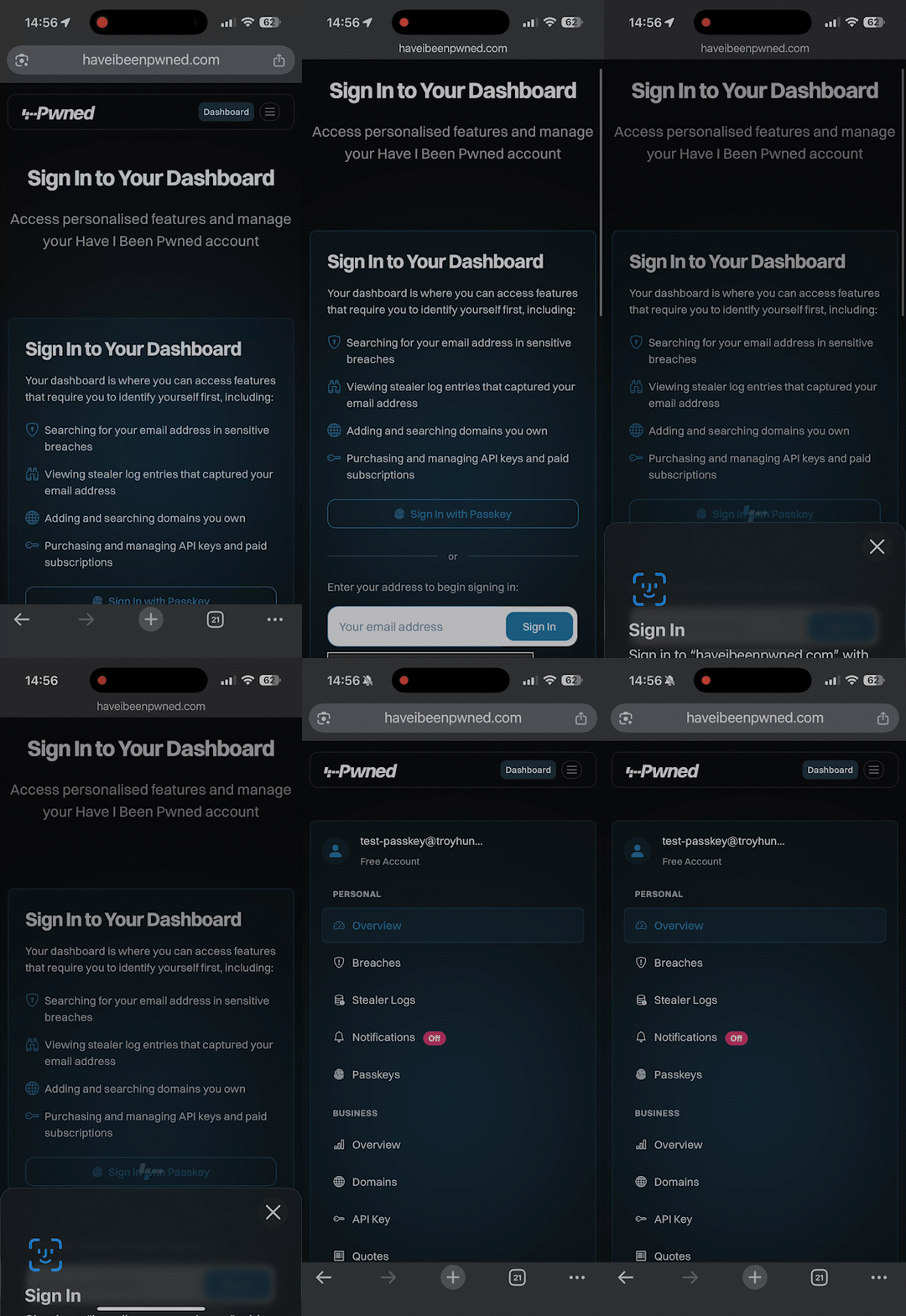
Compared to typing in your email address, hitting the "Sign In" button, flicking over to the mailbox, waiting for the mail to arrive, then clicking the link, we're down from let's call it 30 seconds to about 3 seconds. Nice 😎
Even though there isn't much security benefit to doing this on HIBP (you can still sign in via email, too), we wanted to build this as an example of just how easy it is. It took Stefán about an hour to build a first cut of this (with support from Copilot), and, aside from the dev time, building passkey support into your website is totally free. There are no external services you need to pay for, no hardware to buy or special crypto concepts to grasp. Passkeys are dead simple, and web developers with even a passing interest in security and usability should be adding support for them right now. We also wanted to make sure they were freely available to anyone, regardless of whether you have a paid subscription, because security like this should be the baseline, not a paid extra. So, go and give them a go in HIBP now.
And just in case you want to really geek out on how passkeys work, Stefán presented this at NDC Security in Oslo earlier this month:
All the Plans and Future Changes for Existing Subscribers
It's easiest just to see the whole overview all in one image (or jump over to the pricing page on the website), and it largely reflects everything described above:
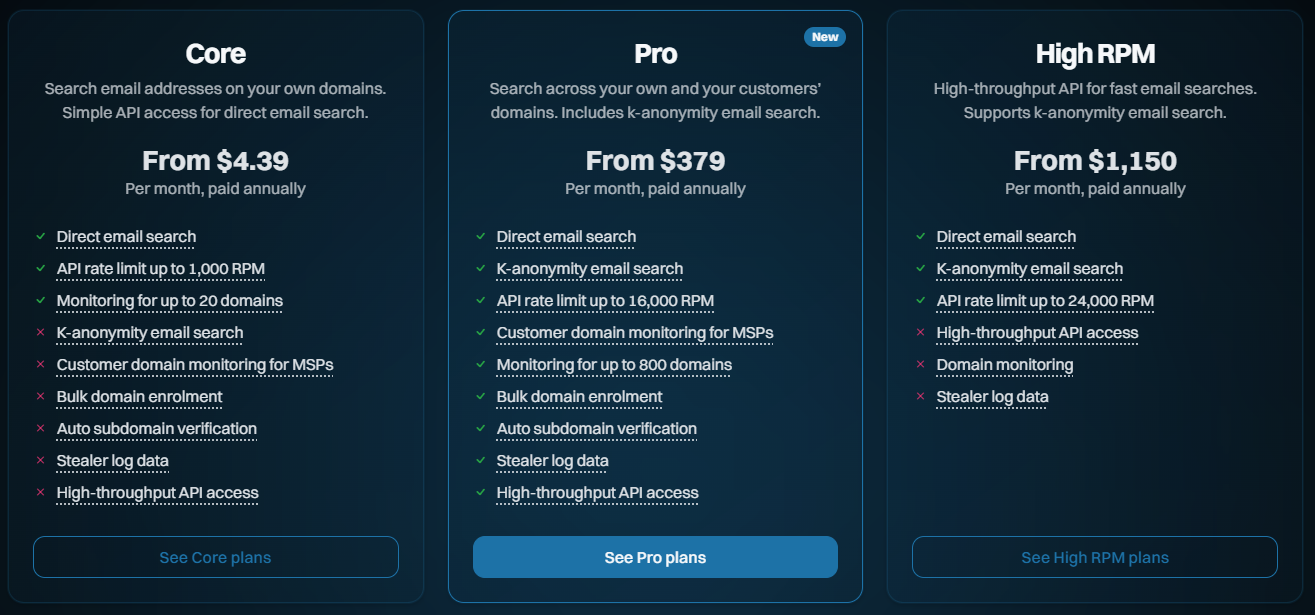
One immediate difference to how we've previously represented the plans is that the annual price is now shown as a monthly figure. It turns out that the vast majority of our subscribers choose annual billing, so leading with the per-month pricing puts the least relevant figures front and centre. As we looked around at other services, that was a pretty consistent trend, especially when one annual subscription is more cost-effective than renewing a monthly one 12 times (annual is roughly 10x a year's worth of month-by-month payments).
Another change is that we're going to cap the number of larger domains (those with over 10 breached addresses) that can be searched on each subscription. Let me explain why: Every time we load a data breach, each record in the breach is checked against each domain being monitored. In 2025, we added 2.9 billion breached records, and we have 400k monitored domains. Multiply those out, and we're looking at 1.16 quadrillion checks for our subscribers each year. This is all handled by SQL queries, so it's not like we're getting hit with human overhead at scale, but we're getting hit hard with SQL costs. Across everything we pay to run this service (storage, app hosting, functions, API management, App Insights, bandwidth, etc.), the SQL bill is more than the total for all other services combined. In addition to how we currently calculate plan size based on breached email count, we're adding a cap on the number of domains per plan.
Only domains with more than 10 breached addresses are included in the cap.
The “10” threshold aligns with the existing requirement for a domain to need a subscription at all, and means this change impacts only a single-digit percentage of subscribers. It also helps filter out noise so the cap reflects domains that actually matter. For those larger domains beyond the cap, all current alerts will continue to work just fine until they run a search. At that time, they'll have the option to upgrade the plan or reduce the number of domains. But none of that affects existing subscribers now:
There will be no changes to existing plans until at least August 2 this year.
We do an annual price revision each August, and that's already factored into the table above. That applies to any new subscriptions immediately, but it won't touch existing ones until August 2 at the earliest. The revised pricing only kicks in on the next subscription renewal after that date, so it could be as late as August 2027 if you're an existing subscriber. The same goes for the cap on the number of domains being monitored - there's no impact on existing subscribers until at least August. That leaves plenty of time to cancel, downgrade, upgrade, or just do nothing, and the plan will automatically roll over to the new one. We'll be emailing everyone in the coming days with details of precisely what will change.
Note: if you had an old Pwned 5 subscription for the sake of stealer log access, we'll be rolling all those folks over to Pro 1 and applying a permanent discount code to ensure there's no change in price by moving to the higher plan (it'll actually drop slightly). That'll be explained in the upcoming email, it just made more sense to keep stealer logs in Pro and move people over, and this'll just give them free access to all the new stuff too.
Speaking of which, the thing that (almost) nobody reads but everyone is subject to has been revised to reflect the changes described above - the Terms of Use. For the first time, we've also summarised all the changes and linked through to an archive of the old ones, so if you really love digging through a long document prepared by lawyers, this should make you happy 😊
We're Still Doing Credit Cards via Stripe
While I'm here, just a quick comment on our ongoing Stripe dependency and, as a result, the necessity to pay for public services via credit card. I've written before about some of the challenges we've faced with customers' requests to pay by other means and how, push comes to shove, they (almost) always find a way around internal barriers. Let me share a recent empirical anecdote about this:
Just the other day, I had a call with a Fortune 500 company that was initially interested in our enterprise services. As the discussion unfolded, it became evident that the public services would more than suffice and that the enterprise route was too burdensome for their particular use case. Be that as it may, the procurement lady on the call was adamant that payment by credit card was impossible, even going to the extent of making a pretty bold statement:
No Fortune 500 company is going to pay for services like this via credit card!
O RLY? If only I had the data to check that claim... 😊 Based on a list of their domains, 132 unique Fortune 500 companies have paid for our services by credit card. The real number will be higher because many more of their domains are not on that list, or purchases have been made via an email address not on the corporate domain. Let's call it somewhere between a quarter and a third of the Fortune 500 who've puschased direct via the world's most common payment method. In other words, a significantly different number from the "zero" claim.
I've dropped the hard facts here out of both frustration from our dealings with unnecessarily artificial barriers and in support of the folks out there who, just like me in my corporate days, had to deal with "Neville" in procurement. Per that linked blog post, push back against "corporate policy" prohibiting payment by card, and statistically, you'll likely find you're not the 1 in 160 who can't make a simple payment.
Summary
We're continuing to massively invest in expanding HIBP in every way we can find. Nearly 3 billion additional breached records last year, hundreds of billions of free Pwned Passwords queries during that time, a bunch of new tweaks and features everyone gets access to and, of course, all the new stuff we've rolled into the higher plans. These new features are the culmination of a huge volume of work dating back to November, when I took this pic of our little team during our planning meeting together in Oslo.
We all hope it helps people use our Have I Been Pwned services to do more good after bad things happen.