Discover how AI-driven vulnerability discovery is reshaping the cybersecurity landscape. Learn why foundational hardening and proactive threat detection are now essential for defending against zero-day threats in the post-AI era.
Cisco is moving to a scheduled, twice-monthly security release model to address AI-accelerated vulnerability discovery, providing customers with greater predictability and streamlined, systemic security updates.
With so much traffic on the global internet day after day, it’s not always easy to spot the occasional irregularity. After all, there are numerous layers of complexity that go into the serving of webpages, with multiple companies, agencies and organizations each playing a role.
That’s why when something does catch our attention, it’s important that the various entities work together to explore the cause and, more importantly, try to identify whether it’s a malicious actor at work, a glitch in the process or maybe even something entirely intentional.
That’s what occurred last year when Internet Corporation for Assigned Names and Numbers staff and contractors were analyzing names in Domain Name System queries seen at the ICANN Managed Root Server, and the analysis program ran out of memory for one of their data files. After some investigating, they found the cause to be a very large number of mysterious queries for unique names such as f863zvv1xy2qf.surgery, bp639i-3nirf.hiphop, qo35jjk419gfm.net and yyif0aijr21gn.com.
While these were queries for names in existing top-level domains, the first label consisted of 12 or 13 random-looking characters. After ICANN shared their discovery with the other root server operators, Verisign took a closer look to help understand the situation.
Exploring the Mystery
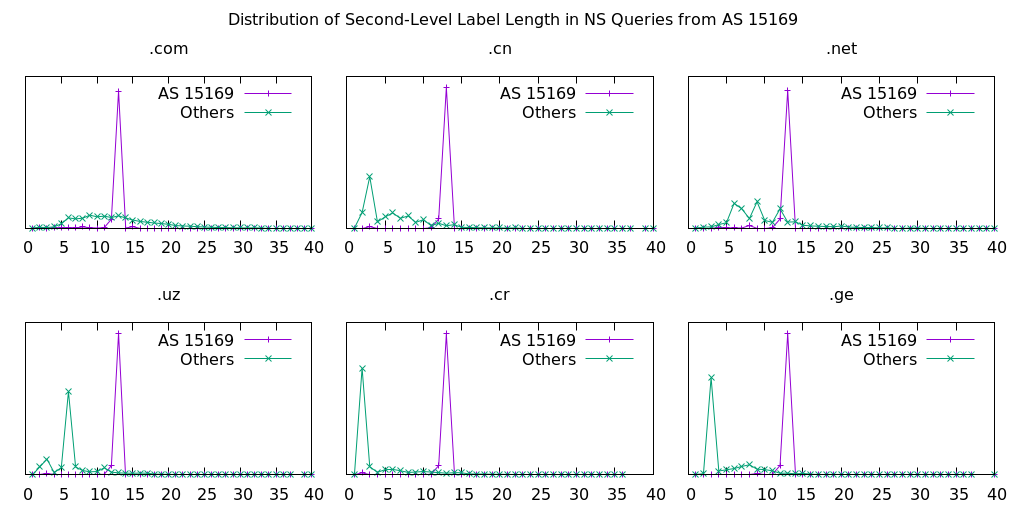
One of the first things we noticed was that all of these mysterious queries were of type NS and came from one autonomous system network, AS 15169, assigned to Google LLC. Additionally, we confirmed that it was occurring consistently for numerous TLDs. (See Fig. 1)
Figure 1: Distribution of second-level label lengths in queries to root name servers, comparing AS 15169 to others, for several different TLDs.
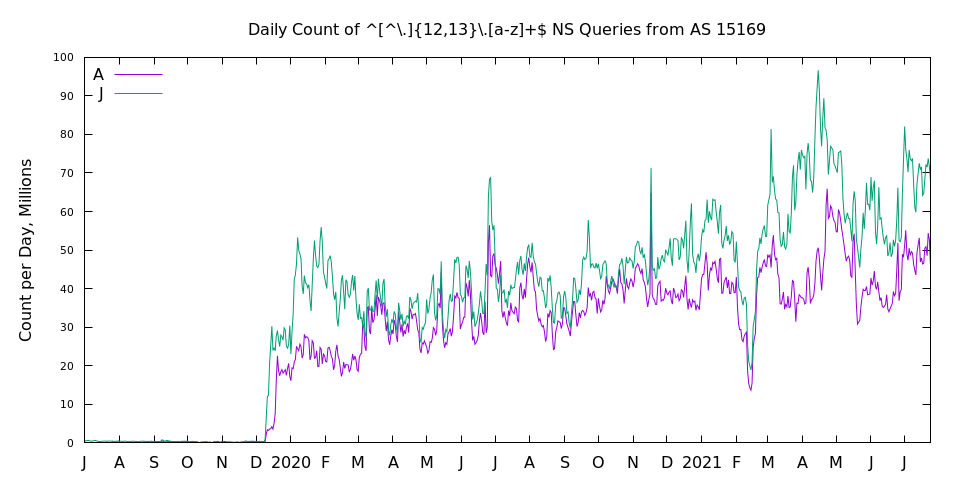
Although this phenomenon was newly uncovered, analysis of historical data showed these traffic patterns actually began in late 2019. (See Fig. 2)
Figure 2: Historical data shows the mysterious queries began in late 2019.
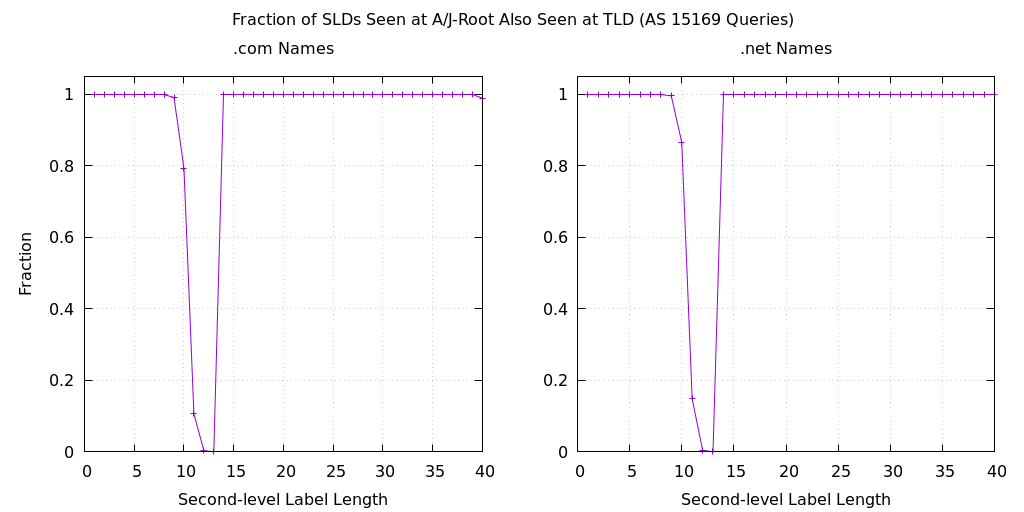
Perhaps the most interesting discovery, however, was that these specific query names were not also seen at the .com and .net name servers operated by Verisign. The data in Figure 3 shows the fraction of queried names that appear at A-root and J-root and also appear on the .com and .net name servers. For second-level labels of 12 and 13 characters, this fraction is essentially zero. The graphs also show that there appears to be queries for names with second-level label lengths of 10 and 11 characters, which are also absent from the TLD data.
Figure 3: Fraction of queries from AS 15169 appearing on A-root and J-root that also appear on .com and .net name servers, by the length of the second-level label.
The final mysterious aspect to this traffic is that it deviated from our normal expectation of caching. Remember that these are queries to a root name server, which returns a referral to the delegated name servers for a TLD. For example, when a root name server receives a query for yyif0aijr21gn.com, the response is a list of the name servers that are authoritative for the .com zone. The records in this response have a time to live of two days, meaning that the recursive name server can cache and reuse this data for that amount of time.
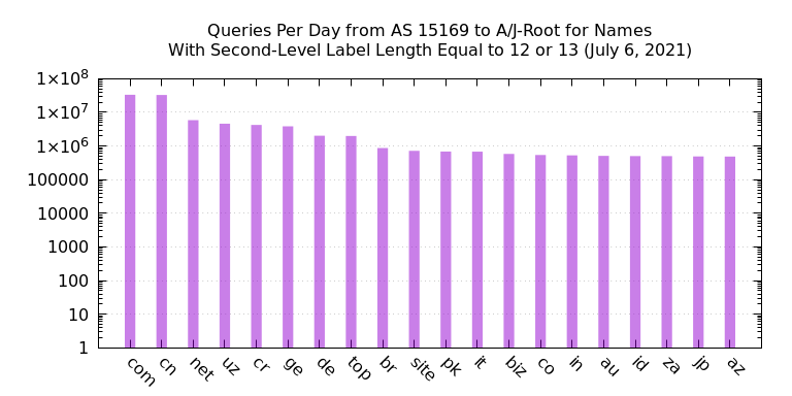
However, in this traffic we see queries for .com domain names from AS 15169 at the rate of about 30 million per day. (See Fig. 4) It is well known that Google Public DNS has thousands of backend servers and limits TTLs to a maximum of six hours. Assuming 4,000 backend servers each cached a .com referral for six hours, we might expect about 16,000 queries over a 24-hour period. The observed count is about 2,000 times higher by this back-of-the-envelope calculation.
Figure 4: Queries per day from AS 15169, for names with second-level label length equal to 12 or 13, over a 24-hour period.
From our initial analysis, it was unclear if these queries represented legitimate end-user activity, though we were confident that source IP address spoofing was not involved. However, since the query names shared some similarities to those used by botnets, we could not rule out malicious activity.
The Missing Piece
These findings were presented last year at the DNS-OARC 35a virtual meeting. In the conference chat room after the talk, the missing piece of this puzzle was mentioned by a conference participant. There is a Google webpage describing its public DNS service that talks about prepending nonce (i.e., random) labels for cache misses to increase entropy. In what came to be known as “the Kaminsky Attack,” an attacker can cause a recursive name server to emit queries for names chosen by the attacker. Prepending a nonce label adds unpredictability to the queries, making it very difficult to spoof a response. Note, however, that nonce prepending only works for queries where the reply is a referral.
In addition, Google DNS has implemented a form of query name minimization (see RFC 7816 and RFC 9156). As such, if a user requests the IP address of www.example.com and Google DNS decides this warrants a query to a root name server, it takes the name, strips all labels except for the TLD and then prepends a nonce string, resulting in something like u5vmt7xanb6rf.com. A root server’s response to that query is identical to one using the original query name.
The Mystery Explained
Now, we are able to explain nearly all of the mysterious aspects of this query traffic from Google. We see random second-level labels because of the nonce strings that are designed to prevent spoofing. The 12- and 13-character-long labels are most likely the result of converting a 64-bit random value into an unpadded ASCII label with encoding similar to Base32. We don’t observe the same queries at TLD name servers because of both the nonce prepending and query name minimization. The query type is always NS because of query name minimization.
With that said, there’s still one aspect that eludes explanation: the high query rate (2000x for .com) and apparent lack of caching. And so, this aspect of the mystery continues.
Wrapping Up
Even though we haven’t fully closed the books on this case, one thing is certain: without the community’s teamwork to put the pieces of the puzzle together, explanations for this strange traffic may have remained unknown today. The case of the mysterious DNS root query traffic is a perfect example of the collaboration that’s required to navigate today’s ever-changing cyber environment. We’re grateful and humbled to be part of such a dedicated community that is intent on ensuring the security, stability and resiliency of the internet, and we look forward to more productive teamwork in the future.
The Domain Name System has provided the fundamental service of mapping internet names to addresses from almost the earliest days of the internet’s history. Billions of internet-connected devices use DNS continuously to look up Internet Protocol addresses of the named resources they want to connect to — for instance, a website such as blog.verisign.com. Once a device has the resource’s address, it can then communicate with the resource using the internet’s routing system.
Just as ensuring that DNS is secure, stable and resilient is a priority for Verisign, so is making sure that the routing system has these characteristics. Indeed, DNS itself depends on the internet’s routing system for its communications, so routing security is vital to DNS security too.
To better understand how these challenges can be met, it’s helpful to step back and remember what the internet is: a loosely interconnected network of networks that interact with each other at a multitude of locations, often across regions or countries.
Packets of data are transmitted within and between those networks, which utilize a collection of technical standards and rules called the IP suite. Every device that connects to the internet is uniquely identified by its IP address, which can take the form of either a 32-bit IPv4 address or a 128-bit IPv6 address. Similarly, every network that connects to the internet has an Autonomous System Number, which is used by routing protocols to identify the network within the global routing system.
The primary job of the routing system is to let networks know the available paths through the internet to specific destinations. Today, the system largely relies on a decentralized and implicit trust model — a hallmark of the internet’s design. No centralized authority dictates how or where networks interconnect globally, or which networks are authorized to assert reachability for an internet destination. Instead, networks share knowledge with each other about the available paths from devices to destination: They route “by rumor.”
The Border Gateway Protocol
Under the Border Gateway Protocol, the internet’s de-facto inter-domain routing protocol, local routing policies decide where and how internet traffic flows, but each network independently applies its own policies on what actions it takes, if any, with data that connects through its network.
BGP has scaled well over the past three decades because 1) it operates in a distributed manner, 2) it has no central point of control (nor failure), and 3) each network acts autonomously. While networks may base their routing policies on an array of pricing, performance and security characteristics, ultimately BGP can use any available path to reach a destination. Often, the choice of route may depend upon personal decisions by network administrators, as well as informal assessments of technical and even individual reliability.
Route Hijacks and Route Leaks
Two prominent types of operational and security incidents occur in the routing system today: route hijacks and route leaks. Route hijacks reroute internet traffic to an unintended destination, while route leaks propagate routing information to an unintended audience. Both types of incidents can be accidental as well as malicious.
Preventing route hijacks and route leaks requires considerable coordination in the internet community, a concept that fundamentally goes against the BGP’s design tenets of distributed action and autonomous operations. A key characteristic of BGP is that any network can potentially announce reachability for any IP addresses to the entire world. That means that any network can potentially have a detrimental effect on the global reachability of any internet destination.
Resource Public Key Infrastructure
Fortunately, there is a solution already receiving considerable deployment momentum, the Resource Public Key Infrastructure. RPKI provides an internet number resource certification infrastructure, analogous to the traditional PKI for websites. RPKI enables number resource allocation authorities and networks to specify Route Origin Authorizations that are cryptographically verifiable. ROAs can then be used by relying parties to confirm the routing information shared with them is from the authorized origin.
Specifically, RPKI creates new external and third-party dependencies that, as adoption continues, ultimately replace the traditionally autonomous operation of the routing system with a more centralized model. If too tightly coupled to the routing system, these dependencies may impact the robustness and resilience of the internet itself. Also, because RPKI relies on DNS and DNS depends on the routing system, network operators need to be careful not to introduce tightly coupled circular dependencies.
Regional Internet Registries, the organizations responsible for top-level number resource allocation, can potentially have direct operational implications on the routing system. Unlike DNS, the global RPKI as deployed does not have a single root of trust. Instead, it has multiple trust anchors, one operated by each of the RIRs. RPKI therefore brings significant new security, stability and resiliency requirements to RIRs, updating their traditional role of simply allocating ASNs and IP addresses with new operational requirements for ensuring the availability, confidentiality, integrity, and stability of this number resource certification infrastructure.
As part of improving BGP security and encouraging adoption of RPKI, the routing community started the Mutually Agreed Norms for Routing Security initiative in 2014. Supported by the Internet Society, MANRS aims to reduce the most common routing system vulnerabilities by creating a culture of collective responsibility towards the security, stability and resiliency of the global routing system. MANRS is continuing to gain traction, guiding internet operators on what they can do to make the routing system more reliable.
Conclusion
Routing by rumor has served the internet well, and a decade ago it may have been ideal because it avoided systemic dependencies. However, the increasingly critical role of the internet and the evolving cyberthreat landscape require a better approach for protecting routing information and preventing route leaks and route hijacks. As network operators deploy RPKI with security, stability and resiliency, the billions of internet-connected devices that use DNS to look up IP addresses can then communicate with those resources through networks that not only share routing information with one another as they’ve traditionally done, but also do something more. They’ll make sure that the routing information they share and use is secure — and route without rumor.
For over a decade, the Internet Corporation for Assigned Names and Numbers (ICANN) and its multi-stakeholder community have engaged in an extended dialogue on the topic of DNS abuse, and the need to define, measure and mitigate DNS-related security threats. With increasing global reliance on the internet and DNS for communication, connectivity and commerce, the members of this community have important parts to play in identifying, reporting and mitigating illegal or harmful behavior, within their respective roles and capabilities.
As we consider the path forward on necessary and appropriate steps to improve mitigation of DNS abuse, it’s helpful to reflect briefly on the origins of this issue within ICANN, and to recognize the various and relevant community inputs to our ongoing work.
As a starting point, it’s important to understand ICANN’s central role in preserving the security, stability, resiliency and global interoperability of the internet’s unique identifier system, and also the limitations established within ICANN’s bylaws. ICANN’s primary mission is to ensure the stable and secure operation of the internet’s unique identifier systems, but as expressly stated in its bylaws, ICANN “shall not regulate (i.e., impose rules and restrictions on) services that use the internet’s unique identifiers or the content that such services carry or provide, outside the express scope of Section 1.1(a).” As such, ICANN’s role is important, but limited, when considering the full range of possible definitions of “DNS Abuse,” and developing a comprehensive understanding of security threat categories and the roles and responsibilities of various players in the internet infrastructure ecosystem is required.
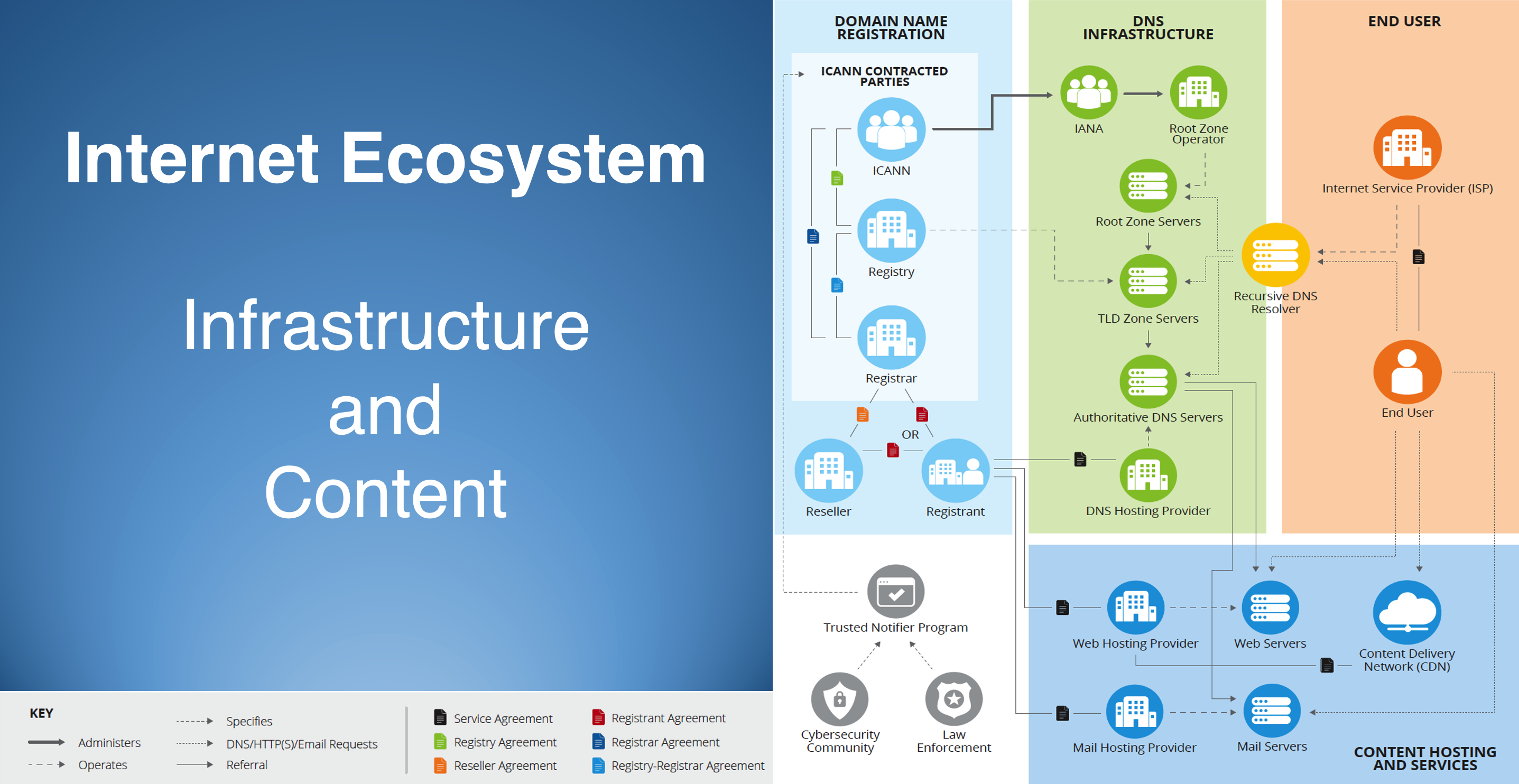
In support of this important work, ICANN’s generic top-level domain (gTLD) contracted parties (registries and registrars) continue to engage with ICANN, and with other stakeholders and community interest groups, to address key factors related to effective and appropriate DNS security threat mitigation, including:
Determining the roles and responsibilities of the various service providers across the internet ecosystem;
Delineating categories of threats: content, infrastructure, illegal vs. harmful, etc.;
Understanding the precise operational and technical capabilities of various types of providers across the internet ecosystem;
Relationships, if any, that respective service providers have with individuals or entities responsible for creating and/or removing the illegal or abusive activity;
Role of third-party “trusted notifiers,” including government actors, that may play a role in identifying and reporting illegal and abusive behavior to the appropriate service provider;
Processes to ensure infrastructure providers can trust third-party notifiers to reliably identify and provide evidence of illegal or harmful content;
Promoting administrative and operational scalability in trusted notifier engagements;
Determining the necessary safeguards around liability, due process, and transparency to ensure domain name registrants have recourse when the DNS is used as a tool to police DNS security threats, particularly when related to content.
Supporting ICANN’s important and appropriate role in coordination and facilitation, particularly as a centralized source of data, tools, and resources to help and hold accountable those parties responsible for managing and maintaining the internet’s unique identifiers.
Figure 1: The Internet Ecosystem
Definitions of Online Abuse
To better understand the various roles, responsibilities and processes, it’s important to first define illegal and abusive online activity. While perspectives may vary across our wide range of interest groups, the emerging consensus on definitions and terminology is that these activities can be categorized as DNS Security Threats, Infrastructure Abuse, Illegal Content, or Abusive Content, with ICANN’s remit generally limited to the first two categories.
DNS Security Threats:defined as being “composed of five broad categories of harmful activity [where] they intersect with the DNS: malware, botnets, phishing, pharming, and spam when [spam] serves as a delivery mechanism for those other forms of DNS Abuse.”
Infrastructure Abuse: a broader set of security threats that can impact the DNS itself – including denial-of-service / distributed denial-of-service (DoS / DDoS) attacks, DNS cache poisoning, protocol-level attacks, and exploitation of implementation vulnerabilities.
Illegal Content: content that is unlawful and hosted on websites that are accessed via domain names in the global DNS. Examples might include the illegal sale of controlled substances or the distribution of child sexual abuse material (CSAM), and proven intellectual property infringement.
Abusive Content: is content hosted on websites using the domain name infrastructure that is deemed “harmful,” either under applicable law or norms, which could include scams, fraud, misinformation, or intellectual property infringement, where illegality has yet to be established by a court of competent jurisdiction.
Behavior within each of these categories constitutes abuse, and it is incumbent on members of the community to actively work to combat and mitigate these behaviors where they have the capability, expertise and responsibility to do so. We recognize the benefit of coordination with other entities, including ICANN within its bylaw-mandated remit, across their respective areas of responsibility.
ICANN Organization’s Efforts on DNS Abuse
The ICANN Organization has been actively involved in advancing work on DNS abuse, including the 2017 initiation of the Domain Abuse Activity Reporting (DAAR) system by the Office of the Chief Technology Officer. DAAR is a system for studying and reporting on domain name registration and security threats across top-level domain (TLD) registries, with an overarching purpose to develop a robust, reliable, and reproducible methodology for analyzing security threat activity, which the ICANN community may use to make informed policy decisions. The first DAAR reports were issued in January 2018 and they are updated monthly. Also in 2017, ICANN published its “Framework for Registry Operators to Address Security Threats,” which provides helpful guidance to registries seeking to improve their own DNS security posture.
The ICANN Organization also plays an important role in enforcing gTLD contract compliance and implementing policies developed by the community via its bottom-up, multi-stakeholder processes. For example, over the last several years, it has conducted registry and registrar audits of the anti-abuse provisions in the relevant agreements.
The ICANN Organization has also been a catalyst for increased community attention and action on DNS abuse, including initiating the DNS Security Facilitation Initiative Technical Study Group, which was formed to investigate mechanisms to strengthen collaboration and communication on security and stability issues related to the DNS. Over the last two years, there have also been multiple ICANN cross-community meeting sessions dedicated to the topic, including the most recent session hosted by the ICANN Board during its Annual General Meeting in October 2021. Also, in 2021, ICANN formalized its work on DNS abuse into a dedicated program within the ICANN Organization. These enforcement and compliance responsibilities are very important to ensure that all of ICANN’s contracted parties are living up to their obligations, and that any so-called “bad actors” are identified and remediated or de-accredited and removed from serving the gTLD registry or registrar markets.
The ICANN Organization continues to develop new initiatives to help mitigate DNS security threats, including: (1) expanding DAAR to integrate some country code TLDs, and to eventually include registrar-level reporting; (2) work on COVID domain names; (3) contributions to the development of a Domain Generating Algorithms Framework and facilitating waivers to allow registries and registrars to act on imminent security threats, including botnets at scale; and (4) plans for the ICANN Board to establish a DNS abuse caucus.
ICANN Community Inputs on DNS Abuse
As early as 2009, the ICANN community began to identify the need for additional safeguards to help address DNS abuse and security threats, and those community inputs increased over time and have reached a crescendo over the last two years. In the early stages of this community dialogue, the ICANN Governmental Advisory Committee, via its Public Safety Working Group, identified the need for additional mechanisms to address “criminal activity in the registration of domain names.” In the context of renegotiation of the Registrar Accreditation Agreement between ICANN and accredited registrars, and the development of the New gTLD Base Registry Agreement, the GAC played an important and influential role in highlighting this need, providing formal advice to the ICANN Board, which resulted in new requirements for gTLD registry and registrar operators, and new contractual compliance requirements for ICANN.
Following the launch of the 2012 round of new gTLDs, and the finalization of the 2013 amendments to the RAA, several ICANN bylaw-mandated review teams engaged further on the issue of DNS Abuse. These included the Competition, Consumer Trust and Consumer Choice Review Team (CCT-RT), and the second Security, Stability and Resiliency Review Team (SSR2-RT). Both final reports identified and reinforced the need for additional tools to help measure and combat DNS abuse. Also, during this timeframe, the GAC, along with the At-Large Advisory Committee and the Security and Stability Advisory Committee, issued their own respective communiques and formal advice to the ICANN Board reiterating or reinforcing past statements, and providing support for recommendations in the various Review Team reports. Most recently, the SSAC issued SAC 115 titled “SSAC Report on an Interoperable Approach to Addressing Abuse Handling in the DNS.” These ICANN community group inputs have been instrumental in bringing additional focus and/or clarity to the topic of DNS abuse, and have encouraged ICANN and its gTLD registries and registrars to look for improved mechanisms to address the types of abuse within our respective remits.
During 2020 and 2021, ICANN’s gTLD contracted parties have been constructively engaged with other parts of the ICANN community, and with ICANN Org, to advance improved understanding on the topic of DNS security threats, and to identify new and improved mechanisms to enhance the security, stability and resiliency of the domain name registration and resolution systems. Collectively, the registries and registrars have engaged with nearly all groups represented in the ICANN community, and we have produced important documents related to DNS abuse definitions, registry actions, registrar abuse reporting, domain generating algorithms, and trusted notifiers. These all represent significant steps forward in framing the context of the roles, responsibilities and capabilities of ICANN’s gTLD contracted parties, and, consistent with our Letter of Intent commitments, Verisign has been an important contributor, along with our partners, in these Contracted Party House initiatives.
In addition, the gTLD contracted parties and ICANN Organization continue to engage constructively on a number of fronts, including upcoming work on standardized registry reporting, which will help result in better data on abuse mitigation practices that will help to inform community work, future reviews, and provide better visibility into the DNS security landscape.
Other Groups and Actors Focused on DNS Security
It is important to note that groups outside of ICANN’s immediate multi-stakeholder community have contributed significantly to the topic of DNS abuse mitigation:
Internet & Jurisdiction Policy Network The Internet & Jurisdiction Policy Network is a multi-stakeholder organization addressing the tension between the cross-border internet and national jurisdictions. Its secretariat facilitates a global policy process engaging over 400 key entities from governments, the world’s largest internet companies, technical operators, civil society groups, academia and international organizations from over 70 countries. The I&JP has been instrumental in developing multi-stakeholder inputs on issues such as trusted notifier, and Verisign has been a long-time contributor to that work since the I&JP’s founding in 2012.
DNS Abuse Institute The DNS Abuse Institute was formed in 2021 to develop “outcomes-based initiatives that will create recommended practices, foster collaboration and develop industry-shared solutions to combat the five areas of DNS Abuse: malware, botnets, phishing, pharming, and related spam.” The Institute was created by Public Interest Registry, the registry operator for the .org TLD.
Global Cyber Alliance The Global Cyber Alliance is a nonprofit organization dedicated to making the internet a safer place by reducing cyber risk. The GCA builds programs, tools and partnerships to sustain a trustworthy internet to enable social and economic progress for all.
ECO “topDNS” DNS Abuse Initiative Eco is the largest association of the internet industry in Europe. Eco is a long-standing advocate of an “Internet with Responsibility” and of self-regulatory approaches, such as the DNS Abuse Framework. The eco “topDNS” initiative will help bring together stakeholders with an interest in combating and mitigating DNS security threats, and Verisign is a supporter of this new effort.
Other Community Groups Verisign contributes to the anti-abuse, technical and policy communities: We continuously engage with ICANN and an array of other industry partners to help ensure the continued safe and secure operation of the DNS. For example, Verisign is actively engaged in anti-abuse, technical and policy communities such as the Anti-Phishing and Messaging, Malware and Mobile Anti-Abuse Working Groups, FIRST and the Internet Engineering Task Force.
What Verisign is Doing Today
As a leader in the domain name industry and DNS ecosystem, Verisign supports and has contributed to the cross-community efforts enumerated above. In addition, Verisign also engages directly by:
Monitoring for abuse: Protecting against abuse starts with knowing what is happening in our systems and services, in a timely manner, and being capable of detecting anomalous or abusive behavior, and then reacting to address it appropriately. Verisign works closely with a range of actors, including trusted notifiers, to help ensure our abuse mitigation actions are informed by sources with necessary subject matter expertise and procedural rigor.
Blocking and redirecting abusive domain names: Blocking certain domain names that have been identified by Verisign and/or trusted third parties as security threats, including botnets that leverage well-understood and characterized domain generation algorithms, helps us to protect our infrastructure and neutralize or otherwise minimize potential security and stability threats more broadly by remediating abuse enabled via domain names in our TLDs. For example, earlier this year, Verisign observed a botnet family that was responsible for such a disproportionate amount of total global DNS queries, we were compelled to act to remediate the botnet. This was referenced in Verisign’s Q1 2021 Domain Name Industry Brief Volume 18, Issue 2.
Avoiding disposable domain name registrations: While heavily discounted domain name pricing strategies may promote short-term sales, they may also attract a spectrum of registrants who might be engaged in abuse. Some security threats, including phishing and botnets, exploit the ability to register large numbers of ‘disposable’ domain names rapidly and cheaply. Accordingly, Verisign avoids marketing programs that would permit our TLDs to be characterized in this class of ‘disposable’ domains, that have been shown to attract miscreants and enable abusive behavior.
Maintaining a cooperative and responsive partnership with law enforcement and government agencies, and engagement with courts of relevant jurisdiction: To ensure the security, stability and resiliency of the DNS and the internet at large, we have developed and maintained constructive relationships with United States and international law enforcement and government agencies to assist in addressing imminent and ongoing substantial security threats to operational applications and critical internet infrastructure, as well as illegal activity associated with domain names.
Ensuring adherence of contractual obligations: Our contractual frameworks, including our registry policies and .com Registry-Registrar Agreements, help provide an effective legal framework that discourages abusive domain name registrations. We believe that fair and consistent enforcement of our policies helps to promote good hygiene within the registrar channel.
Entering into a binding Letter of Intent with ICANN that commits both parties to cooperate in taking a leadership role in combating security threats. This includes working with the ICANN community to determine the appropriate process for, and development and implementation of, best practices related to combating security threats; to educate the wider ICANN community about security threats; and support activities that preserve and enhance the security, stability and resiliency of the DNS. Verisign also made a substantial financial commitment in direct support of these important efforts.
Trusted Notifiers
An important concept and approach for mitigating illegal and abusive activity online is the ability to engage with and rely upon third-party “trusted notifiers” to identify and report such incidents at the appropriate level in the DNS ecosystem. Verisign has supported and been engaged in the good work of the Internet & Jurisdiction Policy Network since its inception, and we’re encouraged by its recent progress on trusted notifier framing. As mentioned earlier, there are some key questions to be addressed as we consider the viability of engaging trusted notifiers or building trusting notifier entities, to help mitigate illegal and abusive online activity.
Verisign’s recent experience with the U.S. government (NTIA and FDA) in combating illegal online opioid sales has been very helpful in illuminating a possible approach for third-party trusted notifier engagement. As noted, we have also benefited from direct engagement with the Internet Watch Foundation and law enforcement in combating CSAM. These recent examples of third-party engagement have underscored the value of a well-formed and executed notification regime, supported by clear expectations, due diligence and due process.
Discussions around trusted notifiers and an appropriate framework for engagement are under way, and Verisign recently engaged with other registries and registrars to lead the development of such a framework for further discussion within the ICANN community. We have significant expertise and experience as an infrastructure provider within our areas of technical, legal and contractual responsibility, and we are aggressive in protecting our operations from bad actors. But in matters related to illegal or abusive content, we need and value contributions from third parties to appropriately identify such behavior when supported by necessary evidence and due diligence. Precisely how such third-party notifications can be formalized and supported at scale is an open question, but one that requires further exploration and work. Verisign is committed to continuing to contribute to these ongoing discussions as we work to mitigate illegal and abusive threats to the security, stability and resiliency of the internet.
Conclusion
Over the last several years, DNS abuse and DNS-related security threat mitigation has been a very important topic of discussion in and around the ICANN community. In cooperation with ICANN, contracted parties, and other groups within the ICANN community, the DNS ecosystem including Verisign has been constructively engaged in developing a common understanding and practical work to advance these efforts, with a goal of meaningfully reducing the level and impact of malicious activity in the DNS. In addition to its contractual compliance functions, ICANN’s contributions have been important in helping to advance this important work and it continues to have a critical coordination and facilitation function that brings the ICANN community together on this important topic. The ICANN community’s recent focus on DNS abuse has been helpful, significant progress has been made, and more work is needed to ensure continued progress in mitigating DNS security threats. As we look ahead to 2022, we are committed to collaborating constructively with ICANN and the ICANN community to deliver on these important goals.

 Login
Login