❌

Reading view

Elder Fraud Losses Surge to $3B: FTC Report and Prevention Tips

Financial scammers are increasingly targeting older Americans, using deceptive online platforms, high-pressure phone pitches, and complex impersonation schemes to drain hard-earned savings. While older consumers are more likely to report suspicious solicitations, those who get caught in these elaborate operations face catastrophic financial consequences. As digital payment systems and online networks evolve, organized criminal rings are extracting record amounts of capital from people preparing for or living in retirement.

On October 19, 2026, the Federal Trade Commission (FTC) submitted its annual report to Congress, Protecting Older Consumers 2025–2026, detailing the rapid escalation of this trend. The report revealed that fraud losses reported by adults aged 60 and older reached approximately $3 billion in 2025, a fivefold increase from the $600 million reported in 2020. Since most victims do not report fraud to government agencies, the FTC estimates actual losses for older adults in 2025 ranged between $13.3 billion and $119.5 billion.

How Fraud Schemes Target Older Adults

The sharp rise in elder fraud is largely propelled by a surge in massive, individual six-figure losses. Combined losses from older adults who lost $100,000 or more increased nearly sevenfold between 2020 and 2025. While these severe losses represented only 6% of loss reports filed by older adults in 2025, they accounted for 70% of the entire $3 billion total.

Analysis of consumer reports reveals that these catastrophic losses were concentrated in these specific scam categories:

Investment Scams Promoted on Social Media

Investment fraud was the costliest category for older consumers in 2025, with $1.06 billion in reported losses, a 42% jump. Scammers use social media to pitch fake crypto, stock, or automated trading platforms, directing targets to fraudulent sites displaying falsified account balances. When victims request withdrawals, operators demand bogus “taxes” or “administrative fees” before freezing accounts.

Government and Business Impersonation Schemes

Government and business impersonators drew $870 million in losses ($448M government, $422M business). Government imposters claim bank accounts are tied to crime, while business imposters pose as bank or tech support fraud departments. Both fabricate urgent crises, coercing victims to transfer money to “protective custodial accounts” or government “lockboxes.”

Romance Scams That Exploit Trust

Romance scams caused $384 million in reported losses among older adults in 2025 (up 17%). Fraudsters build trust over weeks or months via social media or dating apps before fabricating urgent emergencies—like medical bills or foreign travel issues—to request repeated money transfers.

Prize, Sweepstakes, and Lottery Schemes

Prize and lottery scams cost older adults $143 million in 2025. Scammers contact targets via phone, mail, or online, claiming major prize wins from known brands but requiring upfront processing fees or taxes to release funds.

Tech Support Deception

Older consumers were over four times (324%) more likely than younger adults to report losing money to tech support scams. Alarming browser pop-ups prompt calls to fake technicians who gain remote access to computers and charge high fees for unneeded services.

Irreversible Payment Methods That Fuel the Losses

While credit cards were the payment method most frequently used by older adults (accounting for 28% of loss reports), payment channels that cannot be easily recalled accounted for the largest aggregate dollar amounts. Bank transfers and payments accounted for over $1.03 billion in reported losses, while cryptocurrency transfers totaled $603 million. In impersonation and sweepstakes scams, criminals also routinely demand payment through retail gift cards, direct bank wires, physical cash sent via couriers, or cash deposits into automated Bitcoin kiosks.

The table below details the top six fraud categories ranked by total reported dollars lost by older adults (ages 60 and older) in 2025, alongside the year-over-year percentage change compared to calendar year 2024.

Fraud Category

2025 Reported Losses (Age 60+)

Change from 2024

2025 Loss Reports

Common Tactic

Investment Scams

$1.059 billion

+42%

10,578

Counterfeit crypto dashboards and fake trading platforms.

Government Imposters

$448 million

+20%

12,183

Threats of arrest or asset seizure to force money transfers.

Business Imposters

$422 million

+12%

24,820

Fake bank fraud alerts directing funds to “safe” accounts.

Romance Scams

$384 million

+17%

6,832

Fabricated emergencies or joint investment pitches from online partners.

Prizes, Sweepstakes & Lotteries

$143 million

-1%

5,280

Upfront fee demands to release fake winnings.

Tech Support Scams

$126 million

-21%

5,334

Browser pop-ups prompting calls to bogus technicians.

Warning Signs of Elder Scams

Federal agencies participating in the nationwide Never Ever campaign, led by the FTC, the Department of Justice (DOJ), and the Department of Health and Human Services (HHS), have identified clear warning signs that expose fraudulent communications.

  • Demands to transfer money to “protect” it: Legitimate banks and government agencies never tell you to move your funds into a separate account, a crypto kiosk, or a temporary vault to keep it safe from fraud.
  • Insistence on specific, unusual payment methods: Demands to pay using retail gift cards, cryptocurrency, money-transfer apps, bank wires, or envelopes of cash collected by a courier are red flags that you may be dealing with a scam.
  • Demands for complete secrecy: Fraudsters often order you to stay on the line, instruct you not to speak with family members, and supply fake cover stories to recite to bank tellers during cash withdrawals.

How to Protect Yourself and Older Relatives

You do not need to be a technical expert to guard against these schemes. Following five straightforward habits can help protect household savings from scams:

  1. Hang up and call a number you know is real. If you get a call or text claiming your bank account, credit card, or Social Security number is in danger, hang up immediately. Do not press any buttons or call back the number that contacted you. Pick up your physical debit card, credit card, or an official paper statement, and call the customer service phone number printed on the back.
  2. Talk to a family member or friend before you pay. Scammers rely on panic to make you act before you have time to think. Make it a personal rule to discuss any unexpected financial request, sudden investment tip, or prize notification with a trusted relative, neighbor, or bank employee before you authorize any transfer.
  3. Refuse all requests to buy gift cards or use Bitcoin machines. If anyone on the phone tells you to go to a retail store to buy gift cards, or asks you to deposit cash into a Bitcoin ATM to clear a bill or protect your savings, stop. Legitimate businesses and government offices do not accept payment through these methods.
  4. Restart your computer if an alarming warning screen appears. If your screen suddenly freezes with loud alarms or an urgent warning saying you are hacked, never call the phone number shown. Press and hold your computer’s power button until everything turns completely off, wait 30 seconds, and turn it back on. When you reopen your internet browser, click “Cancel” or the “X” if it asks to restore your previous pages.
  5. Let unfamiliar phone calls go to voicemail. Scammers can alter the name and phone number that appear on your phone screen to look like a local courthouse, police department, or bank. Let calls from numbers you do not recognize go to voicemail. If a matter is truly legitimate, the organization will leave a message and send official mail.

What to Do If You Have Already Been Targeted

When money has been sent or sensitive personal details have been disclosed, acting promptly improves the chances of limiting damage and recovering funds:

  • Cut off all communication: Discontinue every phone call, text exchange, and email thread with the scammer. Never send additional money to “release” previously transferred funds or pay supposed “withdrawal fees.”
  • Contact your financial institutions immediately: Call your bank, credit union, or credit card company. Request an immediate recall on any recent wire transfers, flag fraudulent debit or credit charges, and ask the bank to secure your accounts.
  • Request the Financial Fraud Kill Chain for wire transfers: If you sent a significant bank wire within the last 72 hours, submit a report immediately to the FBI Internet Crime Complaint Center. The FBI’s Recovery Asset Team works directly with domestic and international financial networks to freeze fraudulent wire transfers before they settle. In 2025, this process helped freeze $679 million in stolen funds.
  • Contact the National Elder Fraud Hotline: Call the DOJ’s free hotline at 1-833-372-8311. Staffed by the Office for Victims of Crime, case managers provide direct support, help you organize reporting documentation, and connect you with local and federal resources.
  • Place a security freeze on your credit reports: Restrict identity thieves from opening new lines of credit by freezing your credit files directly with the three national credit bureaus: Equifax, Experian, and TransUnion.
  • Report identity exposure: If you provided your Social Security number, banking details, or driver’s license number, go to IdentityTheft.gov to receive a customized recovery plan.
  • Preserve all records: Save written notes, phone numbers, text messages, emails, bank transfer confirmations, and cryptocurrency wallet transaction receipts to share with investigators.

How to Report Elder Fraud

Reporting scam attempts provides law enforcement agencies with the evidence required to identify criminal syndicates, freeze illicit assets, and bring enforcement actions. In fiscal year 2026, FTC enforcement actions resulted in more than $513 million returned to consumers of all ages.

Submit incident details through these official reporting portals:

Federal enforcement actions continue to target the infrastructure that enables these operations. In fiscal year 2026, the FTC secured a settlement requiring payment processor Nuvei to turn over $4.85 million for processing transactions for an overseas tech-support scheme that impersonated major US brands. The FTC also took action against operations like American Tax Service, requiring defendants to surrender nearly $10 million in cash and assets for running deceptive tax-debt telemarketing targeting older adults. Staying informed, hanging up on unsolicited calls, and checking in with loved ones remain the most dependable defenses against these escalating threats.

The post Elder Fraud Losses Surge to $3B: FTC Report and Prevention Tips appeared first on McAfee Blog.

  •  

The Top 5 Scams Hitting Gen Z Harder Than the Rest of America

Gen Z grew up online. But that isn’t giving them an advantage against the next generation of AI-powered scams, and the data shows it. 

More than one in three Gen Z adults reported losing money to an online scam in the past year. They’re also encountering several types of online fakes at higher rates than Americans overall, including fake social media profiles, fake recruiters, AI-generated images and deepfake-style videos.

The data points to a new reality for a generation that has spent much of its life online: Digital familiarity alone may not be enough when AI is making fake content easier to create and harder to recognize.

Here’s what we found, plus our Head of Threat Research Abhishek Karnik’s key safety takeaways for Gen Z:

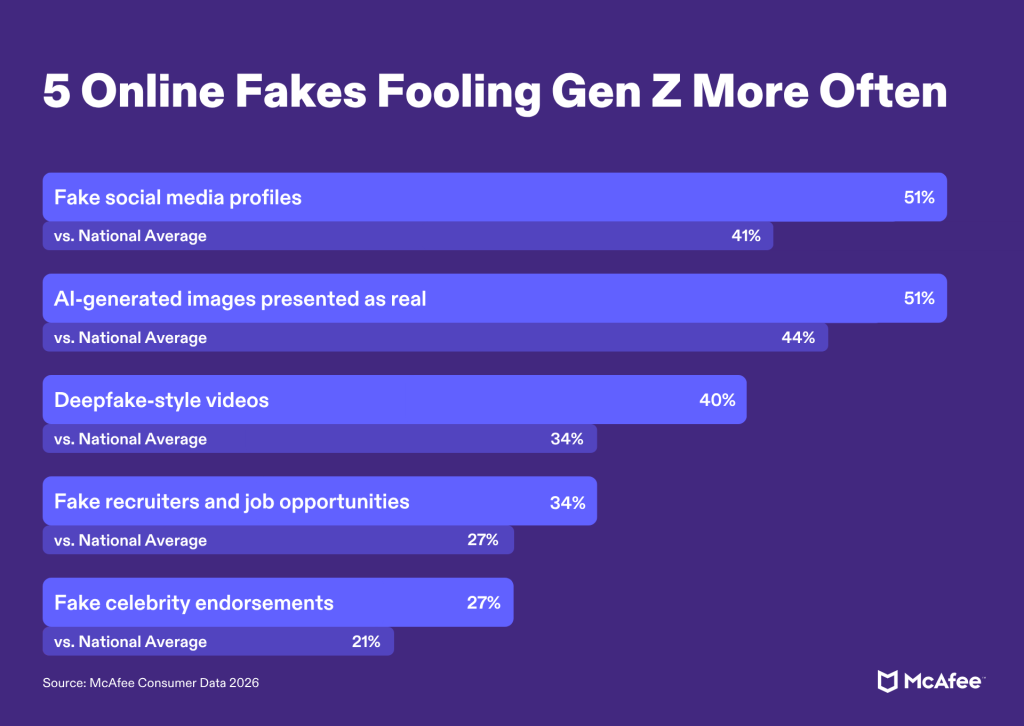
 5 Online Fakes Fooling Gen Z More Often

Gen Z Data- Top 5 Online Fakes

1. Fake social media profiles: 51% of Gen Z vs. 41% of Americans overall

More than half of Gen Z adults encountered a fake social media profile in the past year, according to McAfee’s research.

In these instances, someone might impersonate a creator, brand, potential romantic partner or even a person you already know. Once contact is established, the conversation can move toward a suspicious link, request for money, investment opportunity or attempt to collect personal information.

Abhishek’s key takeaway: “Treat unexpected messages regarding requests for money or help, with some level of skepticism, even if it’s from familiar-looking accounts. Account takeovers (where a known contact’s account was compromised) and copycat accounts (impersonated accounts where someone created a similar looking profile) are often tactics used to target victims. Call your friend on a trusted number and confirm if they really need help.”

2. AI-generated images presented as real: 51% vs. 44%

AI image tools can produce realistic-looking people, products, places and events that never existed.

For scammers, that creates another way to manufacture credibility. A fake profile can have convincing photos. A fraudulent product listing can appear to show a real item. An investment or giveaway scam can be dressed up with imagery that looks legitimate at first glance.

Abhishek’s key takeaway: “Look for oddities in the images itself. AI is not always perfect and does make errors. But also look beyond the image. Check the account posting it, the surrounding context and whether reputable sources confirm the claim before acting on it.”

3. Deepfake-style videos: 40% vs. 34%

Two in five Gen Z adults said they encountered deepfake-style videos in the past year.

A deepfake is manipulated or AI-generated media designed to make it appear that a real person said or did something they didn’t. Improvements in AI mean visual oddities alone are becoming a less reliable way to identify one.

Abhishek’s key takeaway: “Not all deepfakes are bad. Some are made for entertainment. However, pause to analyze and consider what the video is asking you to do or believe.

A surprising celebrity investment pitch, urgent request for money or unbelievable announcement deserves independent verification, even when the person on screen looks and sounds convincing.”

Examples of deepfake videos

4. Fake recruiters and job opportunities: 34% vs. 27%

For Gen Z adults entering or moving through the workforce, job hunting increasingly means interacting with people they have never met through email, social media, job platforms and messaging apps.

Scammers can exploit that normal behavior by posing as recruiters or employers. A convincing company name, professional-looking profile and friendly interview process can make a fraudulent opportunity harder to distinguish from the real thing.

Abhishek’s key takeaway: “Be cautious when a recruiter quickly asks for sensitive personal information, asks you to pay upfront costs or moves the hiring process onto an unusual platform like WhatsApp. Verify the role through the employer’s official website and independently confirm that the recruiter works there.”

5. Fake celebrity endorsements: 27% vs. 21%

AI has also made it easier to put familiar faces and voices behind claims they never made.

Fake celebrity endorsements can appear in investment scams, product promotions and giveaways. What makes them powerful is the borrowed trust. Seeing someone familiar can make an unfamiliar offer feel more credible.

Before buying, investing or sharing information, verify the endorsement through the celebrity’s official channels and independently research the company or offer.

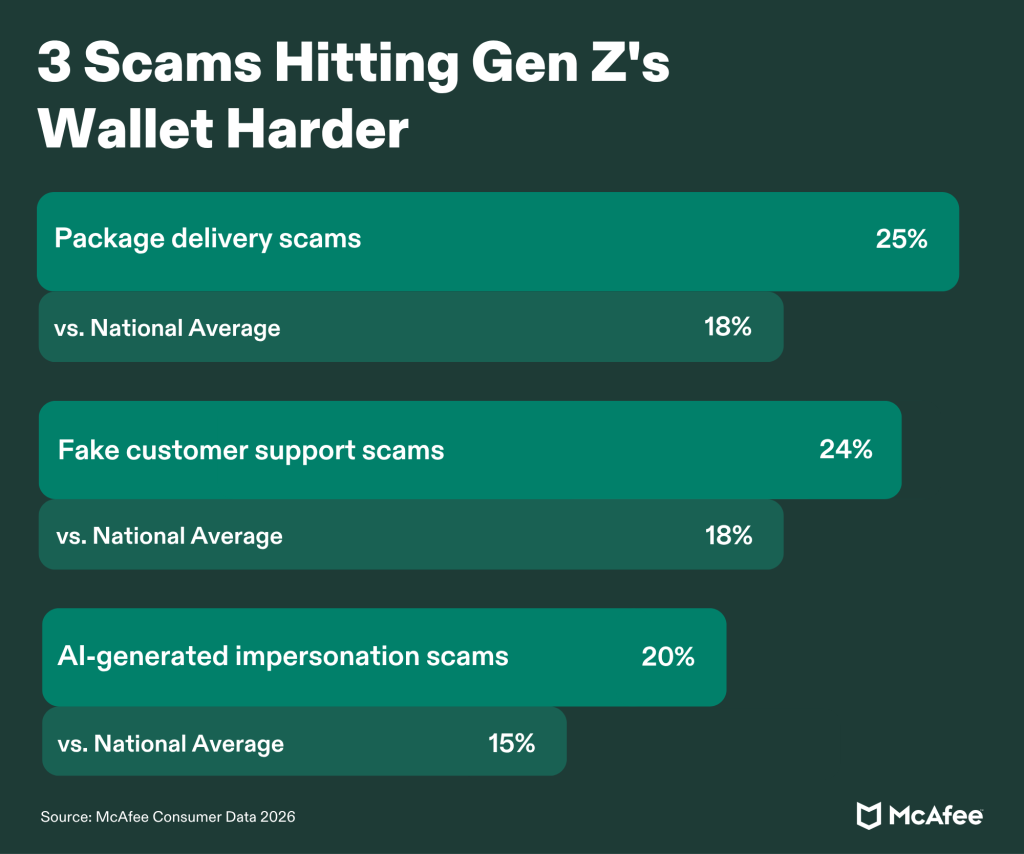
3 Scams Hitting Gen Z’s Wallet Harder

Gen Z Data- Money Scams

Exposure tells us what people are seeing. Financial loss tells another part of the story.

McAfee’s research found Gen Z adults were more likely than Americans overall to report losing money to three particular types of scams:

  • Package delivery scams: 25% of Gen Z vs. 18% overall
  • Fake customer support scams: 24% vs. 18%
  • AI-generated impersonation scams: 20% vs. 15%

Each takes advantage of an ordinary digital interaction.

Abhishek’s key takeaway: “Scams can work by fitting naturally into what someone is already doing online, making verification increasingly important before clicking a link, sending money or sharing sensitive information.”

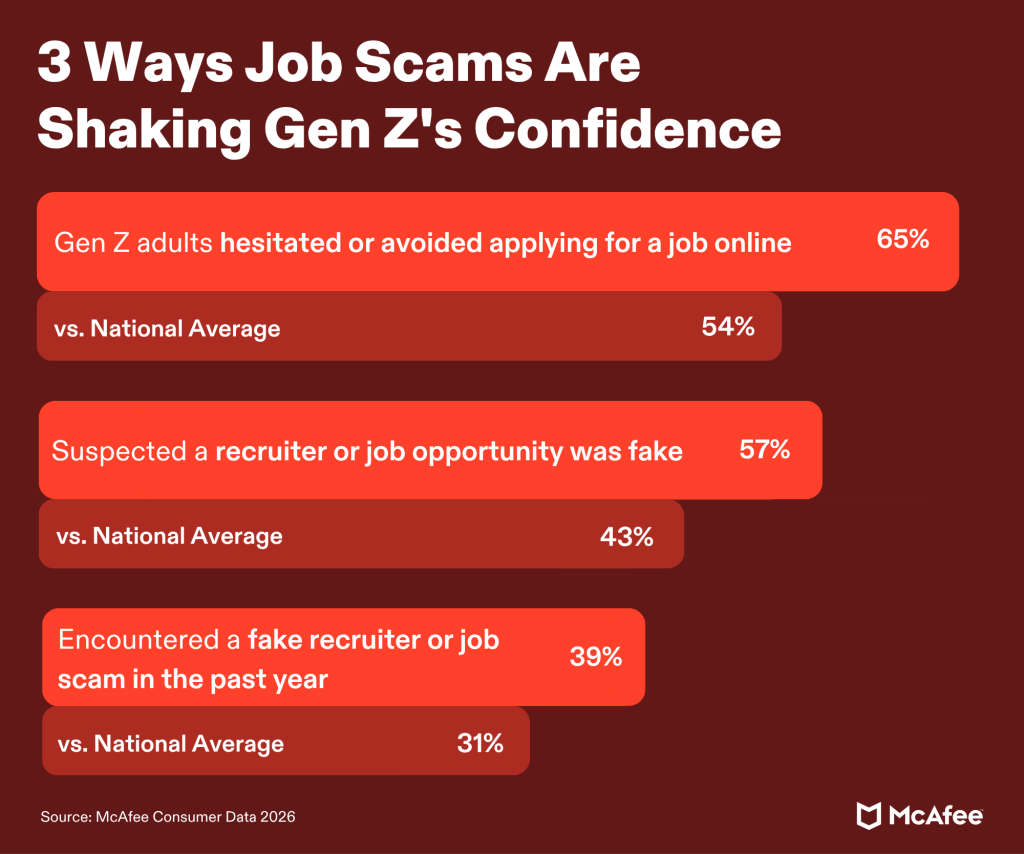
3 Ways Job Scams Are Shaking Gen Z’s Confidence

Gen Z Data- Job Scams

The job market provides one of the clearest examples of how scam concerns can affect people even when they never lose money.

McAfee found:

  • 65% of Gen Z adults say scam concerns have made them hesitate or avoid applying for a job online, compared with 54% of Americans overall.
  • 57% have suspected a recruiter or job opportunity was fake, compared with 43% overall.
  • 39% encountered a fake recruiter or job scam in the past year, compared with 31% overall.

For young adults building careers, that uncertainty can carry a real cost. A legitimate recruiter and a scammer may contact someone through the same platforms and use many of the same professional conventions.

Abhishek’s key takeaway: “Verification can help. Search for the position on the company’s official careers page, check the recruiter independently and contact the company through information you find yourself when something feels questionable.”

The Broader Scam Reality Across the U.S.

State by state breakdown infographic

Gen Z’s experience sits inside a much bigger shift in how Americans navigate life online.

McAfee’s newest research, which combines a nationally representative survey of 5,000 U.S. adults with McAfee Labs analysis of text-based scam activity, found that 88% of Americans encountered at least one type of scam in the past year. Nearly one-third, 31%, reported losing money to one.

The effects extend beyond financial losses.

Nearly three-quarters of Americans, 74%, say they feel the need to double-check most things online before trusting them. Sixty-two percent say figuring out what is real takes more mental energy than it did a year ago. And 82% say concerns about scams have changed something they do online.

That can mean avoiding an unfamiliar retailer, ignoring a legitimate message or deciding against clicking a real link.

AI adds another layer to that uncertainty because convincing content can now be produced faster and at greater scale. As synthetic content becomes part of everyday digital life, spotting scams cannot depend entirely on whether something simply “looks fake.”

For Gen Z, the findings suggest that challenge is already especially visible. They are encountering some forms of manipulated and fraudulent content more frequently while also navigating important parts of early adult life, from finding work to shopping and managing money, online.

Safety Tips From McAfee Experts

A few habits can help reduce the risk without requiring you to investigate everything you encounter online.

Here’s what our threat researchers want you to know:

  • Verify through a second channel. If a friend, recruiter, company or customer support representative contacts you unexpectedly, confirm the request somewhere else. Open the company’s official app, visit its website yourself or contact the person using a number you already trust.
  • Slow down when someone creates urgency. Scammers frequently want a decision before you have time to investigate. Unexpected requests involving money, account credentials, verification codes or personal information deserve an extra check.
  • Investigate the source, not just the content. AI-generated images, video and audio are becoming increasingly convincing. Check who posted something, where an offer originated and whether another reliable source confirms it.
  • Avoid sending money to unlock money. Be especially cautious if a job, prize, investment or refund requires you to pay a fee, purchase equipment or transfer money first.

How McAfee Is Changing to Meet This Moment

As AI changes how people create, communicate and connect, consumer protection needs to evolve with it.

McAfee has been protecting people for decades, and for many people, our name is still synonymous with antivirus. Today’s digital lives extend far beyond a single device, and the risks people encounter do too.

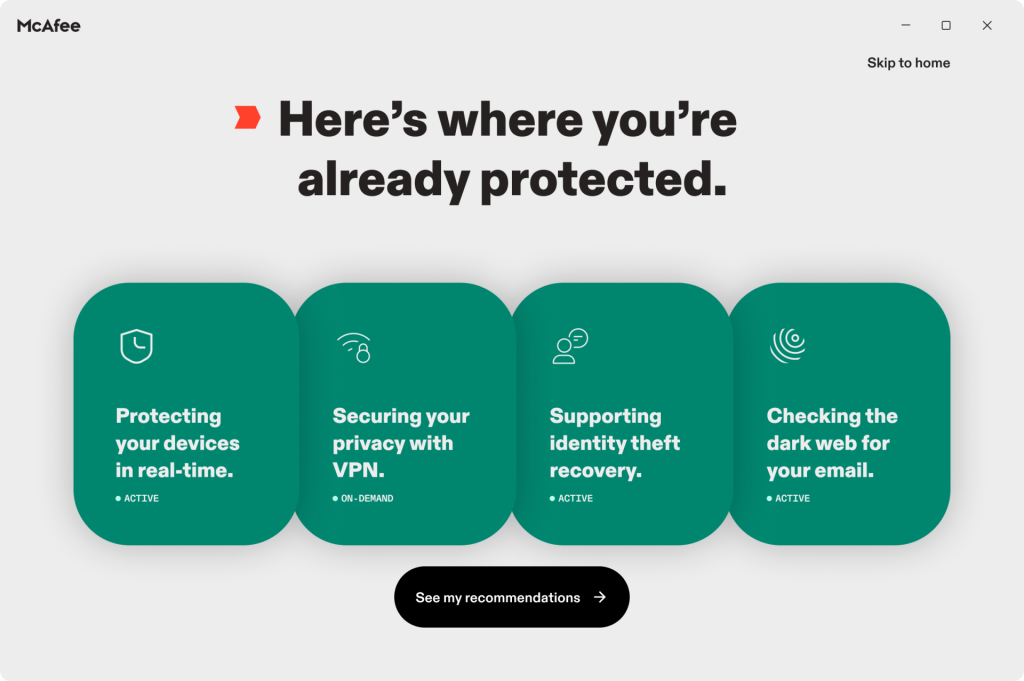
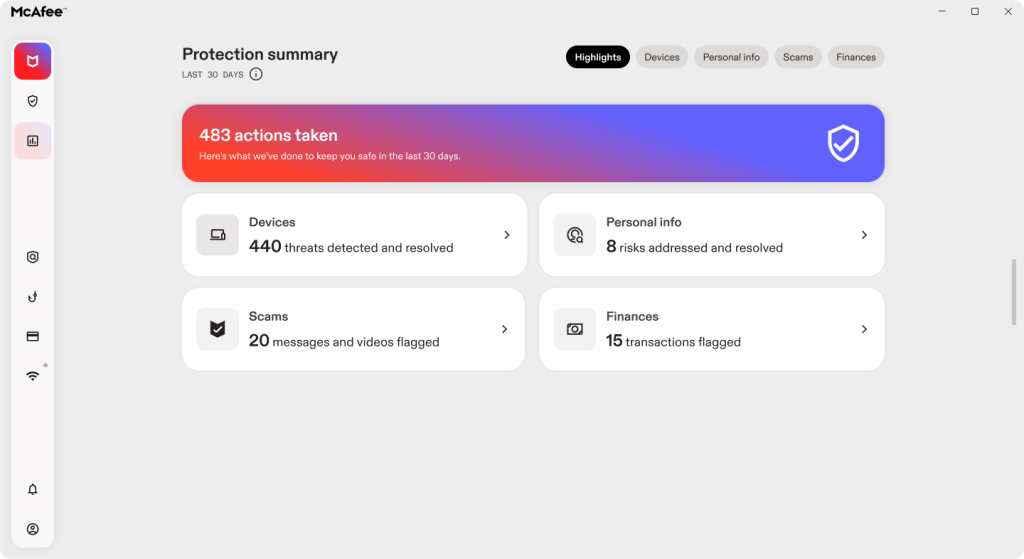
The new McAfee experience is designed to help protect the things people rely on every day, including their personal information, connections, devices and accounts, while making it clearer what’s safe, what needs attention and what McAfee can handle for them.

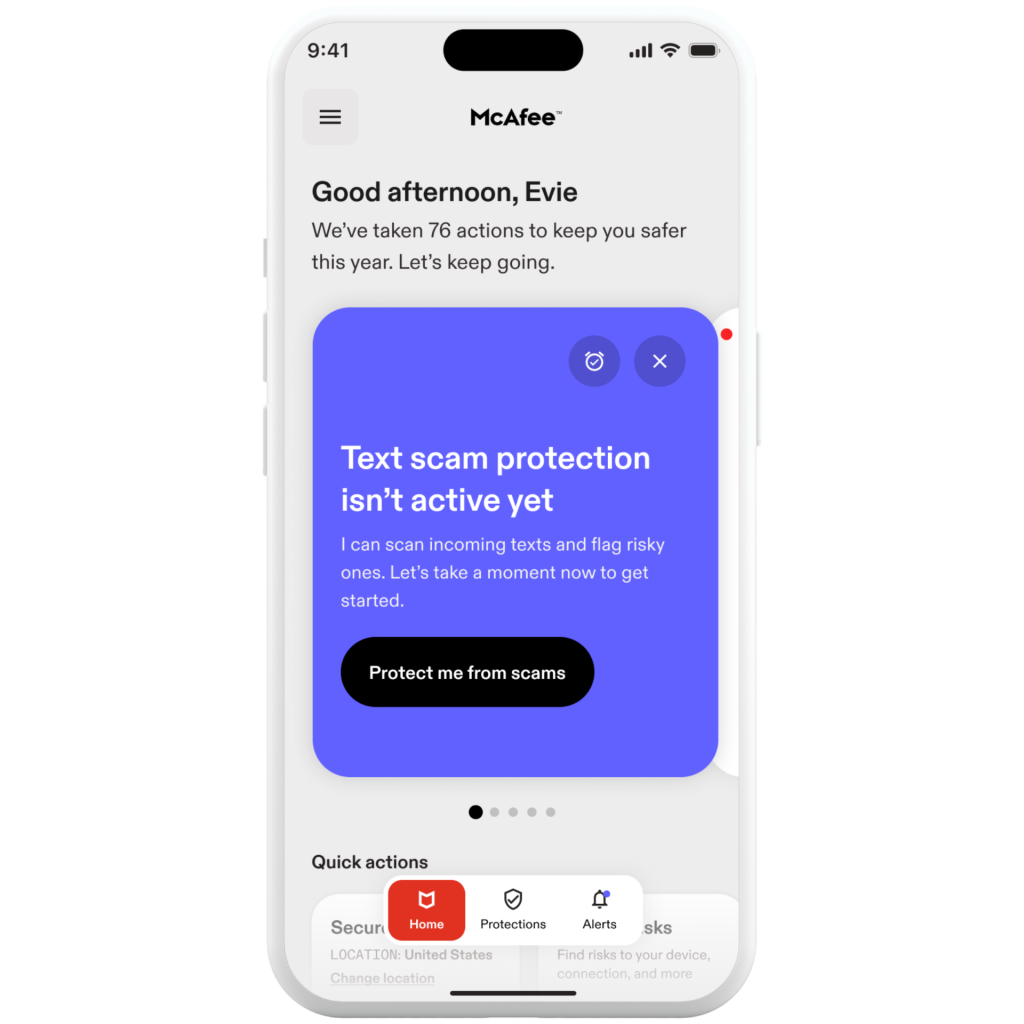
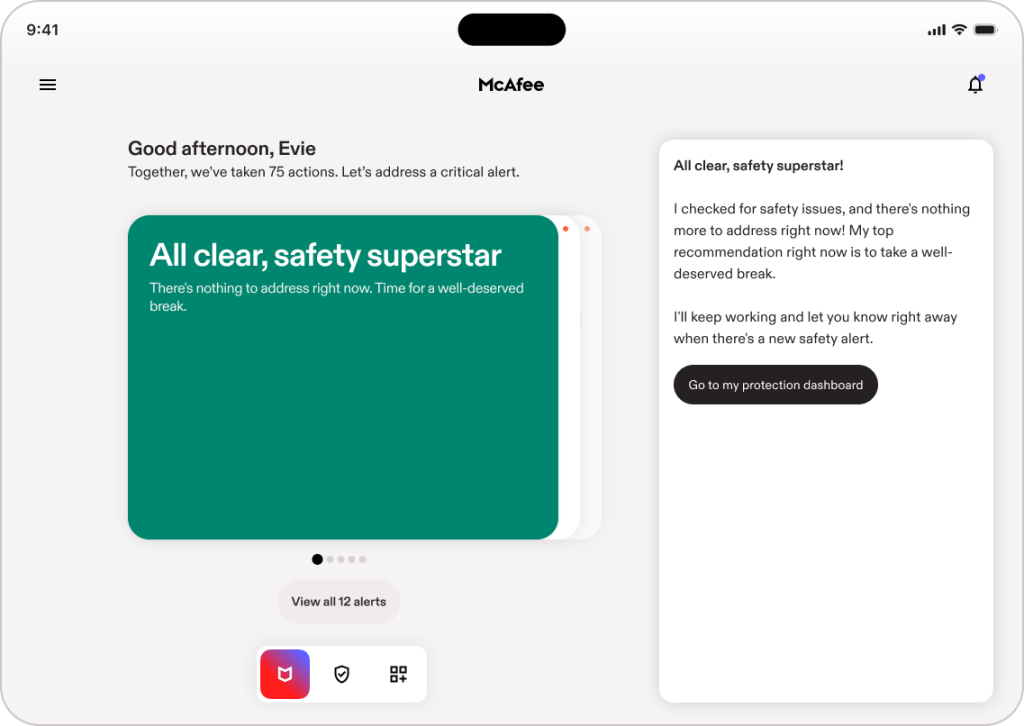
An example of McAfee's new experience and recommendations

That includes helping identify suspicious messages, links and websites, alerting people when personal information appears in a data breach, monitoring for exposed personal information, helping protect connections on risky Wi-Fi and keeping devices and accounts safer.

The experience is built around three principles:

  • Simple and easy. McAfee does more of the work so people don’t need to understand complex threats, security terminology or which setting they need to find.
  • Personalized and proactive. McAfee surfaces timely alerts when information or devices may be at risk, with guided actions that explain what is happening and what to do next in plain language.
  • Always-on and unified. Protection for personal information, connections and devices comes together in one connected experience across devices, helping people stay protected wherever their digital lives take them.

The goal is to help identify risk earlier and give people clearer guidance in the moment, reducing how much of the burden they have to carry themselves.

Navigating the New Scam Reality

Gen Z’s digital fluency has developed alongside the internet itself. Now the internet is changing again.

AI is lowering the barrier to creating realistic fake content, while many of the interactions young adults depend on, including friendships, job searches, shopping, banking and entertainment, happen online.

The answer cannot be expecting people to become experts at identifying every new AI trick.

Let McAfee do that for you.

The post The Top 5 Scams Hitting Gen Z Harder Than the Rest of America appeared first on McAfee Blog.

  •  

Pentagon Data Breach Impacts 3.05 Million: How Military Personnel Can Protect Themselves

A security breach at the Pentagon’s Defense Manpower Data Center (DMDC) exposed unencrypted personal and military records for approximately 3.05 million individuals between October 2025 and July 2026. First reported by Military Times on September 24, 2026, the intrusion compromised sensitive files, including Social Security numbers, belonging to active-duty personnel, veterans, and deceased service members.

With official notification letters dated September 18, 2026, now arriving in physical mailboxes, affected individuals can determine their exposure and enroll in 12 months of free credit monitoring and identity restoration services provided by the Department of Defense through IDX. Understanding the full scope of the incident, confirming whether your records were involved, and establishing immediate account and credit safeguards are essential steps to shielding military benefits and personal finances from targeted exploitation.

How the DMDC Data Breach Happened and What Data Was Compromised

The breach occurred when unauthorized actors exploited a software vulnerability in a DMDC file-sharing system, maintaining access to a server holding unencrypted personnel data for nine months. According to official notification letters mailed by the DMDC on September 18, 2026, unauthorized users accessed personal and military service files between October 2025 and July 2026.

The Pentagon did not issue a public press release prior to dispatching physical mailings. Community members first raised public awareness by sharing letter excerpts on Reddit’s r/Veterans. Pentagon officials confirmed to CNN that the breach compromised records for 2.76 million living individuals and 294,000 deceased service members.

The exposed server contained unencrypted personally identifiable information (PII) belonging to service members, veterans, and military dependents. Compromised records include full names, Social Security numbers, dates of birth, contact information, and administrative military service details.

How to Know If Your Information Was Exposed in the Pentagon Breach

The primary notification method for this incident is a physical letter sent via the United States Postal Service. The DMDC began mailing official breach notification letters dated September 18, 2026, directly to affected personnel, veterans, and surviving family members.

The Pentagon has not released an online lookup database to verify individual exposure. The incident affects individuals whose personnel, manpower, or benefits records were stored on the compromised server during the nine-month exposure window, spanning active-duty military, reserve personnel, National Guard, defense civilians, contractors, veterans, and eligible dependents.

If you have moved recently, your notification letter may be delayed or returned to sender. Log in to milConnect to confirm that your mailing address and contact details are current within the Defense Enrollment Eligibility Reporting System (DEERS). If your records were maintained in DMDC systems between October 2025 and July 2026, take proactive security steps even before a physical letter arrives.

Red Flags That Cybercriminals Are Using Your Military Data

When personal and military records leak, cybercriminals routinely use the data to stage targeted impersonation schemes and financial fraud. Watch for these warning signs:

  • Government impersonation attempts: Unsolicited calls, emails, or text messages claiming to be from the Department of Defense (DOD), Department of Veterans Affairs (VA), or TRICARE requesting verification of personal identifiers.
  • Benefit redirection notices: Unexpected alerts regarding direct deposit changes, login credential updates, or profile modifications across military portals that you did not initiate.
  • Phony breach assistance solicitations: Unofficial communications offering expedited claims, settlements, or data removal services in exchange for an upfront fee or account numbers.
  • Unexplained credit or loan activity: Inquiries on your credit report, new credit card accounts, or collection notices for debt you do not recognize.
  • Unexpected tax or benefit filings: Notifications from the IRS or state tax authorities stating that a tax return or benefit claim has already been filed in your name.

How Military Personnel Can Protect Themselves

Military personnel and service members should take immediate steps to restrict access to their credit profiles and personal accounts:

  1. Enroll in free credit monitoring through the official IDX portal.
    The Defense Department is offering 12 months of free credit monitoring and identity restoration services to affected individuals through IDX. If you received a breach notification letter, use the unique enrollment code included in the mailing to register on the official IDX DMDC response portal or call the support line directly at 1-855-744-4556.
  2. Place a credit freeze with all three credit bureaus.
    Contact Equifax, Experian, and TransUnion to freeze your credit files. A credit freeze blocks prospective lenders from accessing your credit report, stopping identity thieves from opening loans or lines of credit with your Social Security number.
  3. Enable multi-factor authentication on defense portals.
    Log in to MilConnect, VA.gov, and MyPay to update passwords and enforce multi-factor authentication (MFA). Use an authenticator app or hardware security key rather than SMS verification where available.
  4. Verify official contacts independently.
    The DOD, DMDC, and VA do not initiate contact via phone, text, or email to demand immediate payment or confirmation of your Social Security number. Verify any inquiry by navigating directly to official .gov domains.
  5. Inspect TRICARE and medical billing statements.
    Review Explanations of Benefits (EOBs) and medical statements closely. Confirm that all listed provider appointments, diagnostic tests, and prescription orders match care you actually received.

What Military Personnel Should Do If Their Data Was Compromised

If you received an official DMDC notification letter dated September 18, 2026, or notice unauthorized activity on your accounts, execute the following recovery steps:

  • File an identity theft report with the FTC. Submit an official report through the Federal Trade Commission identity theft portal to establish your legal rights and dispute fraudulent accounts with creditors and banks.
  • Obtain an IRS Identity Protection PIN (IP PIN). Prevent fraudulent tax filings using your exposed Social Security number by applying for a six-digit IP PIN through the Internal Revenue Service identity protection page.
  • Place an extended fraud alert on your credit file. If you choose not to freeze your credit entirely, request an extended fraud alert, which requires lenders to verify your identity before approving credit in your name.
  • Notify your financial institutions. Contact the fraud divisions of your bank and credit card issuers to review account statements, replace compromised account numbers, and set up real-time transaction alerts.
  • Retain all breach correspondence. Keep physical copies of your DMDC notification letter, agency complaints, police reports, and dispute logs for ongoing tracking.

How Military Personnel Can Report Fraud and Suspicious Activity

Report security incidents, fraudulent accounts, and impersonation attempts directly through official federal reporting channels:

  • Department of Defense Inspector General: Report military personnel data misuse or military identity impersonation via the Department of Defense Hotline.
  • FBI Internet Crime Complaint Center (IC3): File an online cybercrime complaint regarding credential misuse or unauthorized financial compromise through the FBI Internet Crime Complaint Center.
  • Local Law Enforcement: File a formal police report with your municipal department if an unauthorized party obtains loans, opens accounts, or conducts financial transactions in your name.

Because Social Security numbers and military service records cannot be readily changed, exposure from the DMDC breach presents a persistent risk for active personnel and veterans. Taking proactive security measures now, such as enrolling in the IDX identity monitoring program, locking down credit files, securing military accounts with multi-factor authentication, and reporting suspicious contact immediately, is critical to preventing long-term identity exploitation.

The post Pentagon Data Breach Impacts 3.05 Million: How Military Personnel Can Protect Themselves appeared first on McAfee Blog.

  •  

ASOS Push Notification Hack: Inside the Breach and How to Stay Safe

On October 6, 2026, the ASOS push notification hack sent unauthorized messages to millions of customer devices after cybercriminals accessed a connected third-party platform. ASOS, a British online fashion and cosmetic retailer serving active shoppers worldwide, confirmed that an attacker compromised employee credentials to access external systems. As reported by BBC News, the intrusion exposed customer contact records and personal search histories, although company representatives confirmed that banking and payment information was not accessed.

How the Attack and Social Engineering Breach Worked

The unauthorized messages originated from an extortion ring calling itself the Xuanyewen hacker group. The intruders hijacked the ASOS mobile shopping app interface to broadcast rogue alerts directly to users, claiming they had extracted full customer databases.

The breach did not stem from a software flaw within the ASOS mobile application. Instead, the intruders relied on social engineering, impersonating a trusted contact to deceive an employee into providing valid system credentials.

Those credentials allowed the attackers to sign in to Simon AI, a third-party marketing and personalization platform built on Snowflake Cortex AI that ASOS uses to power customer communications. Once logged in, the threat actors initiated app-wide push alerts and exfiltrated audience data containing customer personal data.

Clarifying the Snowflake Breach Claims

During the intrusion, the hackers claimed they had carried out a direct Snowflake breach to compromise ASOS’s central databases. Official statements from both platforms quickly refuted that claim.

In a corporate statement released through Snowflake’s official statement via Alliance News, a Snowflake spokesperson stated: “We can confirm this issue did not in any way result from a vulnerability, weakness, flaw, or misconfiguration with the Snowflake service… and was not caused by Snowflake.”

Independent reporting and corporate disclosures confirm that the compromise occurred exclusively at the third-party marketing integration layer. Attackers frequently target peripheral marketing tools using stolen credentials because these platforms handle live customer segments without requiring direct access to locked-down corporate networks.

Warning Signs That Your Personal Data Was Compromised

The data accessed during the incident included more than basic contact lists. As documented by BBC’s reporting, data samples provided directly by the threat actors revealed specific customer search histories, including search terms such as “reclaimed vintage.”

In the official ASOS customer breach notification, the retailer stated they did not believe that payment card numbers, banking details, and account passwords were accessed, as those are stored on separate, isolated transactional systems. However, exposed contact information and shopping preferences still present risks for targeted follow-up fraud. Watch for these warning signs that your personal data was exposed:

  • Unsolicited push messages: App notifications prompting you to verify your identity, visit external chat platforms, or click unverified links.
  • Tailored phishing emails: Messages referencing specific clothing brands, recent browsing queries, or recent order details designed to trick you into revealing passwords.
  • Unrequested authentication codes: Password reset messages or multi-factor prompts that you did not initiate.
  • Direct contact from extortionists: Unsolicited communications via email or messaging apps claiming to hold your retail browsing data.

How to Protect Your Personal Data

Taking direct defensive steps helps minimize the risk of identity theft or secondary phishing. Use these best practices to protect your personal data:

  • Avoid clicking unexpected push notification links: If you receive an unexpected alert about an account security issue, dismiss the message and sign in through an official web browser instead.
  • Update your account password: Create a strong, unique password for your ASOS account that is at least 12–16 characters long and not shared across any other platforms.
  • Enable multi-factor authentication (MFA): Set up MFA across your primary email and retail accounts, opting for an authenticator app over SMS codes whenever available.
  • Verify retailer messages independently: If you receive an email regarding an order change or account issue, visit the store’s website directly rather than using embedded links.

What to Do If Your Personal Data Was Compromised

If your personal details were exposed or you interacted with the rogue push alert, take these containment measures:

  • Cease all contact with extortionists: Do not communicate with extortionists or send payments to individuals offering to delete stolen records.
  • Change shared account credentials: If you used your ASOS password on other websites, update those services with unique login combinations immediately.
  • Place a credit freeze: Contact the three major credit reporting agencies—Equifax, Experian, and TransUnion—to freeze your credit files against unauthorized new accounts.
  • Monitor financial statements: Check linked credit card and bank statements for unauthorized charges or low-value test transactions.
  • Create an identity recovery plan: If sensitive contact or identity records were exposed, file a report at the federal government’s IdentityTheft.gov recovery portal to document the incident and receive a recovery plan.
  • Preserve digital evidence: Keep screenshots, message headers, and timestamps of any suspicious texts, emails, or calls you receive.

How to Report Identity Threats and Extortion

Reporting incidents to official oversight agencies helps authorities identify threat infrastructure and take down fraudulent operations:

The ASOS App push notifications incident highlights how cybercriminals bypass central infrastructure by using social engineering to compromise connected third-party tools. Practicing strong credential hygiene, staying alert to targeted phishing messages, and reporting suspicious contact to regulators are your most effective steps for keeping your personal information secure.

The post ASOS Push Notification Hack: Inside the Breach and How to Stay Safe appeared first on McAfee Blog.

  •  

New Adception Campaign Weaponizes Search Ads: How to Stay Safe From Malvertising

A new cyberattack is weaponizing everyday search results to trick users into running malicious code on their devices. The campaign, dubbed “Adception,” was uncovered by Push Security. By buying paid search ads on Google and routing traffic through trusted web services, attackers are placing deceptive links directly in front of people searching for popular software. Then, they use a social engineering framework known as “ClickFix” to trick people into running malicious scripts on their devices.

How the Adception Campaign Works

Search ads appear at the very top of search engine results, making them easy to click and easy to trust. Malvertising (short for malicious advertising) occurs when cybercriminals buy or hijack legitimate ad placements to spread malware or direct users to fraudulent websites. In this campaign, attackers purchase legitimate ad slots but route clicking visitors through a hidden chain of web redirects before loading a fraudulent website. This detour conceals the final destination from automated ad-review crawlers, allowing malicious ads to bypass platform security filters and reach active searchers.

According to Push Security’s research, the threat actors specifically targeted Mac users searching for Anthropic’s Claude AI assistant. To evade automated detection, the attack chain bounces traffic through legitimate Bing click-tracking redirects and a compromised website. Once a visitor lands on the fake software portal, the attackers deploy an evasion technique known as “ClickFix,” using deceptive troubleshooting prompts to trick macOS users into executing base64-encoded malware directly inside the Z shell (zsh).

The campaign executes across five distinct stages:

  1. Sponsored Search Ad Placement: Attackers purchase top-ranked Google search ads that bid on keywords for Anthropic’s Claude desktop app.
  2. Cross-Engine Redirection (Google to Bing): Clicking the Google ad routes the visitor through legitimate Bing click-tracking infrastructure. The attackers use this cross-engine detour because automated Google ad-review crawlers do not expect ad traffic to route through a competitor’s tracking domain, effectively blinding them to the ultimate destination.
  3. Compromised Intermediary Site: The traffic forwards to a compromised WordPress site owned by a South American retailer, which runs two layers of cloaking to weed out automated scanners and non-Mac operating systems.
  4. Deceptive Landing Page: Qualifying visitors land on a counterfeit webpage that closely mimics Anthropic’s official website and branding.
  5. ClickFix Terminal Execution: The landing page displays a fake installation error and activates the “AcSig” ClickFix toolkit, which hijacks the user’s clipboard and instructs them to paste code into the macOS Terminal to “fix” the download.

Warning Signs of Deceptive Search Ads

  • Unfamiliar or shifting URLs: The address displayed on the ad card does not match the real software vendor, or your browser rapidly redirects through multiple unrelated domains before loading.
  • Terminal or command-line prompts: When you arrive at a website through a search ad, it instructs you to open your computer’s terminal, shell, or command prompt to complete a download or resolve an installation error.
  • Clipboard hijack instructions: The webpage asks you to copy code or automatically copies script text containing terms like base64, eval, curl, or zsh into your system clipboard.
  • Fake system repair messages: On-screen pop-ups claim your browser or operating system requires an immediate manual patch to proceed with a standard download.

How to Protect Yourself from Deceptive Search Ads

  • Navigate directly to official vendor sites. Type known web addresses directly into your browser’s address bar rather than searching for download portals.
  • Verify the destination URL before clicking. Inspect the displayed web address on search results to ensure it matches the actual company domain.
  • Use automated web protection tools: Install a secure browsing extension to automatically protect against malware and phishing sites.
  • Never paste unverified code into command-line tools. Legitimate commercial software does not require pasting terminal commands to resolve browser download issues.
  • Use official application stores. Download desktop applications directly through official developer portals, the Mac App Store, or the Microsoft Store.

What to Do If You Interacted with a Malicious Ad

If you clicked a deceptive ad and pasted code into your Mac’s Terminal, assume your device has been compromised. Take these immediate steps to limit the damage:

  1. Disconnect from the internet immediately. Turn off your Wi-Fi from the menu bar at the top of your screen and unplug any network cables. This cuts off communication between your computer and the attacker’s server.
  2. Shut down the Terminal and turn off your Mac. Quit the Terminal app completely. Shut down your computer to stop any background scripts from continuing to run.
  3. Change your passwords from a different device. Using your phone or a separate, clean computer, immediately update passwords for your primary email, online banking, and password manager. When prompted, choose the option to “Log out of all devices.”
  4. Turn on two-factor authentication (2FA). For any critical accounts that don’t already have it, enable two-factor authentication using an authenticator app rather than SMS text messages.
  5. Run a full antivirus scan. Restart your Mac, keep Wi-Fi turned off, and run an offline security scan using reputable antivirus software to detect and quarantine any installed files.
  6. Avoid sensitive logins and seek professional help if uncertain. Do not sign into online banking, email, or password accounts on the affected computer. If your security scan cannot confirm the threat is gone or you feel unsure, take the device to an Apple Store or certified technician to safely wipe and reinstall the operating system.

How to Report Deceptive Ads

  • Report rogue ads to Google: Submit an abuse report via the Google Ads Complaints Form to flag fraudulent ad links and advertiser accounts.
  • Report redirect abuse to Microsoft: Submit details on hijacked redirect links directly through the Microsoft Security Response Center.
  • File an official fraud report: Report deceptive advertising to the Federal Trade Commission.
  • Contact cybercrime authorities: File formal reports regarding malware delivery or financial loss with the FBI’s Internet Crime Complaint Center.
  • Notify the impersonated vendor: Alert the affected brand’s support team to inform them of active trademark abuse and domain spoofing.

Deceptive search ads succeed by exploiting everyday browsing habits and the assumption that top-ranked search results are safe. Taking a moment to verify destination URLs and reporting suspicious sponsored listings helps platforms dismantle malicious infrastructure and keeps the broader online community safer. 

The post New Adception Campaign Weaponizes Search Ads: How to Stay Safe From Malvertising appeared first on McAfee Blog.

  •  

CloudSyncD macOS Malware Hidden in Fake Zoom Installer: How to Avoid Malicious Installers

Security researchers at Jamf Threat Labs issued a September 2026 threat report warning Mac users about a newly discovered malware program called “CloudSyncD.” Disguised as a Zoom installer on unverified download sites, this malicious software tricks users into entering their administrator password, allowing attackers to secretly take remote control of the computer. The campaign targets individuals looking to install or update the popular video conferencing software.

How the CloudSyncD Malware Works

For a detailed technical breakdown of how the malware operates, you can read the full Jamf Threat Labs report. In simple terms, when someone downloads and opens the fake Zoom installer, the malware enacts a process to take control of the Mac:

  • Fake System Prompt: The installer opens a pop-up window asking for your computer password, designed to look like an official macOS prompt.
  • Hidden Credentials: Once typed, the malware saves your password in a disguised file, hiding the text with invisible characters to bypass standard checks.
  • Silent Setup: Using administrative privileges, the malware quietly installs a hidden background program on your system.
  • Remote Access: The background program connects your Mac to an attacker’s server, granting hackers full remote access to run commands, steal files, or install additional software.

Malicious Installer Warning Signs and Red Flags

Recognizing a suspicious installer before opening it prevents system compromise:

  • Unofficial Download Sources: The file originates from a sponsored search link, file-sharing site, or third-party portal rather than the software’s official web page or the official Mac App Store.
  • Immediate Password Requests: A system password prompt appears right when opening a disk image before any setup wizard begins.
  • System Security Warnings: macOS Gatekeeper or XProtect displays an alert stating the software is untrusted or lacks a recognized developer signature.
  • Unfamiliar Background Processes: Unknown applications or scripts execute with administrative privileges in macOS Activity Monitor.

How to Protect Your Mac From CloudSyncD and Other Malware

Adopting safe download practices reduces the risk of installing malicious macOS software:

  • Download exclusively from official sources: Always obtain applications directly from the developer’s official website or the Mac App Store.
  • Verify unexpected password prompts: Cancel any password request that appears unexpectedly when opening a newly downloaded file.
  • Keep macOS security features active: Ensure built-in protections like macOS Gatekeeper and XProtect remain turned on to flag unverified software.
  • Check app signatures before opening: Inspect installer details and developer certificate signatures before approving setup.

What to Do If You’ve Already Used a Fake Zoom Installer

If you downloaded a fraudulent Zoom installer or entered credentials into a suspicious prompt, execute these recovery steps immediately:

  • Disconnect from the Internet: Turn off Wi-Fi and unplug Ethernet cables right away to break active communication between your Mac and remote servers.
  • Change Account Passwords: Using a separate, secure device, update your Mac administrator password and any account credentials accessed from that computer.
  • Turn On Multi-Factor Authentication: Enable multi-factor authentication (MFA) across your financial, email, and personal accounts.
  • Isolate and Remove Malicious Artifacts: Run a full system scan or work with a technical professional to locate and delete unauthorized background files.
  • Place a Credit Freeze: If personal or financial data was stored on the computer, place a credit freeze with Equifax, Experian, and TransUnion.

Report Fraudulent Installers and Secure Your Mac

Reporting malicious downloads helps threat intelligence researchers and federal agencies track active campaigns. Submit reports regarding fraudulent software installers to the FBI Internet Crime Complaint Center or the Federal Trade Commission. Notifying the official security team of the impersonated service provider also assists in taking down fake download domains.

Because CloudSyncD installs persistent background files, completely removing every component is essential to restoring system security. Simply deleting the downloaded installer disk image does not eliminate the threat. Ensure all hidden binaries and configuration files are thoroughly purged from your system to revoke remote access and protect your data.

The post CloudSyncD macOS Malware Hidden in Fake Zoom Installer: How to Avoid Malicious Installers appeared first on McAfee Blog.

  •  

Microsoft X Account Hacked in Crypto Scam: How to Spot Hijacked Accounts Promoting Scams

On October 2, 2026, attackers hijacked Microsoft’s official X account (which reaches over 13 million followers) to execute a cryptocurrency pump-and-dump scheme, as reported by The Verge. The unauthorized access allowed attackers to replace Microsoft’s profile image with its retro mascot Clippy and promote a fraudulent token called $Clippy before the posts were removed. An official statement on Microsoft’s X account confirmed the account was secured, the unauthorized posts were deleted, and an internal investigation into the breach is ongoing.

How the $Clippy Crypto Scam Worked

When cybercriminals gain control of a verified corporate account, they leverage its built-in credibility to trick followers into fake financial investments.

Unauthorized actors gained access to @Microsoft on October 1, 2026. The attackers changed the account’s profile picture to image assets of Clippy, Microsoft’s legacy virtual assistant, and retweeted promotional posts from an impersonator handle, @clippymsftcto.

The malicious posts directed users to external sites promoting a fraudulent $Clippy cryptocurrency token. To confuse followers and delay remediation, the attackers also published a fake apology tweet from @Microsoft claiming control had been restored while continuing to promote the scam. Account access was eventually restored, and X suspended the associated impersonator accounts.

Warning Signs That an Account Has Been Compromised for a Crypto Pump-and-Dump

  • Uncharacteristic financial endorsements: Verified corporate accounts suddenly promoting unannounced meme coins, cryptocurrency presales, or Web3 projects.
  • Sudden profile changes: Abrupt alterations to official branding, logos, bios, or handles accompanying high-yield investment offers.
  • High-pressure purchasing tactics: Posts creating artificial urgency by urging followers to buy unlisted tokens or connect wallets before a deadline.
  • External wallet connection links: Unfamiliar links directing users to third-party decentralized finance platforms or signature-draining websites.
  • Contradictory apology posts: False status updates or fake “all-clear” statements published during an active breach that still include external links or contract addresses.

How to Protect Yourself from Social Media Crypto Scams

Protecting your assets from social media crypto schemes requires careful verification and strict wallet safety practices.

  • Cross-reference announcements on official newsrooms: Confirm product or financial launches on a company’s main website before trusting social media posts.
  • Avoid clicking direct links for token sales: Never interact with link shorteners or unfamiliar domains asking you to connect a digital wallet.
  • Audit token contracts independently: Use reputable blockchain analytics tools to check liquidity, developer wallet allocations, and contract safety before buying new tokens.
  • Remember that verified badges do not guarantee immunity: Blue checkmarks confirm identity verification, but they do not prevent credential theft, session hijacking, or account takeovers.

What to Do If You Have Already Been Targeted

  • Disconnect wallet permissions immediately: Use security tools to cancel active smart contract allowances granted to suspicious sites.
  • Transfer remaining assets: Move funds to a newly generated, secure wallet if you suspect your private keys or seed phrases were compromised.
  • Contact your financial institutions: Notify your bank, credit card company, or crypto exchange immediately if fiat currency or linked accounts were involved.
  • Change passwords and enable multi-factor authentication (MFA): Update credentials across all sensitive accounts using an authenticator app rather than SMS.
  • Document transaction evidence: Save wallet addresses, transaction hashes, screenshots of fraudulent posts, and web links for formal reports.
  • Report identity exposure: If you shared personal identity or banking details on a phishing site, submit a report to the FTC and get a recovery plan.

How to Report Social Media Crypto Scams

If you encounter or fall victim to a social media crypto scam, report cyber fraud directly to the FBI Internet Crime Complaint Center and deceptive financial schemes to the Federal Trade Commission. You can also flag hijacked profiles or scam links using on-platform reporting tools directly on X, or contact local law enforcement if you suffered significant financial losses.

High-profile corporate account hijacks demonstrate how quickly bad actors can exploit trusted brands to promote fraudulent schemes. Verifying financial news across primary corporate websites, auditing token contracts, and recognizing red flags remain critical steps to keeping your digital assets secure.

The post Microsoft X Account Hacked in Crypto Scam: How to Spot Hijacked Accounts Promoting Scams appeared first on McAfee Blog.

  •  

Frontline Education Data Breach: What Happened and How K–12 Staff can Stay Safe

On October 2, 2026, BleepingComputer reported that ed-tech software provider Frontline Education suffered a data breach exposing personal information of K-12 school district employees, including Social Security numbers, email addresses, and physical addresses.

Frontline internally identified unauthorized access on August 14, 2026, stemming from a security flaw in a third-party application, and began notifying impacted school administrators via Cyberscout on October 1, 2026. Because Frontline provides administrative and workforce management tools to over 80,000 schools across the country, the exposure directly impacts teachers, administrators, and educational staff whose employee records were managed through the platform.

How the Frontline Education Data Breach Occurred

According to reporting by BleepingComputer and discussions among IT administrators from multiple school districts in the r/k12sysadmin Reddit community, attackers exploited a vulnerability in a third-party software application integrated with Frontline Education’s systems. This vulnerability enabled unauthorized access to internal databases containing administrative and workforce management records.

Frontline discovered the intrusion on August 14, 2026. Rather than issuing an immediate public statement on its corporate website, Frontline partnered with Cyberscout to dispatch private notification emails directly to superintendents, business managers, and IT personnel starting October 1, 2026. The exposed data includes critical personally identifiable information:

  • Full names and physical street addresses
  • Direct email addresses associated with district employment
  • Social Security numbers (SSNs)

Warning Signs That Your Personal Information was Compromised in a Data Breach

Because compromised Social Security numbers and contact details enable identity theft and targeted phishing, school district employees should watch for these specific warning indicators:

  • Unsolicited verification requests: Emails or calls claiming to represent Frontline Education, Cyberscout, or district HR asking you to confirm personal details or login credentials.
  • Targeted phishing (spear phishing): Messages addressing you by name and referencing your specific school district, job title, or administrative role.
  • Unfamiliar credit inquiries: Alerts from credit monitoring services showing credit checks or new account applications that you did not initiate.
  • Tax filing irregularities: Communications from the IRS or state tax authorities indicating that a tax return has already been filed using your Social Security number.

How School Employees can Stay Safe

If you are a K-12 school employee whose district utilizes Frontline Education software, take these immediate actions to secure your personal information:

  • Place a fraud alert or credit freeze with all three bureaus. Contact Equifax, Experian, and TransUnion to lock your credit files. A credit freeze prevents lenders from accessing your credit report, stopping bad actors from opening unauthorized accounts in your name.
  • Verify notification communications. Confirm with your district’s IT or HR department whether your district was impacted before clicking links in breach notification emails. You can also visit Frontline’s dedicated identity protection portal directly.
  • Enable multi-factor authentication (MFA). Turn on MFA across all personal email accounts, financial portals, and school district access systems to prevent unauthorized sign-ins.
  • Monitor credit reports at the source. Request free annual credit reports through the official annual credit report website to review active accounts and financial inquiries.

What to Do If You Have Already Been Targeted

If your Social Security number or personal financial details have already been misused, complete the following recovery steps immediately:

  • Stop contact with suspicious senders. Do not reply to unverified emails, texts, or phone calls requesting additional personal information.
  • Notify your financial institutions. Contact your bank, credit card issuers, and payment providers to alert them of potential identity theft and place fraud holds on compromised accounts.
  • Report identity theft to the federal government. File an official identity theft report at the FTC identity theft portal to receive a recovery plan and official documentation for disputing fraudulent accounts.
  • Freeze your credit. If you have not yet frozen your credit, do so immediately with Equifax, Experian, and TransUnion.
  • Change affected account credentials. Update passwords for primary email accounts and school portal logins. Use complex, unique passwords for every service.
  • File a report with local law enforcement. If you incur financial losses or discover fraudulent accounts opened in your name, submit a police report and request a copy for your dispute records.
  • Maintain detailed documentation. Retain copies of notification letters, email headers, police reports, and fraudulent transaction statements.

How to Report the Threat and Next Steps

To report suspicious activity or document fraudulent use of your information resulting from this incident, use official reporting channels:

Data breaches often have a long tail, as compromised details can resurface months or years after the initial breach. Long-term protection relies on strong password hygiene, routine credit checks, and ongoing caution with unexpected communications. Automated monitoring tools can alert you if exposed credentials surface online, while consistent security habits and swift action remain your primary defense.

The post Frontline Education Data Breach: What Happened and How K–12 Staff can Stay Safe appeared first on McAfee Blog.

  •  

BigCommerce Ribon App Breach: What It Is and How to Protect Yourself

Phishing scams

Customer names, email addresses, phone numbers, and shipping addresses were exposed across multiple e-commerce storefronts when attackers breached two third-party shopping applications. The cyberattack was confirmed when UK online spirits retailer Master of Malt notified its customers on September 18, 2026 of the risk to their personally identifiable information (PII). The following day, they informed customers that Master of Malt was not the target of the attack and that “The attack was against Ribon, which was installed on hundreds of BigCommerce stores.”

In a September 2026 statement reported by BleepingComputer, e-commerce platform BigCommerce alerted merchants that unauthorized actors accessed shopper records between September 13 and September 17, 2026. BigCommerce confirmed its core platform remained uncompromised and uninstalled the affected software on September 17, 2026, to block cybercriminals from further access.

How the BigCommerce Ribon App Breach Worked

According to BigCommerce’s comments to BleepingComputer, the data breach originated from a system compromise at Fastr, the parent company of third-party app developer “Be A Part Of.” Attackers obtained API application keys for the Ribon and Ribon 1.5 e-commerce apps, which merchants integrate into BigCommerce storefronts to manage customer features.

Because e-commerce integrations grant application keys permission to read store data, holding valid credentials allowed attackers to generate legitimate platform API requests. From September 13 to September 17, 2026, the unauthorized actor extracted customer records across affected stores and injected malicious scripts into a small number of storefronts. BigCommerce uninstalled the applications on September 17, 2026, and notified impacted merchants directly.

Warning Signs That Your Personal Data May Have Been Exposed

Exposed contact details often serve as the foundation for follow-up phishing attempts and impersonation scams. Watch for these specific indicators:

  • Unsolicited credential or payment requests: Watch for unexpected emails, texts, or phone calls claiming to be from affected retailers that ask for account passwords, PINs, or financial details.
  • Urgent payment or store verification messages: Be skeptical of communications demanding payment confirmation or immediate money transfers due to an alleged processing error or security update.
  • Suspicious login and verification links: Avoid clicking links in text messages or emails that direct you to non-official login portals or request personal information.
  • Requests for non-standard payment methods: Treat any demand for wire transfers, prepaid gift cards, or cryptocurrency as a major scam indicator.

 How to Protect Yourself After a Data Breach

Protecting your personal accounts after news of a data breach requires proactive credential management and exercising caution with calls and emails. Take these actions to help protect yourself:

  • Verify sender identity before responding. Legitimate retailers will not contact you unexpectedly to ask for sensitive credentials or payment information over phone or email.
  • Inspect email header details and website URLs. Ensure links lead directly to official domain names rather than lookalike URLs.
  • Use unique passwords across online accounts. Ensure passwords used on e-commerce sites are not reused on email or banking portals.
  • Enable multi-factor authentication (MFA). Turn on MFA across primary email and shopping accounts to add a verification layer beyond passwords.

What to Do If You Have Already Been Targeted

If your data was exposed or you received a breach notification from an affected BigCommerce merchant, take these immediate steps to secure your identity and finances:

  • Stop contact and do not send money. Discontinue communication with any sender requesting credentials or payments related to recent purchases.
  • Contact your bank, card issuer, or payment app immediately. Report potential fraud or stop suspicious transactions if payment details were compromised.
  • Update exposed passwords. Change login credentials and turn on multi-factor authentication for affected merchant accounts and any accounts where you reused passwords.
  • Freeze your credit reports. Consider a credit freeze with Equifax, Experian, and TransUnion if you suspect broader personal identity data exposure.
  • Document all suspicious interactions. Keep records of suspicious activity, including phone numbers, message transcripts, email headers, and receipts.

Next Steps After the BigCommerce Data Breach News

If you encounter phishing attempts or fraudulent activity linked to this breach, report the incident directly to official regulatory and law enforcement channels. You can submit details to the FBI Internet Crime Complaint Center, report deceptive or suspicious messages through the Federal Trade Commission, or notify the impacted retailer directly through the customer support portal on its primary website.

The BigCommerce Ribon app incident demonstrates how compromised third-party application permissions can expose customer records even when core e-commerce platform infrastructure remains secure. Verifying sender credentials and maintaining separate passwords across online accounts helps mitigate personal risk when supply-chain breaches occur.

The post BigCommerce Ribon App Breach: What It Is and How to Protect Yourself appeared first on McAfee Blog.

  •  

There’s Safe. And There’s Safer With McAfee: Transformational Protection

For a long time, being safe online came with a relatively familiar set of rules.

“Don’t click suspicious links.”
“Keep your software updated.”
“Be careful about what you share.”

But today, AI is everywhere. And it’s rapidly evolving and drastically changing what it means to trust what we see and hear online. It can make scams more convincing and easier to create at scale, while personal information available online can make those scams feel remarkably specific to us.

As AI reshapes nearly everything we consume and do, our daily interactions all come with an added mental burden: the feeling that you have to question everything.

Our research found that nearly three-quarters of Americans (74%) feel the need to double-check most things online before trusting them.

That finding stuck with me because it captures something bigger than concern about any one cyberthreat: Trust itself is becoming time-consuming work.

In a world where normal, everyday interactions put people at risk, consumers need protection that keeps them safe in every moment, feels simple, and works quickly and proactively.

Meet the new McAfee: a completely transformational safety solution that protects you when you know you need it, and when you don’t.

Always On. Simple and Easy. Personalized and Proactive.

This marks a shift from reactive security to proactive safety that helps you identify risks and take action before any damage is done.

I experienced a great example of it recently. I was getting on a plane and connected to the public Wi-Fi. McAfee let me know that my VPN had automatically turned on to help protect my connection.

I didn’t have to remember to take a security step. I didn’t have to search for a setting or wonder whether I had done the right thing. I didn’t have to know that I should be securing my connection on public Wi-Fi. And I didn’t have to know what a “VPN” is (virtual private network for those who are wondering!) The protection was simply there when I needed it. Always on. Simple and easy. Personalized and proactive.

That small moment captured something much bigger about the experience we want to create.

Scammers will start taking it personally

McAfee has been protecting people for decades, and for many, our name is still synonymous with antivirus. But in a world of accelerating AI, people’s digital lives no longer fit neatly inside a single device, and neither do the risks they encounter.

That’s why the new McAfee experience is designed to do much more than protect individual devices. It helps protect the things people rely on every day, including their personal information, connections, devices, and accounts, while making it clearer what’s safe, what needs attention, and what McAfee can handle for them.

McAfee’s new product experience seamlessly protects your personal info, finances, connections and devices so you can shop, text, bank and browse with confidence, delivering advanced and comprehensive protection at every moment.

This is merely an evolution of what McAfee has always been here to do: keep people safe- from today’s threats and tomorrow’s.

McAfee. Safer Than Safe.

Our new brand is an expression of that same evolution.

Safe is reacting. Safer is preventing.

Safe is worrying about tomorrow. Safer is enjoying today.

Those contrasts capture what Safer Than Safe means to us. It’s about giving consumers greater confidence instead of building on decades of fear associated with scams, malware, risks, alerts, and the protection industry broadly.

With the growing concern over AI and the speed at which it’s evolving, there has never been a more important moment to provide critical safety solutions proactively and simply. And that’s the moment we’re meeting.

That thinking shaped a McAfee brand that is brighter, simpler, and more human. The experience of being protected shouldn’t be defined by warnings and complexity, and neither should the brand behind it.

McAfee’s “Safer Than Safe” brand promise, the new experience simplifies security into one holistic safety solution:

  • Simple & Easy – McAfee’s new experience does the hard work for you. Consumers no longer need to understand complex threats, technical language or how and where to find tools or settings to turn on the protections they need.
  • Personalized, Proactive Assistance – Designed to help consumers stay a step ahead with proactive notifications, clear guidance and easy steps. McAfee surfaces timely and personalized alerts when your information or devices are at risk, with guided actions that explain what is happening and what to do next in plain, easy-to-understand language.
  • Always-On, Unified Product – McAfee protects you everywhere you are and whatever you’re doing. The new experience brings data, identity and threat protection together into one connected experience across all your devices, so staying safe is seamless and easy.

AI will continue to change how we create, communicate, and connect. It will bring extraordinary possibilities and new risks. We cannot expect people to study every development closely enough to recognize every new way their trust might be tested.

Consumers shouldn’t be security experts. That’s our job.

McAfee. Safer Than Safe.

The post There’s Safe. And There’s Safer With McAfee: Transformational Protection appeared first on McAfee Blog.

  •  

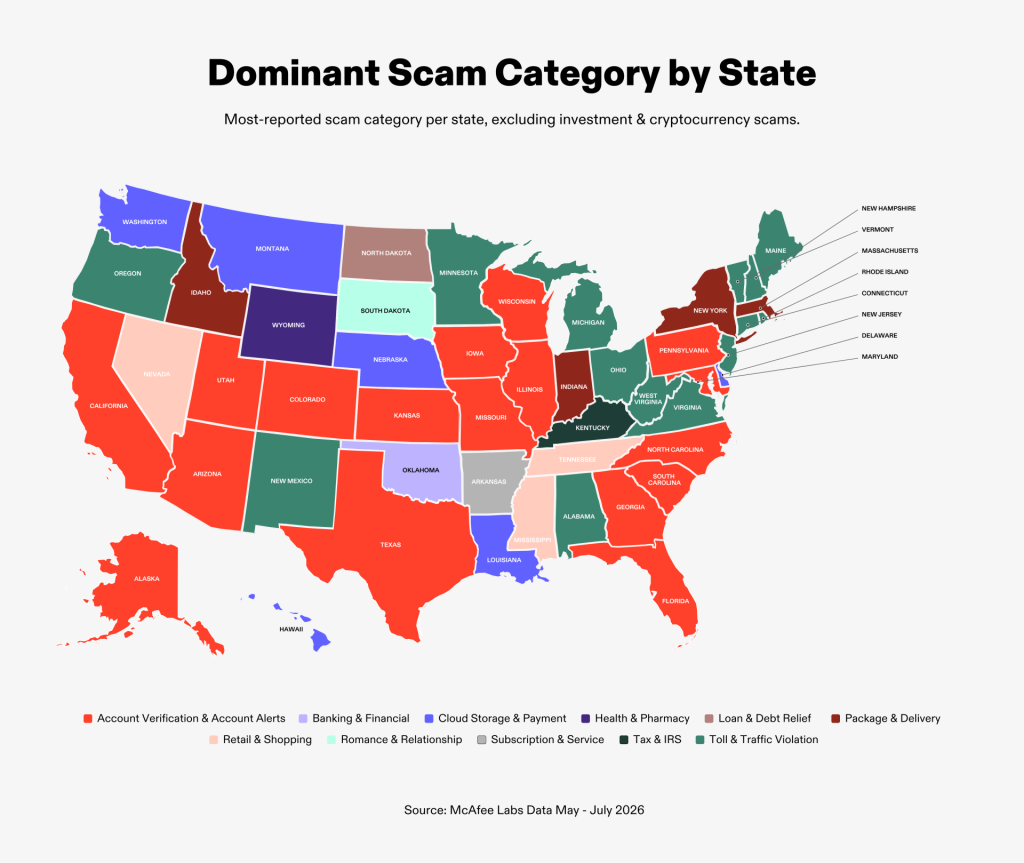
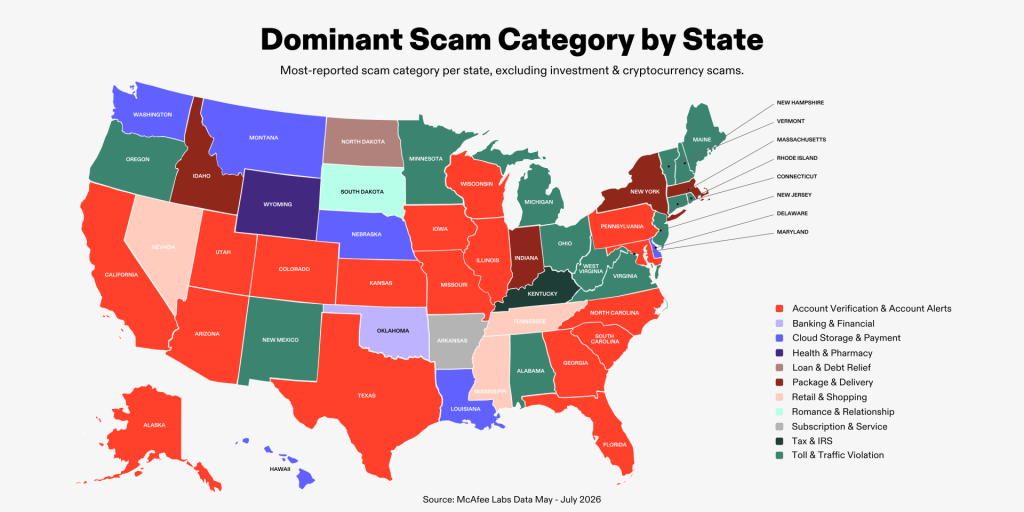
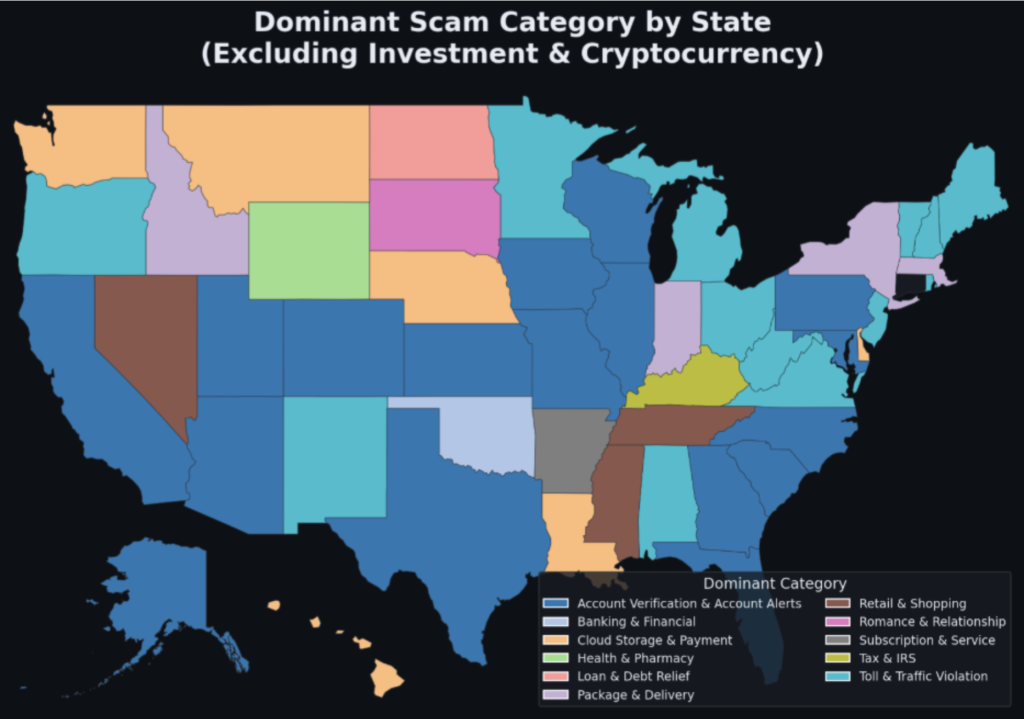
What Scams Look Like in Your State: A 50-State Breakdown

No matter where you live in the U.S., AI-driven scams and deceptive content are increasingly filling our feeds, alerts, and inboxes with moments that make us stop and ask: “Is this real?”

But the scams and threats Americans encounter aren’t the same everywhere. Where you live can shape the types of scams reaching your devices, how often you encounter them, and even how those experiences affect the way you behave online.

This 50-state breakdown combines McAfee consumer research with McAfee Labs data to show how Americans are experiencing scams, how those experiences are affecting trust and behavior online, and which text-based scams are reaching devices across the country.

The consumer findings come from a nationally representative survey of 5,000 U.S. adults, with 100 respondents in each state. The survey explores people’s exposure to scams, financial losses, changing online behaviors, concerns about AI and the mental effort involved in deciding what to trust online.

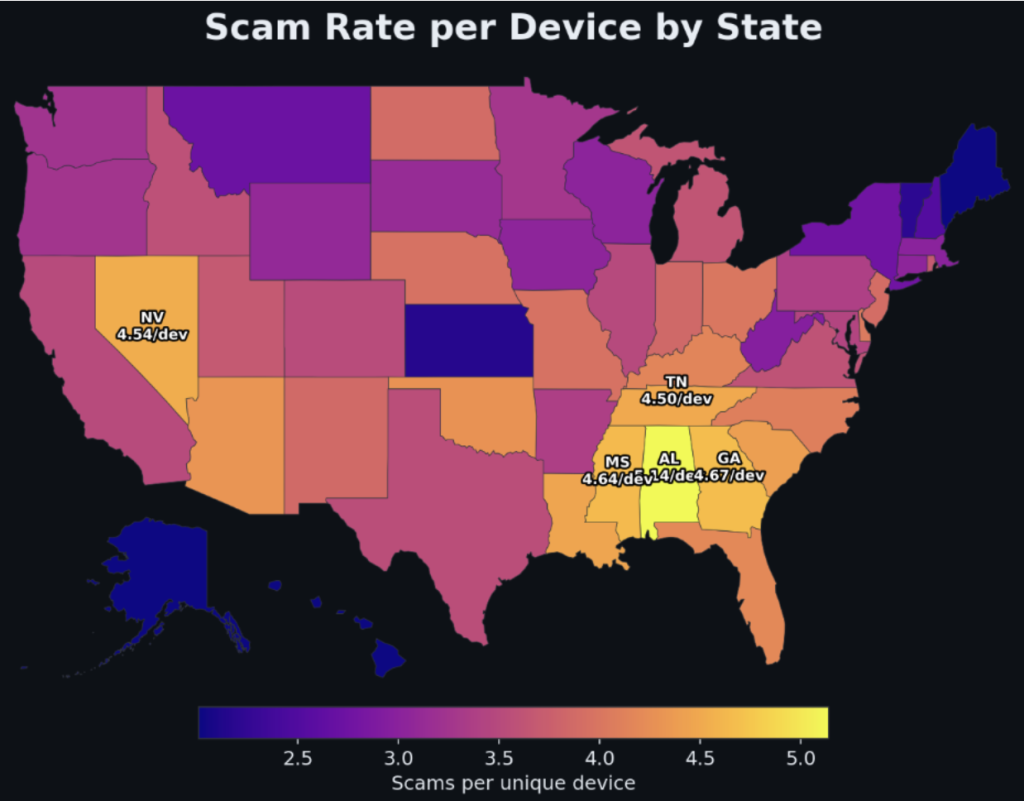
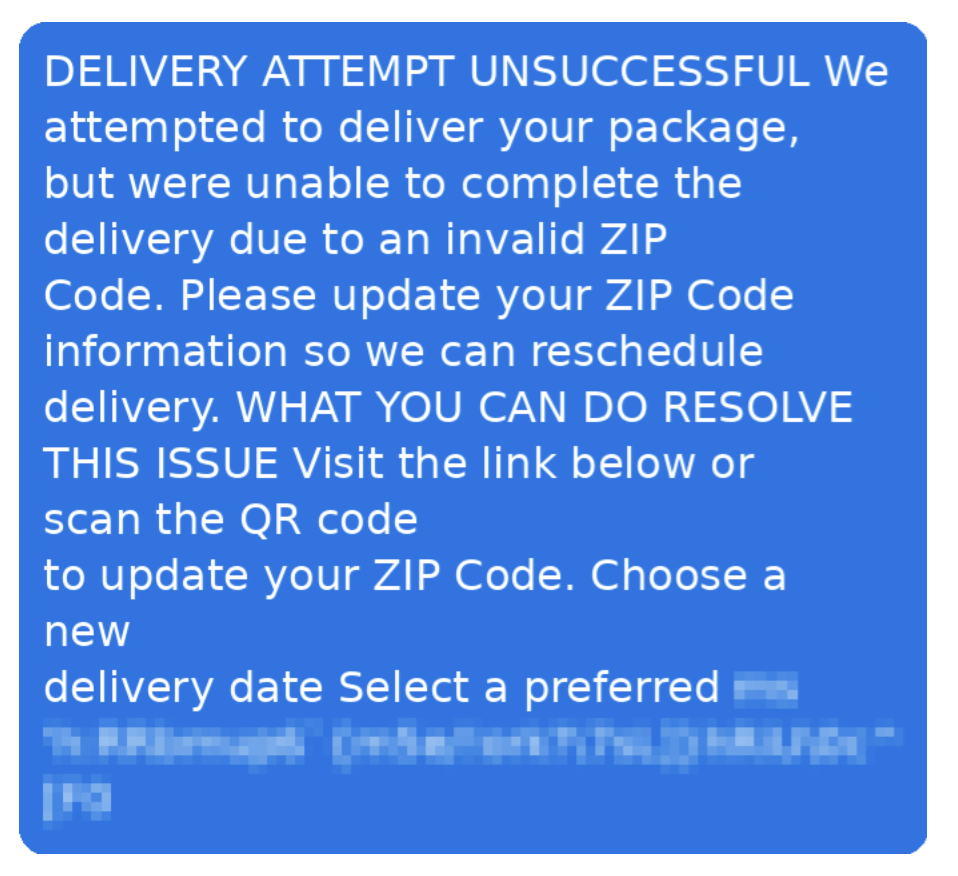
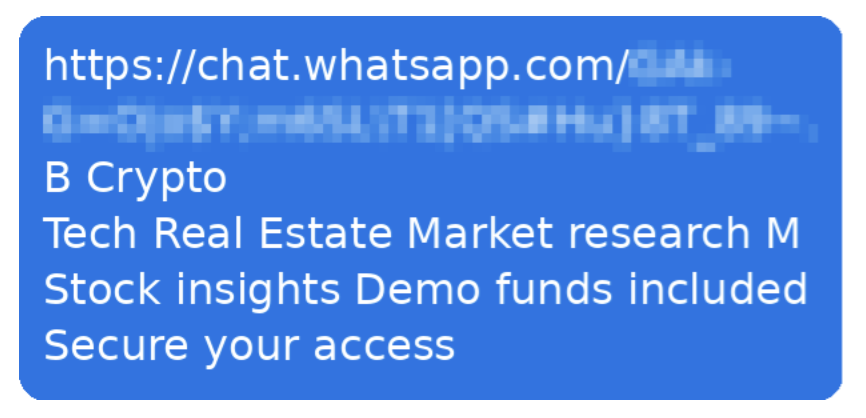
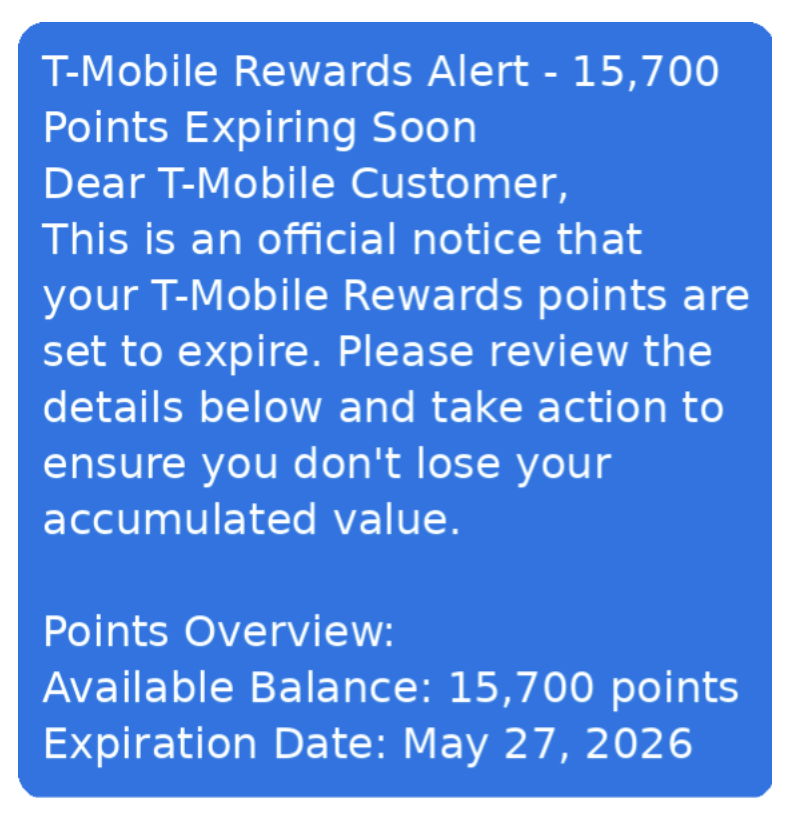
Alongside those findings, McAfee Labs analyzed text-based scam activity across the U.S. from May through July 2026. That data provides a view into the volume, concentration and types of scam texts McAfee observed in each state during the three-month analysis period.

Together, the two datasets offer different views of the same problem: what people say they are experiencing and how it affects them, alongside the scam activity McAfee is seeing in the wild.

Infographic - USA Map Dominant Scam Category by State

Alabama

Key takeaway: Alabama had the highest scam-text rate per device in McAfee’s analysis, while scam concerns are also changing how residents behave online.

  • 66% say figuring out what’s real online takes more mental energy than it did a year ago.
  • 60% check whether something online is legitimate at least weekly.
  • 19% say they do that checking several times a day.
  • 45% have encountered an AI-generated image presented as real.
  • 83% are concerned AI is making scams harder to recognize.
  • 64% have avoided an unfamiliar retailer because of scam concerns.
  • 42% have ignored a legitimate call, text or email because they feared a scam.
  • 41% have avoided trying a new app, website or service.
  • 39% have avoided clicking a legitimate message or link.
  • Investment and cryptocurrency scams were the leading text-scam category detected in Alabama.

McAfee detected 5.14 scam texts per device, the highest rate in the country.

Alaska

Key takeaway: Alaska has one of the widest gaps between rising trust fatigue and active checking: 54% report more mental effort, but only 44% verify online content at least weekly.

  • 54% say figuring out what’s real online takes more mental energy than a year ago.
  • 44% check online legitimacy at least weekly.
  • 13% say they check several times a day.
  • 44% have encountered an AI-generated image presented as real.
  • 82% are concerned AI is making scams harder to recognize.
  • 48% have avoided an unfamiliar retailer.
  • 39% have ignored a legitimate call, text or email.
  • 40% have avoided trying a new app, website or service.
  • 34% have avoided clicking a legitimate message or link.

Investment and cryptocurrency scams were the leading text-scam category detected in Alaska.

Arizona

Key takeaway: Arizonans are feeling a pronounced trust burden, with 65% saying it now takes more mental energy to decide what’s real online.

  • 65% report greater mental effort figuring out what’s real online.
  • 60% check online legitimacy at least weekly.
  • 17% check several times a day.
  • 41% have encountered an AI-generated image presented as real.
  • 81% are concerned AI is making scams harder to recognize.
  • 43% have avoided unfamiliar retailers.
  • 44% have ignored a legitimate call, text or email.
  • 31% have avoided trying a new app, website or service.
  • 39% have avoided clicking a legitimate message or link.

Investment and cryptocurrency scams led Arizona’s text-scam volume.

Arkansas

Key takeaway: Arkansas residents are relatively active verifiers: 64% check online legitimacy at least weekly even though only about half report greater mental strain.

  • 51% say figuring out what’s real online takes more mental energy.
  • 64% verify online content at least weekly.
  • 22% check several times a day.
  • 38% have encountered an AI-generated image presented as real.
  • 77% are concerned AI is making scams harder to recognize.
  • 46% have avoided unfamiliar retailers.
  • 42% have ignored a legitimate call, text or email.
  • 32% have avoided trying a new app, website or service.
  • 32% have avoided clicking a legitimate message or link.

Investment and cryptocurrency scams led Arkansas text-scam volume.

California

Key takeaway: California has one of the heaviest trust burdens in the survey: 72% say figuring out what’s real online now takes more mental energy.

  • 72% report greater mental effort deciding what’s real online.
  • 58% verify online content at least weekly.
  • 20% check several times a day.
  • 41% have encountered an AI-generated image presented as real.
  • 83% are concerned AI is making scams harder to recognize.
  • 49% have avoided unfamiliar retailers.
  • 43% have ignored a legitimate call, text or email.
  • 32% have avoided trying a new app, website or service.
  • 38% have avoided clicking a legitimate message or link.
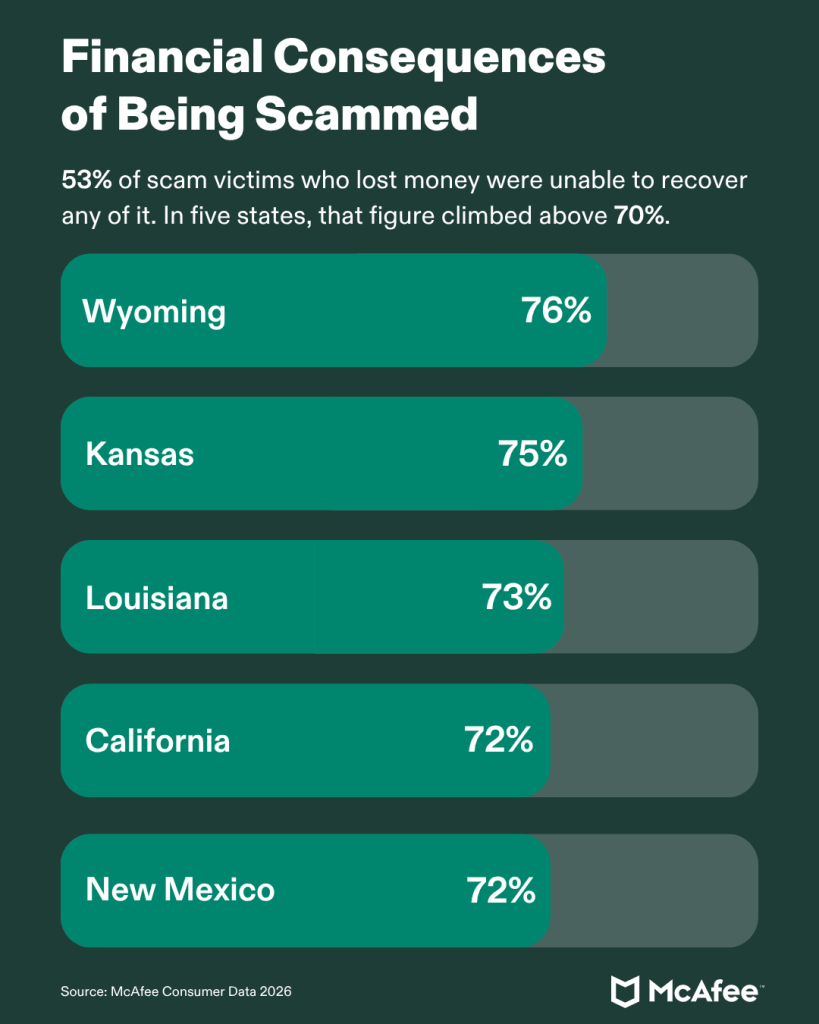
  • Among Californians surveyed who lost money to scams, 72% recovered none of it.

Investment and cryptocurrency scams led California’s  text-scam volume. 

Colorado

Key takeaway: Colorado’s clearest signal is concern about AI-enabled scams, shared by 85% of residents surveyed.

  • 59% report greater mental effort figuring out what’s real online.
  • 56% verify online content at least weekly.
  • 15% check several times a day.
  • 38% have encountered an AI-generated image presented as real.
  • 85% are concerned AI is making scams harder to recognize.
  • 42% have avoided unfamiliar retailers.
  • 45% have ignored a legitimate call, text or email.
  • 35% have avoided trying a new app, website or service.
  • 34% have avoided clicking a legitimate message or link.

Investment and cryptocurrency scams led Colorado’s text-scam volume.

Connecticut

Key takeaway: Connecticut residents report rising trust fatigue, yet fewer than half say they verify online content every week.

  • 57% say figuring out what’s real takes more mental energy.
  • 47% verify online content at least weekly.
  • 18% check several times a day.
  • 35% have encountered an AI-generated image presented as real.
  • 79% are concerned AI is making scams harder to recognize.
  • 33% have avoided unfamiliar retailers.
  • 36% have ignored a legitimate call, text or email.
  • 26% have avoided a new app, website or service.
  • 24% have avoided clicking a legitimate message or link.

Investment and cryptocurrency scams led Connecticut’s text-scam volume.

Delaware

Key takeaway: Delaware stands out for exposure to synthetic imagery, with 46% encountering an AI-generated image presented as real.

  • 53% report greater mental effort figuring out what’s real online.
  • 53% verify online content at least weekly.
  • 8% check several times a day.
  • 46% have encountered an AI-generated image presented as real.
  • 80% are concerned AI is making scams harder to recognize.
  • 47% have avoided unfamiliar retailers.
  • 34% have ignored a legitimate call, text or email.
  • 30% have avoided a new app, website or service.
  • 33% have avoided clicking a legitimate message or link.

Investment and cryptocurrency scams led Delaware’s text-scam volume.

Florida

Key takeaway: Floridians are active online reality-checkers, with 63% verifying messages, offers, websites or people at least weekly.

  • 56% report greater mental effort figuring out what’s real online.
  • 63% verify online content at least weekly.
  • 18% check several times a day.
  • 43% have encountered an AI-generated image presented as real.
  • 85% are concerned AI is making scams harder to recognize.
  • 43% have avoided unfamiliar retailers.
  • 37% have ignored a legitimate call, text or email.
  • 42% have avoided a new app, website or service.
  • 27% have avoided clicking a legitimate message or link.

Investment and cryptocurrency scams led Florida text-scam volume.

From our McAfee Labs Research: This shows approximate location of all the scams received

Georgia

Key takeaway: Georgia had the second-highest scam-text-per-device rate highlighted by McAfee, at 4.67.

  • 59% report greater mental effort figuring out what’s real online.
  • 60% verify online content at least weekly.
  • 25% check several times a day.
  • 33% have encountered an AI-generated image presented as real.
  • 80% are concerned AI is making scams harder to recognize.
  • 40% have avoided unfamiliar retailers.
  • 37% have ignored a legitimate call, text or email.
  • 27% have avoided a new app, website or service.
  • 35% have avoided clicking a legitimate message or link.
  • McAfee detected an average of 4.67 scam texts per device.

Investment and cryptocurrency scams led Georgia’s text-scam volume. 

Hawaii

Key takeaway: Hawaii had the country’s highest scam intensity among affected devices: those receiving at least one scam text averaged 8.45 over three months.

  • 56% report greater mental effort figuring out what’s real online.
  • 54% verify online content at least weekly.
  • 13% check several times a day.
  • 38% have encountered an AI-generated image presented as real.
  • 81% are concerned AI is making scams harder to recognize.
  • 47% have avoided unfamiliar retailers.
  • 38% have ignored a legitimate call, text or email.
  • 37% have avoided a new app, website or service.
  • 37% have avoided clicking a legitimate message or link.
  • Affected devices averaged 8.45 scam texts, the highest figure nationally.

Investment and cryptocurrency scams led Hawaii’s text-scam volume. 

Idaho

Key takeaway: Idaho shows a sizeable trust gap: 62% report greater mental effort deciding what’s real, while 49% verify online content weekly.

  • 62% report more mental effort figuring out what’s real online.
  • 49% verify online content at least weekly.
  • 13% check several times a day.
  • 43% have encountered an AI-generated image presented as real.
  • 82% are concerned AI is making scams harder to recognize.
  • 48% have avoided unfamiliar retailers.
  • 35% have ignored a legitimate call, text or email.
  • 40% have avoided a new app, website or service.
  • 38% have avoided clicking a legitimate message or link.

Investment and cryptocurrency scams led Idaho’s text-scam volume.

Illinois

Key takeaway: Two-thirds of Illinois residents say deciding what’s real online is taking more mental energy than a year ago.

  • 66% report more mental effort figuring out what’s real online.
  • 59% verify online content at least weekly.
  • 18% check several times a day.
  • 39% have encountered an AI-generated image presented as real.
  • 75% are concerned AI is making scams harder to recognize.
  • 40% have avoided unfamiliar retailers.
  • 26% have ignored a legitimate call, text or email.
  • 32% have avoided a new app, website or service.
  • 24% have avoided clicking a legitimate message or link.

Investment and cryptocurrency scams led Illinois text-scam volume.

Indiana

Key takeaway: Indiana’s scam anxiety is translating into caution: 81% are concerned about AI making scams harder to recognize and 60% verify online content weekly.

  • 62% report more mental effort figuring out what’s real online.
  • 60% verify online content at least weekly.
  • 18% check several times a day.
  • 46% have encountered an AI-generated image presented as real.
  • 81% are concerned AI is making scams harder to recognize.
  • 38% have avoided unfamiliar retailers.
  • 41% have ignored a legitimate call, text or email.
  • 35% have avoided a new app, website or service.
  • 35% have avoided clicking a legitimate message or link.

Investment and cryptocurrency scams led Indiana text-scam volume.

Iowa

Key takeaway: Iowa residents report relatively restrained checking behavior: 47% verify online content at least weekly despite 55% reporting greater mental effort.

  • 55% report more mental effort figuring out what’s real online.
  • 47% verify online content at least weekly.
  • 17% check several times a day.
  • 33% have encountered an AI-generated image presented as real.
  • 81% are concerned AI is making scams harder to recognize.
  • 43% have avoided unfamiliar retailers.
  • 32% have ignored a legitimate call, text or email.
  • 33% have avoided a new app, website or service.
  • 34% have avoided clicking a legitimate message or link.

Investment and cryptocurrency scams led Iowa text-scam volume.

Kansas

Key takeaway: Kansas has one of the bleakest recovery pictures in the survey: 75% of scam victims who lost money recovered none of it.

  • 61% report more mental effort figuring out what’s real online.
  • 51% verify online content at least weekly.
  • 10% check several times a day.
  • 40% have encountered an AI-generated image presented as real.
  • 80% are concerned AI is making scams harder to recognize.
  • 42% have avoided unfamiliar retailers.
  • 39% have ignored a legitimate call, text or email.
  • 40% have avoided a new app, website or service.
  • 32% have avoided clicking a legitimate message or link.
  • 75% of victims who lost money said they recovered none of it.

Investment and cryptocurrency scams led Kansas text-scam volume.

Kentucky

Key takeaway: Kentucky is the standout verification state: 76% say they check whether online content is legitimate at least weekly.

  • 62% report more mental effort figuring out what’s real online.
  • 76% verify online content at least weekly.
  • 19% check several times a day.
  • 41% have encountered an AI-generated image presented as real.
  • 83% are concerned AI is making scams harder to recognize.
  • 46% have avoided unfamiliar retailers.
  • 30% have ignored a legitimate call, text or email.
  • 39% have avoided a new app, website or service.
  • 25% have avoided clicking a legitimate message or link.

Investment and cryptocurrency scams led Kentucky text-scam volume.

Louisiana

Key takeaway: Louisiana combines comparatively low trust fatigue with severe financial consequences: 73% of victims who lost money recovered none of it.

  • 45% report more mental effort figuring out what’s real online.
  • 54% verify online content at least weekly.
  • 13% check several times a day.
  • 35% have encountered an AI-generated image presented as real.
  • 75% are concerned AI is making scams harder to recognize.
  • 43% have avoided unfamiliar retailers.
  • 37% have ignored a legitimate call, text or email.
  • 32% have avoided a new app, website or service.
  • 30% have avoided clicking a legitimate message or link.
  • 73% of victims who lost money said they recovered none of it.

Investment and cryptocurrency scams led Louisiana text-scam volume.

Maine

Key takeaway: Maine is one of only two states where toll and traffic scams, rather than investment and crypto scams, ranked first in McAfee’s text telemetry.

  • 64% report more mental effort figuring out what’s real online.
  • 59% verify online content at least weekly.
  • 13% check several times a day.
  • 39% have encountered an AI-generated image presented as real.
  • 81% are concerned AI is making scams harder to recognize.
  • 46% have avoided unfamiliar retailers.
  • 34% have ignored a legitimate call, text or email.
  • 34% have avoided a new app, website or service.
  • 30% have avoided clicking a legitimate message or link.

Toll and traffic violation scams were Maine’s leading text-scam category.

Maryland

Key takeaway: Marylanders show particularly high concern about AI-enabled fraud, with 86% saying AI is making scams harder to recognize.

  • 65% report more mental effort figuring out what’s real online.
  • 60% verify online content at least weekly.
  • 25% check several times a day.
  • 45% have encountered an AI-generated image presented as real.
  • 86% are concerned AI is making scams harder to recognize.
  • 46% have avoided unfamiliar retailers.
  • 45% have ignored a legitimate call, text or email.
  • 37% have avoided a new app, website or service.
  • 44% have avoided clicking a legitimate message or link.

Investment and cryptocurrency scams led Maryland text-scam volume.

Infographic - How Scams Are Affecting Americans 2

Massachusetts

Key takeaway: Massachusetts has a striking trust gap: 65% report more mental effort deciding what’s real, but only 48% verify online content at least weekly.

  • 65% report more mental effort figuring out what’s real online.
  • 48% verify online content at least weekly.
  • 15% check several times a day.
  • 46% have encountered an AI-generated image presented as real.
  • 86% are concerned AI is making scams harder to recognize.
  • 47% have avoided unfamiliar retailers.
  • 35% have ignored a legitimate call, text or email.
  • 37% have avoided a new app, website or service.
  • 38% have avoided clicking a legitimate message or link.

Investment and cryptocurrency scams led Massachusetts text-scam volume.

Michigan

Key takeaway: Michigan joins Maine as the only state where toll and traffic scams outranked investment and cryptocurrency scams.

  • 71% report more mental effort figuring out what’s real online.
  • 52% verify online content at least weekly.
  • 21% check several times a day.
  • 43% have encountered an AI-generated image presented as real.
  • 71% are concerned AI is making scams harder to recognize.
  • 40% have avoided unfamiliar retailers.
  • 35% have ignored a legitimate call, text or email.
  • 34% have avoided a new app, website or service.
  • 32% have avoided clicking a legitimate message or link.

Toll and traffic violation scams were Michigan’s leading text-scam category.

Minnesota

Key takeaway: Minnesota records the highest AI-scam concern in the state crosstabs, at 91%.

  • 60% report more mental effort figuring out what’s real online.
  • 59% verify online content at least weekly.
  • 10% check several times a day.
  • 47% have encountered an AI-generated image presented as real.
  • 91% are concerned AI is making scams harder to recognize.
  • 44% have avoided unfamiliar retailers.
  • 44% have ignored a legitimate call, text or email.
  • 38% have avoided a new app, website or service.
  • 34% have avoided clicking a legitimate message or link.

Investment and cryptocurrency scams led Minnesota text-scam volume.

Mississippi

Key takeaway: Mississippi had one of the heaviest scam-text loads in McAfee’s analysis, averaging roughly 4.64 scam texts per device.

  • 55% report more mental effort figuring out what’s real online.
  • 54% verify online content at least weekly.
  • 17% check several times a day.
  • 32% have encountered an AI-generated image presented as real.
  • 82% are concerned AI is making scams harder to recognize.
  • 43% have avoided unfamiliar retailers.
  • 34% have ignored a legitimate call, text or email.
  • 34% have avoided a new app, website or service.
  • 35% have avoided clicking a legitimate message or link.
  • McAfee detected roughly 4.64 scam texts per device.

Investment and cryptocurrency scams led Mississippi text-scam volume.

Missouri

Key takeaway: Missouri residents show a confidence problem around AI scams: 13% said they were not at all confident spotting AI-created or AI-enhanced fraud.

  • 63% report more mental effort figuring out what’s real online.
  • 60% verify online content at least weekly.
  • 16% check several times a day.
  • 41% have encountered an AI-generated image presented as real.
  • 85% are concerned AI is making scams harder to recognize.
  • 43% have avoided unfamiliar retailers.
  • 40% have ignored a legitimate call, text or email.
  • 39% have avoided a new app, website or service.
  • 35% have avoided clicking a legitimate message or link.
  • 13% said they’re not at all confident they could spot a scam enhanced by AI

Investment and cryptocurrency scams led Missouri text-scam volume.

Montana

Key takeaway: Montana has the highest reported exposure to AI-generated images presented as real, at 51%.

  • 63% report more mental effort figuring out what’s real online.
  • 49% verify online content at least weekly.
  • 11% check several times a day.
  • 51% have encountered an AI-generated image presented as real.
  • 84% are concerned AI is making scams harder to recognize.
  • 47% have avoided unfamiliar retailers.
  • 44% have ignored a legitimate call, text or email.
  • 43% have avoided a new app, website or service.
  • 37% have avoided clicking a legitimate message or link.

Investment and cryptocurrency scams led Montana text-scam volume.

Nebraska

Key takeaway: Nebraska’s strongest signal is AI concern: 87% say AI is making online scams harder to recognize.

  • 56% report more mental effort figuring out what’s real online.
  • 50% verify online content at least weekly.
  • 8% check several times a day.
  • 43% have encountered an AI-generated image presented as real.
  • 87% are concerned AI is making scams harder to recognize.
  • 41% have avoided unfamiliar retailers.
  • 35% have ignored a legitimate call, text or email.
  • 40% have avoided a new app, website or service.
  • 29% have avoided clicking a legitimate message or link.

Investment and cryptocurrency scams led Nebraska text-scam volume.

Nevada

Key takeaway: Nevada has the broadest reported scam exposure in the survey, with 95% encountering at least one type of scam in the past year.

  • 60% report more mental effort figuring out what’s real online.
  • 66% verify online content at least weekly.
  • 18% check several times a day.
  • 43% have encountered an AI-generated image presented as real.
  • 82% are concerned AI is making scams harder to recognize.
  • 45% have avoided unfamiliar retailers.
  • 33% have ignored a legitimate call, text or email.
  • 32% have avoided a new app, website or service.
  • 33% have avoided clicking a legitimate message or link.
  • 95% encountered at least one type of scam in the past year.

Investment and cryptocurrency scams led Nevada text-scam volume.

New Hampshire

Key takeaway: New Hampshire shows another trust gap: 59% report more mental effort figuring out what’s real, while 46% verify online content weekly.

  • 59% report more mental effort figuring out what’s real online.
  • 46% verify online content at least weekly.
  • 10% check several times a day.
  • 48% have encountered an AI-generated image presented as real.
  • 85% are concerned AI is making scams harder to recognize.
  • 50% have avoided unfamiliar retailers.
  • 34% have ignored a legitimate call, text or email.
  • 37% have avoided a new app, website or service.
  • 33% have avoided clicking a legitimate message or link.

Investment and cryptocurrency scams led New Hampshire text-scam volume.

New Jersey

Key takeaway: New Jersey residents report unusually frequent scam exposure, with 30% saying they encounter four or more scam attempts on a typical day.

  • 61% report more mental effort figuring out what’s real online.
  • 61% verify online content at least weekly.
  • 18% check several times a day.
  • 43% have encountered an AI-generated image presented as real.
  • 82% are concerned AI is making scams harder to recognize.
  • 49% have avoided unfamiliar retailers.
  • 34% have ignored a legitimate call, text or email.
  • 37% have avoided a new app, website or service.
  • 36% have avoided clicking a legitimate message or link.
  • 30% report encountering at least four scam attempts on a typical day.

Investment and cryptocurrency scams led New Jersey text-scam volume.

New Mexico

Key takeaway: New Mexico has one of the toughest scam-recovery pictures: 72% of victims who lost money recovered none of it.

  • 65% report more mental effort figuring out what’s real online.
  • 59% verify online content at least weekly.
  • 16% check several times a day.
  • 39% have encountered an AI-generated image presented as real.
  • 79% are concerned AI is making scams harder to recognize.
  • 42% have avoided unfamiliar retailers.
  • 48% have ignored a legitimate call, text or email.
  • 38% have avoided a new app, website or service.
  • 44% have avoided clicking a legitimate message or link.
  • 72% of victims who lost money said they recovered none of it.

Investment and cryptocurrency scams led New Mexico text-scam volume.

New York

Key takeaway: New York’s most striking behavioral signal is comparatively low retailer avoidance: 33% have stayed away from unfamiliar sellers because of scam concerns.

  • 59% report more mental effort figuring out what’s real online.
  • 58% verify online content at least weekly.
  • 19% check several times a day.
  • 41% have encountered an AI-generated image presented as real.
  • 78% are concerned AI is making scams harder to recognize.
  • 33% have avoided unfamiliar retailers.
  • 37% have ignored a legitimate call, text or email.
  • 27% have avoided a new app, website or service.
  • 27% have avoided clicking a legitimate message or link.

Investment and cryptocurrency scams led New York text-scam volume.

Displays the number of scams seen per unique device

North Carolina

Key takeaway: North Carolina stands out on recovery: 42% of scam victims who lost money said they recovered all of it.

  • 53% report more mental effort figuring out what’s real online.
  • 65% verify online content at least weekly.
  • 17% check several times a day.
  • 33% have encountered an AI-generated image presented as real.
  • 69% are concerned AI is making scams harder to recognize.
  • 38% have avoided unfamiliar retailers.
  • 38% have ignored a legitimate call, text or email.
  • 29% have avoided a new app, website or service.
  • 29% have avoided clicking a legitimate message or link.
  • 42% of victims who lost money reported recovering all of it.

Investment and cryptocurrency scams led North Carolina text-scam volume.

North Dakota

Key takeaway: North Dakota had the country’s highest concentration of scams in analyzed text traffic, at 2.8%.

  • 61% report more mental effort figuring out what’s real online.
  • 55% verify online content at least weekly.
  • 13% check several times a day.
  • 46% have encountered an AI-generated image presented as real.
  • 83% are concerned AI is making scams harder to recognize.
  • 48% have avoided unfamiliar retailers.
  • 40% have ignored a legitimate call, text or email.
  • 40% have avoided a new app, website or service.
  • 37% have avoided clicking a legitimate message or link.
  • 2.8% of analyzed text traffic was classified as scams, the highest share nationally.

Investment and cryptocurrency scams led North Dakota text-scam volume.

Ohio

Key takeaway: Ohio stands out for financial harm: 41% of respondents say they lost money to an online scam in the past year.

  • 59% report more mental effort figuring out what’s real online.
  • 63% verify online content at least weekly.
  • 20% check several times a day.
  • 46% have encountered an AI-generated image presented as real.
  • 73% are concerned AI is making scams harder to recognize.
  • 44% have avoided unfamiliar retailers.
  • 33% have ignored a legitimate call, text or email.
  • 33% have avoided a new app, website or service.
  • 30% have avoided clicking a legitimate message or link.
  • 41% report losing money to an online scam in the past year.

Investment and cryptocurrency scams led Ohio text-scam volume.

Oklahoma

Key takeaway: Oklahoma consumers are feeling the mental load of navigating AI-powered scams: 85% are concerned AI is making scams harder to recognize, while half say figuring out what’s real online requires more mental effort.

  • 56% verify online content at least weekly.
  • 19% check several times a day.
  • 47% have encountered an AI-generated image presented as real.
  • 85% are concerned AI is making scams harder to recognize.
  • 50% have avoided unfamiliar retailers.
  • 46% have ignored a legitimate call, text or email.
  • 39% have avoided a new app, website or service.
  • 43% have avoided clicking a legitimate message or link.
  • 10% say they never spend time checking whether online content is legitimate.

Investment and cryptocurrency scams led Oklahoma text-scam volume.

Oregon

Key takeaway: Oregon scam concerns are spilling into ordinary digital life, with 45% avoiding new apps, websites or services.

  • 57% report more mental effort figuring out what’s real online.
  • 49% verify online content at least weekly.
  • 17% check several times a day.
  • 41% have encountered an AI-generated image presented as real.
  • 85% are concerned AI is making scams harder to recognize.
  • 52% have avoided unfamiliar retailers.
  • 45% have ignored a legitimate call, text or email.
  • 45% have avoided a new app, website or service.
  • 39% have avoided clicking a legitimate message or link.

Investment and cryptocurrency scams led Oregon text-scam volume.

Pennsylvania

Key takeaway: Pennsylvania has one of the heavier trust burdens in the survey, with 67% saying figuring out what’s real takes more mental energy.

  • 67% report more mental effort figuring out what’s real online.
  • 54% verify online content at least weekly.
  • 14% check several times a day.
  • 39% have encountered an AI-generated image presented as real.
  • 85% are concerned AI is making scams harder to recognize.
  • 48% have avoided unfamiliar retailers.
  • 38% have ignored a legitimate call, text or email.
  • 37% have avoided a new app, website or service.
  • 31% have avoided clicking a legitimate message or link.

Investment and cryptocurrency scams led Pennsylvania text-scam volume.

Rhode Island

Key takeaway: Rhode Island scam concerns are affecting legitimate online behavior: 42% have avoided clicking a real message or link.

  • 58% report more mental effort figuring out what’s real online.
  • 57% verify online content at least weekly.
  • 11% check several times a day.
  • 45% have encountered an AI-generated image presented as real.
  • 84% are concerned AI is making scams harder to recognize.
  • 40% have avoided unfamiliar retailers.
  • 37% have ignored a legitimate call, text or email.
  • 36% have avoided a new app, website or service.
  • 42% have avoided clicking a legitimate message or link.

Investment and cryptocurrency scams led Rhode Island text-scam volume.

South Carolina

Key takeaway: South Carolina has a confidence problem around AI scams: 13% say they are not at all confident identifying AI-created or AI-enhanced fraud.

  • 57% report more mental effort figuring out what’s real online.
  • 47% verify online content at least weekly.
  • 12% check several times a day.
  • 44% have encountered an AI-generated image presented as real.
  • 79% are concerned AI is making scams harder to recognize.
  • 43% have avoided unfamiliar retailers.
  • 42% have ignored a legitimate call, text or email.
  • 38% have avoided a new app, website or service.
  • 39% have avoided clicking a legitimate message or link.
  • 13% say they are not at all confident identifying AI-created or AI-enhanced fraud.

Investment and cryptocurrency scams led South Carolina text-scam volume.

South Dakota

Key takeaway: South Dakota’s scam response is relatively restrained compared with many states, with 35% avoiding unfamiliar retailers and 29% avoiding legitimate links.

  • 55% report more mental effort figuring out what’s real online.
  • 52% verify online content at least weekly.
  • 11% check several times a day.
  • 41% have encountered an AI-generated image presented as real.
  • 78% are concerned AI is making scams harder to recognize.
  • 35% have avoided unfamiliar retailers.
  • 37% have ignored a legitimate call, text or email.
  • 38% have avoided a new app, website or service.
  • 29% have avoided clicking a legitimate message or link.

Investment and cryptocurrency scams led South Dakota text-scam volume.

Tennessee

Key takeaway: Tennessee residents report rising trust fatigue without matching verification habits: 59% feel more mental strain, but 48% verify weekly.

  • 59% report more mental effort figuring out what’s real online.
  • 48% verify online content at least weekly.
  • 15% check several times a day.
  • 40% have encountered an AI-generated image presented as real.
  • 80% are concerned AI is making scams harder to recognize.
  • 48% have avoided unfamiliar retailers.
  • 33% have ignored a legitimate call, text or email.
  • 35% have avoided a new app, website or service.
  • 37% have avoided clicking a legitimate message or link.

Investment and cryptocurrency scams led Tennessee text-scam volume.

Texas

Key takeaway: Texas is one of the more active verification states, with 62% checking online legitimacy at least weekly.

  • 61% report more mental effort figuring out what’s real online.
  • 62% verify online content at least weekly.
  • 22% check several times a day.
  • 46% have encountered an AI-generated image presented as real.
  • 81% are concerned AI is making scams harder to recognize.
  • 41% have avoided unfamiliar retailers.
  • 30% have ignored a legitimate call, text or email.
  • 32% have avoided a new app, website or service.
  • 30% have avoided clicking a legitimate message or link.

Investment and cryptocurrency scams led Texas text-scam volume.

Infographic describing state-by-state threat data

Utah

Key takeaway: Utah has one of the highest levels of exposure to AI-generated imagery, with 49% seeing an AI image presented as real.

  • 58% report more mental effort figuring out what’s real online.
  • 50% verify online content at least weekly.
  • 8% check several times a day.
  • 49% have encountered an AI-generated image presented as real.
  • 85% are concerned AI is making scams harder to recognize.
  • 43% have avoided unfamiliar retailers.
  • 40% have ignored a legitimate call, text or email.
  • 43% have avoided a new app, website or service.
  • 32% have avoided clicking a legitimate message or link.

Investment and cryptocurrency scams led Utah text-scam volume.

Vermont

Key takeaway: Vermont has a sizeable trust-versus-action gap: 58% report more mental effort online while 47% verify content weekly.

  • 58% report more mental effort figuring out what’s real online.
  • 47% verify online content at least weekly.
  • 12% check several times a day.
  • 45% have encountered an AI-generated image presented as real.
  • 79% are concerned AI is making scams harder to recognize.
  • 47% have avoided unfamiliar retailers.
  • 28% have ignored a legitimate call, text or email.
  • 32% have avoided a new app, website or service.
  • 30% have avoided clicking a legitimate message or link.

Investment and cryptocurrency scams led Vermont text-scam volume.

Virginia

Key takeaway: Virginia reports comparatively low exposure to AI-generated images presented as real, at 34%, even as concern about AI scams remains high.

  • 58% report more mental effort figuring out what’s real online.
  • 54% verify online content at least weekly.
  • 15% check several times a day.
  • 34% have encountered an AI-generated image presented as real.
  • 83% are concerned AI is making scams harder to recognize.
  • 40% have avoided unfamiliar retailers.
  • 33% have ignored a legitimate call, text or email.
  • 39% have avoided a new app, website or service.
  • 30% have avoided clicking a legitimate message or link.

Investment and cryptocurrency scams led Virginia text-scam volume.

Washington

Key takeaway: Washington has one of the highest levels of AI-scam concern in the survey, at 86%.

  • 62% report more mental effort figuring out what’s real online.
  • 55% verify online content at least weekly.
  • 15% check several times a day.
  • 40% have encountered an AI-generated image presented as real.
  • 86% are concerned AI is making scams harder to recognize.
  • 50% have avoided unfamiliar retailers.
  • 36% have ignored a legitimate call, text or email.
  • 34% have avoided a new app, website or service.
  • 36% have avoided clicking a legitimate message or link.

Investment and cryptocurrency scams led Washington text-scam volume.

West Virginia

Key takeaway: West Virginia has one of the lower weekly verification rates in the survey, at 45%, despite a majority reporting greater trust fatigue.

  • 55% report more mental effort figuring out what’s real online.
  • 45% verify online content at least weekly.
  • 12% check several times a day.
  • 43% have encountered an AI-generated image presented as real.
  • 81% are concerned AI is making scams harder to recognize.
  • 41% have avoided unfamiliar retailers.
  • 25% have ignored a legitimate call, text or email.
  • 29% have avoided a new app, website or service.
  • 31% have avoided clicking a legitimate message or link.

Investment and cryptocurrency scams led West Virginia text-scam volume.

Wisconsin

Key takeaway: Wisconsin shows relatively high exposure to synthetic imagery: 46% have encountered an AI-generated image presented as real.

  • 56% report more mental effort figuring out what’s real online.
  • 49% verify online content at least weekly.
  • 15% check several times a day.
  • 46% have encountered an AI-generated image presented as real.
  • 85% are concerned AI is making scams harder to recognize.
  • 39% have avoided unfamiliar retailers.
  • 35% have ignored a legitimate call, text or email.
  • 26% have avoided a new app, website or service.
  • 26% have avoided clicking a legitimate message or link.

Investment and cryptocurrency scams led Wisconsin text-scam volume.

Wyoming

Key takeaway: Wyoming has the most distressing scam-loss recovery story in the survey: 76% of victims who lost money recovered none of it.

  • 64% report more mental effort figuring out what’s real online.
  • 52% verify online content at least weekly.
  • 11% check several times a day.
  • 49% have encountered an AI-generated image presented as real.
  • 78% are concerned AI is making scams harder to recognize.
  • 44% have avoided unfamiliar retailers.
  • 41% have ignored a legitimate call, text or email.
  • 43% have avoided a new app, website or service.
  • 31% have avoided clicking a legitimate message or link.
  • 76% of victims who lost money said they recovered none of it.

Investment and cryptocurrency scams led Wyoming text-scam volume.

The post What Scams Look Like in Your State: A 50-State Breakdown appeared first on McAfee Blog.
  •  

Your State’s Scam Reality: What New Research Reveals Across All 50 States

There is a small tax many of us pay in our everyday interactions without even realizing it.

A package notification arrives, and we stop to check whether we actually ordered something. A recruiter reaches out about a job, but before replying, we research the person and the company. A bank alert appears, and instead of tapping the link, we open the banking app ourselves.

These are sensible habits. But McAfee’s latest research suggests the effort behind them is increasing the average American’s every day mental load.

Nearly three-quarters of Americans (74%) say they feel the need to double-check most things online before trusting them. Sixty-two percent say figuring out what is real takes more mental energy than it did a year ago.

That growing burden is one reason McAfee is introducing a new brand and product experience built around a broader idea of what protection should do. Good security shouldn’t demand more of people’s attention. It should help give some of it back.

That’s why the new McAfee experience is designed to do more than protect individual devices. It helps protect the things people rely on every day, their personal information, connections, devices, and accounts, all while making it clearer what’s safe, what needs attention, and what McAfee can handle for them.

New McAfee Experience - iPhone Mockup

Get quick alerts and easily update protections in McAfee’s app

That matters at a moment when attention is already stretched thin. AI is everywhere, and it has made it easier to produce convincing content at an enormous scale, adding to an already crowded attention economy. Increasingly, ordinary moments come with an extra question: Is this real?

And those questions have consequences. Our research found that 82% of Americans have changed how they behave online because of scams. Some have stopped buying from unfamiliar retailers. Others have ignored communications that turned out to be legitimate. Eighteen percent say scam concerns have even caused them to avoid responding to a job opportunity.

“I’ve accused my doctor’s office of being an AI,” says McAfee Threat Researcher Charles McFarland, recounting a time when even he thought something legitimate was fraudulent. “I had to apologize.”

Financial losses remain a serious part of the picture. Nearly one-third of Americans (31%) reported losing money to a scam in the past year. But measuring scams only in dollars misses something important. Scams are also making trust more expensive.

This report examines that growing cost: the attention Americans are spending figuring out what to trust, how the scam experience differs across all 50 states, and what protection should look like when staying safe increasingly competes for the same limited time and attention as everything else we do online.

Infographic - USA Map Dominant Scam Category by State

Key Findings

McAfee’s research combines a nationally representative survey of 5,000 U.S. adults, with 100 respondents in every state, and McAfee Labs analysis of text-based scam activity across the U.S.

Together, the findings show how scams are affecting not only Americans’ wallets, but also their attention, trust and behavior online.

Scams are placing a growing burden on Americans’ attention. Nearly three-quarters (74%) say they feel the need to double-check most things online before trusting them, while 62% say figuring out what is real takes more mental energy than it did a year ago. (Survey)

That uncertainty is changing legitimate online behavior. Eighty-two percent say scam concerns have changed something they do online. Forty-four percent have avoided buying from an unfamiliar retailer, 37% have ignored a legitimate call, text or email, 34% have avoided a new app, website or service, 33% have avoided a legitimate link and 25% have abandoned an online purchase. (Survey)

Scams can make real opportunities harder to trust. Twenty-seven percent encountered a fake recruiter or job opportunity in the past year. At the same time, 18% say scam concerns have caused them to avoid responding to a job opportunity. (Survey)

Financial losses are widespread, and getting money back can be difficult. Nearly one-third of Americans (31%) report losing money to a scam in the past year. Among those who lost money, 53% recovered none. In Wyoming, Kansas, Louisiana, California and New Mexico, more than 70% of victims who lost money recovered nothing. (Survey)

Investment and cryptocurrency scams dominate text-based scam activity. McAfee Labs found them to be the leading scam-text category by volume in 47 of 50 states from May through July 2026. Maine, North Dakota and Michigan were the exceptions. In Maine and North Dakota, toll and traffic scams ranked first. Meanwhile, in North Dakota, loan and investment scams ranked first. (McAfee Labs)

The volume and intensity of scam texts varies considerably by state. Alabama averaged 5.14 scam texts per device, the highest in McAfee’s analysis. In North Dakota, scams represented 2.8% of analyzed text traffic, the highest concentration nationally. In Hawaii, devices receiving at least one scam text averaged 8.45 scam messages during the three-month analysis period. (McAfee Labs)

Some states experience especially high exposure or financial consequences. Ninety-five percent of Nevada respondents encountered at least one type of scam in the past year. In Ohio, 41% reported losing money to a scam. Thirty percent of New Jersey respondents say they encounter four or more scam attempts on a typical day. North Carolina stood out in the other direction: 42% of victims who lost money said they recovered all of it. (Survey)

Many scam texts are designed to begin a conversation rather than complete the scam immediately. Joining or clicking through to a WhatsApp group was the most common requested action in the scam texts McAfee analyzed, driven largely by investment and cryptocurrency schemes. The initial message may be only the first step in a longer attempt to build trust before asking for money. (McAfee Labs)

Displays the number of scams seen per unique device

Displays the number of scams seen per unique device

The New Scam Landscape

Scams no longer occupy some separate, obviously suspicious corner of the internet. Increasingly, they imitate the ordinary business of being online.

In its analysis of U.S. text-based scams from May through July 2026, McAfee Labs identified 49 leading scam topics across 23 broader categories. They touched nearly every part of daily life: package deliveries and bank accounts, job offers and investments, shopping and subscriptions, health and utilities, relationships and family emergencies.

Example of one of the many types of delivery text scams consumers face Example of one of the many types of delivery text scams consumers face

The full list spans Cloud Storage & Payment; Package & Delivery; Banking & Financial; Toll & Traffic Violation; Tax & IRS; Legal Threat & Law Enforcement; Government Impersonation; Tech Support & Security; Prize & Lottery; Romance & Relationship; Employment & Job Offer; Subscription & Service; Account Verification & Account Alerts; Investment & Cryptocurrency; Charity & Donation; Utility & Bill Payment; Health & Pharmacy; Family & Friend Emergency; Retail & Shopping; Loan & Debt Relief; Buying Property & Real Estate; Context-Free Links & Phone Numbers; and Other.

That breadth matters. The more scams resemble the normal messages people receive every day, the more ordinary life requires verification.

One category nevertheless dominated. Investment and cryptocurrency scams were the largest text-scam category by volume in 47 of 50 states. Only Maine, North Dakota and Michigan broke the pattern, with toll and traffic violation scams as well as loan and investments ranking first.

The prevalence of investment scams is important because many are not trying to steal money with a single text. They are trying to start a relationship.

The most common action requested in the scam texts analyzed by McAfee was clicking or joining a WhatsApp group, driven heavily by investment and cryptocurrency schemes. A message might promote an investing community or offer access to financial advice.

Example of a scam text attempting to move users to WhatsApp Example of a scam text attempting to move users to WhatsApp

Moving the recipient into a group or private conversation gives the scammer more time to establish credibility before money enters the picture. Plus, for many of us, social apps feel more personal and we more easily let our guard down when we move a conversation to these messaging platforms.

That helps explain why an unsolicited text that looks relatively harmless can still be the beginning of a much longer scam.

Other prominent scams rely on a different tactic: urgency. Fake account alerts can suggest that something needs immediate attention. Toll and traffic scams warn of an unpaid charge or violation. McAfee Labs also saw scammers impersonating T-Mobile with fake reward offers among the largest individual scam topics.

Example of a scam text attempting to move users to WhatsApp Example of scammers exploiting trusted brands like T-Mobile to dupe customers

The stories change, but the underlying objective is often the same. Scammers want people to act before they have time to question what they are seeing. And there is a lot to question.

Across the United States

McAfee’s analysis found meaningful differences in the amount of scam traffic reaching consumers around the country during the three month analysis period. Alabama recorded an average of 5.14 scam texts per device, the highest in the analysis. Georgia followed at 4.67, with Mississippi close behind at 4.64.

North Dakota stood out in a different way. There, scams represented 2.8% of all text traffic McAfee analyzed, the highest concentration in the country. Hawaii showed another pattern: among devices that received at least one scam text, the average was 8.45 scam messages during the three-month period. That was about 15% higher than Alabama, which ranked second at 7.35 scam texts per exposed device.

Rank  State  Scams per device  State  Scams per device scammed 
1  Alabama  5.14  Hawaii  8.45 
2  Georgia  4.67  Alabama  7.35 
3  Mississippi  4.64  Ohio  7.29 
4  Nevada  4.54  Florida  7.29 
5  Tennessee  4.50  North Dakota  7.28 

A third measure shows how concentrated scam traffic was within people’s overall text messages. North Dakota had the highest concentration in the country, with scams accounting for 2.8% of all text traffic McAfee analyzed.

These measures capture different dimensions of the same problem. The all-device average shows how many scam texts reached devices across a state overall. The exposed-device average shows how persistent scam activity was for devices that received at least one scam. And the share of total text traffic shows how prominent scam messages were within the broader messaging environment.

This shows each states top scam category by volume if Investments & Cryptocurrency scams are ignored. Notice these colors don’t necessarily match the colors from the previous graph.

This shows each states top scam category by volume if Investments & Cryptocurrency scams are ignored. Notice these colors don’t necessarily match the colors from the previous graph.

For consumers, those distinctions may be invisible. What they experience is repetition: another message asking for attention and another decision about whether it deserves it.

AI raises the stakes further. It can make convincing scam content cheaper and faster to produce, while people are simultaneously encountering more AI-generated material in everyday online life. The result is an environment where the old advice to simply “look for something suspicious” becomes harder to apply reliably. Sometimes the suspicious thing looks perfectly ordinary.

That is why the next phase of consumer protection cannot depend on people becoming infinitely better at scrutinizing everything themselves.

America’s Scam Reality

McAfee’s consumer research shows what happens when that scam environment meets everyday life.

Most Americans are encountering scams regularly. Eighty-eight percent say they experienced at least one type of scam in the past year, and one in five say they typically encounter four or more scam attempts in a single day.

Yet frequency tells only part of the story. The more consequential finding may be what people are doing in response.

Eighty-two percent say scam concerns have changed their online behavior. Forty-four percent have avoided an unfamiliar retailer. Thirty-seven percent have ignored a legitimate call, text or email because they suspected a scam. Thirty-three percent have avoided clicking a legitimate message or link.

These are not examples of people falling for scams. They are examples of people trying not to.

Job scams make that tradeoff particularly tangible. Twenty-seven percent of Americans say they encountered a fake recruiter or job opportunity in the past year. Eighteen percent say concerns about scams have caused them to avoid responding to a job opportunity.

The financial consequences remain substantial when a scam does succeed. Nearly one-third of Americans (31%) report losing money to a scam in the past year. Among those victims, 53% recovered none of what they lost.

From our McAfee Labs Research: This shows approximate location of all the scams received

From our McAfee Labs Research: This shows approximate location of all the scams received

But a national average can obscure how differently people experience the problem.

Our full 50-state scam breakdown examines the data state by state, combining McAfee’s consumer survey with Labs telemetry to show where scam exposure is highest, where financial recovery is hardest, how concerns affect behavior, and which types of text scams McAfee is seeing across the country.

Across those differences, one finding remains remarkably consistent: Americans are adapting. They are checking more carefully and approaching unfamiliar interactions with greater caution, or even avoiding them altogether.

Those behaviors can help keep people safe. But that puts the mental load on back onto the everyday user. There is a limit to how much vigilance we should expect people to supply on their own.

The better question is how technology can take on more of that work for them. And that is the thinking behind McAfee’s new brand and product experience, beginning its rollout in the U.S. today.

How McAfee is Changing to Meet the Moment

McAfee’s new consumer experience is designed to make protection simpler to understand and easier to act on, while helping people navigate the moments where scams and other threats increasingly create uncertainty.

We’ll let you know if something seems suspicious and could put you at risk.

The experience is built to spot risks earlier, guide people clearly, and act when protection can be handled automatically. That means flagging suspicious messages, links, sites, exposed data, or unsafe connections; explaining what matters in plain language; and helping people take the right next step without requiring them to become security experts.

McAfee can alert you when your information appears in a data breach, help identify suspicious messages and links, protect your connection on risky Wi-Fi, monitor for exposed personal information, and help keep your devices and accounts safer.

Just as importantly, we’ve worked to make those protections understandable.

Instead of expecting people to know cybersecurity terminology or hunt through settings, the experience is designed to surface what matters and help people understand what to do next.

Because good protection shouldn’t create another job for you.

The refreshed McAfee experience makes it easier to see what needs your attention and how you’re protected.

The refreshed McAfee experience makes it easier to see what needs your attention and how you’re protected.

What We’re Unveiling

That idea, making protection do more of the work, is built into the new McAfee experience we’re unveiling today.

We’ve brought protection for personal information, connections, and devices into one connected experience across PC, Mac, mobile, and tablet. Instead of asking people to piece together what’s protected or search for what needs attention, McAfee makes it easier to see both in one place.

The experience is also more personal. McAfee can alert you when your information or devices may be at risk and provide guided actions, that explain what needs your attention in plain language. The goal is not to give people more security information. It’s to help them understand what matters to them and what they can do about it.

And over time, the experience is designed to become more personal and relevant to each person, proactively identifying risks, alerting in the moment, and guiding when action is needed for the protections that matter most based on their digital life.

We’ve also made improvements to privacy tools like Online Account Cleanup, which now helps people prioritize higher-risk accounts, and Personal Data Cleanup, which makes it easier to see the personal information being found and removed on their behalf.

Taken together, these changes reflect where we believe consumer safety needs to go: less hunting through settings, less deciphering security alerts, and less relying on people to spot every threat themselves.

More protection that understands what matters, explains what needs attention, and works proactively in the background.

Here to give you peace of mind and lighten the mental load of life online.

Here to give you peace of mind and lighten the mental load of life online.

Conclusion

The findings in this report suggest that the impact of scams extends beyond exposure and financial loss.

Every scam adds another small decision to an already crowded digital day: Is this message real? Is this link safe? Is this person who they say they are? As those decisions multiply, staying safe online becomes not just a security challenge, but a growing mental burden.

As people encounter more attempts to imitate legitimate messages, businesses and opportunities, the effort required to establish trust becomes a consequence in its own right.

That makes reducing the burden of verification an increasingly important part of consumer protection. People should not have to devote more of their limited attention to staying safe simply because scams are becoming harder to distinguish from everyday life online. That’s where McAfee comes in.

The post Your State’s Scam Reality: What New Research Reveals Across All 50 States appeared first on McAfee Blog.
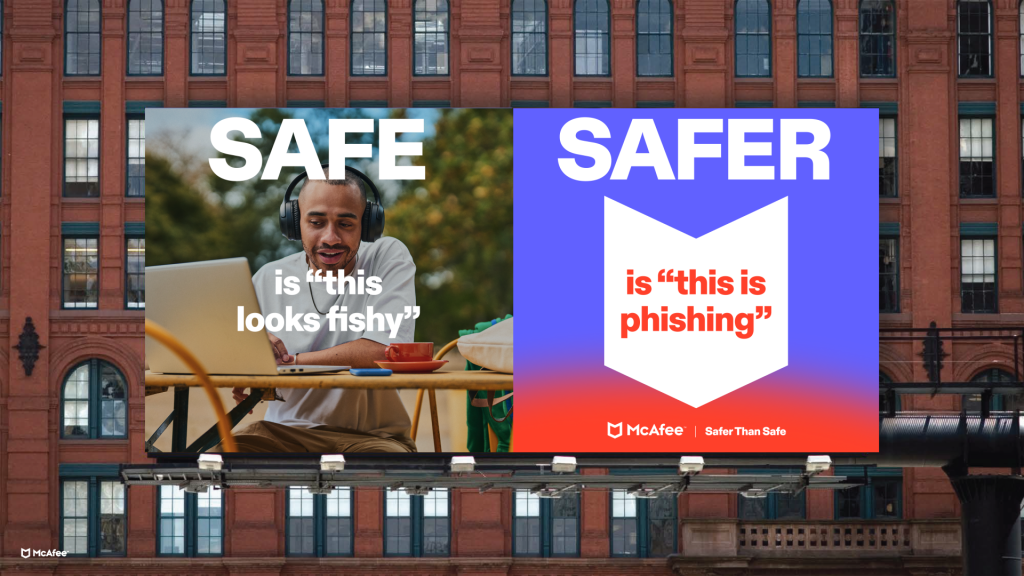
  •  

Card Skimmers Expose 600k Cards: What They Are and How to Protect Yourself

Cybercriminals are deploying autonomous AI agent frameworks to target online retailers and steal payment card details at scale, according to research from cybersecurity firm Gambit Security. Their analysis reveals that the ongoing campaign has compromised at least 119 websites—including a Fortune 500 hospitality company, a major U.S. airline, and an online fashion retailer—exfiltrating over 600,000 valid credit card records. These automated systems allow threat actors to scan, exploit, and infect target sites at a remarkably low operational cost, lowering the technical and financial barriers to large-scale cybercrime.

How the AI Credit Card Skimming Attack Works

In simple terms, a digital credit card skimmer acts like a hidden recording device inside an online checkout counter. Instead of physically tampering with a card reader, scammers use automated software tools to breach an e-commerce website’s backend servers.

Once inside, the software places invisible lines of malicious code directly on the payment page. When you enter your credit card number, expiration date, and security code to make a purchase, the hidden code silently copies your financial information and sends it to the attacker. Your order processes normally without any visible interruption.

Behind this campaign, threat actors use three specialized open-source AI frameworks to manage the intrusion without needing constant human oversight:

  • Strix: Automatically scans websites to search for unpatched security vulnerabilities or unprotected doors into backend servers. Across an eight-day window, Strix logged 633 scanning hours across 138 website hosts.
  • Cairn: Takes the security flaws discovered by Strix and uses them automatically to break through website defenses, giving the scammer administrative access.
  • Hermes: Serves as an orchestration agent for the operation. Powered by advanced AI (Claude Opus 4.6), it makes real-time tactical decisions, directs the attack steps, installs the skimmers, and manages 121 operational skills.

The Low Cost and High Impact of AI-Driven Attacks

According to data published by Gambit Security, the attacker ran 105 distinct attack waves in a five-day span using brief instructions like “get to work.” The total infrastructure cost ranged between $12,000 and $18,000, averaging just $25.46 per targeted company. By driving the average cost down to tens of dollars per target, AI automation slashes the financial and technical barriers to cybercrime. Threat actors can now execute high-volume enterprise breaches at scale that previously required costly manual operations and dedicated technical teams.

Once inside, the AI agents inject malicious JavaScript skimmers into checkout forms, Google tag blocks, content delivery networks (CDNs), or server caches. The Hermes agent was also instructed to execute cleanup routines that wiped stolen payment fields directly from merchant databases, causing server errors and data loss for affected retailers. While this particular campaign compromised e-commerce websites, automated scripts can also target payment data directly on client devices, such as the browser-level threats highlighted in McAfee Labs research on wallet-swapping extension malware.

Warning Signs and Red Flags

Digital skimmers operate quietly within legitimate checkout pages, but technical anomalies can indicate a compromised payment form:

  • Checkout latency or page crashes: The payment form freezes, stutters, or throws an error message while processing your transaction.
  • Repeated payment prompts: The website requests that you re-enter your payment card details immediately after you submit them.
  • Visual formatting errors: Payment entry fields display misaligned input boxes, mismatched fonts, or unexpected design changes compared to the rest of the site.
  • Immediate transaction notifications: Your bank flags an unfamiliar charge or location seconds after you complete a purchase.

How to Protect Yourself From Digital Credit Card Skimmers

  • Pay with third-party digital wallets. Complete purchases using Apple Pay, Google Pay, or PayPal. These payment services use encrypted tokenization, ensuring your actual credit card number is never transmitted to or stored on the merchant’s payment form.
  • Use virtual credit cards. Generate temporary, single-use, or merchant-locked virtual card numbers through your bank or card issuer to prevent stolen card details from being reused elsewhere.
  • Avoid saving payment information in merchant accounts. Input payment details manually for individual transactions rather than storing card numbers inside store customer profiles or retailer databases.
  • Enable real-time transaction alerts. Turn on immediate push notifications or SMS alerts in your banking app for every account charge so you can identify unauthorized activity immediately.

What to Do If You’ve Already Been Targeted

If you suspect your credit card information was stolen or compromised in a digital skimming attack:

  • Contact your bank or card issuer immediately. Report the compromised card, request an immediate cancellation, and dispute any unauthorized charges.
  • Update your account credentials. Change passwords and turn on multi-factor authentication (MFA) across all financial accounts and shopping portals where you used the same login information.
  • Place a credit freeze. Contact Equifax, Experian, and TransUnion to freeze your credit files, preventing unauthorized accounts from being opened in your name.
  • Maintain transaction records. Retain bank statements, order confirmation emails, receipts, and the web URL of the merchant site where the purchase occurred.
  • Create an official recovery plan. If personal identifying information (such as your Social Security number or date of birth) was exposed alongside financial details, submit a report to the FTC to get a recovery plan.

Reporting Credit Card Skimming and Staying Safe

Reporting stolen payment data helps law enforcement track malicious server infrastructure and disrupt automated threat networks. If you suspect your financial data was exposed on a compromised site, report the incident through official channels:

  • FBI Internet Crime Complaint Center: Submit a formal incident report with ic3.
  • Federal Trade Commission: Report payment fraud and scam activity to the FTC.
  • Local Police Department: File a police report if required by your bank or insurance provider for fraud reimbursement claims.
  • The Affected Merchant: Contact the retailer’s customer support or security team directly through their official domain.

While AI skimming attacks can be difficult to detect on the front end of retail websites, taking immediate action after a suspected exposure limits potential financial damage. By utilizing encrypted digital wallets, avoiding stored payment methods, and reviewing account statements regularly, you significantly reduce your exposure to AI-driven cybercrime.

The post Card Skimmers Expose 600k Cards: What They Are and How to Protect Yourself appeared first on McAfee Blog.
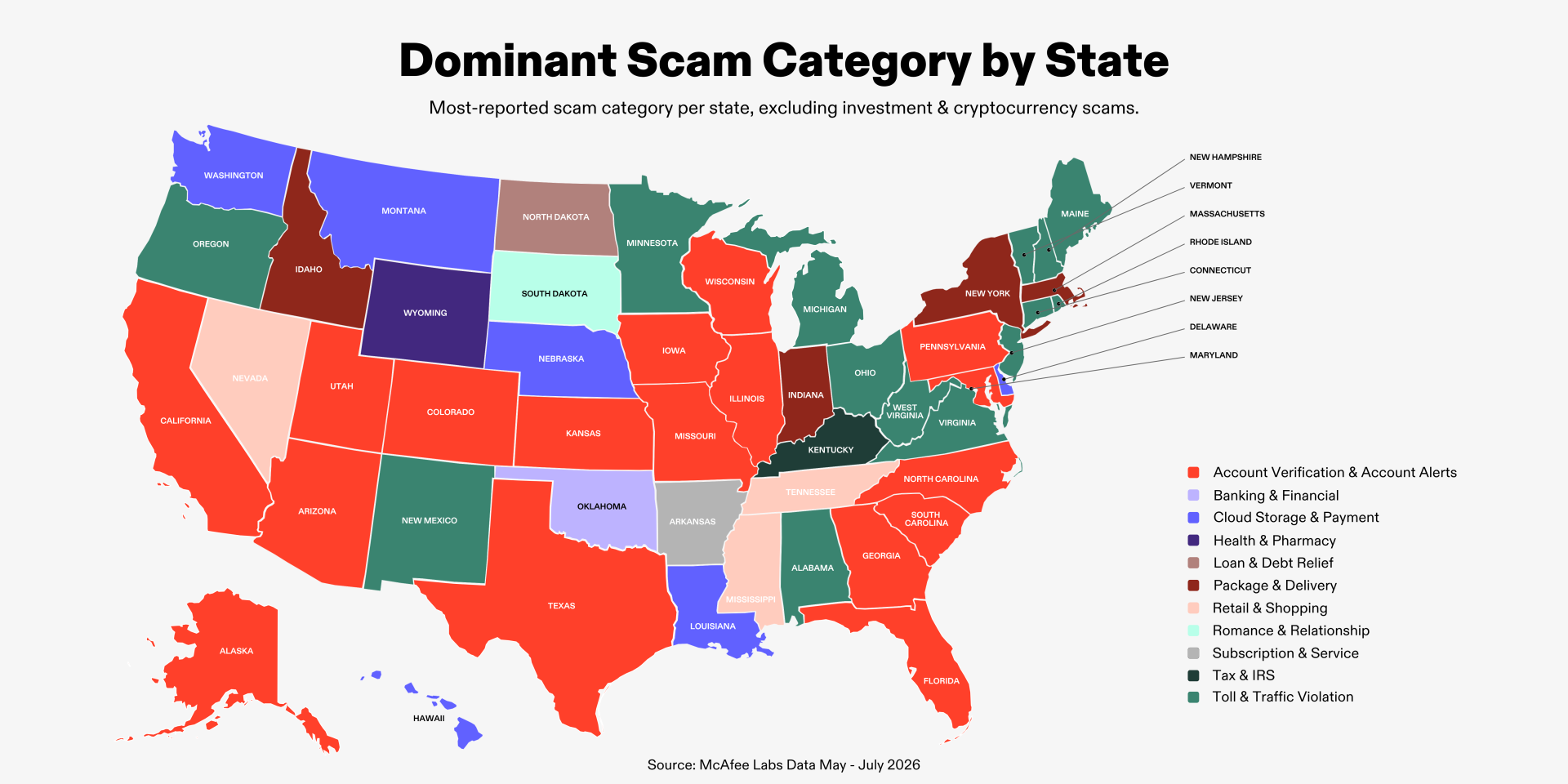
  •  

FBI Job Portal Hack Claimed by ShinyHunters: What Happened and How to Protect Yourself

An agent walks by the FBI seal at headquarters.

The FBI is investigating a major data breach after learning the federal agency’s job application portal was compromised, according to a September 2026 report by 404 Media. The cyberattack on FBIJobs.gov may have exposed the personal records of thousands of job applicants alongside current and former FBI personnel.

On September 23, the FBI shared in a statement that they were “aggressively investigating this matter,” and on September 29, shared a video on X reporting that Dutch authorities had arrested an alleged leader of ShinyHunters, the global cybercrime group known who took responsibility for the FBI data breach. In the video, Brett Leatherman, Assistant Director of the FBI’s Cyber Division, warned remaining members of ShinyHunters that the FBI knew where to find them and suggested they reach out to the FBI first while they still have the choice.

Inside the FBI Jobs Portal Cyberattack

The intrusion targeted the FBI Candidate Gateway, where the hacker group claims to have extracted sensitive personally identifiable information (PII). According to the group and media reviews of leaked sample data, this compromised dataset contains the PII of federal job applicants, prospective candidates, active special agents, and former FBI employees. Exposed records allegedly include full legal names, home addresses, phone numbers, email addresses, spousal information, job titles, and Social Security numbers.

In a statement circulated on the dark-web by ShinyHunters, the group attempted to use the stolen database to extort the agency, giving officials one week to retract a public advisory that had identified ShinyHunters as a criminal syndicate. After the deadline passed and the advisory remained live, the group claimed they would not publish the database publicly. However, breached records frequently wind up circulating in cybercriminal forums.

How Breach Data Creates Additional Threats

When news breaks that sensitive personnel data from a high-profile agency has been exposed, the risks extend beyond immediate identity theft. Cybercriminals can leverage this stolen data to launch two categories of attacks:

  • Internal Spear-Phishing and System Infiltration: Hackers could use stolen internal personnel registries, agent titles, and applicant profiles to target current FBI staff. By citing real colleague names, internal job postings, or specific department codes, bad actors can craft hyper-targeted phishing emails to trick employees into surrendering internal network credentials. The goal of this attack would be to gain access to restricted databases, confidential files, and sensitive intelligence networks.
  • External Impersonation and Consumer Fraud: Scammers could also exploit stolen agent credentials to trick the general public. By matching leaked names with real public offices, fraudsters could contact civilians claiming to be active federal agents conducting official investigations, pressuring targets into paying fake fines or forfeiting financial credentials.

Watch for Warning Signs of FBI Impersonation Scams

Because this breach may have exposed real personnel details, impersonation attempts carry heightened risk. Scammers could pair verified agent names, genuine department titles, and realistic internal background details with fake caller ID tags, making fraudulent outreach appear legitimate. Be extra vigilant for these red flags that you may be dealing with an impersonation scam:

  • Demands for immediate payment. Federal agencies will never call to demand immediate payment, and do not accept payment via gift cards, cryptocurrency, wire transfers, or cash couriers.
  • Threats of arrest or legal action. Impersonators use high-pressure tactics, claiming you face active arrest warrants or federal lawsuits if you do not pay or comply on the spot.
  • Pressure to remain on the line. Scammers try to prevent you from independently verifying their identity. Legitimate law enforcement officers will allow you to hang up and call official public agency numbers.
  • Spoofed caller ID and credentials. Scammers manipulate caller ID displays to mirror official FBI field office phone numbers or send emails containing legitimate bureau logos.

How to Protect Yourself from Impersonation Scams

Protect against impersonation schemes by verifying all unexpected contacts independently.

  • Hang up and verify directly. If you receive a call claiming to be from the FBI or another federal agency, hang up immediately. Search for the official phone number of your local FBI field office on fbi.gov and call them directly to confirm if the inquiry is legitimate.
  • Do not trust caller ID. Phone numbers displayed on caller ID can be spoofed to match real government offices.
  • Avoid clicking links in unsolicited messages. If you receive an email or text message regarding an FBI application or investigation, do not click embedded links. Type the official URL ending in .gov directly into your browser.

What to Do If Your PII Was Compromised or You’ve Been Targeted by Scammers

If you shared personal details or sent funds to a scammer, or if you previously submitted job applications or personal information through federal career sites, take immediate action to secure your identity and accounts:

  • Stop contact with scammers and cease payments. Block all phone numbers, email addresses, and messaging channels used by the scammer immediately. Do not transfer additional money.
  • Notify your financial institutions. If you’ve initiated payment with a suspected scammer or notice charges that you did not approve, contact your bank, credit card issuer, or payment app provider right away to report fraudulent transactions and request charge reversals or account holds.
  • Update passwords and activate multi-factor authentication (MFA). Change login passwords across all online accounts, starting with primary email and financial logins, and enable MFA using an authenticator app.
  • Freeze your credit. Contact Equifax, Experian, and TransUnion to freeze your credit files, preventing attackers from opening loans or credit lines in your name.
  • File an identity theft report. If your Social Security number or identity details were exposed, visit IdentityTheft.gov to submit a report and receive a personalized recovery plan.
  • Preserve evidence. Save phone logs, text messages, emails, wire receipts, and digital wallet addresses associated with the scam.

Report Cybercrime to Help Make a Safer Internet

Reporting cybercrime and impersonation attempts helps law enforcement trace criminal networks like the ShinyHunters hacker group and shut down active fraud operations. Submit reports through these official channels:

  • FBI Internet Crime Complaint Center (IC3): Submit a complaint regarding cyber breaches and online scams through the IC3 reporting portal.
  • Federal Trade Commission (FTC): Rport fraud, impersonation, and identity theft directly to the FTC fraud reporting page.
  • Federal Communications Commission (FCC): File complaints about illegal robocalls and caller ID spoofing via the FCC consumer complaint portal.
  • Local Police Department: Contact local law enforcement if you experienced monetary loss or direct extortion threats.
  • The FBI: Report direct agent impersonation through the official FBI contact page.

Prompt reporting provides law enforcement with vital intelligence to track threat actors and protect others from emerging scams.

The post FBI Job Portal Hack Claimed by ShinyHunters: What Happened and How to Protect Yourself appeared first on McAfee Blog.
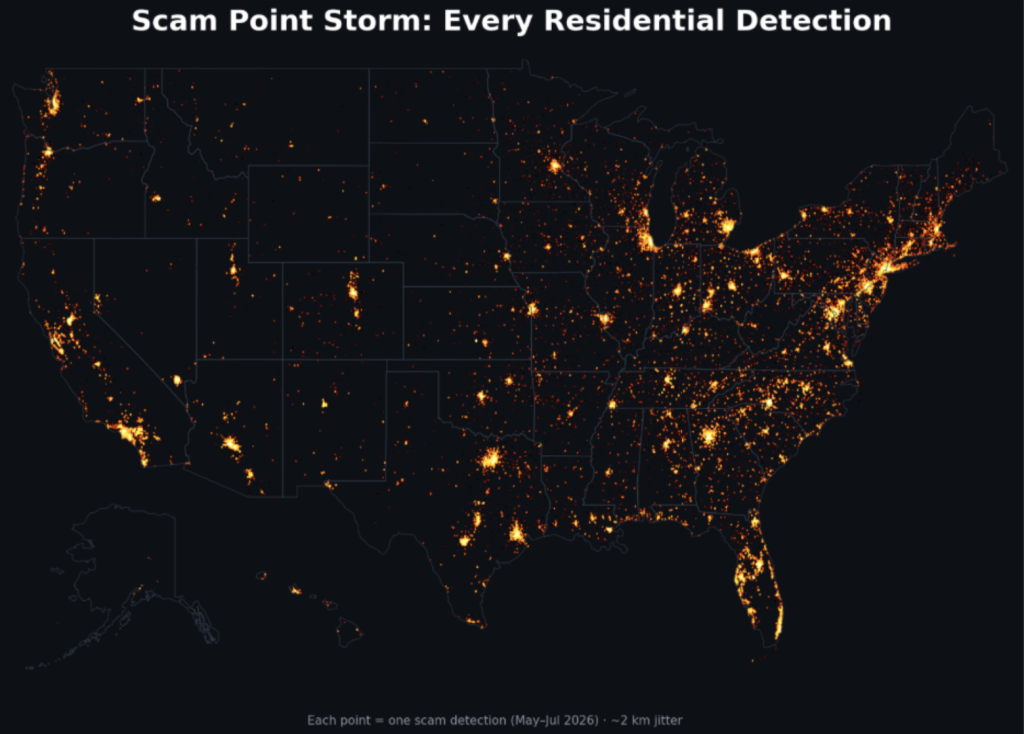
  •  

FBI Warns of Law Enforcement Impersonation Scams: What They Are + How to Protect Yourself

The FBI Internet Crime Complaint Center (IC3) issued a September 2026 public service announcement warning of a rise in government and law enforcement impersonation scams. These scams feature individuals posing as law enforcement agents leveraging threats to acquire money or personal information.

Between January 2025 and July 2026, the IC3 received nearly 61,000 complaints regarding fraudsters posing as local police, federal agents, or court officials, with reported losses exceeding $1.6 billion. Imposters use caller ID spoofing and legal threats to extract immediate payments and sensitive personal information from their targets.

How Law Enforcement Impersonation Scams Work

Law enforcement impersonation scams rely on scammers projecting authority and manufacturing urgency. Their goal is to drive you to act before you can verify the caller’s identity.

According to the IC3, fraudsters use caller ID spoofing technology to make your phone screen display the legitimate name and telephone number of a law enforcement agency or court. They build credibility by providing fake badge numbers, official-sounding department names, and fictitious case file numbers.

During these law enforcement imposter scams, callers may claim that you missed jury duty, owe outstanding court fines, face an active arrest warrant, or have a suspended driver’s license or passport. The fraudster insists that you resolve the issue immediately over the phone or online. They demand payment via non-traditional methods, including prepaid gift cards, cryptocurrency, wire transfers, or physical cash couriers. Scammers frequently follow up with text messages or emails containing links to fake government portals designed to capture payment details and login credentials.

Impersonation Scam Warning Signs and Red Flags

If you receive a call from police, local courts, or federal agencies, watch for these warning signs that you could be dealing with a scam:

  • Demands for immediate payment over the phone: Legitimate law enforcement officers and court clerks will not call demanding instant payment to clear a warrant or missed jury duty summons.
  • Requirements for non-standard payment methods: Requests for payment via prepaid gift cards, cryptocurrency, bank wire transfers, or physical cash couriers indicate a scam.
  • Threats of immediate arrest or legal action: Imposters use aggressive tones to force rapid payment before you can verify their credentials through official sources.
  • Unsolicited links in text messages or emails: Follow-up messages directing you to online payment or verification portals are designed to capture personal credentials or payment details.
  • Requests for sensitive personal identifiers: Scammers ask for Social Security numbers, banking details, or account passwords under the pretense of “verifying” your record.

How to Protect Yourself From Impersonation Scams

  1. Hang up and verify through official channels. Immediately disconnect if you receive a suspicious call from police or court officials. Look up the agency’s official telephone number on a public .gov website and call directly to verify claims.
  2. Recognize how legitimate agencies operate. Real law enforcement officers, courts, and government agencies do not demand payment over the phone, nor do they accept gift cards, cryptocurrency, wire transfers, or cash couriers.
  3. Avoid clicking links in unexpected messages. Do not click unsolicited links or download attachments in emails or text messages claiming to come from court or police portals. Type official website addresses directly into your web browser.
  4. Limit public personal information. Fraudsters collect names, home addresses, and family details from social media and data broker websites to make fake scripts sound authentic. Adjust your privacy settings and submit removal requests to public data broker directories.

What to Do If You’ve Already Been Targeted

  • Stop all communication immediately: Cease interacting with the scammer immediately and do not send additional money.
  • Contact financial institutions: Call your bank, credit card issuer, or payment app provider right away to report the fraud and request a payment reversal or wire recall.
  • Secure online accounts: Change passwords and enable multi-factor authentication on all financial and email accounts that may have been exposed.
  • Freeze your credit: Contact Equifax, Experian, and TransUnion to freeze your credit files and prevent unauthorized accounts from being opened in your name.
  • Report identity theft: If you shared sensitive identifiers like your Social Security number, submit a report to the FTC to get a recovery plan.
  • Maintain evidence: Retain all call logs, text messages, emails, payment receipts, and cryptocurrency transaction details.

Reporting Law Enforcement Impersonation Scams

Reporting an impersonation incident promptly helps authorities track fraudulent networks and protects others from falling victim. If you encounter a fake call from police or a fraudulent court notice, submit an official report through the FBI Internet Crime Complaint Center. You should also contact your local police department to file a report, particularly if you experienced financial loss or received direct threats. Finally, inform the specific agency or court that was impersonated by calling the official directory number listed on its .gov website, allowing their security officials to issue public advisories.

The post FBI Warns of Law Enforcement Impersonation Scams: What They Are + How to Protect Yourself appeared first on McAfee Blog.
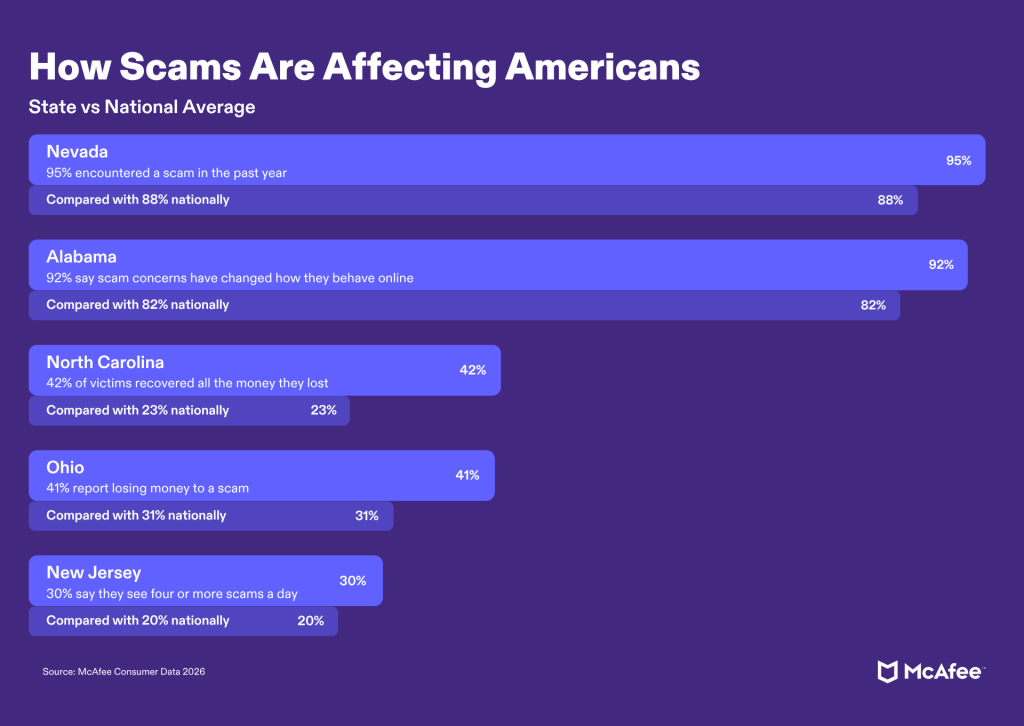
  •  

Feds Suspect Ransom Negotiator Ran ShinyHunters Extortion Site

U.S. federal investigators pursuing the ShinyHunters hacking group that recently stole highly sensitive data from the FBI have identified executives at two different ransomware negotiation firms who maintained unusually close relations with the extortion group, KrebsOnSecurity has learned. Sources close to the investigation say one of the executives in the United States even helped ShinyHunters operate a website that pressured victims into paying a ransom.

Hackers aligned with ShinyHunters have claimed credit for dozens of major data breaches since 2019, when the group was primarily operated by cybercriminals living in France. As those original members were arrested or jailed one by one, control over the ShinyHunters brand eventually passed to “Rey,” identified last year as a teenage hacker from Amman, Jordan. According to the FBI, ShinyHunters has extorted more than $70 million from victims so far this year.

In late September, ShinyHunters hacked the FBI recruitment website fbijobs.gov and taunted the agency by threatening to publish the stolen files, which reportedly included medical and psychological records, Social Security numbers and home addresses, and information about each employee’s unit and specialization.

The FBI jobs site hack has prompted the agency to move with uncommon speed to arrest, detain and question people who had any communications with Rey or other ShinyHunters suspects. Reuters reported on October 3 that Rey had been detained by Jordanian authorities and was cooperating with the FBI.

Rey was able to assume control over the hacking group because one of its alleged senior members had just been nabbed. On the evening of September 15, 2026, authorities in the Netherlands arrested convicted hacker and ShinyHunters suspect Pepijn van der Stap. Dutch police reportedly used flash-bang grenades in an effort to stun and apprehend Van der Stap as he was logged in to various online accounts.

According to a source close to the investigation, the authorities arrested Van der Stap while he was using his Signal instant messaging account, which allowed them to read recent communications with frequent contacts — including ransomware negotiators based in Canada and the United States.

Multiple sources with knowledge of the matter told KrebsOnSecurity that Van der Stap’s messages were the key to unraveling a murder-for-hire plot that emerged immediately following his arrest. The Dutch news outlet RTL reported last month the two murders were allegedly to be committed abroad, and that there are indications Van der Stap gave the order for the attacks (there is no indication those orders were ever carried out).

On October 9, KrebsOnSecurity broke the news that the FBI arrested a 54-year-old Canadian cybersecurity executive named Edward Dubrovsky in connection with the ShinyHunters investigation. Dubrovsky, who recently published a book on handling cyber extortion that recommended always engaging with the hackers, was charged with threatening to disclose stolen or hacked data and interfering with interstate commerce through extortion, according to court records. Politico reports prosecutors have asked that Dubrovsky remain in custody pending trial, and that records related to his case remain under seal.

A source close to the investigation told KrebsOnSecurity that Van der Stap’s Signal messages showed he had frequent conversations with Mr. Dubrovsky and with at least one executive at a large U.S.-based consulting firm, and that these executives often knew the details about new ShinyHunters victims before the victims themselves had even learned of the breach.

That source shared another potentially explosive finding by federal investigators: the Dutch hacker’s chats showed Mr. Dubrovsky knew ShinyHunters had stolen highly sensitive data from FBI servers, and that he never informed the bureau of the data breach prior to ShinyHunters threatening on Twitter/X to publish the agency’s deeply personal personnel files.

SHINYWIRE

KrebsOnSecurity has learned from two sources close to the ShinyHunters probe that FBI investigators believe at least one executive at a U.S.-based consulting firm played an active role in operating the now-defunct ShinyHunters victim extortion website “shinywire[.]com.” KrebsOnSecurity is not naming the U.S. company or the suspected executive(s) for now because they have not yet been charged with a crime, but it is a prestigious firm with more than 1,000 associates.

A section of the homepage for the now-defunct Shinywire website.

The Shinywire website was active from approximately May 3, 2026 until October 16 and had entries for nearly 100 organizations hacked by ShinyHunters. Each entry urged victims to engage with the cybercrime group and discuss terms for payment. The pages also included samples of stolen files and promised those files would be published online if the victim ignored their demands.

The following screenshot shows a cached portion of the Shinywire extortion page for Intuitive Surgical, an American medical technology company that was breached in March 2026 after an employee fell for a targeted phishing email.

The Shinywire website, as indexed by urlscan.io. This listing is an extortion demand targeting Intuitive Surgical, an American medical technology company breached in March 2026 by a targeted phishing email attack that compromised an employee’s credentials.

Victim organizations that refused to engage or negotiate after seven days would find all of their stolen data published on the ShinyHunters victim shaming blog (a website that is only reachable via the anonymity network Tor).

In a story published October 15, The Globe and Mail wrote that a few months before Edward Dubrovsky was arrested by the FBI, the Canadian cybersecurity executive alleged in court documents he had become collateral damage in a campaign by a former business partner to “destroy” another industry executive.

The story noted that Dubrovsky filed the lawsuit in Ontario this year against Daniel Tobok, the former chief executive of Cypfer, a cybersecurity firm founded in Toronto with offices in the U.S., Britain, the Netherlands, the United Arab Emirates, and Mexico. The two first became business partners in 2017 and later developed Cypfer together, where Mr. Dubrovsky was a managing partner and chief operating officer. But by 2024, the two had a falling out, with Dubrovsky accusing Tobok of gradually excluding him from business matters and making “increasingly capricious business decisions.”

Mr. Tobok reportedly denied the allegations and filed a counterclaim, accusing Mr. Dubrovsky of accessing confidential information and unfairly competing with Cypfer through work at another firm called CyberSteward Inc. He also said Mr. Dubrovsky has misrepresented himself as a Cypfer founder, and is not a shareholder.

GHOSTBYTE

According to interviews with several former colleagues of Mr. Tobok, as far back as eight years ago he was known to ransomware purveyors by a particular nickname: Ghostbyte. In 2018, a Canadian company was hacked by Dharma, a prolific Russian-language ransomware affiliate program that first surfaced in 2016. The victim company told the Dharma ransomware representative they were leaning toward paying because some of the files were unrecoverable after being locked, but that they needed a better guarantee that Dharma would keep their word if paid.

A redacted copy of the Dharma rep’s reply is pictured below, and it shows the ransomware group urged the victim to contact a person at a Canadian IT firm that helps companies seeking such guarantees. The Dharma rep recommended the victim contact the email address ghostbyte@tutanota.com.

“If you want guarantees, you can write to the IT company,” the Dharma reply advised. “Take the phone and negotiate with them. This IT company often solves such problems in Canada. You can contact them and sign a contract for services. You’ll still have to pay.”

An email reply from the Dharma ransomware group to a victim, recommending they contact an email address that is connected to Mr. Tobok.

It’s unclear if Mr. Tobok ever used that Ghostbyte address offered by the Dharma representative, and he has not responded to multiple requests for comment. However, the breach tracking service Constella Intelligence finds an email address Mr. Tobok has frequently used — dtobok@me.com — is associated with two online accounts where the chosen username was “ghostbyte,” including a Snapchat account.

Incidentally, Constella also finds the Dharma rep’s email address luckygoodlucky@tuta.io is associated with a cryptocurrency address that processed 38 transactions totaling 43 bitcoin, ~$3.5 million at today’s value (the most recent transaction for this wallet is dated February 2019).

In a statement shared on October 14, Cypfer said the company’s business does not include making or facilitating ransomware payments, and that Cypfer learned of Dubrovsky’s arrest when the news first broke in the media.

“We had no prior knowledge of Mr. Dubrovsky’s arrest,” a spokesperson told KrebsOnSecurity via email. “CYPFER has not received any outreach from law enforcement and, to our knowledge, is not the target of any law enforcement investigation.”

The statement said CyberSteward and Cypfer are separate companies with no officers, directors or employees in common, and that Cypfer was recently acquired by the Apros Group, a holding company led by Jason Hogg, a former FBI special agent and former CEO of Aon Cyber Solutions Group. In 2020, Aon aquired Cytelligence, a security consulting firm where Mr. Tobok was founder and CEO and Mr. Dubrovsky was a managing partner.

CONFLICTING INTERESTS

It is not illegal in the United States to pay hackers for an encryption key to unlock servers infected with ransomware, or in exchange for a promise to delete any stolen files and refrain from publishing them online. While victim organizations can land in legal hot water if they pay a ransom to a group that is sanctioned by the U.S. Treasury Department, ShinyHunters is not among the ransomware groups currently sanctioned by the United States or by any other government.

Experts say ransomware victims are typically directed by their insurance provider to work with a specific incident response firm. But not all cyber forensics and breach response companies will agree to facilitate payments to ransomware groups on behalf of their clients. As a result, once victim firms make a decision to pay, the firms that eschew rewarding extortionists are invariably replaced by companies that have no such qualms.

In December 2024, ShinyHunters began extorting the education technology company PowerSchool, stealing private information on 62 million students and 9.5 million teachers in the U.S. and Canada. PowerSchool reportedly paid a $2.85 million ransom demand, and a “frequently asked questions” statement (PDF) about the breach says PowerSchool was assisted in that effort by CyberSteward (ShinyHunters affiliate Matthew Lane, 20, of Sterling, Mass., was sentenced in November 2025 to four years in prison for his admitted role in the PowerSchool hack).

But that ransom payment did not stop future extortion attempts using the same stolen data. By May 2025, individual school districts were reportedly receiving separate ransom demands using samples of the same stolen files. While nobody has alleged ShinyHunters was behind the second wave of extortion against PowerSchool users, the incident drives home the reality that there is no technical way to verify the threat actors have deleted the stolen data as promised, or prevent others from abusing the same records.

A number of leading cyber incident response firms, including Coveware and Unit 221B, have consistently warned victims against paying ShinyHunters, noting that “destroyed” victim data is often kept, resold or used to extort the company’s clients directly later on.

The FBI echoed those sentiments in an alert on May 15, 2026 advising victims against paying the ShinyHunters group. Meanwhile, ShinyHunters members have been harassing and threatening employees at Coveware and Unit 221B for offering this advice.

The following screenshots show just how annoyed the ShinyHunters leaders were with Coveware’s relentless advice against paying the group. The first image is from a conversation on May 6, 2026 that took place between the group’s main account on Telegram and a co-conspirator. In that chat, snippets of which were shared with KrebsOnSecurity by a trusted source, ShinyHunters complained that Coveware was harming the group’s payment rates.

The operator of the ShinyHunters account on Telegram speaking privately with a co-conspirator and complaining that Coveware was harming their business.

“Go on my website, majority of those companies would’ve paid if it weren’t for Coveware giving them misinformation,” the ShinyHunters account wrote. “Someone (100% Coveware) is going out of their way to make sure i am not paid.”

In another conversation on April 11, 2026, the ShinyHunters Telegram account privately said they were trying to “eliminate the problem,” which they said was Coveware. Coveware declined to comment for this story.

“I’m sure the company will pay but in this specific case I am aware of Coveware and their involvement, and I’ve probably been not getting a lot of other negotiations mostly likely because Coveware keeps getting involved,” the ShinyHunters account bemoaned.

The operator of the ShinyHunters account on Telegram telling a co-conspirator they were “trying to eliminate the problem,” which they identified as Coveware advising victims not to pay the cybercrime group.

Mark Camillo is chief executive at CyberAcuView, an industry group founded in 2021 by a consortium of major cyber insurance carriers. Camillo said some firms charge a flat retainer fee, while those that specialize in helping companies negotiate a ransom payment tend to charge a percentage of the total ransom amount paid.

That latter dynamic, he said, is an inherent conflict of interest, as the negotiator has every incentive to make things more favorable to the attackers because they are financially incentivized to negotiate and pay out, and to not negotiate down on the price.

“It has come to the industry’s attention that many of the ransomware payers charge a percentage of the final payment which may or may not be disclosed,” Camillo said. “This makes no sense if they are also the negotiator. There needs to be more transparency in the process as no one in the ecosystem should be profiting purely on the size of the ransomware transaction or payment itself.”

Camillo said the firms doing this work would argue the fees are needed because there may be unexpectedly higher costs to secure larger quantities of cryptocurrency or more risk carrying the float, and because cryptocurrency exchanges may charge higher fees for high risk transactions.

“There definitely needs to be more visibility around the transaction and clarity on the increasing value of the crypto and the exchange’s percent in the transaction to get to the bottom of this and remove any misaligned incentives,” he said.

In recent months, the U.S. Department of Justice has prosecuted a number of ransomware negotiators alleged to have conspired with cybercriminals to defraud their clients. On October 7, the DOJ charged MonsterCloud CEO Zohar Pinhasi, 50, with wire fraud and conspiracy for allegedly charging customers to remediate ransomware attacks without paying the hackers. According to charging documents, Pinhasi secretly went behind his customers’ backs and paid hackers anyway, paying ransomware groups $8 million while charging customers $19 million.

In July, Angelo Martino, a 41-year-old ransomware negotiator from Land O’Lakes, Florida, was sentenced to 70 months in prison for conspiring with the Blackcat/ALPHV ransomware group to extort multiple victims. According to the DOJ, Martino was paid by BlackCat attackers to provide confidential information about the negotiating position and strategy of his employer’s clients and enable the ransomware actors to maximize the ransoms paid by the victims.

  •  

U.K. Sanctions Cryptomus for RU Money Laundering

The United Kingdom has issued economic sanctions against Cryptomus, a chameleonic cryptocurrency platform that experts say serves as a major conduit for payments related to ransomware, narcotics, darknet markets, fraud and cybercrime services that are helping Russia circumvent existing financial restrictions.

Heleket’s support agent on Telegram claims, despite all evidence to the contrary, that it is not affiliated with Cryptomus. Image: Richard Sanders.

On October 8, the U.K. issued sanctions (PDF) against Cryptomus — previously known as Certa Payments and Xeltox Enterprises — for processing payments that benefit the Russian government and its financial institutions. The sanctions freeze any Cryptomus assets at U.K. banks, and bar British companies from offering it any business, virtual or otherwise. Also targeted in these sanctions were the virtual payment platforms VexPay, TokenSpot, and the Tsunami Payments service.

As explained in our December 2024 investigation, “How Cryptocurrency Turns to Cash in Russian Banks,” Cryptomus has been a key payment processor for dozens of Russian cryptocurrency exchanges and websites hawking cybercrime services. The company has changed its name several times since emerging in 2022, most recently to “Heleket” last year after Canada levied a record CAD $176 million fine against the platform for anti-money laundering violations.

The blockchain data-crunching firm Chainalysis said the U.K. sanctions target the broader infrastructure supporting Russia’s wartime economy.

“Cryptomus and Heleket have emerged as major payment hubs for illicit activity,” Chainalysis wrote in an October 8 blog post. “Together, these services received more illicit funds across tracked categories than the mixers in our dataset and the number of illicit counterparties surged to more than 900 in a single month in late 2025.”

The Cryptomus support bot on Telegram, responding on Oct. 8 to an inquiry by saying the platform was suddenly unable to process transactions.

In April 2026, the blockchain analysis firm TRM Labs found Cryptomus had processed more than $7 billion in transactions since its inception in 2022, including transactions associated with child sexual abuse material vendors, terrorist financing networks, and human trafficking operations.

TRM noted that Cryptomus’s transaction volume cratered after the platform instituted new “know your customer” or KYC rules, and that the cryptocurrency platform responded to the Canadian fines by launching Heleket as a parallel service that continued to offer no-KYC payment processing.

Richard Sanders is a blockchain analyst and investigator who spent months mapping out Cryptomus’s payment infrastructure and transacting with its customers. Sanders said the U.K. sanctions on Cryptomus are important because Canada’s fine against the platform was ultimately unenforceable and uncollectible.

“A fine doesn’t stop a cryptocurrency payment processor from processing payments,” Sanders wrote on LinkedIn. “Sanctions kill the operation. The distinction matters.”

As our 2024 investigation noted, Cryptomus shared a Vancouver address with dozens of other foreign currency dealers and money transfer businesses — none of which appeared to be physically located there. Following the CAD $176 million fine for alleged money laundering violations, Cryptomus appealed the penalty, launched Heleket as a parallel service, and kept on processing large volumes of sketchy transactions, Sanders said.

Sanders said the sanctions also are notable because they are the first known instance of a “Five Eyes” country (referring to the Australia, Canada, New Zealand, the U.K. and the U.S.) sanctioning a cryptocurrency operation incorporated in another Five Eyes jurisdiction.

Where do entities like Cryptomus and Heleket derive their authority to offer international financial services? The answer appears to involve fake financial institutions overseen by a phony regulatory body positioned in a country that is not widely recognized as a sovereign nation.

Our 2024 investigation found the sole shareholder of Cryptomus’s parent company Certa Payments was a 25-year-old Ukrainian woman who also headed several other firms, including the WS Management and Advisory Corporation, which bills itself as the regulatory body that exclusively oversees licenses for cryptocurrency, foreign exchange and online gaming businesses incorporated in the disputed region in northwest Africa known as the Western Sahara.

That entity’s website — crasadr.com — says it assists applicants with bank setup and formation, online gaming licenses, and the creation and licensing of foreign exchange brokers. One of Certa Payments’ former sites — certa[.]website — also shared a server with 12 other domains, including rasd-state[.]ws, a website for the Central Reserve Authority of the Western Sahara.

The website crasadr dot com, the official website of the Central Reserve Authority of Western Sahara, which lists the entities awarded licenses for cryptocurrencies, gaming and foreign exchange services.

  •  

FBI Arrests Executive at Ransomware Negotiation Firm

Agents with the Federal Bureau of Investigation (FBI) on Thursday arrested an executive at a Canadian cybersecurity firm in connection with an investigation into the ShinyHunters hacking group that recently relieved the FBI of sensitive data on thousands of agents, multiple sources tell KrebsOnSecurity.

The New York Times reported today that the FBI has arrested a Canadian man in Pennsylvania on suspicion of assisting ShinyHunters. The Times story did not identify the man, nor did a statement on Twitter/X about the arrest from FBI Director Kash Patel.

One source close to the investigation told KrebsOnSecurity the Canadian person arrested this week was visiting Pennsylvania for a cyber insurance conference, and that the suspect’s company specialized in handling ransomware negotiations with cybercrime groups. Another shared that control over the ShinyHunters investigation has been centralized at an FBI field office in Texas.

An online search reveals the Cyber Risk Summit was held at the Loews Philadelphia Hotel between Oct. 5 and Oct. 7. The conference had several sponsors, but according to the summit’s website its biggest sponsor was a Canadian security company called Cypfer.

According to LinkedIn, one of Cypfer’s “ex-founders” was Edward Dubrovsky, who is now associated with another Canadian security firm and sponsor called CyberSteward. In a post to LinkedIn approximately one month ago, Dubrovsky said he had plans to attend the Cyber Risk Summit with the rest of the CyberSteward team.

[Update: Oct. 10, 9:58 a.m. ET: A spokesperson for Cypfer said Dubrovsky was not a founder or co-founder as his LinkedIn profile claims, but instead served as a managing director before resigning in December 2025].

Edward Dubrovsky’s LinkedIn profile.

“Looking forward to continuing conversations around strategy & compliant driven coercive (ransomware, extortion) advisory, negotiations and settlement services that are global and truly agnostic,” Dubrovsky wrote.

Federal court records show that on October 8, an Edward Dobrovsky (note the slight misspelling of the last name) was arrested in Pennsylvania on cyber extortion and conspiracy charges. Several of those documents — including the core complaint — are now sealed. But a handful of them were indexed at Courtlistener.com, including a summary of the complaint, which charges the defendant with “conspiracy to threaten to impair the confidentiality of information with the intent to extort money,” and “interference with commerce by threats.”

Image: Courtlistener.com

The inmate locator at the U.S. Bureau of Prisons website reports that a 54-year-old Edward Dubrovsky is currently being held at a federal facility in Philadelphia. But the court records indexed by CourtListener include a notice filed on October 9 that moved the case to the Eastern District of Texas, which sources say is now the epicenter of the FBI’s ShinyHunters investigation. The FBI declined to comment for this story.

Dubrovsky’s LinkedIn profile states he is the author of Cyber Extortion Strategic Response, a 252-page book that promises to “take readers beyond the ransom note and into the decisions that determine how an organization responds, recovers, and protects what matters.”

Edward Dubrovsky’s book, which centers on the intricacies of ransomware negotiations.

“At the heart of the book is a critical distinction: communicating with a criminal is not the same as negotiating a payment, and negotiating is not a commitment to pay,” reads an excerpt from the book’s listing on Amazon. “Engagement can serve other objectives, including testing claims, gathering information, creating time, and preserving options while the organization evaluates its next move.”

Mr. Dubrovsky could not be immediately reached for comment. KrebsOnSecurity also sought comment from other executives at CyberSteward, and will update this post in the event they respond. The available court records in Dubrovsky’s case show that he does not currently have an attorney and has yet to be appointed a public defender by the courts.

ShinyHunters typically uses phishing and stolen credentials to siphon data from corporate accounts at software-as-a-service companies, and then threatens to publish the stolen data online unless a ransom demand is paid. According to the FBI, the group has extorted more than $70 million from victims so far this year.

Sources tell KrebsOnSecurity the FBI has been poring over devices that were seized last month when the Dutch police arrested the convicted cybercriminal Pepijn van der Stap in connection with the ShinyHunters investigation, and that charges against principals at other companies that specialize in ransomware negotiation may be forthcoming.

Immediately after Van der Stap’s arrest, another member of ShinyHunters named “Rey” assumed control over the group and began taunting the FBI over data the group stole from the agency’s online recruitment portal, which included each’s person’s unit and specialization, as well as medical and psychiatric records.

Last week, Reuters reported that Rey — identified as a teenager named Saif Al-din Khader — had been detained and was cooperating with FBI investigators. On October 7, we detailed how Rey was apprehended as the cybercrime group allegedly sought to extort a navigation and digital aviation unit that was divested by Boeing in late 2025.

This is likely to be a fast-moving story. Updates will be noted along with timestamps.

  •  

ShinyHunters Extorted Boeing Spin-off Prior to Arrests

A teenager from Amman, Jordan suspected of leading the prolific data theft and extortion group ShinyHunters has been detained and is reportedly cooperating with the FBI to identify other members of the hacking gang. KrebsOnSecurity has learned that the suspect, who uses the hacker handle “Rey,” was detained as ShinyHunters was in the process of extorting a business unit recently divested by the global aerospace company Boeing, which manufactures the fleet of planes used by the employer of Rey’s father — Royal Jordanian Airlines.

The logo for Jeppesen ForeFlight, a business unit divested last year by the aerospace firm Boeing.

On October 3, Reuters cited three unnamed sources saying a suspected ShinyHunters member in Amman named Saif Al-din Khader was detained by Jordanian authorities and was cooperating with the FBI. KrebsOnSecurity identified Rey as Khader in a November 2025 profile, in which the young man admitted working with multiple ransomware groups.

Rey was featured again in a September 28 exclusive about the Dutch police arresting 24-year-old convicted cybercriminal Pepijn van der Stap on suspicion of aiding in data thefts and extortions by ShinyHunters. The story noted that immediately following the Dutchman’s arrest on the evening of September 15, Rey assumed control over the ShinyHunters brand and boasted publicly about stealing highly sensitive data from the FBI and extorting the ransomware group Cl0p.

Rey taunted both the FBI and Cl0p with memes posted to his longtime account on Twitter/X, while simultaneously including images of the avatar used by Van Der Stap’s former hacker alias “Umbreon” in an apparent attempt to frame the Dutchman for both hacks.

A taunting meme uploaded to Twitter/X by Rey on Sept. 22. A giant sized version of the Pokemon character Umbreon can be seen in the bottom left.

As noted in our September 28 report, ShinyHunters gained access to the FBI site and other victims by exploiting a vulnerability (CVE-2026-35273) in PeopleSoft, a software-as-a-service platform from the tech giant Oracle that is broadly used by companies to manage hiring and human resources, benefits and payroll. Oracle quickly issued a fix for CVE-2026-35273, which ShinyHunters first began exploiting as a zero-day in June, and at the time Mandiant released web application firewall rules intended for organizations that couldn’t apply the security update quickly enough.

ShinyHunters told BleepingComputer in June that the original goal behind exploiting the PeopleSoft vulnerability was to breach the FBI’s own PeopleSoft database, but the hackers said those attacks were unsuccessful for some reason. In recent weeks, however, ShinyHunters turned to a well-known URL-encoding trick to bypass Mandiant’s suggested web application firewall rules.

In a report released Sept. 25, security experts at Mandiant and the Google Threat Intelligence Group (GTIG) confirmed that ShinyHunters had mass-exploited the PeopleSoft vulnerability to steal data from dozens of systems across a range of industries, including higher education, technology, healthcare, agriculture, transportation and government.

Reuters reported October 5 that the FBI has removed a contractor at Accenture over their failure to patch the FBI recruitment website hacked by ShinyHunters, which exposed sensitive data on more than 5,000 FBI personnel, including each’s person’s unit and specialization, as well as medical and psychiatric records.

‘REY’ MEANS KING, AS IN ROYAL

According to two sources familiar with the ShinyHunters investigation, a navigation and digital aviation unit recently divested by the global aerospace company Boeing was among the victims that ShinyHunters was in the process of extorting when Rey was apprehended by Jordanian authorities.

Those sources said the FBI’s investigation into ShinyHunters gained renewed urgency with the group’s attempted extortion of the former Boeing unit, which allegedly included the theft of sensitive information that sources said could pose operational safety and security risks.

In a brief statement shared with KrebsOnSecurity, Boeing acknowledged the extortion attempts by ShinyHunters, and said the incident concerned data stolen from Jeppesen ForeFlight, a subsidiary that Boeing sold in November 2025 to the private equity firm Thoma Bravo for $10.55 billion.

“We are aware of claims by a threat actor regarding data allegedly associated with Boeing and our former subsidiary Jeppesen ForeFlight,” a Boeing spokesperson shared. “We are actively reviewing the matter with the Jeppesen ForeFlight team.”

A spokesperson for Jeppesen ForeFlight shared a written statement in response to questions, saying the company has seen no impact on their end. “Based on our investigation to date into this claim and proactive security posture, there was no impact to our operations or products.”

Rey’s alleged involvement in attempting to extort the former Boeing unit is noteworthy because there is strong evidence that his father works for Royal Jordanian Airlines, which is mostly controlled by the Jordanian government and operates its long-haul fleet on passenger planes built by Boeing. Rey claimed on Telegram in early 2025 that his father was an airline pilot, although that could not be independently confirmed.

However, as noted in our November 2025 profile of Rey, his family’s shared computer was at one point compromised by password-stealing malware, and the data collected by that malware clearly shows Rey’s father used the same credentials to log in at multiple online portals for Royal Jordanian Airlines employees.

Royal Jordanian Airlines has not yet responded to a request for comment. In advance of our September 28 story, KrebsOnSecurity once again emailed Rey’s father to seek comment and update him on his son’s alleged activities. Neither of the Khaders have responded. But just hours after that request was sent, Rey began deleting his various social media accounts, including the Twitter/X account he previously used to taunt the FBI, Cl0p, and other ShinyHunters victims.

Rey may have nixed many of his social media profiles, but his cybersecurity blog on GitHub somehow escaped the purge, and it shows that Rey was fixated on the leaders of the Cl0p ransomware group. In March 2026, Rey’s blog featured a lengthy post that identified two Russian men as the core developers and hackers behind Cl0p.

Rey’s blog on GitHub. This post doxes two Russian men as the core operators behind Cl0p, one of the oldest and most established ransomware groups still in operation today.

MURDER FOR HIRE?

Meanwhile, news outlets in the Netherlands reported explosive new allegations leveled at Van der Stap, whose supposed personal transformation from convicted to reformed hacker has been widely covered in the tech news media. The Dutch daily RTL reported on Sept. 29 that investigators suspect Van der Stap tried to orchestrate at least two murders. According to RTL, the murders were allegedly to be committed abroad, and there are indications Van der Stap gave the order for these attacks.

Van der Stap was released from prison after serving the better part of a four year sentence for data theft and extortion activity that prosecutors said netted between €1.5 million and €2.7 million. In an interview with KrebsOnSecurity on September 9, Van der Stap described his new role as “offensive security lead” at the Dutch cybersecurity company Neo Security, saying the job involved probing client networks for security vulnerabilities.

Neo Security’s owner Benjamin Korper told Reuters he has hired an outside firm to investigate whether Van der Stap had hacked Neo Security or its customers, but that so far investigators have found no evidence he acted against his employer or clients. Korper said Dutch forensic investigators visited his office on September 15, the night Van der ⁠Stap was arrested in a dramatic police raid that reportedly involved flash bang grenades.

A screenshot of a Sept 16 story by the Dutch news outlet at5.nl, describing a police raid on Van Der Stap’s residence that reportedly used flash-bang grenades.

Prior to his first arrest in 2023, Van der Stap was working as a software engineer at the Amsterdam-based cybersecurity startup Hadrian, while volunteering at the Dutch Institute for Vulnerability Disclosure (DIVD) — even as he was hacking into and extorting a number of large organizations.

When asked in a recent interview why anyone should believe the word of a self-described “reformed” cybercriminal who had so casually deceived countless friends, co-workers and journalists for years, Van der Stap replied that his work spoke for itself and there was nothing he could say that would convince his worst critics.

“You can throw a bunch of nice words at someone, but you can’t convince them if they don’t want to be convinced,” Van der Stap told KrebsOnSecurity on Sept. 9. “I’m doing what I can to repay victims, and that’s all I can do. If someone doesn’t want to believe me, then that’s on them.”

FRANCHISING AND BURNING A BRAND

Cybercriminals aligned with ShinyHunters have been responsible for dozens of data breaches involving billions of stolen records, and breaches claimed by the group stretch back to at least 2019. But experts say the people recently operating behind the ShinyHunters name are not the same core members that populated the group in its early days, most of whom are French citizens who have been arrested (if not also imprisoned) on at least one prior occasion for alleged cybercrime activity.

More to the point, ShinyHunters has become something of a franchise. Think the Dread Pirate Roberts character in the 1980s cult movie classic “The Princess Bride,” only succession by death is replaced with succession by arrest, and there can be multiple simultaneous Dread Pirate Robertses. Sources close to the investigation say the FBI is focusing on a remaining handful of cybercriminal freelancers or affiliates who have been feeding the group stolen credentials to various software-as-a-service (SaaS) platforms used by major companies in exchange for a cut of any data ransoms later paid by victims.

In the days after the news broke of Van der Stap’s arrest, a cybercrime-focused chat server on Telegram that was allegedly operated by Rey erupted with hot takes, with most participants heaping ridicule on the teenage hacker after he publicly backed down from threats against the FBI and Cl0p, and again when the ShinyHunters’s darknet website suddenly went offline. Several commentators accused Rey of resurrecting the ShinyHunters brand after its core members were rounded up in France, and making a mockery of the group’s name and reputation ever since.

“He bought the old forum PGP key and used it to make new Breachforum websites and Telegram channels larping as ShinyHunters to ransom companies and then sell the used data or resell his forum when he goes broke,” one member recounted.

A relatively new Telegram channel called “The Battle” has been doxing and needling Rey and other alleged ShinyHunters members for several weeks, and it has gained a considerable readership among the cybercrime communities operating on Telegram. One of the coordinators of that harassment campaign repeatedly portrayed Rey as clueless greenhorn who sought to ride the coattails of a cybercriminal brand that has long enjoyed a reputation for ruthlessly selling or publishing data stolen from victim companies who refuse to give in to extortion demands.

“Rey (Saif Al-Din Khader) made a serious mistake when he started pretending to be a member of ShinyHunters,” wrote the administrators of The Battle server on Telegram. “That group had already been dismantled, with many of its members either arrested or imprisoned, yet Rey still chose to use its name while carrying out his crimes. We’re aware of claims that [Rey] caused over $200 million in damages and helped around 5–6 friend groups in the community make money by using Shiny Hunters group aliases to negotiate deals for a 25–30% cut over the past few months.”

In an interview with The Register, ShinyHunters claimed they hacked the FBI to counter the agency’s narrative in a May 2026 alert that advised victims against paying a ransom to the group, which came off looking unprofessional and capricious in the FBI’s advisory.

A flash notice on ShinyHunters released by the FBI on May 15, 2026.

The public notice warned the group has been known to pursue a number of different victim harassment strategies, from sending threatening text messages and phone calls to victims and their family members to in some cases swatting victims. The FBI warned ShinyHunters members “may also falsely claim to have sensitive or compromising information, including embarrassing photographs or videos of victims, which frequently do not exist.”

The hackers told The Register their attack on the FBI “demonstrated our technical capabilities and directly refuted the misinformation disseminated by the FBI, journalists, and industry researchers.” At the same time, the group’s leaders seemed to acknowledge that the FBI’s warning materially harmed their prospects for convincing victims to pay, saying “this was fundamentally a public relations and marketing initiative for our business.”

  •  
❌