Years before the figure skater became an Olympic superstar, a Chinese operative tried to stalk her father and monitored other US residents deemed dissidents against China. And that’s just the beginning.
I love cutting-edge tech, but I hate hyperbole, so I find AI to be a real paradox. Somewhere in that whole mess of overnight influencers, disinformation and ludicrous claims is some real "gold" - AI stuff that's genuinely useful and makes a meaningful difference. This blog post cuts straight to the good stuff, specifically how you can use AI with Have I Been Pwned to do some pretty cool things. I'll be showing examples based on OpenClaw running on the Mac Mini in the hero shot, but they're applicable to other agents that turn HIBP's data into more insightful analysis.
So, let me talk about what you can do right now, what we're working on and what you'll be able to do in the future.
Model Context Protocol (MCP)
A quick MCP primer first: Anthropic came up with the idea of building a protocol that could connect systems to AI apps, and thus the Model Context Protocol was born:
Using MCP, AI applications like Claude or ChatGPT can connect to data sources (e.g. local files, databases), tools (e.g. search engines, calculators) and workflows (e.g. specialized prompts)—enabling them to access key information and perform tasks.
If I'm honest, I'm a bit on the fence as to how useful this really is (and I'm not alone), but creating it was a no-brainer, so we now have an MCP server for HIBP:
https://haveibeenpwned.com/mcp
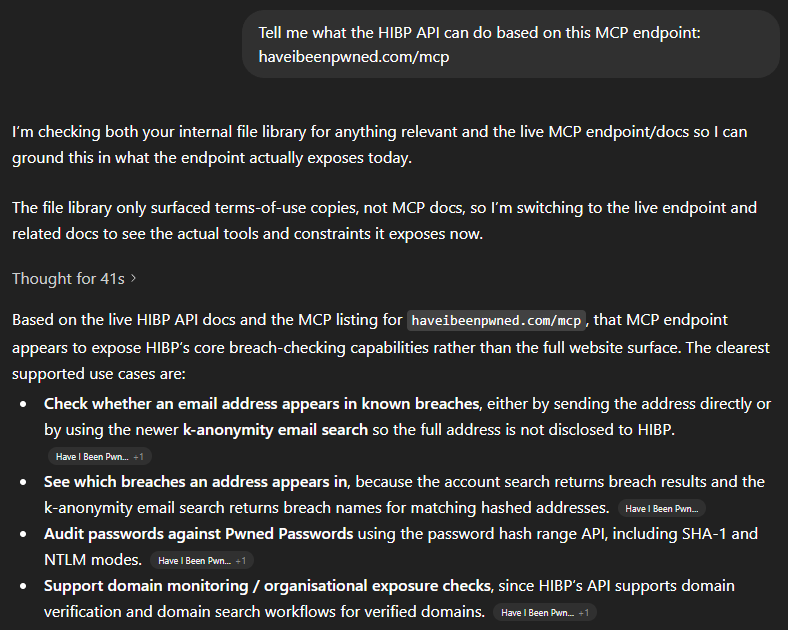
You can't just make an HTTP GET to the endpoint, but you can ask your favourite AI tool to explain what it does:
In other words, all the stuff we describe in the API docs 🙂 That's an overly simplistic statement, and there are many nuances MCP introduces beyond a computer reading docs intended for humans, but the point is that we've implemented MCP and it's there if you want it. Which means you can easily use the JSON below to, for example, extend GitHub Copilot:
This is really the point of the whole thing - how can humans use it to do genuinely useful stuff? In particular, how can they use it to do stuff that was hard to do before, and how can "normies" (non-technical folks) use it to do stuff they previously needed developers for? I've been toying with these questions for a while now. Here's what I've come up with:
Firstly, I'm going to do all these demos on OpenClaw. I've been talking a lot about that on my weekly live streams over the past month, and the "agentic" nature of it (being able to act as an independent agent tying together multiple otherwise independent acts) is enormously powerful. Every company worth its AI salt is now focusing on building out agentic AI so whilst I'm using OpenClaw for these demos, you'll be able to do exactly the same thing in your platform of choice either now or in the very near future.
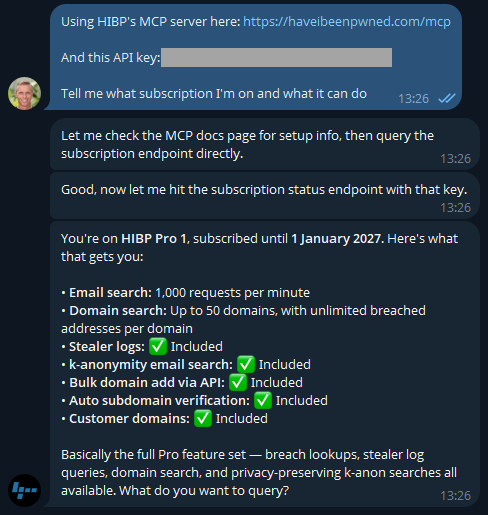
I'm using a Telegram bot as my interface into OpenClaw, let's kick it off:
Easy, right? 🙂 There's a different discussion around how secrets are stored and protected, but that's a story for another time (and is also obviously dependent on your agent). But the key is easily rotated on the HIBP dashboard anyway. If you don't have a key already, go and take out a subscription (they start at a few bucks a month), and you'll be up and running in no time.
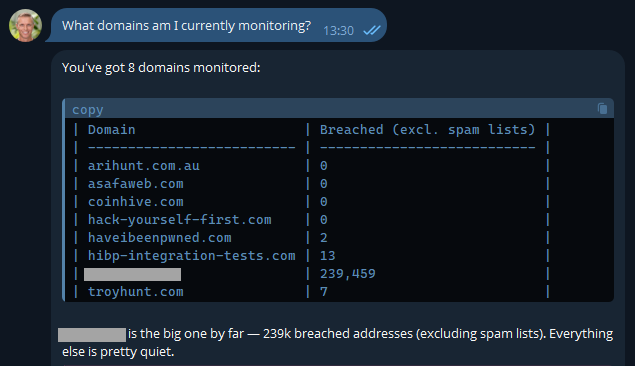
Now that I know I'm connected, let's learn about how I'm presently using the service:
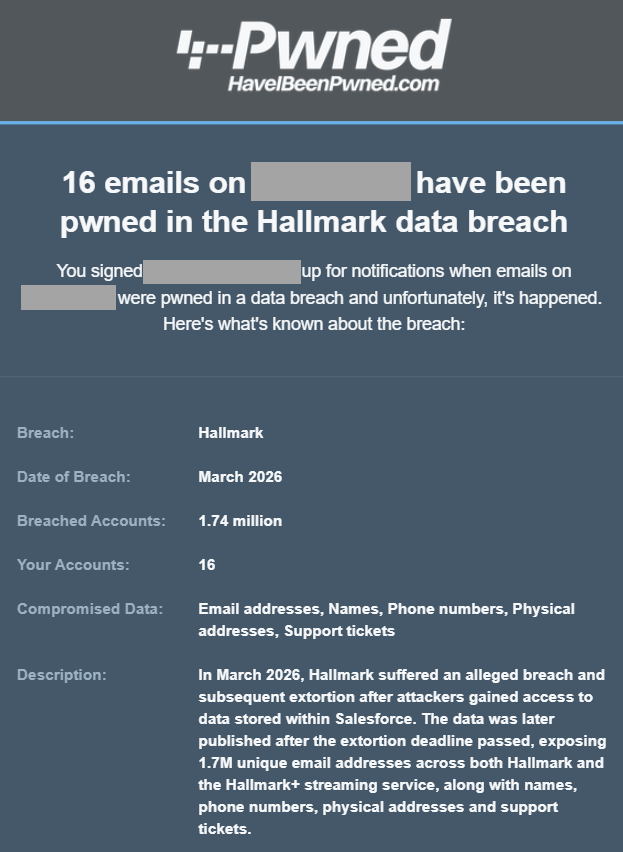
Most of these are pretty obvious, but I've also included another here that I use to monitor how the service is behaving with a large organisation. It's a real domain with real data, so I'm going to obfuscate it to preserve privacy, but it's a great demonstration of how useful AI is. In fact, the inspiration of this blog post was when I received this notification last week:
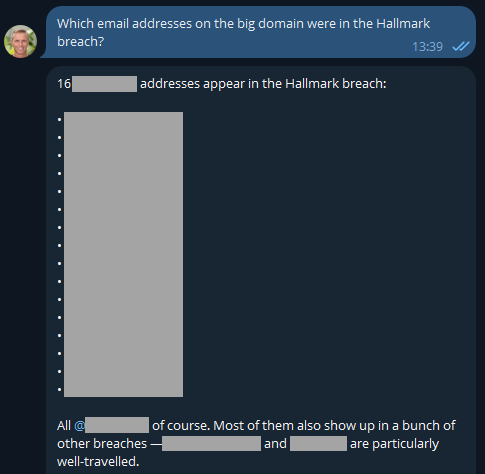
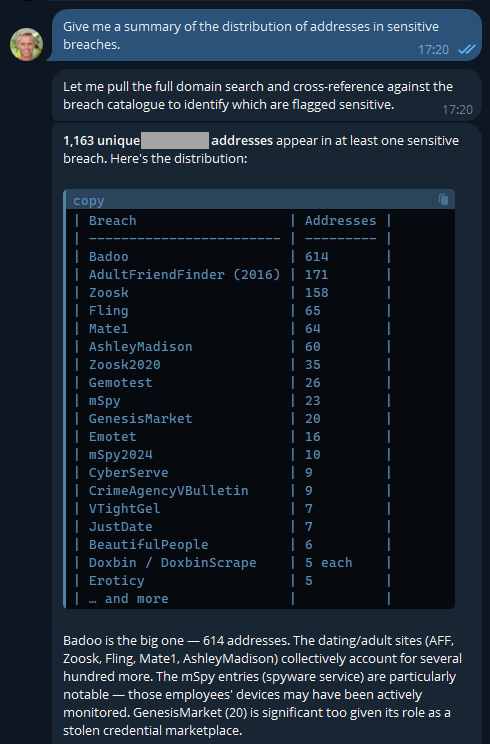
One of the most asked questions after someone in a large org receives an email like this is "who are those 16 people in the breach"? Because we can't reliably filter large domains in the UI, I'd normally suggest they either download the CSV or JSON format in the dashboard, then search for "Hallmark" in there or use the API and write some code. But now, there's a much easier way:
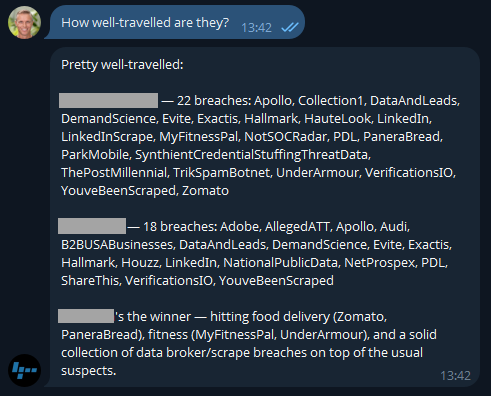
Well that was easy 😎 I like the additional context too, and now it has me curious: what have these people been up to?
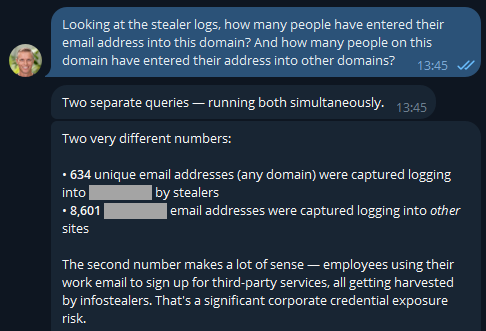
Because I'm on a Pro plan (or if you're still on the old Pwned 5 plan), I've also got access to stealer logs. Let's see what's going on there:
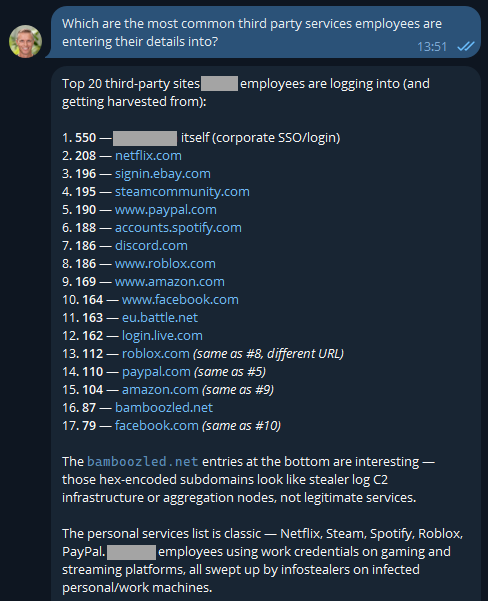
If you were running an online service, that first number would indicate compromised customers. But as OpenClaw has suggested here, the second number is the one that's interesting in terms of employees entering their data into other websites using the corporate email address. But they'd never reuse the same password as the work one, right? 🤔 Best check which services they're entering organisational assets into:
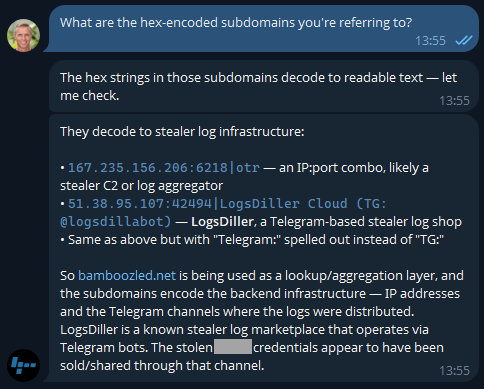
The first one makes sense and is extra worrying when you consider these are people infected with infostealers. That's not necessarily malware on a corporate asset; they could always be using an infected personal device to sign into a corporate asset... ok, that's also pretty bad! I was a bit surprised to see Steam in there TBH - who's using their corporate email address to sign into a gaming platform?! A quiet chat with them might be in order. And the bamboozled.net stuff is weird, I want to understand a bit more about that:
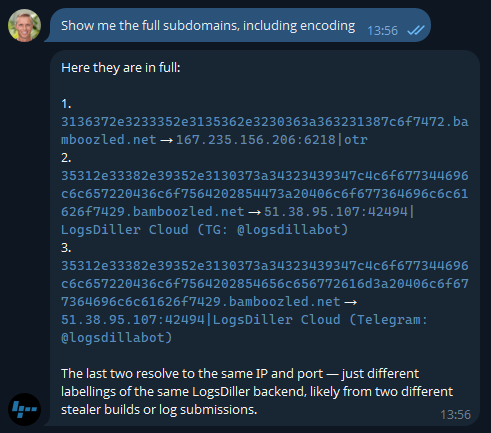
Now I'm losing interest in this blog post and am really curious as to what's actually in the data!
Ok, so there's an entire rabbit hole over there! Let's park that, but think about how useful information like this is to infosec teams when you can pull it so easily. Or how useful info like this is to HR teams 😬
Keep in mind, these are corporate addresses tied to the company and are the company's property, so, yeah...
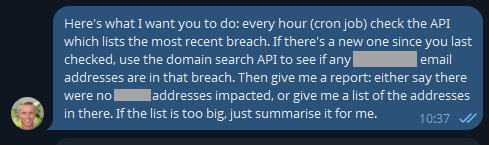
But remember the agentic nature of OpenClaw means we can ask it to go off and run tasks in the background, tasks like this:
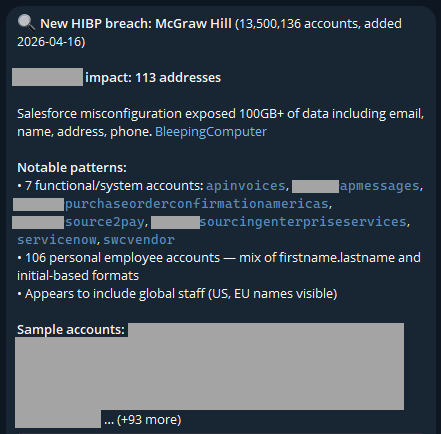
This was just a little thought experiment I set up a few days ago and forgot about until yesterday, when I loaded a new breach:
I never asked it to look for "functional/system accounts"; it just decided that was relevant. And it is - this breach clearly had a lot of data in it related to purchases of services, which is an interesting aspect.
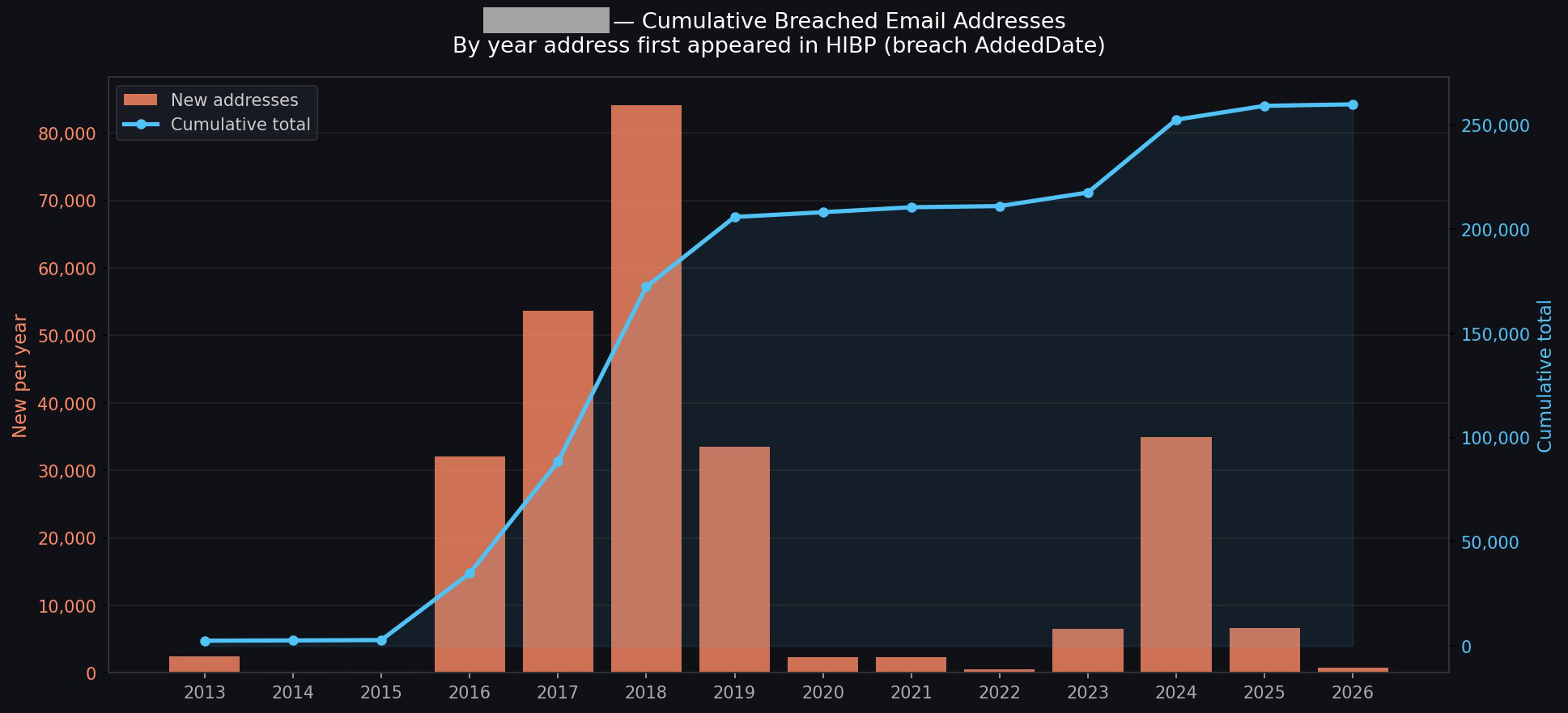
The idea of running stuff on a schedule opens up a whole raft of new opportunities. For example, monitoring your family's email addresses: "let me know when mum@example.com appears in a new breach". From here, your creativity is the only limit (and even that statement is debatable, given how much stuff AI agents come up with on their own). For example, creating visualisations of the data:
I could go on and on (I started going down another rabbit hole of having it generate executive-level reports with all the data), but you get the idea.
The AI Pipeline
This is about what's in our pipeline, and the primary theme is putting tooling where it's more easily accessible to the masses. Creating a connector in Claude, an app in ChatGPT, and similar plumbing in the other big players' AI tools is an obvious next step. This will likely involve adding an OAuth layer to HIBP, allowing end users to configure the respective tools to query those HIBP APIs under their identity and achieve the same results as above, but built into the "traditional" AI tooling in a way people are familiar with.
Future
A big part of this is about AI enabling more human conversations to achieve technical outcomes. I spotted this from Cloudflare just yesterday, and it's a perfect example of just this:
Cloudflare dashboard can now complete tasks for you.
- "Create a Worker and bind a new R2 bucket to it" - "Change my DNS records to 1.1.1.1" - "How many errors have happened this week"
Not only do we tell you, but we show you with generative UI.
I've been pretty blown away by both how easy this process has been and how much insight I've been able to draw from data I've been sitting on for ages. We'll be building out more tooling and easily reproducible demos in the future, and I'm sure a lot of that will do stuff we haven't even thought of yet. If you give this a go and find other awesome use cases, please leave a comment and tell me what you've done, especially if you've cut through the hyperbole and created some genuinely awesome stuff 😎
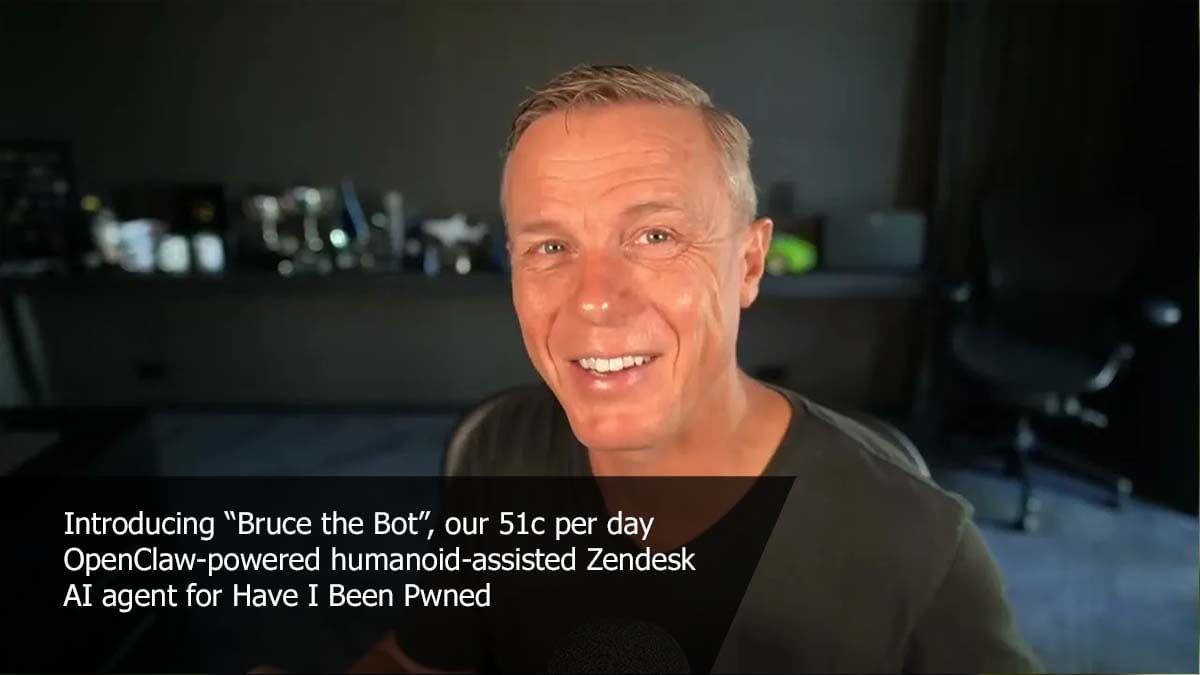
I'm starting to become pretty fond of Bruce. Actually, I've had a bit of an epiphany: an AI assistant like Bruce isn't just about auto-responding to tickets in an entirely autonomous manner; it's also pretty awesome at responding with just a little bit of human assistance. Charlotte and I both replied to some tickets today that were way too specific for Bruce to ever do on his own, but by feeding in just a little bit of additional info (such as the number of domains someone was presently monitoring), Bruce was able to construct a really good reply and "own" the ticket. So maybe that's the sweet spot: auto-reply to the really obvious stuff and then take just a little human input on everything else.
As strikes continue on Iran’s nuclear facilities, the real danger isn’t the explosion, but what happens if critical safety systems fail—and how that risk could spread across the Gulf.
Day by day, I find we're eeking more goodness out of OpenClaw and finding the sweet spot between what the humans do well and the agent can run off and do on its own. Significantly, we're shifting more and more of the workload to the latter as all 3 of us at HIBP HQ get better at assigning workloads to machines. In addition to my use of my "PwnedClaw" bot to help catalogue and process data breaches, Stefan and I are both using GitHub Copilot in Visual Studio extensively, and Charlotte is using her own Telegram bot, "Pwny," plugged into OpenClaw to crawl all our content and look for inconsistencies while designing revised user interfaces. Over the last couple of weeks, I've spent US$854 on Claude tokens, which feels like a lot until you look at it like an employee doing work for you. But we've barely scratched the surface, and I can't wait to see the things we do with this in the weeks and months to come 😊
For a hobby project built in my spare time to provide a simple community service, Have I Been Pwned sure has, well, "escalated". Today, we support hundreds of thousands of website visitors each day, tens of millions of API queries, and hundreds of millions of password searches. We're processing billions of compromised records each year provided by breached companies, white hat researchers, hackers and law enforcement agencies. And it's used by every conceivable demographic: infosec pros, "mums and dads", customer support services, and, according to the data, more than half the Fortune 500 who are actively monitoring the exposure of their domains. So yeah, "escalated" seems fair!
Amidst all the time spent processing data, we've been trying to figure out where to invest energy in building new stuff. In essence, data breaches are pretty simple: you've got a bunch of exposed email addresses attributed to a source, sitting next to a whole bunch of fields we describe with metadata. Our goal has always been to help people use this data to do good after bad things happen, and today we're launching a bunch of new features to do just that. So, here goes:
New Features, New Plans
In the beginning (ok, in "recent years"), there was one plan we referred to as "Pwned", and within that, there were various levels. For example, the entry-level plan has been "Pwned 1," and to this day, more than half our subscriptions are on it. That's "a coffee a month" for a simple service that, by the raw numbers, does precisely what most of our subscribers are looking for. These are typically small businesses that make a handful of API queries or monitor a domain or two with a few email addresses. It's simple, effective and... insufficient for larger organisations. So, we added Pwned 2, 3 and 4, and they all added more RPMs for email searches and more capacity for searching larger domains. Then we added Pwned 5, which added stealer log support, and somewhere along the way also added Pwned Ultra tiers for making large numbers of API requests. As a result, that one "plan" added more and more stuff at different levels and ultimately became a bit kludgy.
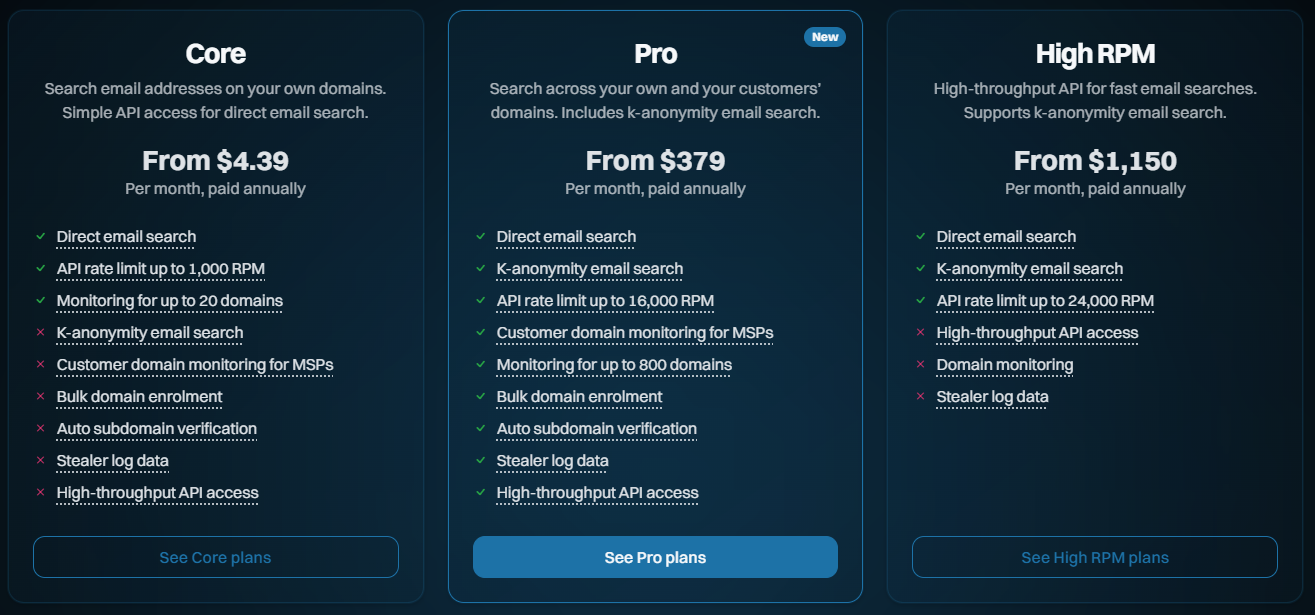
Today, we're launching a bunch of new features to better support the volume and privacy needs of our subscribers, and we're shuffling our existing plans to help do this. Here's what they now look like:
Core: The fundamentals, largely being what we already had and designed for entry-level use cases
Pro: Contains a bunch of the new features designed for larger orgs and those searching domains on behalf of customers
High RPM: The old "Ultra" plan levels, designed solely for making large volumes of requests to the email search API
Enterprise: We've had this for many years now, and it's a more tailored offering
So, that's the high-level overview. Let's now look at all the new stuff and everything that changes:
Supporting MSPs Monitoring on Behalf of Third Parties
For most people, this won't sound particularly exciting, but I'm putting it up front because I'll refer to it when describing the more important stuff shortly. In the past, we've had the following carve-out in our terms of use, namely, what you're not permitted to use the service for:
the benefit of a third party (including for use by a related entity or for the purpose of reselling or otherwise making the Services available to any third party for commercial benefit)
This excluded managed service providers from, for example, monitoring their customers' domains as part of their services. That clause has now been revised with the preceding text:
unless you have purchased a Paid Service which expressly allows you to do so
Which means we can now welcome MSPs to the Pro and High RPM tiers. They can't just take HIBP and use it to create a competing product (for obvious reasons, that's a pretty standard clause within many online services), but they can absolutely add it to the offerings they provide to their own customers. And we're adding new features to make it easier to do just that, for example:
Automating Domain Verification
Preserving privacy whilst still providing a practical, effective service has always been a balancing act, one I think we've gotten pretty spot on. But the hoops people have had to jump through for domain verification, in particular, have been cumbersome. An organisation wanting to add a bunch of its domains has had to go through the process one by one via the web interface, then verify control over them one by one. They'd spend a lot of time doing kludgy, repetitive work. Today, we're launching two new ways of adding domains in a much more automated fashion, and the first is the verifying via DNS API:
Successfully adding a pre-defined TXT record to DNS is solid proof that whoever is attempting to search that domain genuinely controls it. As well as the old kludgy way of doing it in the browser, waiting for DNS to propagate, then coming back to the browser to complete the verification, we can now fully automate the process via API. Here's how it works:
Call the HIBP API to generate the TXT record token
Call the API on your DNS provider to add the token to the TXT record
Call another HIBP API to validate that the token exists
This is easily scripted in your language of choice, and you can enumerate it over as many domains as you like. You can also keep retrying step 3 above as often as needed when DNS takes a little while to do its thing. It's all now fully documented in the latest version of the API, and ready to roll. But what if you don't control the DNS? Perhaps it's a cumbersome process in your org, or you're an MSP monitoring your customers' domains, but you don't have control of DNS. That's where the verifying by email API comes in:
We've long had a verification process that involves choosing one of several standard aliases on a domain to email a verification token to. You do this via the dashboard, grab the token sent to the email, paste it back into the dashboard and the domain is now verified. The new API makes that much easier, especially when multiple domains are being verified. Here's how it works:
Call the HIBP API and specify one of the pre-defined aliases to send a verification email to
Click the link in the email and approve the domain to be added to the requester's account
And that's it. We see this being particularly useful for MSPs who can now send a heap of emails on their customers' domains, and so long as someone receives it and clicks the link, that's the verification process done. That API is also now fully documented and ready to roll and is accessible to all Pro plan subscribers.
Auto-verifying Subdomains
This one was just unnecessarily frustrating for larger customers who spread email addresses over multiple subdomains. Let's say a company owns example.com and they successfully verify control of it, but then they distribute their email addresses by region. They end up with addresses @apac.example.com and @emea.example.com and so on, and in the past, needed to verify each subdomain separately.
Turns out we have 154 votes for this feature in User Voice, which is substantially more than I expected. So, in keeping with the theme of the Pro plan making it easier on larger orgs, anyone on that level can now add their apex domain, verify it accordingly, then go to town adding all the subdomains they want without the need for verifying each one.
Bringing K-Anonymity Searches to the Masses
Until today, every time you took out a subscription via the public website and started searching email addresses, it looked like this:
GET https://haveibeenpwned.com/api/v3/breachedaccount/test@example.com
Clearly, this involved sending the email address to HIBP's service. Whilst we don't store those addresses, if you're sending data to a service in this fashion, there's always the technical capability for us to see that piece of PII and associate it back to the requester via their API key. This approach is what we'll refer to as "direct email search". Let's now look at k-anonymity searches, and I'll break it down into a few simple steps:
Start by creating a SHA-1 hash of the address to be searched, so for test@example.com, that's:
567159D622FFBB50B11B0EFD307BE358624A26EE
Take the first 6 characters of the hash and pass them to the new API:
GET https://haveibeenpwned.com/api/v3/breachedaccount/range/567159
The prefix presently contains 393 suffixes, and if one of them matches the remaining characters of the hash of the full email address, you know that's the address you're looking for.
This is the same methodology we've been using for years with the Pwned Passwords search, and we're currently serving about 18 billion requests a month, so it seems that lots of people have easily gotten to grips with it. It's a pretty simple technical concept with great privacy attributes, and it's fully documented on the API page.
K-anonymity searches are now available to all Pro and High RPM subscribers at the same rate limit as the direct searches. That rate limit is shared, so you can either make 100% of them to k-anon or 100% to the direct search or go 50/50. We're really happy with the privacy aspects of this API and we know it ticks a box a lot of orgs have been asking for.
Unsmoothing the API Rate Limit
Previously, when you took out a 10-request-per-minute API key, we implemented a rate limit of 1 request every 6 seconds. The same logic applied to all the higher-tier products, too, and the reason was simply to distribute the load across each minute more evenly or in other words, "smoothing" the rate at which requests were made. That was important earlier on as the underlying Azure infrastructure had to support that traffic, and sudden bursts could be problematic.
But the other thing that was problematic is that people (quite reasonably) assumed that they could make 10 fast requests, wait a minute, then go again. This led to support overhead for us and customer frustration, and neither is good.
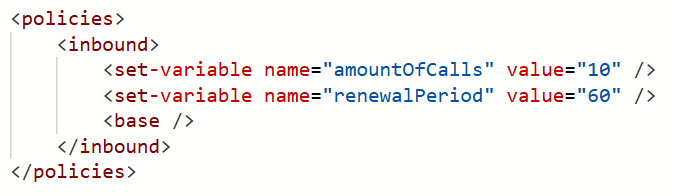
With these latest updates, 10RPM (and all the other RPMs) is now implemented exactly as it sounds - 10 requests in any one-minute block. Here's our Azure API Management policy:
In other words, we've "unsmoothed" it. You can hammer the service 10 times in quick succession, then wait a minute, and you won't see a single HTTP 429 "Too many requests" response. Equally, if you're on a 12,000 RPM plan (and you can actually send that many requests quickly!), you won't see an unexpected 429. We can do this now because of the way we serve a huge amount of content from Cloudflare's edge, unburdening the underlying infrastructure from sudden spikes.
It's a little thing, but it'll solve a lot of unnecessary frustration for a bunch of people, including us. That's implemented across every single plan, too, so everyone benefits.
We Just Wanna Go (Even) Fast(er)
Here's our challenge today: how do we enable millions of people a day to search through billions of records with near instantaneous results... and do it affordably? They're somewhat competing objectives, but every now and then, we find this one neat trick that dramatically improves things. About 18 months ago, I wrote about how we were Hyperscaling HIBP with Cloudflare Workers and Caching. The basic premise is that, as people search the service, we build a cache in Cloudflare's 300+ edge nodes that includes the entire hash range just searched for (see the k-anon section above). We flush that out on every new breach load and as it builds back up to the full 16^6 possible cachable hash ranges, our origin load approaches zero and everything gets served from the edge. Almost, because we have the following problem I described in the post:
However, the second two models (the public and enterprise APIs) have the added burden of validating the API key against Azure API Management (APIM), and the only place that exists is in the West US origin service. What this means for those endpoints is that before we can return search results from a location that may be just a short jet ski ride away, we need to go all the way to the other side of the world to validate the key and ensure the request is within the rate limit.
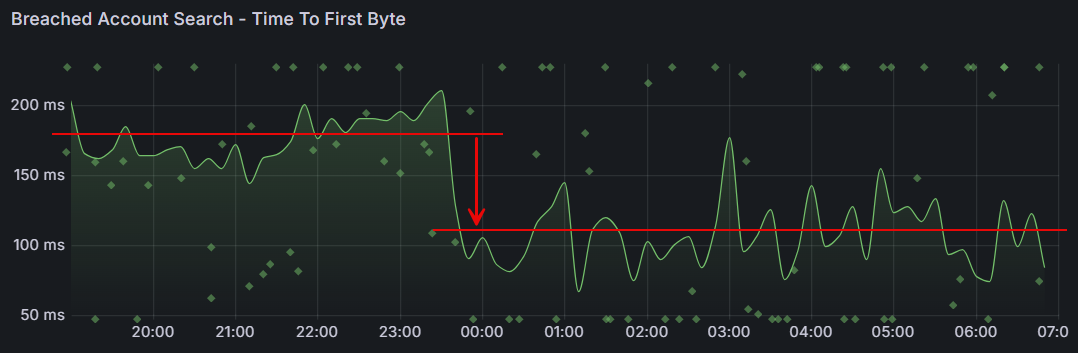
Or at least we had that problem, which we've just solved with a simple fix. The quoted problem stemmed from the fact that, to ensure everyone adhered to the rate limit, we performed the APIM check before returning any data. That meant always waiting for packets to make a round trip to America, even when the data was cached nearby. But what we realised is that adhering to the rate limit can be eventually enforced; it really doesn't matter too much if a request or two in excess of the rate limit slips through, then we enforce it. The reason why that epiphany is important is that with that in mind, we can start returning data to the client immediately whilst doing the APIM check asynchronously. If the request exceeds the rate limit, Cloudflare will block subsequent requests until the client starts making requests within their limit. So, the rate limit check is no longer a blocking call; it's a background process that doesn't delay us returning results.
What that means is a dramatic reduction in the time til first byte:
That's almost a 40% reduction in wait time! It's an awesome example of how continuous investment in the way we run this thing yields tangible results that make a meaningful difference to the value people get from the service.
Passkeys!
Just one more thing...
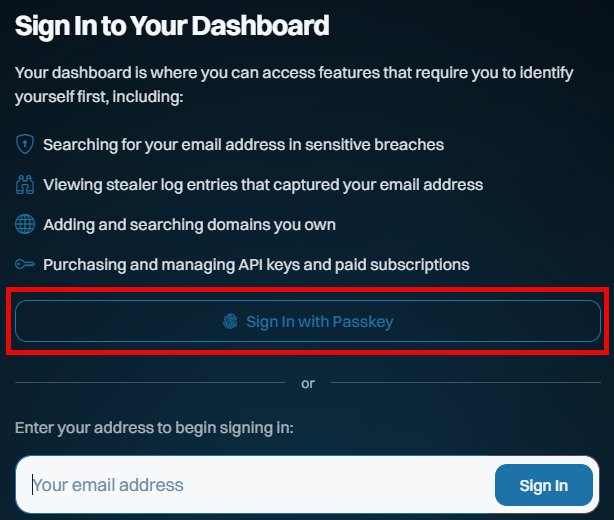
This is all new, all free and all available to everyone, whether they have a paid subscription or not. Remember when I got phished last year? I sure do, and I vowed to use that experience to maximise the adoption of passkeys wherever possible. So, putting my money (and time) where my mouth is, we've now launched passkeys as an alternate means of signing into your dashboard:
This saves you needing a "magic" link via email on every sign-in, and whilst it doesn't constitute 2FA (the passkey becomes a single factor used to sign in), it massively streamlines how you access the dashboard. And because we never used passwords for access in the first place, the only account-takeover risk our customers face is someone gaining access to either their email account or to where they store their passkeys (in either case, they have much bigger problems!).
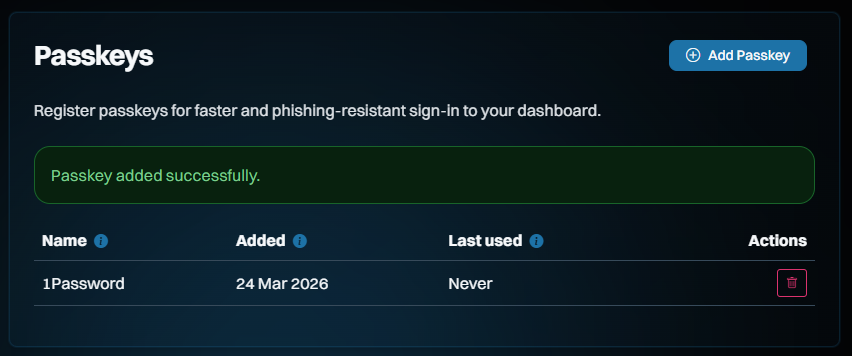
Here's how it works: start by signing into your dashboard, then heading over to the "Passkeys" section on the left of the screen and adding a new one:
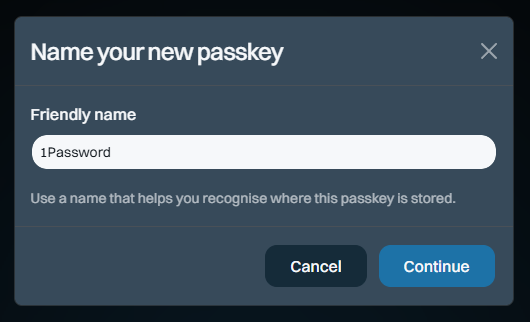
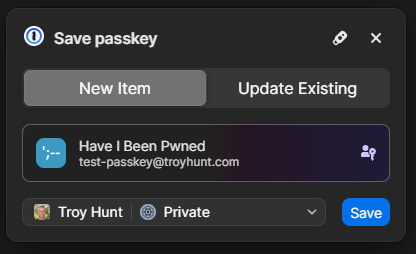
The name is so you can keep track of which passkey you save where. I save most of mine in 1Password, but you can also save them on a physical U2F key or in your browser, for example. Clicking "Continue" will cause your browser to prompt you for the location where you'd like to store it and again, that's 1Password for me:
And that's it - we're done!
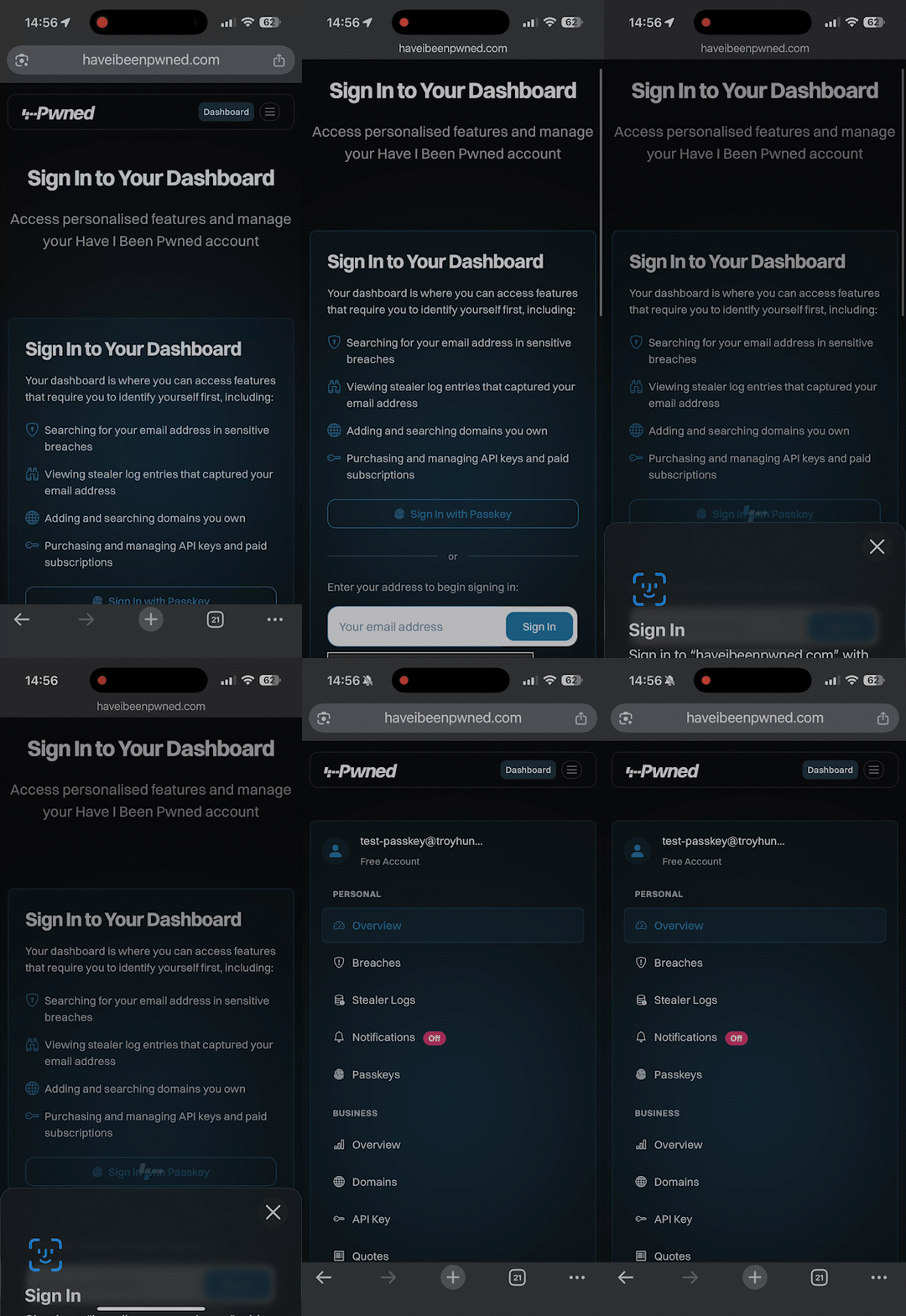
So, how does it work? Check this out, and don't blink or you'll miss it:
Compared to typing in your email address, hitting the "Sign In" button, flicking over to the mailbox, waiting for the mail to arrive, then clicking the link, we're down from let's call it 30 seconds to about 3 seconds. Nice 😎
Even though there isn't much security benefit to doing this on HIBP (you can still sign in via email, too), we wanted to build this as an example of just how easy it is. It took Stefán about an hour to build a first cut of this (with support from Copilot), and, aside from the dev time, building passkey support into your website is totally free. There are no external services you need to pay for, no hardware to buy or special crypto concepts to grasp. Passkeys are dead simple, and web developers with even a passing interest in security and usability should be adding support for them right now. We also wanted to make sure they were freely available to anyone, regardless of whether you have a paid subscription, because security like this should be the baseline, not a paid extra. So, go and give them a go in HIBP now.
One immediate difference to how we've previously represented the plans is that the annual price is now shown as a monthly figure. It turns out that the vast majority of our subscribers choose annual billing, so leading with the per-month pricing puts the least relevant figures front and centre. As we looked around at other services, that was a pretty consistent trend, especially when one annual subscription is more cost-effective than renewing a monthly one 12 times (annual is roughly 10x a year's worth of month-by-month payments).
Another change is that we're going to cap the number of larger domains (those with over 10 breached addresses) that can be searched on each subscription. Let me explain why: Every time we load a data breach, each record in the breach is checked against each domain being monitored. In 2025, we added 2.9 billion breached records, and we have 400k monitored domains. Multiply those out, and we're looking at 1.16 quadrillion checks for our subscribers each year. This is all handled by SQL queries, so it's not like we're getting hit with human overhead at scale, but we're getting hit hard with SQL costs. Across everything we pay to run this service (storage, app hosting, functions, API management, App Insights, bandwidth, etc.), the SQL bill is more than the total for all other services combined. In addition to how we currently calculate plan size based on breached email count, we're adding a cap on the number of domains per plan.
Only domains with more than 10 breached addresses are included in the cap.
The “10” threshold aligns with the existing requirement for a domain to need a subscription at all, and means this change impacts only a single-digit percentage of subscribers. It also helps filter out noise so the cap reflects domains that actually matter. For those larger domains beyond the cap, all current alerts will continue to work just fine until they run a search. At that time, they'll have the option to upgrade the plan or reduce the number of domains. But none of that affects existing subscribers now:
There will be no changes to existing plans until at least August 2 this year.
We do an annual price revision each August, and that's already factored into the table above. That applies to any new subscriptions immediately, but it won't touch existing ones until August 2 at the earliest. The revised pricing only kicks in on the next subscription renewal after that date, so it could be as late as August 2027 if you're an existing subscriber. The same goes for the cap on the number of domains being monitored - there's no impact on existing subscribers until at least August. That leaves plenty of time to cancel, downgrade, upgrade, or just do nothing, and the plan will automatically roll over to the new one. We'll be emailing everyone in the coming days with details of precisely what will change.
Note: if you had an old Pwned 5 subscription for the sake of stealer log access, we'll be rolling all those folks over to Pro 1 and applying a permanent discount code to ensure there's no change in price by moving to the higher plan (it'll actually drop slightly). That'll be explained in the upcoming email, it just made more sense to keep stealer logs in Pro and move people over, and this'll just give them free access to all the new stuff too.
Speaking of which, the thing that (almost) nobody reads but everyone is subject to has been revised to reflect the changes described above - the Terms of Use. For the first time, we've also summarised all the changes and linked through to an archive of the old ones, so if you really love digging through a long document prepared by lawyers, this should make you happy 😊
We're Still Doing Credit Cards via Stripe
While I'm here, just a quick comment on our ongoing Stripe dependency and, as a result, the necessity to pay for public services via credit card. I've written before about some of the challenges we've faced with customers' requests to pay by other means and how, push comes to shove, they (almost) always find a way around internal barriers. Let me share a recent empirical anecdote about this:
Just the other day, I had a call with a Fortune 500 company that was initially interested in our enterprise services. As the discussion unfolded, it became evident that the public services would more than suffice and that the enterprise route was too burdensome for their particular use case. Be that as it may, the procurement lady on the call was adamant that payment by credit card was impossible, even going to the extent of making a pretty bold statement:
No Fortune 500 company is going to pay for services like this via credit card!
O RLY? If only I had the data to check that claim... 😊 Based on a list of their domains, 132 unique Fortune 500 companies have paid for our services by credit card. The real number will be higher because many more of their domains are not on that list, or purchases have been made via an email address not on the corporate domain. Let's call it somewhere between a quarter and a third of the Fortune 500 who've puschased direct via the world's most common payment method. In other words, a significantly different number from the "zero" claim.
I've dropped the hard facts here out of both frustration from our dealings with unnecessarily artificial barriers and in support of the folks out there who, just like me in my corporate days, had to deal with "Neville" in procurement. Per that linked blog post, push back against "corporate policy" prohibiting payment by card, and statistically, you'll likely find you're not the 1 in 160 who can't make a simple payment.
Summary
We're continuing to massively invest in expanding HIBP in every way we can find. Nearly 3 billion additional breached records last year, hundreds of billions of free Pwned Passwords queries during that time, a bunch of new tweaks and features everyone gets access to and, of course, all the new stuff we've rolled into the higher plans. These new features are the culmination of a huge volume of work dating back to November, when I took this pic of our little team during our planning meeting together in Oslo.
We all hope it helps people use our Have I Been Pwned services to do more good after bad things happen.
Watching OpenClaw do its thing must be like watching the first plane take flight. It's a bit rickety and stuck together with a lot of sticky tape, but squint and you can see the potential for agentic AI to change the world as we know it. And I don't think that's hyperbolic. A lot of what people claim to have done with it is hyperbolic, and as with all new tech, the challenge is to cut through the noise and find the value. Stay tuned for more on that, as I've already found some really useful applications for it to help me do my job better, which I think I should devote my next weekly vid to just that.
In the beginning, it was simple. A website, a database and 150M+ email addresses to search. Time has added serverless functions (which run on servers 🤷♂️), code on the edge, new data storage constructs and a completely different mechanism for even just querying a simple email address. HIBP is a continually evolving beast, and barely a week goes by that we don't implement code of significance. You don't always see it out there in the public realm, but the tweaks - in including the major one I talk about in this week's video - all add up to make the platform faster, more sustainable and if we do it right, even a bit more cost-effective to run 😊
Since starting HIBP a dozen and a bit years ago, I've loaded an average of one breach every 4.7 days. That's 959 of them to date, but last week it was five in only two days. That's a few weeks' worth of breaches in only 48 and a half hours. And that's the way it tends to be in this industry: flurries of activity followed by periods of silence. I obviously don't have any control over the cadence of breaches (nor when they begin circulating), which does make for some interesting scheduling challenges. Somewhere amongst responding to those incidents, we manage to do all the other mechanical things required to keep this service running the way it does. Anyway, this week it's "breachapalooza", with some behind-the-scenes info on the Odido, KomikoAI, Quitbro, Lovora and Provecho.
The Odido breach leaks were towards the beginning during this week's update. I recorded it the day after the second dump of data had hit, with a third dump coming a few hours later, and a final dump of everything the day after that. From what I hear, it dominated the news in the Netherlands, and we sure saw that through the traffic stats. Clearly, the leak cadence was designed for maximum news impact, and it seems to have achieved that. It may not have put any cash in the extortionist's pockets, but it's set a very visible precedent and, I suspect, put a massive law enforcement target on them. It's hard to image leaks of this impact continuing for much longer...
Well, the ESP32 Bluetooth bridge experiment was a complete failure. Not the radios themselves, they're actually pretty cool, but there's just no way I could get the Yale locks to be reliably operated by them. At a guess, BLE is a bit too passive to detect state changes, and unless it was awake and communicating, it just had no idea what was happening with the locks. So, I've now silenced all lock-related alerts and am focusing on making the wifi network as reliable as possible in the hope the locks actually become responsive. If that doesn't work, those Aqara U400s look really sweet...
A big "thank you" to everyone who helped me troubleshoot the problem with my "Print Screen" button on the new PC. Try as we all might, none of us could figure out why it refused to bind to SnagIt and instead insisted on dumping the entire collection of screens to a file on the desktop. But an especailly big thanks to the follower who later emailed me with an idea that didn't work, and followed up with an idea that finally did!
So, yeah, thanks Logitech for making this a real pain in the arse 🤦♂️
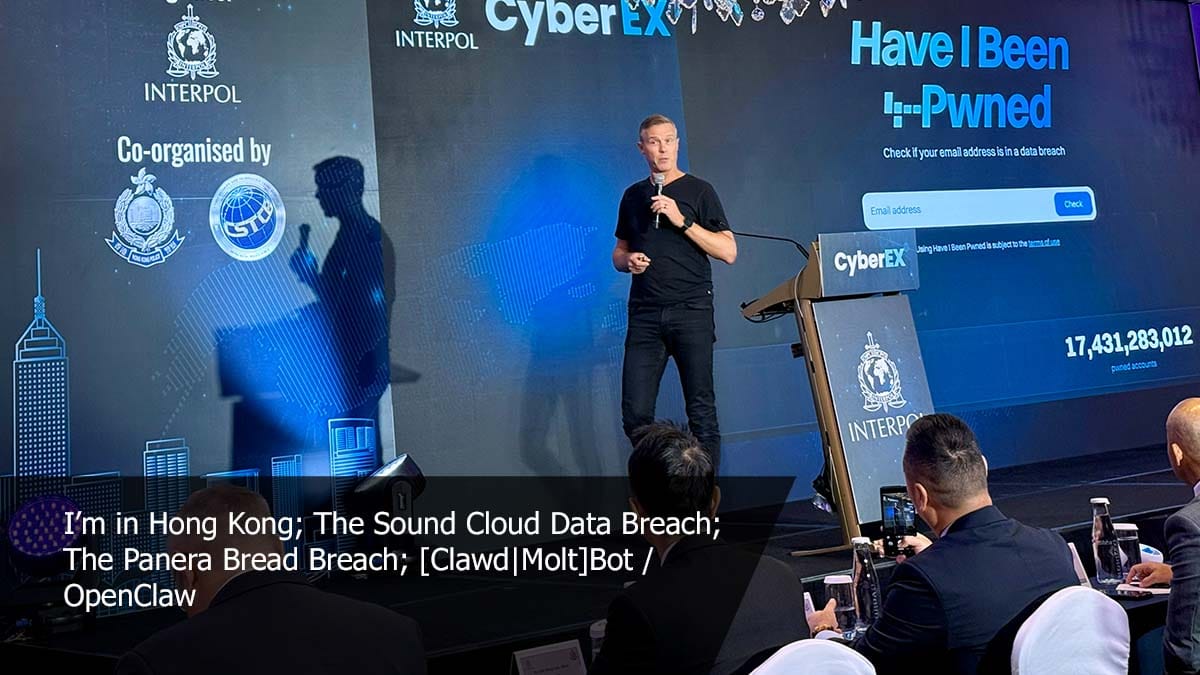
This week I'm in Hong Kong, and the day after recording, I gave the talk shown in the image above at INTERPOL's Cybercrime Expert Group. I posted a little about this on Facebook and LinkedIn, but thought I'd expand on what really stuck with me after watching other speakers: the effort agencies are putting into cybercrime prevention. It's very easy for folks to judge law enforcement solely on what they see from the outside, and that's mostly going after offenders and taking down criminal infrastructure. But the bit I'm increasingly seeing behind the scenes is a push to help kids (the sorts of hackers I usually interact with are teenagers or young adults at most) make better choices when they're faced with a pathway into cybercrime. The transition from minor offences (game cheats and DDoS'ing) to full-on cybercriminals (hacking and extortion) is very well-known, and intervening at the right time can not only make a difference to the impact of data breaches on all of us, but it can also make a massive difference to these kids' lives. These agencies are underfunded and understaffed compared to the scale of the problem, so making the time to come visit and find some ways to help in our little corner of the data breach world is a no-brainer 😊
It's the discussion about the reaction of some people in the UK regarding their impending social media ban for under 16s that bugged me most. Most noteably was the hand-waving around "the gov is just trying to siphon up all our IDs" and "this means everyone will have to show ID, not just under 16s". If only there was another precedent somewhere in the world where precisely this model was rolled... oh - wait! 🐨 The way the ban (sorry - "delay") has been done in Australia isn't perfect, but it also doesn't have to be. There are still plenty of under 16s with access so socials, but I do not know of a single adult who had had to show any form of ID or do any age verification whatsoever. So, relax, wait until we know more about how thye're planning to do it (and the UK gov will be closely looking at the Aussie precedent), and then lose your minds if it's done totally differently at the expense of everyone's privacy.
I thought Scott would cop it first when he posted about what his solar system really cost him last year. "You're so gonna get that stupid AI-slop response from some people", I joked. But no, he got other stupid responses instead! And I got the AI-slop responses! Draw your own conclusions on those comments, but I find it fascinating that the one thing people would take away from a thoughtful blog post I spent many hours writing to explain how much work I put into privacy is that the illustration was computer-generated. That such feedback aligns with the political leanings of folks on Mastodon is also fascinating, and probably something I should have seen coming. But hey, there's nothing new about folks popping their heads up to make inane comments where none were needed, and I have a special blog post for just such occasions: If You Don't Want Guitar Lessons, Stop Following Me.
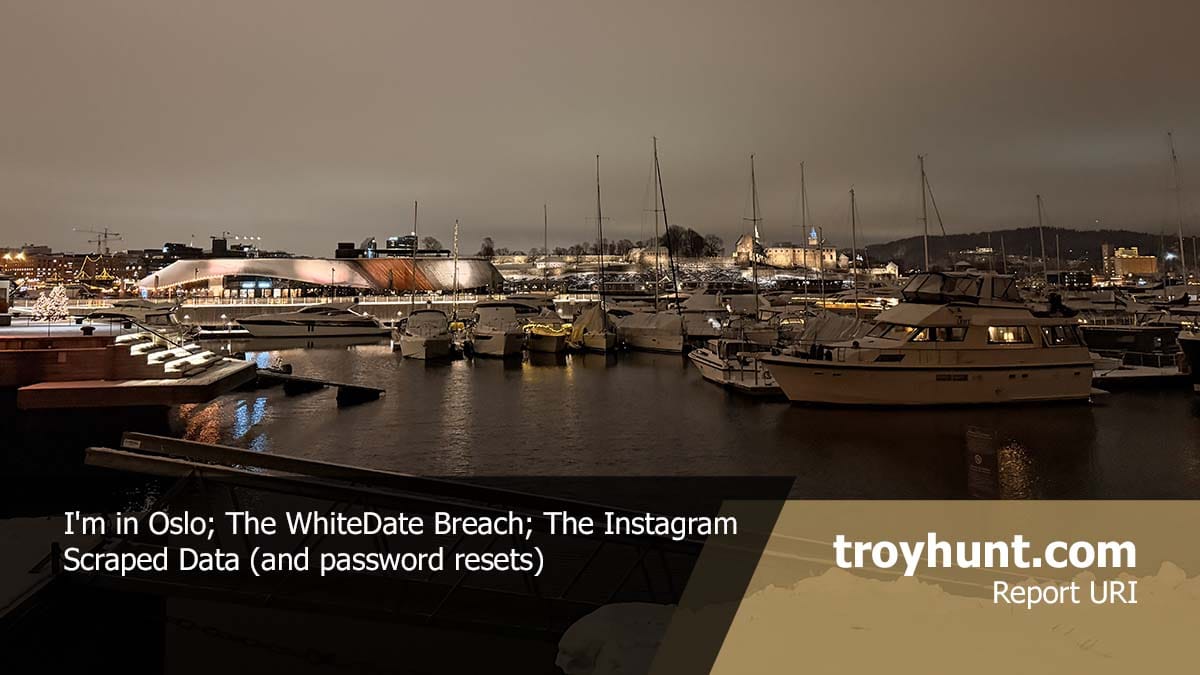
I’m in Oslo! Flighty is telling me I’ve flown in or out of here 43 times since a visit in 2014 set me on a new path professionally and, many years later, personally. It’s special here, like a second home that just feels… right. This week, the business end of things is about the WhiteDate data breach. Seeking a partner along common racial lines isn’t unusual, but… well… WhiteDate is anything but usual. And, just for fun, see if you can pick the thing that garnered the most negative feedback about that blog post this week, I’ll feature the discussion in the next vid.
Remember the Ashley Madison data breach? That was now more than a decade ago, yet it arguably remains the single most noteworthy data breach of all time. There are many reasons for this accolade, but chief among them is that by virtue of the site being expressly designed to facilitate extramarital affairs, there was massive social stigma attached to it. As a result, we saw some pretty crazy stuff:
Arguably, we now live in a more privacy-conscious era, one full of acronyms such as GDPR and CCPA, among others, in different parts of the world. The right to be forgotten, the right to erasure, and, indeed, privacy as a fundamental human right feature very differently in 2026 than they did in 2015. But arguably, even back then, the impact of outing someone as a member of the site should have been obvious. It was certainly obvious to me, which is why I introduced the concept of a sensitive data breach before the data even went public. HIBP wouldn’t show results for this breach publicly because I was concerned about the impact on people being outed. My worst fear was a spouse coming home to find someone having taken their own life, an HIBP search result on the screen in front of their lifeless body.
People died as a result of the breach. Marriages ended and lives were turned upside down. People lost their jobs. The human toll of the breach was profound. The decision I made after witnessing this was that if a breach was likely to have serious personal or social consequences for people in there, it would be flagged as sensitive and not publicly searchable.
The public doxing of members of the service was often justified on a moral basis: “adultery is bad, they deserve to be outed”. But there are two massive problems with this attitude, and I’ll begin with the purpose for which accounts were sometimes made:
An email address appearing in that breach implied that the person was there to have an extramarital affair because that was literally the catch-phrase of the service: “Life is short, have an affair”. But the reality was that people were members of the service for many, many different reasons. Have a read of my post titled Here’s What Ashley Madison Members Have Told Me and you’ll begin to understand how much more nuanced the situation was:
Single people had joined the service, and later married before the breach occurred
People who were worried about a cheating spouse joined the service in order to try to catch them
Accounts were made with some people’s names and email addresses without their consent (there are many “Barrack Obamas” in the data)
So, should everyone with an email address on Ashley Madison be considered an adulterer? Clearly, no, that completely misses the nuances of what an email address in a data breach really means. But what about the people who were there to have an affair? Well, that brings us to the second problem:
Our own personal belief systems are not a valid basis for outing people publicly because their belief systems differ. I used more generic terms than “extramarital affair” or “cheating” because there are many other data breaches that are flagged as sensitive in HIBP for the very same reason. Fur Affinity, for example: there is a social stigma around furries and outing someone as a member of that community could have negative consequences for them. Rosebutt Board is another example: anal fisting is evidently something a bunch of people are into, and equally, I’m sure there are many who take a moral objection to it. And finally, to get to the catalyst for this post, WhiteDate: the website that is ostensibly designed for white people to date other white people. Flagging that as sensitive resulted in some unsavoury commentary being directed at me:
Now, I emphasised “ostensibly” because the more you dig into this breach, the more you find tones of white supremacy and other behaviours that definitely don’t align with my personal value system. That societal view doesn’t sit well with me, and I think I’m safe in saying it wouldn’t sit well with most people. Would someone being outed as a member of that service be likely to result in “serious personal or social consequences”? Yes, and you can see that in the messaging from the same account:
Context matters. U are literally shielding Nazi hate mongering scoundrels. We can't doxx white supremacists?
If ISIS had a dating site & it got breached, would you protect it out of fear of doxxing? No.
This behaviour is precisely what I don’t want HIBP being used for: as a weapon to attack people solely on the basis of their email address being affiliated with a website that has had a data breach.
personal data revealing racial or ethnic origin, political opinions, religious or philosophical beliefs;
trade-union membership;
genetic data, biometric data processed solely to identify a human being;
health-related data;
data concerning a person’s sex life or sexual orientation.
An ISIS dating website breach would tick many of the boxes above and would therefore constitute a sensitive data breach. That's not an endorsement of what they stand for; it's simply a data-processing decision. But there may be a nuance in there which I didn't see present in the WhiteDate data - what if it contained illegal activity? (Sidenote: for the most part, HIBP is used by people in Western Europe, North America and Australasia, so when I say "illegal", I'm looking at it through that lens. Clearly, there are parts of the world where our "illegal" is their "normal", which further complicates how I run a service accessible from every corner of the world.) I had another example recently that went well beyond moral contention and deep into the realm of illegality:
New sensitive breach: "AI girlfriend" site Muah[.]ai had 1.9M email addresses breached last month. Data included AI prompts describing desired images, many sexual in nature and many describing child exploitation. 24% were already in @haveibeenpwned. More: https://t.co/NTXeQZFr2x
Of all the different things people can disagree on when it comes to our moral compasses, paedophilia is where we unanimously draw the line. But I still flagged it as sensitive because of the reasons outlined above. Many people using the service were just lonely guys trying to create an AI girlfriend with no prompts around age. There would be email addresses in there that weren’t entered by the rightful owner. And then, there are cases like this:
That's a firstname.lastname Gmail address. Drop it into Outlook and it automatically matches the owner. It has his name, his job title, the company he works for and his professional photo, all matched to that AI prompt. pic.twitter.com/wpXQMBLf3B
I sat there with my wife, looking at the LinkedIn profile that used the same email address as the person who posted that comment. We looked at his photo and at the veneer of professionalism that surrounded him on that site, knowing what he had written in that prompt above. It was repulsive. Further, beyond being solely an affront to our morals, it was clearly illegal. So, I had many conversations with law enforcement agencies around the world and ensured they had access to the data. Involving law enforcement where data sets contain illegal activity is absolutely the right approach here, but equally, not being the vehicle for implying someone’s affiliation or beliefs and doxing them publicly without due process is also absolutely the right approach.
I understand the gut reaction that flagging a breach like WhiteDate as sensitive protects people whom most of us do not like. But a dozen years of running this service have caused me to consider individual privacy and rights literally hundreds of times, and these conclusions aren’t arrived at hastily. Imagine for a moment, the possible ramifications for HIBP if the service were used to publicly shame someone as a "Nazi" and that, in turn, had serious real-world consequences for them. Whether that implication was right or not, there are potentially serious ramifications for us that could well leave us unable to operate at all. And, as the Ashley Madison examples show, there are also potentially life-threatening outcomes for individuals.
I don't particularly care about one random, anonymous X account making poorly thought-out statements, but the same sentiment has been expressed after loading previous similar breaches, and it deserves a blog post. Equally, I've written before about why all the other data breaches are publicly searchable and again, that conclusion is not arrived at lightly.
No one shall be subjected to arbitrary interference with his privacy, family, home or correspondence, nor to attacks upon his honour and reputation. Everyone has the right to the protection of the law against such interference or attacks.
Breaches with legally defined sensitive data will continue to be flagged as sensitive, and breaches with illegal data will continue to be forwarded to law enforcement agencies.

 Login
Login






.mp4)